Showing posts with label Database. Show all posts

Tuesday, May 24, 2011

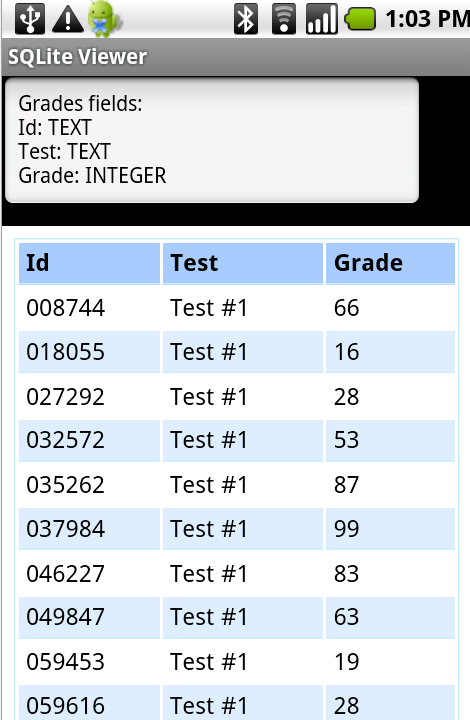
Android SQLite Viewer

sqliteviewer_2.png


Choosing the database file is done with an external file manager or with agraham's FileDialog.
After choosing a database file, you will see a list with the database tables. Choosing a table will open the second activity which shows the table fields types and the table contents.
BLOB columns will display: "click to see image".
When you click on such a cell the program will try to convert the BLOB data to an image and show it.

Read more: Anywhere Software

Wednesday, May 18, 2011

Практическое знакомство с Cassandra: Часть 1 Модель данных и установка

Cassandra - это высоко-масштабируемое, согласуемое(автоматически восстанавливающее согласованность данных), распределенное, основанное на структуре ключ-значение хранилище. Cassandra предлагает вместе технологии распределенных систем Dynamo и модель данных Google BigTable.

Это первая из трех частей по практическому знакомству с NoSQL распределенной базой данных Cassandra. Тема NoSQL баз данных приобрела большую популярность за последние пару лет и благодаря открытым проектам стала доступна многим разработчикам, а не только элитарному кругу посвященных. NoSQL технологии достаточно молоды, по крайне мере в области "массового" применения, что только подогревает интерес к изучению. Сразу оговорюсь, это не серебряные пули, которые решат все проблемы. Это другой взгляд на их решение со своими недостатками. Для знакомство с Cassandra мы реализуем учебное приложение MyBlog на Java. В качестве операционной системы я использую GNU/Linux Debian Squeeze. Функционал приложения позволит создавать пользователей и помещать посты, а также просматривать созданные данные. С целью уменьшения внешних зависимостей приложение будет реализовано в консольном виде. Все повествование пойдет на основе версии Cassandra 0.7.0 beta1.

Модель данных Cassandra
Column (колонка) - это наименьшая единица данных. Это tuple (кортеж), который содержит name (название), value (значение) и timestamp (временная метка). Все значения устанавливаются клиентом, включая timestamp. Это означает, что часы на клиентах должны быть синхронизированы, потому как timestamp используется для разрешения конфликтов изменения данных.

Column Family (семейство колонок) - это контейнер для колонок, аналог таблицы из реляционных систем. В column family устанавливается механизм сортировки для порядка в котором хранятся данные. Из коробки доступны следующие механизмы сортировки AsciiType, BytesType, LexicalUUIDType, LongType, TimeUUIDType, и UTF8Type.

Row (ряд) - это key(ключ) и связанные с ним наборы column. В Cassandra, каждый column family сохраняется в отдельном файле и этот файл отсортирован в row порядке. Связанные column, это те, к которым вы обращаетесь вместе, следует сохранять в том же самом column family.

Keyspace (пространcтво ключей) - это первое измерение Cassandra хэша и оно содержит column family. Keyspace это грубо тоже самое, что и схема в РСУБД.

Super Column (супер колонка) - это колонка контейнер, которая содержит другие колонки.


Установка и конфигурирование

Целью статьи не является детальное рассмотрение установки и конфигурирования, поэтому просто быстро пробежимся по необходимым шагам для минимального запуска. Скачиваем архив с 0.7 бинарной версией отсюда http://cassandra.apache.org/download/. Распаковываем куда хотим. Создаем директории для данных и логов /var/lib/cassandra/data, /var/lib/cassandra/commitlog и /var/log/cassandra. Заходим в директорию с распакованным содержимым архива в поддиректорию ./bin. Можно изменить конфигурацию прослушиваемых интерфейсов в файле ./conf/cassandra.yaml параметр listen_address для передачи данных в кластере и Thrift rpc интерфейс rpc_address. Рядом есть параметры для указания портов. Теперь можно запускать ./cassandra -f, ключ служит для того, чтобы процесс не отключался от консоли. Это удобный режим для изучения.

Tuesday, April 05, 2011

Efficient Paging In Silverlight 2.0

When it comes to ASP.NET, I am a huge fan of efficient code, and one of the most efficient ways to retrieve data from the server is to use paging. Paging has been around for a long time now, but it is not available out of the box in Silverlight 2.0. I thought this was a good time to demonstrate how to consume a WCF service in Silverlight, and to create efficient server side paging using LINQ.

Before we begin you need to have the Silverlight 2 Tools installed. You can go here to download it. 
To begin with open Visual Studio 2008 and choose File > New > Project > Silverlight >
Silverlight Application:

When you click OK a new dialog will appear. Accept the default settings. The rules of this application are to create a WCF service that returns records from the Windows event log. Some computers store event log entries that can contain hundreds of entries, so it is important to page through this data efficiently.   Add a new class to the web application and name it EventEntry. Add the following code to the class:

C#
public class EventEntry
{
public string Message { get; set; }      
}
public class TotalInfo
{
public List<EventEntry> Entries { get; set; }
      public int Total { get; set; }
}

The code above is self explanatory, but we will use it later. Next we need to create a Silverlight enabled WCF service. Right click the project and choose Add > New Item > Silverlight > Silverlight-enabled WCF service:

It is important to create a Silverlight enabled WCF service because the only binding supported by Silverlight 2.0 is basicHttpBinding. Once the WCF service is created, add the following code:

C#
[OperationContract]
public TotalInfo FetchEventLogEntries(int skip, int take)
{
      TotalInfo info = new TotalInfo();
      List<EventEntry> entries = new List<EventEntry>();
      using (EventLog log = new EventLog("Application"))
      {
            info.Total = log.Entries.Count;
            var query = log.Entries.Cast<EventLogEntry>()
                  .OrderByDescending(o => o.TimeWritten)
                  .Skip(skip).Take(take);
            foreach (var item in query)
            {
                  entries.Add(new EventEntry()
                  {
                        Message = item.Message
                  });
            }
            info.Entries = entries;               
      }
      return info;
}    

In the code above one method is decorated with the OperationContract attribute. This means that it is a public method that can be consumed by the Silverlight application. The method takes two arguments, skip and take. We use these two values in the LINQ query to page through the event log. The code uses the EventLog class which is in System.Diagnostics namespace. This gives you access to the Windows event log. I am using LINQ to query the event log and return an ordered list of event log entries and limit the amount of entries that are returned by the Skip and Take methods.

That’s the server code taken care of. Next is to build a Silverlight XAML file to display the data. Open the Silverlight project and view the Page.xaml file. Add the following XAML to the file:

<Grid x:Name="LayoutRoot" Background="Azure" HorizontalAlignment="Left" Width="Auto">
        <StackPanel Width="800" Height="800">
            <ListBox x:Name="lstEvent" Width="750" Height="500" Margin="10" BorderThickness="2" BorderBrush="Black">
                <ListBox.ItemTemplate>
                    <DataTemplate>                       
                        <Border BorderBrush="BurlyWood" BorderThickness="1" CornerRadius="4">
                            <TextBlock Text="{Binding Message}" x:Name="txtMessage" Width="710" TextWrapping="Wrap" />   
                        </Border>
                    </DataTemplate>
                </ListBox.ItemTemplate>
            </ListBox>

Read more: dot Net Curry

ListBox Paging in Silverlight 4 using DataPager control

Prior to Silverlight 4, implementing paging in an application would require the developer to create controls, that would allow the user to move from one page to another. Check an old article by Malcolm Efficient Paging In Silverlight 2.0 which shows how to create and consume a WCF service in Silverlight 2.0 and use efficient server side paging using LINQ to page through event log data.

With the introduction of DataPager control in Silverlight 4, this task has become much simpler. All you need to do is add the DataPager to your page, configure a few properties and use it with the PagedCollectionView.

The DataPager control is a fully templatable data control that provides a user interface for paging through a collection of data. To provide paging functionality for an IEnumerable collection, you can wrap it in the PagedCollectionView class.

Let us see a demonstration of how to use the DataPager control to page through a ListBox control in Silverlight.

Step 1: Create a Silverlight 4 project. Drag and drop a ListBox and DataPager control from the toolbox to the UI.

Step 2: In the MainPage.xaml.cs, add an Employee class as shown below:
employeeclass0327.png

Step 3: Now create the PagedCollectionView using the Employee class we just created in Step 2, and assign it to the DataContext of the MainPage. Observe how we are providing paging functionality for an IEnumerable collection, by wrapping it in the PagedCollectionView class.

pagedcollectionview0327.png

Read more: dot net curry

Monday, April 04, 2011

NoSQL explained correctly (finally)

Now here is a definition of “NoSQL” that I can agree with:
A very interesting write-up with one little oversight: you’re wrong.
I am part of a large program to write a NoSQL database for military applications. It’s not a backlash against paying Oracle (the DoD has a blanket license for Oracle installations) or a philosophical stance by the hippies in the defense arena; it’s the fact that RDBMSs are built in a different space in the CAP trades (see this article).

Google, Amazon, Facebook, and DARPA all recognized that when you scale systems large enough, you can never put enough iron in one place to get the job done (and you wouldn’t want to, to prevent a single point of failure). Once you accept that you have a distributed system, you need to give up consistency or availability, which the fundamental transactionality of traditional RDBMSs cannot abide. Based on the realization that something fundamentally different needed to be built, a lot of Very Smart People tackled the problem in a variety of different ways, making different trades along the way. Eventually, we all started getting together and trading ideas, and we realized that we needed some moniker to call all of these different databases that were not the traditional relational databases. The NoSQL name was coined more along the lines of “anything outside of the SQL part of the Venn diagram” rather than “opposed to SQL”.

Read more: Javalobby

Thursday, March 31, 2011

How I store Enumerations in the Database

One of the things I come across in databases now and then is a collection of single tables with a name like "MessageType". You have a look in them and it turns out to have 6 or so rows with no foreign key relationships. Every single time it turns out to be someone had the idea to store an Enumeration (Enum) type in the database. Not a bad idea as it turns out since you can add sort options, soft deletes and the like, but the implementation of a single table for each one is flawed.

The following is how I deal with it (probably not ideal but works well for me). Essentially you define two tables in the database with names like Lookup and Value. Inside lookup you have something similar to the following.

+------+
|id    |
|lookup|
|name  |
+------+

This is basicly a representation of the enum name. Id is usually an autoincrementing id to make joins easy while lookup is the primary key. This is the definition of the enum, IE the name part in the database, or in our example "Message".

Then you add the enum values to your Values table which looks similar to the below,

+---------+
|id       |
|lookupid |
|name     |
|sortorder|
|deleted  |
+---------+

Then through the power of a simple join you can get your enum values, 
SELECT * FROM Value v INNER JOIN Lookup l ON l.id = v.lookupid WHERE l.name = '?';

Read more: Search [co.de]

Tuesday, March 22, 2011

Indexes in MS SQL Server

Introduction
I bought a book from Crossword; he packed the book and added two bookmarks into my pack. A thought came to my mind. Why do we need this bookmark? I can easily memorize the page number and next time resume from the same page when I resume reading, or read them all over to reach to the point where I stopped reading. But not all have a blessed memory; moreover, there are better things to remember, my grand pa would rather bookmark and rely on it to help him resume reading. It’s a kind of simple index, isn’t it?

This article focuses on how MS SQL Server uses indexes to read and write data. Logically, data is stored in record sets in a table. We have fields identifying the type of data contained in each of the record sets. Tables are a collection of record sets which are either in the form of unorganized heaps or organized clustered index. By default, tables are stored in the form of heaps where the next inserted record is simply added in the next available space on the table page. Data is arranged by SQL Server in the form of extents and pages. Each extent is of size 64 KB having 8 pages of 8KB sizes. An extent may have data of multiple or same table, but each page holds data from a single table only.

So resuming with the discussion, each inserted record by default is added to the next available row into the data page. And there is no attempt to keep the data organized or sorted by default. This option seems excellent for adding data to the table, but does not provide an optimum solution when there is an attempt to retrieve the data. Suppose in a library the books are organized simply in the order they are received. There is no sort upon author, genre, or title. There would be no problem in adding or storing the books into our library. But how about getting a book for issue? Bizarre, isn’t it? This would lead to a full scan of all the books to get the required book. A tough time is guaranteed.

This is exactly how SQL Server works too. Here’s when the index chips in.
Note: All code has been tested on MS SQL Server 2008 R2.

Table Indexes

A SQL Server table by default stores data as heaps. A heap is a table that does not have any clustered index defined on it. A table stored as a heap has no enforced physical order, but a clustered index does. Data is inserted into the heap table as described in the library example.
Heaps work very well for storing data, and are very efficient in handling new records, but they are not so great when it comes to finding specific data in a table. This is where indexes come in. SQL Server supports two basic types of indexes: clustered and non-clustered. It also supports XML indexes, which is not discussed in this article; XML indexes are quite different from the regular relational indexes that will be used to locate the majority of data in database tables.
The key difference between clustered and non-clustered indexes is the leaf level of the index. In non-clustered indexes, the leaf level contains pointers to the data. In a clustered index, the leaf level of the index is the actual data.

Read more: Codeproject

Monday, March 21, 2011

Simple paging with ASP.NET MVC and NHibernate

This post demonstrates how you can do efficient paging using ASP.NET MVC and NHibernate.
To make paging efficient we need to pass the start index and the number of records to return to the database. So that we can display page links we also need to pass some information to our view such as the number of pages available and the current page index. I found the cleanest way of doing this was to create a new class PagedList<T>.

First I defined an interface that a PagedList should implement, IPagedList:

    public interface IPagedList {
        int RecordCount { get; set; }
        int PageIndex { get; set; }
        int PageSize { get; set; }
        int PageCount { get; set; }
        bool HasPreviousPage { get; }
        bool HasNextPage { get; }
    }

Then I create my PagedList that implements this interface and inherits from List<T>:

    public class PagedList<T> : List<T>, IPagedList
    {
        public PagedList(IList<T> source, int pageIndex, int pageSize, int recordCount) {
            
            this.RecordCount = recordCount;
            this.PageSize = pageSize;
            this.PageIndex = pageIndex;
            this.PageCount = recordCount / pageSize;
            if (recordCount % pageSize > 0)
                this.PageCount++;
            this.AddRange(source);
        }
        public int RecordCount { get;set; }
        public int PageIndex { get; set; }
        public int PageSize { get; set; }
        public int PageCount { get; set; }
        public bool HasPreviousPage { get { return (PageIndex > 0);}}
        public bool HasNextPage {get{ return (PageIndex * PageSize) <= RecordCount;}}
    }

The properties are fairly self explanatory.

Next I extend our repository interface IRepository to include a new method GetPaged:

    public interface IRepository<T> {
        int Save(T entity);
        void Delete(T entity);
        T GetById(int id);
        ICollection<T> GetAll();
        PagedList<T> GetPaged(int pageIndex, int pageSize);
    }

My PSScriptRepository (returns PSScript domain objects) has the following implementation of GetPaged:

        public PagedList<PSScript> GetPaged(int pageIndex, int pageSize)
        {
            using (ISession session = NHibernateHelper.OpenSession()) {
                var rowCount = session.CreateCriteria<PSScript>()
                                    .SetProjection(Projections.RowCount())
                                    .FutureValue<Int32>();
                var results = session.CreateCriteria<PSScript>()
                    .SetFirstResult((pageIndex - 1) * pageSize)
                    .SetMaxResults(pageSize)
                    .Future<PSScript>()
                    .ToList<PSScript>();
                return new PagedList<PSScript>(results, pageSize, pageSize, rowCount.Value);
            }
        }

Note the use of Future<T> and FutureValue<T>. These functions allow for deferred execution and means that instead of hitting the database twice (once for the count, once for our records) the queries are combined and we only go to the database once. Bloody clever stuff!
Read more: my great discovery

Silverlight & WCF RIA Services: Strategies for handling your Domain Context - Part 1

This is the first in a two-part article series on the WCF RIA Services Domain Context.

This article series is accompanied by source code, which can be downloaded here.

Introduction
A lot of business applications that are being developed in Silverlight today are built with the help of WCF RIA Services. This should come as no surprise, as it’s a really powerful, extensible framework which provides us with a lot of features out of the box (validation, authentication, authorization, …) that otherwise would require quite a lot of custom code, workarounds & plumbing. In WCF RIA Services, you’re going to be working with a client-side Domain Context instance. This article will look into a few strategies on working with this Domain Context, and is accompanied by a demo & source code, which you can download here.

But let’s start with a short introduction on what a Domain Context actually is.

What is a Domain Context?

When you create a new Domain Service & build your project, you’ll notice a Domain Context class (a class inheriting DomainContext) has been generated for you on the client (in a Silverlight class library project if you’re using a WCF RIA Services class library, or straight into your Silverlight project): one for each Domain Service. If you create a Domain Service named MyDomainService, you’ll get a generated Domain Context on your client named MyDomainContext, which inherits from the DomainContext class. It contains query operations to fetch data, collections of the entities you’re exposing through the Domain Service, submit and reject operations, … It provides a lot of functionality to help you with change tracking & interacting with the underlying Domain Service.

Those of you who are familiar with an object relation mapper (ORM), like the Entity Framework, will feel right at home: working with the WCF RIA Services Domain Context is quite similar to working with the Object Context you get when using the Entity Framework: you load data into the Context, the Context has collections of Entities you’re exposing through your Domain Service(s), it allows for change tracking on these entities, and you get your typical submit & reject-operations. Of course, you’re working in an asynchronous, service oriented environment when using WCF RIA Services: what actually happens when you submit the changes on your Domain Context is that that same context is rebuilt on the server side, and submitted once completely built.

As an example, we’ll assume we’ve got an Entity Model with a Category & Book object (cfr John Papa’s Bookstore Club example). A Book belongs to a Category, so one Category can have multiple Book objects: we’ve got a Navigation Property Books on our Category. When you create a Domain Service, BookDomainService, and select these 2 entities, WCF RIA Services will generate all the
CRUD operations for you.

Read more: Silverlight Show

Sunday, March 06, 2011

Cloudata

Project Description
Cloudata is Distributed Large scale Structured Data Storage, and open source project implementing Google's Bigtable.
  • Database management system. but not support relational data model.
  • Scalability: can store more than Peta bytes.
  • Reliability
  • Low Cost, High performance: Use commodity hardware
  • Easy, fast data analysis: MapReduce
  • Abstract FileSystem: Supports various FileSystem(default FileSystem is Hadoop FileSystem)
Features
Cloudata has the following features.
  • Basic data service
  • Single row operation(get, put)
  • Multi row operation(like, between, scanner)
  • Data uploader(DirectUploader)
  • MapReduce(TabletInputFormat)
  • Simple cloudata query and supports JDBC driver

  • Table Management


    • split
    • distribution
    • compaction

  • Utility


    • Web based Monitor
    • CLI Shell

  • Failover


    • Master failover
    • TabletServer failover

  • Change log Server


    • Reliable fast appendable change log server

  • Support language


    • Java, RESTful API, Thrift
    Contact
    For more information or question send mail to babokim@gmail.com

    Read more: Cloudata

    Friday, March 04, 2011

    Getting Started with Spring.NET

    I have been a big fan of the Spring Framework for quite some time. As a matter of fact, I count on the many benefits and features of Spring for most of my Java projects. I have found Spring to be a gateway to productivity and better practice development for a number of solutions in the enterprise.

    Recently, I have been investigating the .NET platform and C#. We have a mixed Java/C# environment at work and I would like to be a more flexible resource in order to help out on more projects. As I started looking into C#, I thought it was only appropriate to look into the Spring.NET project. It is quite similar to its Java counterpart and here is how I got things started with a very simple C# project:

    First, I downloaded Visual C# 2010 Express. It is not quite as fancy as the variety of Visual Studio 2010 offerings, but it is a great IDE to get started with learning C#. Next, I downloaded the latest Spring.NET release, which happens to be version 1.3.1. In Visual C# 2010 Express, I then created a new blank project, ‘SpringNET1′. Next, I added the Spring.Core.dll and Common.Logging.dll as references in my new project.

    I created a new Class, MyApp.cs. This is the entry point of my application. I will go over the details of the Main(string[] args) function shortly, but basically it grabs the application context, gets an instance of the MyService class, calls MyService’s GetName() function and writes the output to the console.

    Read more: TheJavaJar