Showing posts with label Android. Show all posts

Monday, June 27, 2011

Visidon Applock sees your pretty face, grants you Android access (video)

In the event you got lulled into a groovy seat dance by that most excellent muzak above, let us repeat - this app does not protect your lockscreen. That said, Visidon's Applock will prevent the privacy-adverse from messing with your personally curated app collection. Have a nosy significant lover? No sweat -- snap a pick with your front-facing cam, enable the face-lock in your settings, and those sexts are as good as blocked. It's far from foolproof, however, as some comments indicate an extended bit of facial-wriggling tricks the app into unlock mode. Oh well, you're so vain, you'll probably think this Android market link is for you -- don't you?


Read more: Engadget
QR: https://chart.googleapis.com/chart?chs=80x80&cht=qr&choe=UTF-8&chl=http://www.engadget.com/2011/06/23/visidon-applock-sees-your-pretty-face-grants-you-android-access/

Monday, June 20, 2011

Security Alert: Malware Found Targeting Custom ROMs (jSMSHider)

The Threat
Recently we discovered a new Trojan in the wild, surfacing in alternative Android markets that predominately target Chinese Android users. This Trojan, which we’ve dubbed jSMSHider due to the name used inside the APK, predominantly affects devices with a custom ROM. Custom ROMs are custom built versions of Android, which have been released by third-party groups. The manufacturer or carrier do not traditionally endorse custom ROMs. (If you do not know what a custom ROM is, and do not think you’ve downloaded a custom ROM, you are probably not affected.)
Who is Affected
To date, we have identified eight separate instances of jSMSHider and because the distribution is limited to alternative app markets targeting Chinese Android users, the severity for this threat is low. This Trojan, jSMSHider, predominantly affects devices where the owner has downloaded a custom ROM or rooted phone.
Due to where the malware was found and the limited number of devices the malware could infect, we believe the impact to be limited.  All Lookout users are automatically protected from this malware.
How it works
The application follows the common pattern of masquerading as a legitimate application, though a few extra permissions have been added. At first glance, it appears like other recent Android Trojans that tries to take control over the mobile phone by rooting the phone (breaking out of the Android security container), but instead jSMSHider exploits a vulnerability found in the way most custom ROMs sign their system images. The issue arises since publicly available private keys in the Android Open Source Project (AOSP) are often used to sign the custom ROM builds.  In the Android security model, any application signed with the same platform signer as the system image can request permissions not available to normal applications, including the ability to install or uninstall applications without user intervention.
Read more: Lookout security

Android UI pattern - Workspaces

Workspaces is a renamed pattern UI pattern from patterns "scrollable lists". I don't think the pattern only applies to lists hence the new name. 
Workspaces is a horizontally scrolling composite component that consists of tabs and data container, often a list. This component provides easy navigation between a lot of data that is hierarchically on the same level.
Pattern card
Problem
Displaying a lot of data and user navigation between the data is not simple on a small smart phone screen.

Sunday, June 19, 2011

Android App Engine Integration

Google App Engine is great for those of you in search of a complete, scalable and affordable hosting solution. Especially if you start a project and you don't yet know exactly how successful it'll be (which mostly you never know), how much potential users you'll have and so on, then App Engine is great.
It allows you to start with a free plan and then to scale your pricing as the number of users and CPU resources increases. The advantage: you don't have to setup (and pay) for a huge system to cover the maximum possible work load, but instead just pay the exact work load you need.

appengine_android.png
So far one had to create the connection between client-side applications, whether from Android or GWT by hand (I know what I'm talking about). This means also to handle authentication issues and so on.

The video below - presented at Google IO 2011 - demonstrates the creation of a task management app with an AppEngine back-end (using the Google Datastore as persistence medium) and an Android as well as a GWT app as the client-side front-end. It nicely demonstrates a new template which an updated version of the Google Plugin creates with build-in authentication and Android to AppEngine RPC call mechanism.

Read more: JavaCode geeks

Thursday, June 16, 2011

Some Things To Know About Publishing Android Apps

Now that I have two apps listed in the Android Market, I thought I would write up something about the publication process to let folks know what to expect when they to go publish their own Android apps.
The first step in preparing your app for publication is to digitally sign your app with a certificate. There is an entire page on the topic of signing on Google's Android Developer site, but if you're using the ADT (Android Developer Tools) plugin for Eclipse to develop your apps, the process is pretty darn simple:  you right-click on your app project name in the Package Explorer view, choose "Android Tools" from the context menu, then choose "Export Signed Application Package."  That will activate a signing wizard that will take you through the steps, and it's simply a matter of filling in the form fields with the appropriate information (which is when the documentation on signing really comes in handy).  Once the process is complete, you'll end up with a keystore file for your app and the signed .apk installer file.  I would suggest keeping your app keystore files in one place (each keystore file shares the same name as the app it belongs to) because you'll need the keystore file any time you sign an updated version of your app.

Once you've got your signed .apk file, you should figure out what you want to do for the screenshots for your app that will appear in the Market listing.  The Android Market allows you to upload only two screenshots of your application, so you need to figure out which screens best capture the essence of what your app does and look reasonable readable even if shrunk to half the size: the images are shrunk when viewed in the app description on the Android Market app, and while users can tap a screenshot to see it at full-size I don't know how many people realize that they have that option.

You have two options for capturing the screenshots:  either take the screenshots using the Android device emulator that comes with the Eclipse plugins for Android, or root your Android device and run a screen capture program like drocap2 (UPDATE: actually, there is a tool in the SDK that will allow you to take screenshots without rooting).  The Android Market only accepts screenshots that are either 320x480 pixels or 480x854 pixels, so make sure your screenshots conform to one or the other set of dimensions.

You will also need to provide a title for your app as well as a brief description.  Your app title can be as long as 30 characters, but be aware that the label beneath the launcher icon for your app on an Android homescreen will only display first eight or nine letters of the title.  The description for your app can only be 325 characters long: I have no idea why Google picked that particular length, but it means you have to choose your words carefully.  Make sure you choose words that you think users will likely search on in the Android Market app on their phones in order to find apps like yours.

Read more: Mobile Zone

Wednesday, June 15, 2011

IP Camera Adapter

Turn your android phone into a camera. Download the application from the Market
A universal network camera adapter for the Windows operating system. Can be used with a variety of protocols, cameras with MJPG output or static images. Works with any application that uses DirectShow API, such as Skype, MSN messenger and Chatroulette. 
Works on Windows 2000/XP/Vista/7. 

Read more: IP Camera adapter
Read more: Android market
qrcode.png
Posted via email from Jasper-Net

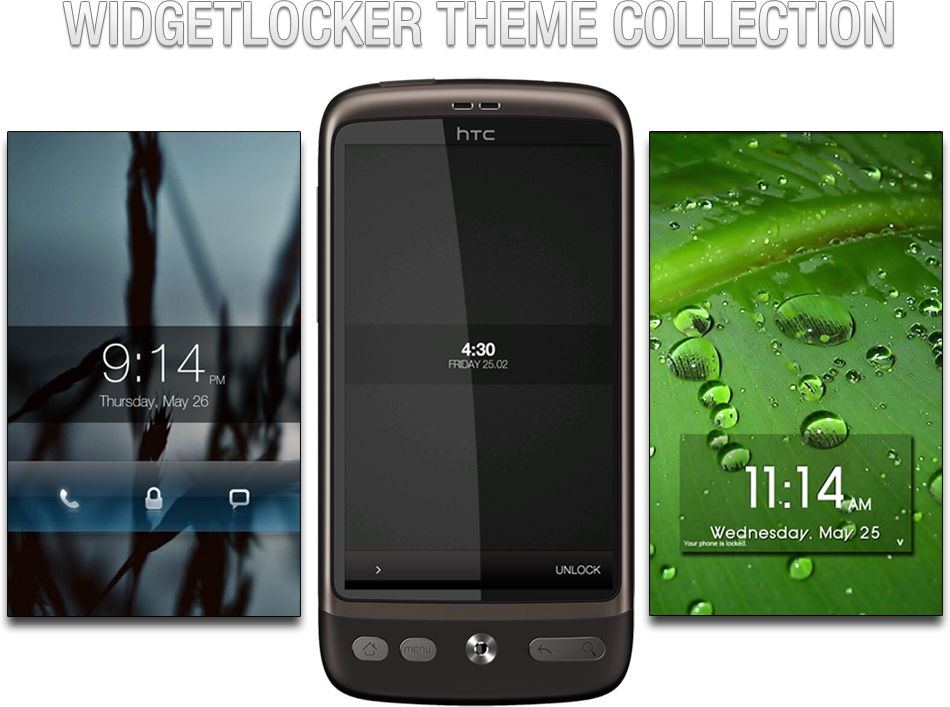
Focus on Community: Widgetlocker Theme collection

Introduction.png


Looking for a way to trick out your lockscreen? Already have Widgetlocker but don’t have that artistic touch? Worry not, as xda member zHk3R has assembled the largest Widgetlocker theme collection your eyes will ever see. Hundreds of pages of users posting their work for you to use. The thread is an absolute must for those who like to keep their phone aesthetically up to date. The thread gives users various widgets, slider themes, wallpapers, and much more! The thread can be found over on xda.

Read more: Talk Android
Read more: XDA Forum

Android – How to Unpack/Repack .apk Files

If you want to learn more about .apk files here is a good tutorial on how to unpack and repack these for your Android device. XDA member despotovski01 prepared an interesting guide for which you just need to follow the instructions and you will learn how to unpack/repack .apk files fast and easily. You will need Winrar or similar program and Formatter, which is an application made by the developer, in order to make it work. If you don´t want to mess with Command Prompt, then this option will give you a very graphical/simple user interface to make the changes you want.

Please let us know what you think.
Originally posted by despotovski01

Hey guys!
I’ve made another tutorial. This one is about unpacking and repacking .apk files. This tutorial was made for people who don’t want to mess with Command Prompt, or for those who want to do it in graphical user interface.
————————————————-
Requirements:
-An archive manager, such as WinZip, WinRar, or Power Archiver, that is capable of extracting and making .rar archives
-Formatter (it’s a program made by me) – click here to download it. Mirror: http://www.mediafire.com/?5a74bjg475er75d

Read more: XDA developers

Play Heroes of Might and Magic 3 on your Android device. Original files required.

heroes%20of%20might%20and%20magic%203%20android%20game.jpg


People who are fans of the long running RPG series called Heroes of Might and Magic will be happy to know that the engine to run the third installment of the game on your Android device is now available. Just like with the second one, this one requires you to have the original files.

Read more: Pocket Legends

Google Removes 10 New Malware Apps from Android Market

Google has removed 10 Angry Birds-related apps from the market after a professor at North Carolina State reported they were infected with Malware. Xuxian Jiang, the professor who found the apps, said that they run in the background in order to send phone information to a remote server. The professor labeled the new kind of malware "plankton."

Read more: Android Pit

Tuesday, June 14, 2011

Android for .NET Developers - Menus and Dialogs

The Android for .NET Developers Series

Part 1 Starting with this article, I'll discuss what you need to know to approach Android programming without any aid from your .NET expertise.
Part 2 In this article, we'll go through an Android application that accepts input from the user and handles user's clicking.
Part 3 In this article, you will learn how to build the user interface.
Part 4 In this article, I'll be delving deep into menus and dialog boxes in Android for .NET, and discuss a few very common (and frequently used) types of menus and dialogs.


Introduction
In Android, you define a large share of the user interface through views. A view is a resource that combines together multiple widgets, including custom widgets you create from existing ones or completely from scratch. A view, however, represents the static part of a user interface, which is the part that is displayed by default as the user navigates to that particular section of the application. As the user interacts with the presented user interface the need for additional input elements may arise. Which kind of additional input elements? I mean portions of the user interface not originally displayed and mostly displayed on demand such as dialog boxes and menus.
Android devices feature a Menu button that, when touched by users, automatically pops up any application registered menu that applies to that context. Dialog boxes, instead, are programmatically displayed under the total control of the developer. The developer, in fact, may decide when to display a given dialog whether after a click on a button or the selection of a menu item. In this article, I'll be delving deep into menus and dialog boxes in Android for .NET, and discuss a few very common (and frequently used) types of menus and dialogs.


Types of Menus in Android
Android defines three distinct types of menus: options, context and submenu. The options menu refers to a feature has similarities with both the main menu and the context menu of desktop applications. In fact, the options menu is always hidden and shows up only when the user touches the Menu button. The options menu is dismissed right after a selection is made. At the same time, the options menu displays always in the same position, that is at the bottom of the screen.
The idea is that, as a user, you touch the Menu button when you're looking for a list of possible actions to take at a given stage of the application. Just for this reason, the list of options presented by the menu may be significantly different at different times. You can handle these differences in either of two ways. You can, for example, create a single menu and add or remove items and disable and enable items on a per-display basis. In alternative, you can reset and repopulate the menu before each display. You typically choose the latter option if the two menus to display are significantly different.
Another type of menu you find in Android is the context menu. It is nearly the same as the context menu of a desktop application. In Android, you associate the context menu with a view or a widget and all you get is a floating list of menu items to choose from. Finally, the submenu is a floating menu used to nest child menus to both options and context menus.

Read more: dot Net Slackers

Dependency Injection for Android with Google’s Roboguice

For most developers, writing Android apps means writing a ton of Java. On large projects, trying to keep patterns straight can be pretty difficult. Useful frameworks for Android are few and far between, which leaves the programmer to pick up a lot of the details of the system. Far too many bugs are created this way.
The other day, I came across Roboguice, a port of Google's Guice framework over to Android. If you've never heard of it, it’s a simple framework to streamline Dependency Injection within Android. The framework still seems to be a hidden gem. I couldn’t find many developers that even knew it existed.
What is Dependency Injection, really?

In short, Dependency Injection is a way to decouple specific types of objects in your code. It allows your program to be far more modular with minimal extra effort. If you have ever heard of the Factory, then you have at least a faint idea of what Dependency Injection is.

What is Roboguice… and what’s up with the name?
Roboguice is actually just an implementation of Google's Guice within Android – sorry, I don’t have a clue why they picked the name. It lets an application have all the benefits of Dependency Injection with just a handful of lines of code. In Google's words, "Guice alleviates the need for factories and the use of new in your Java code." Like everything else Google related, an IO video gives a pretty good idea about it.

SMS is doomed: Google working on Android iMessage, BBM competitor

Just after Apple announced iMessage app in iOS 5, it appears that Google has its own Android messaging client in the works, the Wall Street Journal reports.

The paper didn’t have any additional details on Google’s messaging app, but just like iMesssage, it’s reportedly being positioned as an answer to Research in Motion’s popular BlackBerry Messenger app.
Google’s new messaging app could fall under the Google Talk name, but it will need to do much more than that service, which is based on the Jabber IM protocol. IM is less convenient for mobile devices since it requires a steady data connection to remain logged in. To function as a texting replacement, Google needs to make sure its messaging app can accurately tell users when messages are sent, delivered and read.
For consumers, these new apps will offer faster and cheaper integrated ways to message friends. But the outlook is less rosy for carriers, who will likely see their lucrative text messaging revenue take a major dip. The messaging apps will move texting-like activity into cellular data networks and out of carrier’s aging SMS networks.

Consumers currently pay anywhere from 20 cents per text to $20 a month for unlimited texting on SMS networks. Most of that money is pure profit for the carriers: a dollar of SMS charges can produce around 80 cents of profit, while carriers only see around 35 cents of profit from a dollar of data or voice fees, analysts at UBS tell the WSJ.

Read more: Mobile Beat

Tuesday, June 07, 2011

How To Stream Video to Both iOS and Android Devices With Plex

banner-011.png

Finding a video streaming solution that does transcoding is tough enough, but trying to find one solution that’ll work for both iOS and Android makes it even harder. Thankfully we have Plex, which does all of this and more.

Plex Media Server

Plex Media Server is an application based off of XBMC that’s primarily built for Mac OS X. It works in two parts: a server app on your desktop and a client app for your mobile device. Plex has been around for a while and even has some awesome plug-ins available. Fortunately for us, the developers made a Windows version that’s pretty wholesome, and there’s even a Linux beta currently in the works and available for download. The Mac OS X version is the definitely the most fully featured, allowing pictures, video, music, and tons of plugins – life Netflix and Hulu – to be streamed to your devices. The Windows version is pretty polished, but doesn’t support Flash/Silverlight plug-ins – no Netflix or Hulu, here. The Linux version is definitely beta – fewer options, no Netflix/Hulu, and the management interface can be really slow – but transcoding and streaming work well on both iOS and Android. Choose the appropriate link below, download the app, and give it quick install.

Read more: How-to-geek

[Hands On] Mr. Mixit Turns Memory Matching On Its Head With A Surprisingly Good Soundtrack

screen?id=7801964998494210322&i=1

Mr. Mixit puts a spin on the classic "memory match" formula by adding a turntable motif and some decent tunes. As Mr. Mixit, you drag shapes down from the monitors behind you to the turntable game area. After choosing two you think will match, you spin the turntables and try to get the image to overlap.

Doing this quickly gives you multipliers to score, which forms the core gameplay of Mr. Mixit; scores are saved in a "top 10" format as opposed to using online leaderboards, like OpenFeint. As levels progress, more symbol possibilities are added, and the multiplier meter decreases at a faster rate. However, making fast matches will boost it back up again.

Read more: Android police
Read more: Android Market
Read more: chart?cht=qr&chs=108x108&chld=L%7C0&chl=market%3A%2F%2Fdetails%3Fid%3Dair.com.hdinteractive.MrMixitFree

Is this real life? Apple copies Android’s notification system and lock screen

Android_eats_apple.png


At the WWDC conference in San Francisco, Apple just showed off a number of features and improvements that are coming in iOS 5. One of those improvements is a revamped notification system called Notifications Center, which might look at little too familiar to those of us that use Android. As you might or might not know, iOS’ current notification system is horrible. iPhone users know this, and Apple certainly knows this.

On the other hand, Android’s notification system is a work of art. It’s useful, non-intrusive, accessible, and easy to use. In summary, everything that iOS’ is not. Therefore, is really not a surprise that Apple has decided to go ahead and copy Android’s notification bar. With that said, we’re happy that iPhone users will now be able to enjoy the awesomeness of having a non-awful notification system. You’re welcome, iPhone users.

Since we’re already talking about things that suck in iOS, Apple also demoed some improvements for iOS’ lock screen. iPhone and iPod users will now be able to launch certain apps right from the lock screen by dragging their icons. If you think you’ve seen something like that before, that’s because you have. HTC’s Sense 3.0 has the same kind of capability built-in. If Apple can sue HTC for such ridiculous things like swiping to unlock, I guess HTC can now sue Apple for this as well.

Read more: Android and me

Android Dependency Injection and Testing Libraries

Anything and everything that makes life easier to develop for Android should be looked into. There are a couple of libraries that make testing easier, increase the modularity of your code, and provide already created mock objects: 
  • RoboGuice - This is an adaption of Google’s dependency injection library but for Android
  • Robolectric -This is a testing framework/platform which works to remove the need for constant mocking of Android objects.  It also works with RoboGuice.
I can’t begin to thank the guy that first introduced me to dependency injection enough. Coming from a C++ world, where objects can’t describe themselves and there is no reflection unless the developer purposefully implements it himself, to a more modern language I often created my own static factories to simulate the @inject pattern. But why reinvent the wheel each and every time if an object can describe itself perfectly to the virtual machine?

If you’ve never seen Dependency Injection (DI) before look at the “simple example” RoboGuice provides on their webpage. At first glance it might seem like a fancy way to clean up the code so that maintainers could focus on just the specifics of the actions within each method. That is a side benefit (a really nice one at that) but only a side benefit. The example does not demonstrate the true power of such a framework in testing and asserting bug-free code.

Without DI in your code base

Let’s take a look at a contrived example of what sort of pain points DI can help conquer and alleviate. Suppose that I have a method which needs some sort of widget that takes user input. How can I test such a method without requiring someone to step through a script (as in written instructions) wherein they manually enter all the different combinations which could result in a real world scenario? That’s expensive and time consuming. I’m not even going to mention the human factor for mistakes (like skipping a test by accident). Oops, I just did (see? So easy to make mistakes!)

Read more: Java code geeks

Sunday, June 05, 2011

Tutorial: Flex for Android in 90 Minutes

If you are looking for a quick way to get started building Flex applications for Android (even if you don’t have an Android device), check out this tutorial: FlexAndroid90Minutes.pdf.
You can download the supporting materials here: FlexAndroid90Minutes.zip.
This tutorial will be posted as a DevNet article in a couple of weeks, but I already wanted to make it available here because a number of people have asked for it. It is based on the hands-on session I delivered at MAX, with additional information and instructions.

Here is a quick outline:
Part 1: Creating a Basic Mobile Application
Part 2: Using Mobile Item Renderers
Part 3: Navigating and Passing Information between Views
Part 4: Creating an Action Bar
Part 5: Integrating with the Device Capabilities (Dialer, SMS, Email)
Part 6: Using a RemoteObject
Part 7: Using a Local SQLite Database

In this tutorial, you build a fully functioning Employee Directory application. The end result is the application available on the Android Market. (Just search “Employee Directory” in the Android Market).

Read more: Flash Builder Zone

FaceNiff Is a Hacker's Dream for Android Users

Firesheep has gone mobile. For those who may not remember, Firesheep is a Firefox extension, released in October of last year, which allows the user to access the social network accounts logged in on the same network. Developer Bartosz Ponurkiewicz adapted the Firesheep concept for Android.
The only prerequisite for FaceNiff is a rooted Android phone. Once installed, the app will tear through the Wi-Fi network for any accounts that are logged in. Protected networks aren't safe from this, as FaceNiff can access WEP, WPA, and WPA2 Wi-Fi networks.

The developer put a disclaimer at the top of the FaceNiff site. "Legal notice: this application is for educational purposes only. Do not try to use it if it's not legal in your country."
With all of the rooting how-to guides available, it's fairly simple for a user to root an Android phone. In theory, all Android users could use this app, and while the legal disclaimer may be up on the site, it does not guarantee that will be put the reason the app is used.

The free version of this APK provides access to three hacked profiles. The site notes that wider access can be purchased through PayPal.

FaceNiff cannot, however, access accounts that use https browsing, which encrypts information for a more secure browsing session. Facebook is not automatically on https. Users must enable it manually, and Twitter also requires users to manually activate it. Perhaps with the wider availability of an app like FaceNiff, https browsing will become standard.

Google made SSL authentication, an encryption protocol for communication security, standard for GMail following the advent of Firesheep. At the time in November 2010, Facebook and Twitter lacked SSL authentication.

Read more: PC World

Friday, June 03, 2011

Download Updated Thrutu Android App, brings a handful functions on your call screen

Downlaod-Updated-Thrutu-Android-App1.jpg

Wondering it would have been better to have some extra button on calling screen? Thrutu Android App exactly does it! With Thrutu, simply make a phone call in the normal way and Thrutu will automatically appear with these button to let you share location, contacts, photos and more – all at the touch of a button. If you both have Thrutu you’ll get live updating maps and near-instant sharing. If you don’t both have Thrutu, or if you don’t have simultaneous voice and data connections, then Thrutu will offer to share by SMS. Latest update to Thrutu Android App adds a ton of features. Some of them are described below in video demo of Thrutu Android App.