Showing posts with label Google. Show all posts

Monday, June 27, 2011

HowTo: Generate QR code for your site

Everyone know that one of the keys to have a great SEO for your website is making sure you keep your website updated, new and fresh. Whether you do this with a blog, or you change your homepage with new offers, coupons or new products, it serves to show Google that your site is “alive.” For many small businesses in particular, this is a real challenge.

So you already have great, fresh content on your site – what’s next? Do you know what is coming that may benefit your business?

What are QR codes?
QR codes (abbreviation for Quick Response code) are a popular type of two-dimensional barcode. They are also known as hardlinks or physical world hyperlinks. QR Codes store up to 4,296 alphanumeric characters of arbitrary text. This text can be anything, for example URL, contact information, a telephone number, even a poem! QR codes can be read by an optical device with the appropriate software. Such devices range from dedicated QR code readers to mobile phones.

QR code for your site?
There are various QR code generators available  online but, generating QR code without using generators is also very easy. We will use Google Chart APIs to generate QR code for us.

Creating QR code
Google charts API allows us to generate QR code by passing various parameters to their API. Below is the short description of each parameter-

Name Required? Description
cht=qr Yes Specifies a QR code.
chs=<width>x<height> Yes Image size. (Remember it’s English alphabet ‘x’ and not cross ’X’ )
choe=<output_encoding> No How to encode the data in the chart. Here are the available values:
UTF-8 [Default]
Shift_JIS
ISO-8859-1
Read more: Tech Tutkiun 

howto-generate-qr-code-for-your-site.html&choe=UTF-8

Wednesday, June 22, 2011

Google's Browser Interception Plugin For Chrome

Google has released a passive in-the-browser reconnaissance plugin, called the 'DOM Snitch'. By intercepting JavaScript calls to the browser infrastructure, it detects common cross-site scripting, mixed content and insecure DOM changes. The plugin displays the DOM modifications in real time so developers don't have to pause the application to run an outside debugger. It exports traces for easier collaboration and analysis.

Read more: Slashdot

Sunday, June 19, 2011

KB: Google App Engine - Getting started

With App Engine, we can build web applications using the Python/Java programming language, and  our application runs on Google's scalable infrastructure, and uses large-scale persistent storage and services.
The Python Runtime Environment
App Engine includes a simple web application framework, called webapp, to make it easy to get started.App Engine supports Python 2.5. Our app take advantage of the many libraries, tools and frameworks for Python.
The Development Environment
We can develop and upload Python applications for Google App Engine using the App Engine Python software development kit (SDK).
The Python SDK includes a web server application that simulates the App Engine environment, including a local version of the datastore, Google Accounts, and the ability to fetch URLs and send email directly from your computer using the App Engine APIs. The Python SDK runs on any computer with Python 2.5
Creating the first application
Create a directory named helloworld. All files for the sample application reside in this directory.
Creating the Configuration File
An App Engine application has a configuration file called app.yaml. Among other things, this file describes which handler scripts should be used for which URLs.

The contents of app.yaml file are as below

application: helloworld 
version: 1
runtime: python 
api_version: 1
handlers:
- url: .*
  script: main.py

From top to bottom, this configuration file says the following about this application:

*The application identifier is helloworld. When we register our application with App Engine ,we will select a unique identifier, and update this value. This value can be anything during development. For now, leave it set to helloworld.

*This is version number 1 of this application's code. If we adjust this before uploading new versions of our application software, App Engine will retain previous versions, and let us roll back to a previous version using the administrative console.

*This code runs in the python runtime environment, version "1". Additional runtime environments and languages may be supported in the future.
*Every request to a URL whose path matches the regular expression /.* (all URLs) should be handled by the main.py script.


Working with webapp Framework
App Engine includes a simple web application framework of its own, called webapp. The webapp framework is already installed in the App Engine environment and in the SDK, so do not need to bundle it with our application code to use it.

Read more: Consult Sarath

Android App Engine Integration

Google App Engine is great for those of you in search of a complete, scalable and affordable hosting solution. Especially if you start a project and you don't yet know exactly how successful it'll be (which mostly you never know), how much potential users you'll have and so on, then App Engine is great.
It allows you to start with a free plan and then to scale your pricing as the number of users and CPU resources increases. The advantage: you don't have to setup (and pay) for a huge system to cover the maximum possible work load, but instead just pay the exact work load you need.

appengine_android.png
So far one had to create the connection between client-side applications, whether from Android or GWT by hand (I know what I'm talking about). This means also to handle authentication issues and so on.

The video below - presented at Google IO 2011 - demonstrates the creation of a task management app with an AppEngine back-end (using the Google Datastore as persistence medium) and an Android as well as a GWT app as the client-side front-end. It nicely demonstrates a new template which an updated version of the Google Plugin creates with build-in authentication and Android to AppEngine RPC call mechanism.

Read more: JavaCode geeks

Google Job Interview Questions

Google Job Interview Questions | (PM, SE, Testing, EM, AdWord)
  • Why do you want to join Google?
  • What do you know about Google's product and technology?
  • If you are Product Manager for Google's Adwords, how do you plan to market this?
  • What would you say during an AdWords or AdSense product seminar?
  • Who are Google competitors, and how does Google compete with them?
  • Have you ever used Google's products? Gmail?
  • What's a creative way of marketing Google's brand name and product?
  • If you are the product marketing manager for Google's Gmail product, how do you plan to market it so as to achieve 100 million customers in 6 months?
Google Interview Questions:   Product Manager
  • How would you boost the GMail subscription base?
  • What is the most efficient way to sort a million integers?
  • How would you re-position Google's offerings to counteract competitive threats from Microsoft?
  • How many golf balls can fit in a school bus? 
  • You are shrunk to the height of a nickel and your mass is proportionally reduced so as to maintain your original density. You are then thrown into an empty glass blender. The blades     will start moving in 60 seconds. What do you do?
  • How much should you charge to wash all the windows in Seattle?
  • How would you find out if a machines stack grows up or down in memory?
  • Explain a database in three sentences to your eight-year-old nephew.
  • How many times a day does a clocks hands overlap?
  • You have to get from point A to point B. You  don't know if you can get there. What would you do?
  • Imagine you have a closet full of shirts. It's very hard to find a shirt. So what can you do to organize your shirts for easy retrieval?
  • Every man in a village of 100 married couples has cheated on his wife. Every wife in the village instantly knows when a man other than her husband has cheated, but does not know when her     own husband has. The village has a law that does not allow for adultery. Any wife who can prove that her husband is unfaithful must     kill him that very day. The women of the village would never disobey     this law. One day, the queen of the village visits and announces     that at least one husband has been unfaithful. What happens?
  • In a country in which people only want boys, every family continues to have children until they have a boy. If they have a girl, they have another child. If they have a boy, they     stop. What is the proportion of boys to girls in the country?
  • If the probability of observing a car in 30 minutes on a highway is 0.95, what is the probability of observing a car in 10 minutes (assuming constant default probability)?
  • If you look at a clock and the time is 3:15, what is the angle between the hour and the minute hands? (The answer to this is not zero!)
  • Four people need to cross a rickety rope bridge to get back to their camp at night. Unfortunately, they only have one flashlight and it only has enough light left for seventeen minutes. The bridge is too dangerous to cross without a flashlight, and it's only strong enough to support two people at any given time. Each of the campers walks at a different speed. One can cross the bridge in 1 minute, another in 2 minutes, the third in 5 minutes,  and the slow poke takes 10 minutes to cross. How do the campers make     it across in 17 minutes?
  • You are at a party with a friend and 10 people     are present including you and the friend. your friend makes you a     wager that for every person you find that has the same birthday as     you, you get $1; for every person he finds that does not have the     same birthday as you, he gets $2. would you accept the wager?
  • How many piano tuners are there in the entire world?
  • You have eight balls all of the same size. 7 of them weigh the same, and one of them weighs slightly more. How can     you find the ball that is heavier by using a balance and only two     weighings?
  • You have five pirates, ranked from 5 to 1 in descending order. The top pirate has the right to propose how 100     gold coins should be divided among them. But the others get to vote     on his plan, and if fewer than half agree with him, he gets killed.     How should he allocate the gold in order to maximize his share but     live to enjoy it? (Hint: One pirate ends up with 98 percent of the gold.)
  • You are given 2 eggs. You have access to a     100-story building. Eggs can be very hard or very fragile means it     may break if dropped from the first floor or may not even break if     dropped from 100th floor. Both eggs are identical. You need to     figure out the highest floor of a 100-story building an egg can be     dropped without breaking. The question is how many drops you need to     make. You are allowed to break 2 eggs in the process.
  • Describe a technical problem you had and how you     solved it.
  • How would you design a simple search engine?
  • Design an evacuation plan for San Francisco.
  • There's a latency problem in South Africa. Diagnose it.
  • What are three long term challenges facing google?
Read more: way 2 rankers

Fridaygram

When you search with Google, you use words to create your query. That basic fact changed earlier this week when we launched Search by Image. This new feature is well-described by its name: you just hand Google an image, and it searches for similar images on the web. You can try it out by going to Google Image Search and dragging one of the sample images into the search box. This is handy for figuring out the names of things, such as buildings, paintings, and logos, or for finding images that are similar to one you already have.
Search by image is a great example of magical technology that helps people learn or do their jobs. Here’s one that improves your health: spray-on skin. For people with burns and other skin damage, ReCell is a technology that allows doctors to take a sample of healthy skin cells, culture them to grow more, and then literally spray the cells onto the injury. This process speeds healing and reduces the risk of complications. Although it sounds like science fiction, it’s already being used in much of the world.

Read more: Google code blog

Google Makes Web Pages Load Instantly

googlespeed_x582.jpg

Google is ready to make waiting for Web pages to load a thing of the past—at least for those pages found using its search engine and the company's Chrome browser. As a user peruses the list of results returned in response to a query, the browser will fetch and load in the background the page it considers most relevant. If a person does click that result, the page will load instantaneously.

The new feature, called Instant Pages, will appear in Chrome and Google's mobile browsers in "coming weeks" but can be experienced today in the developer version of the browser, or later this week in the beta version (the Chrome browser is automatically updated). A video showing the new feature in action has been posted on YouTube.

"We all have broadband, but loading a Web page is still nothing like flipping channels on your TV," said Amit Singhal, Google's head of search ranking, when he announced the new feature today at an event in San Francisco. "We will not be happy until loading a page is as fast as flipping pages in a magazine."

Thursday, June 16, 2011

Using Google Calendar in ASP.NET Website

Problem
Google Calendar is used to store concert dates of some famous Russian DJs. The task is to display these dates with titles on the ASP.NET website.


What is Google Calendar?

Google calendar is a free Google service for planning of meetings, events, affairs with a binding to a calendar. It is possible to set a time for a meeting, repetition, a reminder, to invite other participants (service sends the invitation by e-mail). It is possible to create several calendars, each with its own name.
Possible Ways to Solve the Problem
Google has Calendar Data API that allows you to view and update calendar events from your application.
The following Calendar Data API libraries are there:

.NET
Java
JavaScript
PHP
Python

We will use .NET library for our task, because we have ASP.NET application where we need to work with Google Calendar service.

Meaningful Statement of the Problem

Get an array of events from the Google Calendar, using the following information: "Google calendar name", "Google account name", "Google account password".
Display these events on the site.


Solution of the Problem

(1) Get an array of events from the Google Calendar, using the following information: "Google calendar name", "Google account name", "Google account password".
Consider the solution to this problem step by step:

Step 1: Download .NET library for Google data API
You can download the .NET library for Google data API from Google_Data_API_Setup_1.8.0.0.msi. Then, run the installer. The library will be installed into the following folder: C:\Program Files\Google\Google Data API SDK\Redist\.

Step 2: Copy the necessary files to the Web site
Copy the following files from C:\Program Files\Google\Google Data API SDK\Redist\ into Bin folder of the website: Google.GData.AccessControl.dll, Google.GData.Calendar.dll, Google.GData.Client.dll, Google.GData.Extensions.dll.
Next, add the References to these files in the website project.
Go to References-Add Reference-Browse, choose files and press OK.

Read more: Codeproject

Wednesday, June 15, 2011

Google Publishes C++, Go, Java and Scala Performance Benchmarks

This post is part of our ReadWriteHack channel, which is a resource and guide for developers. The channel is sponsored by the Intel AppUp Developer Program. As you're exploring these resources, check out this helpful resource from our sponsors: AIR for AppUp: What You Need To Know
Google has published a paper (PDF) comparing performance of four programming languages, C++, its own language Go, Java and Scala. A team at Google created a "simple and compact" benchmark that didn't take advantage of language-specific features. An algorithm was implemented using each language's "idiomatic container classes, looping constructs, and memory/object allocation schemes."
However, the paper notes: "While the benchmark itself is simple and compact, it employs many language features, in particular, higher-level data structures (lists, maps, lists and arrays of sets and lists), a few algorithms (union/find, dfs/deep recursion, and loop recognition based on Tarjan), iterations over collection types, some object oriented features, and interesting memory allocation patterns."

Read more: ReadWrite hack

Tuesday, June 14, 2011

SMS is doomed: Google working on Android iMessage, BBM competitor

Just after Apple announced iMessage app in iOS 5, it appears that Google has its own Android messaging client in the works, the Wall Street Journal reports.

The paper didn’t have any additional details on Google’s messaging app, but just like iMesssage, it’s reportedly being positioned as an answer to Research in Motion’s popular BlackBerry Messenger app.
Google’s new messaging app could fall under the Google Talk name, but it will need to do much more than that service, which is based on the Jabber IM protocol. IM is less convenient for mobile devices since it requires a steady data connection to remain logged in. To function as a texting replacement, Google needs to make sure its messaging app can accurately tell users when messages are sent, delivered and read.
For consumers, these new apps will offer faster and cheaper integrated ways to message friends. But the outlook is less rosy for carriers, who will likely see their lucrative text messaging revenue take a major dip. The messaging apps will move texting-like activity into cellular data networks and out of carrier’s aging SMS networks.

Consumers currently pay anywhere from 20 cents per text to $20 a month for unlimited texting on SMS networks. Most of that money is pure profit for the carriers: a dollar of SMS charges can produce around 80 cents of profit, while carriers only see around 35 cents of profit from a dollar of data or voice fees, analysts at UBS tell the WSJ.

Read more: Mobile Beat

Sunday, June 05, 2011

Google +1

Just added Google +1 to my blog.
The +1 is the Google "like" button. It should help Google to find what kind of pages people are interested in and improve the search experience.
In order the add the +1 button go to the documentation add to your page:

<!-- Place this tag in your head or just before your close body tag -->
<script type="text/javascript" src="http://apis.google.com/js/plusone.js" ></script>
<!-- Place this tag where you want the +1 button to render -->
<g:plusone></g:plusone>

In some pages (this blog platform for example) you can’t add this code so you must use HTML5 style (I think it is better)

<div class="g-plusone" data-size="standard" data-count="true"></div>

Read more: .Net && Beyond

Thursday, May 26, 2011

Creating Your Own RSS Reader Using Google Feed API

I think every one faced with the task of connecting RSS feeds to your website, you can search and find some ready solutions (such as jQuery plugins), but also you can write your own script (which will smaller) and that will do it too. In this tutorial I’ll tell you how you can do it in pure javascript. Surfing web, I stumbled upon the Google Feed API, and thought that perhaps he would help me in this matter. Because using this service, I can easily (on-fly) to convert XML (of RSS) to JSON format. And as far as we know, javascript can easily work with JSON response. That’s what we will use, and now, lets check online demo.

Step 1. HTML

As usual, we start with the HTML. This is source code of our sample:

<html>
<head>
    <title>New own RSS reader demonstration</title>
    <link rel="stylesheet" type="text/css" href="css/main.css" />
    <script type="text/javascript" src="js/main.js"></script>
</head>
 <body>
    <div class="example">
        <div class="post_results" id="post_results1" rss_num="8" rss_url="http://rss.news.yahoo.com/rss/topstories">
            <div class="loading_rss">
                <img alt="Loading..." src="images/loading.gif" />
            </div>
        </div>
        <div class="post_results" id="post_results2" rss_num="8" rss_url="http://newsrss.bbc.co.uk/rss/newsonline_world_edition/front_page/rss.xml">
            <div class="loading_rss">
                <img alt="Loading..." src="images/loading.gif" />
            </div>
        </div>
        <div style="clear:both;"></div>
    </div>
 </body>
</html>

As you can see – I prepared 2 DIV elements where going to load RSS feeds, in attributes (rss_url and rss_num) I pointing url of rss feed and amount of elements which going to display

Step 2. CSS
Here are single CSS file with all necessary styles:

css/main.css

Read more: Script Tutorials

Tuesday, May 24, 2011

Eureka! Google breakthrough makes SSL less painful

oogle researchers say they've devised a way to significantly reduce the time it takes websites to establish encrypted connections with end-user browsers, a breakthrough that could make it less painful for many services to offer the security feature.

What's more, the technique known as False Start requires that only simple changes be made to a user's browser and appears to work with 99 percent of active sites that offer SSL, or secure sockets layer, protection.

"We implemented SSL False Start in Chrome 9, and the results are stunning, yielding a significant decrease in overall SSL connection setup times," Google software engineer Mike Belshe wrote in a blog post published Wednesday. "SSL False Start reduces the latency of a SSL handshake by 30%. That is a big number."

The finding should come as welcome news to those concerned about online privacy. With the notable exceptions of Twitter, Facebook, and a handful of Google services, many websites send the vast majority of traffic over unencrypted channels, making it easy for governments, administrators, and Wi-Fi hotspot providers to snoop or even modify potentially sensitive communications while in transit. Companies such as eBay have said it's too costly to offer always-on encryption.

The Firesheep extension introduced last year for the Firefox browser drove home just how menacing the risk of unencrypted websites can be.

Read more: The register

Уникальные шрифты: Google Fonts

Kаждый веб-дизайнер встает перед выбором шрифтов для своего проекта. Сегодня мы рассмотрим API от гугла Google Fonts. Плюс шрифтов от гугла в том, что нам не требуется ничего скачивать. Мы просто подключаем нужный шрифт, прописываем стили CSS и все. В этой статье я приведу готовые куски кода для каждого из шрифтов, которые поддерживают кириллические символы.

Почему именно Google Fonts?

Достаточно долго продолжались дебаты по-поводу веб шрифтов. Было много разных идей и решений. Но понять кто выиграет было невозможно. А итогом борьбы стала победа @font-face.
Давайте посмотрим почему же победу одержал @font-face. Во-первых, достаточно чистый и простой CSS код. Во-вторых, @font-face поддерживает выделение и копипаст, что порадовало экспертов по юзабилити. И последнее – возможность самого широкого применения @font-face. Любой вебмастер может с помощью @font-face создать абсолютно любой шрифт.
Сейчас же соревнование происходит уже внутри мира @font-face. Кто-то использует шрифты с FontSquirrel.com. Чтобы использовать шрифты с FontSquirrel.com достаточно выбрать и скачать нужный комплект, а после подключить их с помощью CSS стилей.
Мы же сегодня будем использовать Google Fonts. Шрифты от гугла бесплатны и опциональны.
Советы при комбинировании шрифтов
Перед тем, как мы начнем работать со шрифтами, я хотел бы поделиться несколькими советами по комбинированию шрифтов.

Использовать шрифты из одного семейства. 
Первым делом, если это возможно, используйте шрифты из одного семейства. Шрифты из одного семейства обычно очень хорошо подходят друг к другу и они не будут создавать визуального неудобства.

Read more: RusDigi.org

Thursday, May 19, 2011

How The Martha Graham Google Logo is Animated (Short Explanation)

grab.jpg

Google’s logo was so cool today, I had to write something. Here’s a short explanation of how they did it:
First, start with an sprite image that contains every frame of the animation. Next, have in mind to create a whole lota <div>s, styled like so…

<div id="hplogo0" style="left: 307px; top: 48px; width: 88px; height: 89px; background: url(logos/2011/graham11-hp-sprite.png) no-repeat scroll 0px 0px transparent;"></div>
<div id="hplogo1" style="left: 307px; top: 48px; width: 89px; height: 89px; background: url(logos/2011/graham11-hp-sprite.png) no-repeat scroll -88px 0px transparent;"></div>
<div id="hplogo2" style="left: 307px; top: 48px; width: 91px; height: 89px; background: url(logos/2011/graham11-hp-sprite.png) no-repeat scroll -177px 0px transparent;"></div>
//...and so on, and so on

Firebug is a web develper's best friend
The best way to see how these <divs> will tie together is to use a tool like Firebug or the Webkit Inspector to inspect the Google logo after the animation is complete. Since the logo will only be for a single day, I’ve included a screen capture.

Read more: AcumenBrands

Wednesday, May 18, 2011

Google Announces Chromebooks For Business, At $28 Monthly Per User

Google Product VP Sundar Pichai announced today at Google I/O that the Chromebooks functionality for consumers will be expanded for businesses. According to Pichai, more than 50% of IT companies today are still running the ten-year-old Windows XP software despite the fact that it will be phased out in 2014. In addition, that fact that users are increasingly using their laptops to move in and out of the company firewalls has created problems for CIOs and IT admins.
Said Pichai, “Many companies have a hard time upgrading OS and most users use laptops today. They take them in and out of enterprise firewalls and this is challenging for IT admins. CIOs and IT admins are moving computing to the cloud.”

Because of these challenges Pichai announced that Google will be launching Chromebooks for Business, a software and hardware package tailored to the needs of businesses.

In preparation for this, Google has partnered with Citrix and VMWare to provide business apps for Chromebooks and has tested the service with businesses like Jason’s Deli and the City of Orlando.

Read more: Techcrunch

Google Announces Chromebooks For Business, At $28 Monthly Per User

Google Product VP Sundar Pichai announced today at Google I/O that the Chromebooks functionality for consumers will be expanded for businesses. According to Pichai, more than 50% of IT companies today are still running the ten-year-old Windows XP software despite the fact that it will be phased out in 2014. In addition, that fact that users are increasingly using their laptops to move in and out of the company firewalls has created problems for CIOs and IT admins.

Said Pichai, “Many companies have a hard time upgrading OS and most users use laptops today. They take them in and out of enterprise firewalls and this is challenging for IT admins. CIOs and IT admins are moving computing to the cloud.”

Because of these challenges Pichai announced that Google will be launching Chromebooks for Business, a software and hardware package tailored to the needs of businesses.
In preparation for this, Google has partnered with Citrix and VMWare to provide business apps for Chromebooks and has tested the service with businesses like Jason’s Deli and the City of Orlando.

Read more: Techcrunch

Wednesday, May 11, 2011

Google Storage for Developers open to all, with new features

For those of you who have been waiting to use Google Storage, we’re happy to announce that effective immediately, you can get a Google Storage for Developers account without needing to request an invitation.

We’ve also launched several significant enhancements to the service, including more flexible and powerful security features, simplified sharing, the ability to store data in Europe, support for larger objects (up to 5 TB), team-oriented accounts and a completely free promotional tier.

OAuth 2.0 Support
OAuth 2.0 is the new recommended Google Storage authentication and authorization scheme. OAuth 2.0 is an industry standard that we’ve adopted across Google, offering many benefits:
Simpler - never sign a request again! OAuth 2.0 uses access tokens for authentication, which obviate the need for complicated signature schemes. We recommend that all OAuth 2.0-authenticated requests be made over SSL.

More flexible and powerful - OAuth 2.0 allows for three-legged authentication, where a user can grant an application permission to access Google Storage on their behalf (and revoke the grant at any time if necessary).

Read more: Google code blog

Streamline your web font requests: introducing “text=”

Last week, the Google Web Fonts team announced a new feature on the Google Web Fonts Blog. Since we’re discussing this feature today at Google I/O, we’d like to share this news with Google Code Blog readers as well.

Oftentimes, when you want to use a web font on your website or application, you know in advance which letters you’ll need. This often occurs when you’re using a web font in a logo or heading. 
That’s why we’re introducing a new beta feature to the Google Web Fonts API. The feature is called “text=”, and allows you to specify which characters you’ll need. To use it, simply add “text=” to your Google Web Fonts API requests. Here’s an example:

<link href='http://fonts.googleapis.com/css?family=Special+Elite &text=MyText' rel='stylesheet' type='text/css'>

Google will optimize the web font served based on the contents of this parameter. For example, if you only require a few letters for a logo, such as “MyText”, Google will return a font file that is optimized to those letters. Typically, that means Google will return a font file that contains only the letters you requested. Other times, Google might return a more complete font file, especially when that will lead to better caching performance.

Read more: Google code blog

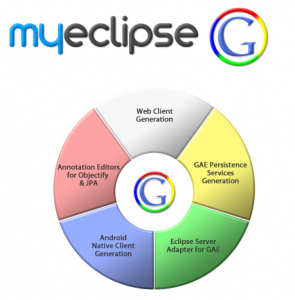
“MyEclipse G” Set to Revolutionize Cloud Deployments by Easing Business Users into Google Development

myeclipse_g_logo-295x300.png


Live from Google I/O, we’re pleased to announce the newest IDE on the market; “MyEclipse G.” The “G” showcases our laser-focus on Google development technologies for the cloud. As with all our  product lines, MyEclipse G is a robust solution designed for an easy user experience while creating multiple frameworks for Google App Engine. The simple-to-use cloud studio-type functionality automates project architecture and implementation, all with very little time investment from you, the developer or business user.

Read more: Genuitec blog