Showing posts with label Application. Show all posts

Monday, June 27, 2011

Visidon Applock sees your pretty face, grants you Android access (video)

In the event you got lulled into a groovy seat dance by that most excellent muzak above, let us repeat - this app does not protect your lockscreen. That said, Visidon's Applock will prevent the privacy-adverse from messing with your personally curated app collection. Have a nosy significant lover? No sweat -- snap a pick with your front-facing cam, enable the face-lock in your settings, and those sexts are as good as blocked. It's far from foolproof, however, as some comments indicate an extended bit of facial-wriggling tricks the app into unlock mode. Oh well, you're so vain, you'll probably think this Android market link is for you -- don't you?


Read more: Engadget
QR: https://chart.googleapis.com/chart?chs=80x80&cht=qr&choe=UTF-8&chl=http://www.engadget.com/2011/06/23/visidon-applock-sees-your-pretty-face-grants-you-android-access/

Friday, June 24, 2011

Compile And Run VB, C# And F# Code Without Installing Visual Studio

FastSharpForm.png

Don’t have Visual Studio installed on your system and you want to compile some C# or VB code to verify the functionality of your project modules? You should try out FastSharp. It’s is a lightweight text editor to compile not only C# and VB code but also F#. It was designed to let users compile and run C# and VB code without having to open or install Visual Studio. All the Import statements required to compile code have already been appended which enables you to compile C# and VB code without any problems. The Import list is configurable. You can access it anytime and change it to meet your coding requirements. A small output console window beneath the code editor lets you identify errors and view outputs. FastSharp also offers a small desktop gadget to compile and run VB, C# and F# code right from the desktop.
On the main toolbar, you have options to compile and run code. If you’re dealing with C # or VB code files, you can open them as well by clicking Open. Before compiling the code, make sure that you’ve specified code language from pull-down menu present alongside Run command.
Read more: Addictive Tips

Wednesday, June 15, 2011

IP Camera Adapter

Turn your android phone into a camera. Download the application from the Market
A universal network camera adapter for the Windows operating system. Can be used with a variety of protocols, cameras with MJPG output or static images. Works with any application that uses DirectShow API, such as Skype, MSN messenger and Chatroulette. 
Works on Windows 2000/XP/Vista/7. 

Read more: IP Camera adapter
Read more: Android market
qrcode.png
Posted via email from Jasper-Net

Focus on Community: Widgetlocker Theme collection

Introduction.png


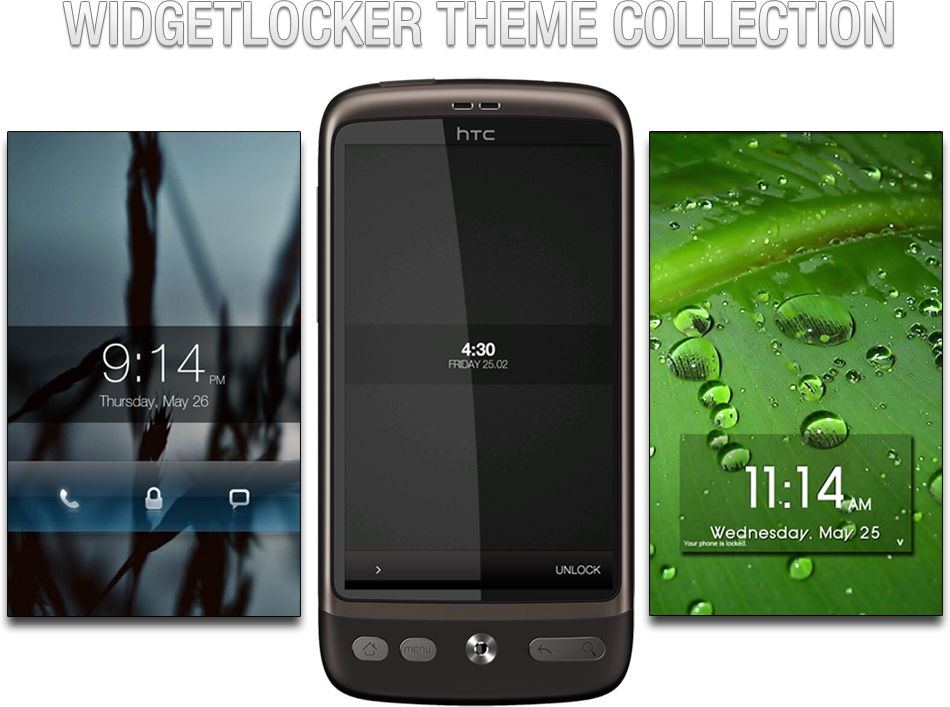
Looking for a way to trick out your lockscreen? Already have Widgetlocker but don’t have that artistic touch? Worry not, as xda member zHk3R has assembled the largest Widgetlocker theme collection your eyes will ever see. Hundreds of pages of users posting their work for you to use. The thread is an absolute must for those who like to keep their phone aesthetically up to date. The thread gives users various widgets, slider themes, wallpapers, and much more! The thread can be found over on xda.

Read more: Talk Android
Read more: XDA Forum

Monday, June 13, 2011

Microsoft Download Manager

The Microsoft Download Manager enables you to download files simply and easily. It also makes downloading large files such as application and multimedia files quick and reliable.

Read more: MS Download

Tuesday, June 07, 2011

How To Stream Video to Both iOS and Android Devices With Plex

banner-011.png

Finding a video streaming solution that does transcoding is tough enough, but trying to find one solution that’ll work for both iOS and Android makes it even harder. Thankfully we have Plex, which does all of this and more.

Plex Media Server

Plex Media Server is an application based off of XBMC that’s primarily built for Mac OS X. It works in two parts: a server app on your desktop and a client app for your mobile device. Plex has been around for a while and even has some awesome plug-ins available. Fortunately for us, the developers made a Windows version that’s pretty wholesome, and there’s even a Linux beta currently in the works and available for download. The Mac OS X version is the definitely the most fully featured, allowing pictures, video, music, and tons of plugins – life Netflix and Hulu – to be streamed to your devices. The Windows version is pretty polished, but doesn’t support Flash/Silverlight plug-ins – no Netflix or Hulu, here. The Linux version is definitely beta – fewer options, no Netflix/Hulu, and the management interface can be really slow – but transcoding and streaming work well on both iOS and Android. Choose the appropriate link below, download the app, and give it quick install.

Read more: How-to-geek

[Hands On] Mr. Mixit Turns Memory Matching On Its Head With A Surprisingly Good Soundtrack

screen?id=7801964998494210322&i=1

Mr. Mixit puts a spin on the classic "memory match" formula by adding a turntable motif and some decent tunes. As Mr. Mixit, you drag shapes down from the monitors behind you to the turntable game area. After choosing two you think will match, you spin the turntables and try to get the image to overlap.

Doing this quickly gives you multipliers to score, which forms the core gameplay of Mr. Mixit; scores are saved in a "top 10" format as opposed to using online leaderboards, like OpenFeint. As levels progress, more symbol possibilities are added, and the multiplier meter decreases at a faster rate. However, making fast matches will boost it back up again.

Read more: Android police
Read more: Android Market
Read more: chart?cht=qr&chs=108x108&chld=L%7C0&chl=market%3A%2F%2Fdetails%3Fid%3Dair.com.hdinteractive.MrMixitFree

Monday, June 06, 2011

Awesome embeddable, deployable web browser that's free for independents... Awesomium!

Sometimes all you want to do in your app or game is display some HTML content. But you also don't want to take a dependency on Internet Explorer or other installed web browser. Being a hobby, independent, or just for fun at home, developer you don't have many resources and just wish there was a browser you could easily embedded and deploy in your app. That it would be awesome if you could easily used it in a .Net app, be it VB.net, WinForms or WPF.

I give you Awesomium!

I caught this via Chris Cavanagh's post, Awesomium – Free Indie License! where the awesome, indie and free seemed like it would make a good post.
Awesomium is the first, full-featured, windowless web-browser framework.
It is crazy fast, supports the latest stuff, and is super simple to use in your own applications .
Great for use in 3D games, .NET apps, HTML GUIs, and way more.
For In-Game Browsing:
Add a custom web-browser to your game to grant users access to forums, guides, and additional online game content without ever leaving your application.

screenshot_eveonline_browser2_thumb%5B1%5D.jpg

Read more: Channel9

A Better Way to Meet Online

I work in a remote office, so I like the idea of chatting with colleagues face to face over the Internet. But until now, I haven't come across an online videoconferencing service that meets all of my needs. I like Skype for Business, but it works only if everyone has the software installed on his or her computer. Other Web conferencing services, like Cisco WebEx, don't require downloads, but they can be complicated, involving various passcodes and dial-in numbers. So when I heard about iMeet, a promising new Web conferencing service that all the tech blogs seem to be raving about, I decided to give it a try.

Registering for an iMeet account was a breeze. I went to iMeet.com, clicked Get My Room, entered some basic information, and chose a URL for my room. Next, I browsed through a selection of backgrounds—I chose a minimalist "birds on a wire" theme. (You can also customize a room with your company logo.) I created a profile with a short bio and links to my Facebook, Twitter, and LinkedIn accounts. Instead of uploading a head shot, I used iMeet's avatar tool to create a cyberversion of myself in a suit and tie. So far, I was having fun.

Setting up meetings was easy as well. I clicked the Add Guest button on the right-hand side of my meeting room, typed in a few e-mail addresses, and entered the time and date for the meeting. (You can also invite people by text, instant message, or phone.) To join a meeting, guests clicked on the link to my room in an e-mail invitation, then hit Call My Phone, and typed in their numbers to have iMeet call them on their landlines. Then, we turned on our webcams. No meeting codes or software downloads required.

Read more: Inc.

Istream

Project Description
Istream is a new web browser for windows computers. We have designed the browser so you have everything right at your fingertips. Download it today and discover a new browsing experience, we have a range of features avaialble just now and its only the first release. istream.im
Istream is now available!
You can download the first version of our browser now. Full details are available at www.istream.im

Read more: Codeplex

Sunday, June 05, 2011

FaceNiff Is a Hacker's Dream for Android Users

Firesheep has gone mobile. For those who may not remember, Firesheep is a Firefox extension, released in October of last year, which allows the user to access the social network accounts logged in on the same network. Developer Bartosz Ponurkiewicz adapted the Firesheep concept for Android.
The only prerequisite for FaceNiff is a rooted Android phone. Once installed, the app will tear through the Wi-Fi network for any accounts that are logged in. Protected networks aren't safe from this, as FaceNiff can access WEP, WPA, and WPA2 Wi-Fi networks.

The developer put a disclaimer at the top of the FaceNiff site. "Legal notice: this application is for educational purposes only. Do not try to use it if it's not legal in your country."
With all of the rooting how-to guides available, it's fairly simple for a user to root an Android phone. In theory, all Android users could use this app, and while the legal disclaimer may be up on the site, it does not guarantee that will be put the reason the app is used.

The free version of this APK provides access to three hacked profiles. The site notes that wider access can be purchased through PayPal.

FaceNiff cannot, however, access accounts that use https browsing, which encrypts information for a more secure browsing session. Facebook is not automatically on https. Users must enable it manually, and Twitter also requires users to manually activate it. Perhaps with the wider availability of an app like FaceNiff, https browsing will become standard.

Google made SSL authentication, an encryption protocol for communication security, standard for GMail following the advent of Firesheep. At the time in November 2010, Facebook and Twitter lacked SSL authentication.

Read more: PC World

Friday, June 03, 2011

Download Updated Thrutu Android App, brings a handful functions on your call screen

Downlaod-Updated-Thrutu-Android-App1.jpg

Wondering it would have been better to have some extra button on calling screen? Thrutu Android App exactly does it! With Thrutu, simply make a phone call in the normal way and Thrutu will automatically appear with these button to let you share location, contacts, photos and more – all at the touch of a button. If you both have Thrutu you’ll get live updating maps and near-instant sharing. If you don’t both have Thrutu, or if you don’t have simultaneous voice and data connections, then Thrutu will offer to share by SMS. Latest update to Thrutu Android App adds a ton of features. Some of them are described below in video demo of Thrutu Android App.

Monday, May 30, 2011

Real-time 3D design tool, MachStudio Pro, now free (as in free, not even reg-ware)

BZ_002.jpg  BZ_004.jpg

Last week it was $4000, now it is free ;)
What is MachStudio Pro?
MachStudio Pro is stand-alone, visualization and rendering software that lets 3D artists create and manipulate lights, materials, and HDR cameras in a real-time, non-linear workflow environment to achieve film quality results..."

Sunday, May 29, 2011

A comprehensive list to Silverlight Controls for developers

I’ve written a few times about some of the controls that have been provided by organizations like Telerik and ComponentOne.  I figured it would be a good idea to do a larger dump of those that I’m aware of (and hope you add comments to point me to others so I can amend this list) and help make you aware of them as well.  There are a ton of great resources out there for Silverlight developers and I’m always impressed how our developer partners are extending our platforms to make tools for developers (and most of the time better than we do :-)).

Here’s my round-up of controls (alphabetically – links here will jump to their section):

Thursday, May 26, 2011

No glasses 3D now free in the App Store

You can create a 3D effect without needing special glasses. All you have to do is track where the user is looking and render the scene accordingly. You can now try it out the technique on an iPhone or iPad.
When you think about ways of creating a 3D display then you can't help but start to invent hardware to do the job - in  particular special glasses that send different images to the left and right eye. In fact you can do much of the same job with just some clever software.

A team of researchers, the Engineering Human-Computer Interaction (EHCI) Research Group has built on earlier work that showed 3D images either using accelerometers (Holotoy) or a Wii remote to track the orientation.

The idea is that by working out the users view point the display can be modified to show what they should see from that position. Looking at the screen then becomes more like looking through a window into another world. Objects in the other world seem to be 3D because they move relative to each other as the viewer's position changes.

Read more: I Programmer

Tuesday, May 24, 2011

Android SQLite Viewer

sqliteviewer_2.png


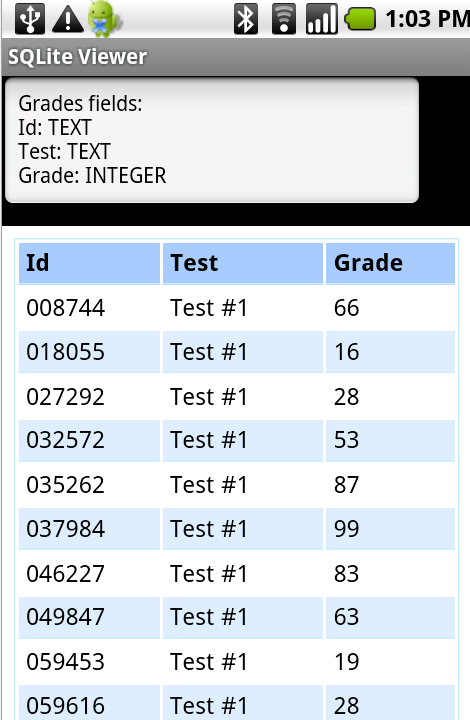
Choosing the database file is done with an external file manager or with agraham's FileDialog.
After choosing a database file, you will see a list with the database tables. Choosing a table will open the second activity which shows the table fields types and the table contents.
BLOB columns will display: "click to see image".
When you click on such a cell the program will try to convert the BLOB data to an image and show it.

Read more: Anywhere Software

Using Fiddler HTTP Debugger for CRM Troubleshooting and Performance Tuning.

Performance tuning continues to be one of the top requests from customers. When looking at performance from a client side perspective I will often use Fiddler (www.fiddlertool.com) to inspect HTTP traffic as the CRM pages are being loaded. Below is a screenshot that shows what the application looks like and then some of the top features I use.

1538.clip_5F00_image002_5F00_thumb_5F00_758E16E1.jpg

This tool has many features that give you good insight into what is happening during the page load. The data I use most often is:
Total number of requests and request size to pull up a page.

3817.clip_5F00_image003_5F00_thumb_5F00_3FF20B28.png

Thursday, May 19, 2011

Thrift

Thrift is a software framework for scalable cross-language services development. It combines a software stack with a code generation engine to build services that work efficiently and seamlessly between C++, Java, Python, PHP, Ruby, Erlang, Perl, Haskell, C#, Cocoa, JavaScript, Node.js, Smalltalk, and OCaml.
Originally developed at Facebook, Thrift was open sourced in April 2007 and entered the Apache Incubator in May, 2008.

Read more: Apache Thrift

Wednesday, May 18, 2011

Create And Share Panoramic Photos With 360 For Android

Capturing-a-panorama.png

New to the Android Market, 360 is yet another commendable tool for casual photography enthusiasts. The app lets you capture HD panoramic photographs with your Android device and share them with your social media (Facebook, Twitter) contacts and other 360 users, complete with geotagging. You can also view panoramas uploaded by 360 users from all around the globe or those in your vicinity from within the app.
In our brief test-run, we found the method for capturing panoramas to be taxing yet rewarding. It takes quite a lot of time and patience to capture a flawless panorama but the result is usually well worth the effort, quite satisfying and a treat to view.

Read more: Addictive tips

Finally Source code of ZeuS Botnet Version: 2.0.8.9 available for Download !

zeus-kit-src.Png

The source code to the infamous Zeus crimeware kit, which has been sold on underground forums for years, has been leaked and is now available for anyone to see if they know where to look. Security researchers over the weekend noticed that files appearing to contain the source code for the Zeus crimeware kit were starting to pop up on various forums frequented by attackers and cyber-criminals. The Zeus exploit kit is perhaps the most well-known kit of its kind right now, and has been used by a variety of attackers for numerous malware campaigns and targeted attacks.

Read more: Slashdot
Read more: The hacker news