Showing posts with label C#. Show all posts

Tuesday, June 28, 2011

Working with SortedSet in .NET 4.0

SortedSet is one class that is been added to the .Net class library 4.0 which actually merges the behaviour of HashSet and SortedList together. It maintains the sorted ordering of the list without affecting performance.

Lets see how it works :

SortedSet sorted = new SortedSet { 1, 43, 65, 23, 44, 56, 43, 1, 56, 66, 24 };
 foreach(int number in sorted)
   {
      Console.WriteLine(number);
 }

Console.Read();


Read more: Daily .Net Tips
QR: https://chart.googleapis.com/chart?chs=80x80&cht=qr&choe=UTF-8&chl=http://dailydotnettips.com/2011/06/26/working-with-sortedset-in-net-4-0/

Some facts about Null in .NET

As I am tweeting around the facts on Nulls for last couple of days, I thought of writing a blog on that as many of you have already requested me on this regard. This post is basically dealing with Nulls and will go through only with basic C# stuffs, so for geeks, it is not recommended and you might end up knowing a little or almost nothing. So if you just here for time pass, then I refer to read on.

Considering the fact Nulls appear on any objects, we have mainly two categories of programmable storage in .NET.

    Nullables (generally mutable with exceptions like strings)
    Value Types / struct (generally immutable)
Nullables are types that either user defined or in framework in which one of its value can be null. .NET treats null specially. Say for instance :
class Program
    {
        static void Main(string[] args)
        {
            X xobj = null;
            Y yobj = null;
        }
    }
Here both xobj and yobj holds null, but you cannot equate xobj == yobj. It is illegal.
Another important fact is Unassigned local values are not treated as null. .NET compiler throws exception when an unassigned variable is used. But if you declare the member of a class unassigned, it will automatically be assigned to null. Hence :

static void Main(string[] args)
        {
            X xobj;
            Y yobj = null;
            xobj = xobj ?? new X();
        }


Read more: DOT NET TRICKS
QR: some-facts-about-null-in-net.html

Working with BigInteger in .NET 4.0

One of the interesting feature that is added with .NET 4.0 is the support of BigInteger. Big numbers are needed when a number cannot be held with any of the existing data types available with .NET framework.
Long has the highest value of 9,223,372,036,854,775,807 which is 0x7FFFFFFFFFFFFFFF in hexadecimal. This is the highest value of a variable which you can store in .NET. Or rather you can say UInt64 to store the highest value of 18,446,744,073,709,551,615 if you don’t need negatives. But this is not actually sufficient when dealing with certain situations like dealing with yearly analytical reports, statistical data etc.
BigInteger is a new type(struct) introduced in .NET 4.0 which deals with the situation and can store any value. To use it you need to add System.Numarics.dll.

For instance :

BigInteger binteger = new BigInteger(3824783785434543);
Console.WriteLine(binteger);

Here in the constructor I have specified the value with which the binteger is to be initialized. You can also use assignment operator and any operators with this object.

BigInteger binteger = 3824783785434543;
Console.WriteLine(binteger);
Console.WriteLine(binteger > 32948454);
Console.Read();


Read more: Daily .Net Tips
QR: https://chart.googleapis.com/chart?chs=80x80&cht=qr&choe=UTF-8&chl=http://dailydotnettips.com/2011/06/27/working-with-biginteger-in-net-4-0/

Using POP3 with C# to download and parse your mail.

Introduction
This article explains a simple way to add mail support in your application. Just use the classes:
POP3class methods:

    string DoConnect(String pop3host,int port, String user, String pwd)
    string GetStat()
    string GetList()
    string GetList(int num)
    string Retr(int num)
    string Dele(int num)
    string Rset()
    string Quit()
    string GetTop(int num)
    string GetTop(int num_mess, int num_lines)
    string GetUidl()
    string GetUidl(int num)
    string GetNoop()
MessageClass methods:
    string GetFrom(string messTop)
    string GetDate(string messTop)
    string GetMessID(string messTop)
    string GetTo(string messTop)
    string GetSubject(string messTop)
    string GetBody(string AllMessage)


Using the code
The following sample illustrates how to use the classes:

POP3class pop3;
pop3 = new POP3class();
pop3.DoConnect("your.mail.server",110,"username","password");
pop3.GetStat();
// and if we have mail:
MessageClass msg;
msg = new MessageClass();
string sMessageTop = msg.GetTop(1);
//OK, message is well, lets download it.


Read more: Codeproject
QR: karavaev_denis.aspx

Monday, June 27, 2011

How to unsubscribe from an Event which is registered to an anonymous method

Anyone who has been doing any type of .net development knows you can subscribe (MSDN on event subscription) to an event as follows:
Subscribe to an Non-Anonymous Method

...
// instance class w/ an event
myClass.DoSomething += HandleDoSomething
...
// the method which handles the event
privat evoid HandleDoSomething( object s, args e )
{

// Logic goes here
}
Subscribe to an Anonymous Method
...
// instance class w/ an event
myClass.DoSomething += (s, e) => {
         // logic goes here
    }
And to unsubscribe from a non-anonymous method you would do the following
...
// instance class w/ an event
myClass.DoSomething -= HandleDoSomething
...


Read more: Derik Whittaker
QR: how-to-unsubscribe-from-an-event-which-is-registered-to-an-anonymous-method.aspx

Ref returns and ref locals

"Ref returns" are the subject of another great question from StackOverflow that I thought I might share with a larger audience.
Ever since C# 1.0 you've been able to create an "alias" to a variable by passing a "ref to a variable" to certain methods:

static void M(ref int x)
{
    x = 123;
}
...
int y = 456;
M(ref y);

Despite their different names, "x" and "y" are now aliases for each other; they both refer to the same storage location. When x is changed, y changes too because they are the same thing. Basically, "ref" parameters allow you to pass around variables as variables rather than as values. This is a sometimes-confusing feature (because it is easy to confuse "reference types" with "ref" aliases to variables,) but it is generally a pretty well-understood and frequently-used feature.

However, it is a little-known fact that the CLR type system supports additional usages of "ref", though C# does not. The CLR type system also allows methods to return refs to variables, and allows local variables to be aliases for other variables. The CLR type system however does not allow for fields that are aliases to other variables. Similarly arrays may not contain managed references to other variables. Both fields and arrays containing refs are illegal because making it legal would overly complicates the garbage collection story. (I also note that the "managed reference to variable" types are not convertible to object, and therefore may not be used as type arguments to generic types or methods. For details, see the CLI specification Partition I Section 8.2.1.1, "Managed pointers and related types" for information about this feature.)

As you might expect, it is entirely possible to create a version of C# which supports both these features. You could then do things like

static ref int Max(ref int x, ref int y)
{
  if (x > y)
    return ref x;
  else
    return ref y;
}


Read more: Fabulous Adventures In Coding
QR: ref-returns-and-ref-locals.aspx

Sunday, June 26, 2011

C# - How to Insert paragraph to MsWord and save it as PDF

1. First you need to install the Add-In: 2007 Microsoft Office Add-in: Microsoft Save as PDF

2. You need to create Bookmark in msWord
Microsoft.Office.Interop.Word.Application ap = new Microsoft.Office.Interop.Word.Application();
Microsoft.Office.Interop.Word.Document doc1 = ap.Documents.Open(@"c:\test.docx", ReadOnly: false, Visible: false);
Object oBookmarkTOC1 = "BookMarkName";
object format = Microsoft.Office.Interop.Word.WdSaveFormat.wdFormatPDF;
//Update BookMark
doc1.Bookmarks.get_Item(ref oBookmarkTOC1).Range.Text = "Bla Bla 123";

Read more: Uzi Drori's Blog

Friday, June 24, 2011

Compile And Run VB, C# And F# Code Without Installing Visual Studio

FastSharpForm.png

Don’t have Visual Studio installed on your system and you want to compile some C# or VB code to verify the functionality of your project modules? You should try out FastSharp. It’s is a lightweight text editor to compile not only C# and VB code but also F#. It was designed to let users compile and run C# and VB code without having to open or install Visual Studio. All the Import statements required to compile code have already been appended which enables you to compile C# and VB code without any problems. The Import list is configurable. You can access it anytime and change it to meet your coding requirements. A small output console window beneath the code editor lets you identify errors and view outputs. FastSharp also offers a small desktop gadget to compile and run VB, C# and F# code right from the desktop.
On the main toolbar, you have options to compile and run code. If you’re dealing with C # or VB code files, you can open them as well by clicking Open. Before compiling the code, make sure that you’ve specified code language from pull-down menu present alongside Run command.
Read more: Addictive Tips

Thursday, June 23, 2011

Word Aligned Hybrid (WAH) Compression for BitArrays

Introduction
After much searching the internet for a .net implementation for WAH compressed BitArray and not finding one, I decided to write and publish an article here so we the .net community are not left out as all the implementations are in the java language.  This ties into a pretty advanced topic of bitmap indexing techniques for databases and I needed this for my upcoming RaptorDB Document data-store database engine.
What is it? 
A BitArray is a data structure in .net library for storing true/false or bits of data in a compact form within an array of Int32 objects. A WAH or word-aligned hybrid BitArray is a special run length compressed version of a BitArray which saves a lot of space and memory. All the implementations that exist in java essentially duplicate the functionality of a BitSet that is the AND, OR, NOT and XOR operations with the compressed internal storage format.
In my implementation I defer the functionality of the BitArray to itself and just add compression and decompression routines. This is much faster than the java way at the expense of memory usage, to overcome this I have also added a FreeMemory method to release the BitArray contents and keep the compressed contents. Arguably if you are using 100s million bits then a full implementation is more performant than my implementation but for most of our usecases we are at most in the 10s millions of bits range.
This original method was invented at the Berkeley Labs of US Department of Energy, it is a project named FastBit and is used for high energy physics department experiments, you can see it here : FastBit site
Why should I care?
So what! you ask?, well as mentioned before BitArrays are used in an indexing technique called bitmap indexes (wiki) and Column based databases which store data in columns instead of rows, a example which you might know is Microsoft's PowerPivot for Excel which can process millions of rows in seconds. Interestingly Microsoft has only recently announced the implementation of bitmap indexes in the upcoming SQL Server platform post 2008 R2. It has long been in use by other RDBM vendors like Oracle.
How it works
The WAH compression algorithm is as follows:
  1. take 31 bits from the array.
  2. if all zeros then increment the zero count by 31.
  1. if ones count > 0 then output 32 bits with bit 32 =1 and bit 31=1 and 0-30 = ones count

  • if all ones then increment the ones count by 31.


    1. if zeros count >0 then output 32 bits with bit 32=1 and bit 31=0 and 0-30 = zeros count

  • else output the 31 bits as 32 bits with bit 32 = 0.


    1. if zeros or ones count >0 then output as above before.
    From the above in the worst case you will get N/31 more bits encoded or about 3% increase in size to the original. 

    Read more: Codeproject

    Wednesday, June 22, 2011

    Sending Richly Formatted Emails with .NET

    Richly formatted emails can require quite a bit of CSS, but since email clients don’t always handle CSS well the styles need to be inlined. With Ruby this is easily handled with the Alex Dunae’s Premailer library, but calling it from .NET isn’t palatable to most developers. So Martin H. Normark built a .NET version called PreMailer.NET.
    PreMailer.Net is based on code from these two projects:
    A CSS Parser for .NET (by The Dynamic Programmer).
    A .Net CSS Selector Engine, called Fizzler.
    For those who would like to try the original you can check out Kevin Blake’s introduction on executing Ruby code from .NET. Changes to Premailer may be needed to support the IronRuby runtime.

    Read more: InfoQ

    YourKit Profiler for .NET

    ynp_logo.gif

    YourKit Profiler provides zero-overhead profiling for your .NET applications and makes code profiling and memory usage optimization simple and fast.
    • Supports:
    • .NET Framework 2.0, .NET Framework 3.x, .NET Framework 4
    • Integration with Microsoft Visual Studio 2005, 2008 and 2010
    • Windows 2003/XP/Vista/2008/7
    • 32-bit and 64-bit systems

  • Fastest code profiling for locating bottlenecks and solving application performance problems


  • Real-time, live performance metrics with graphs, stacks and threads


  • Memory profiling for optimizing memory usage and discovering memory leaks


  • Profiles all types of .NET applications, including standalone .NET applications, .NET web services, Silverlight 4 applications, .NET Windows services, .NET DCOM objects, ASP.NET and more


  • User-friendly interface provides results that are easy to interpret


  • Smart tools for locating problems automatically


  • On-demand profiling lets you profile only when needed to ensure lowest overhead

  •  

  • Read more: YourKit

    .NET StockTrader 5 Sample Application

    Overview
    This application is an end-to-end sample application for Windows Azure and Microsoft cloud technologies. It is a service-oriented application based on the .NET Framework 4.0, including ASP.NET and Windows Communication Foundation (WCF). It illustrates many of the .NET enterprise development technologies that can be used for building highly scalable, "cloud-connected" applications. The application demonstrates a single code base that works on traditional servers, Hyper-V private clouds, and in the Windows Azure public cloud, including hybrid cloud scenarios.
    The download includes the automated setup for the .NET StockTrader 5.0 and the Configuration Service 5.0, with associated technical documents that explain how to run and reconfigure the .NET StockTrader service-oriented application. Additional documentation in the download provides the steps necessary to implement the Configuration Service 5.0 in your own applications and services for central configuration management; distributed caching; load-balancing and failover across clustered service nodes. The sample includes:
    · .NET StockTrader 5.0 composite Web application and middle tier services.
    · Optional Windows Azure Projects for deploying to the cloud.
    · New modes for Advanced Web Service (WS-*) message-level security and interoperability with a variety of non-Microsoft platforms via the SOA architecture.
    · Configuration Service 5.0 with technical guides and samples.
    · Capacity planning tool for running multi-agent benchmarks against the .NET StockTrader services.
    · WSTest 1.5 Web services benchmark.
    Read more: MS Download

    Anonymous Typed Classes in C#

    Introduction
    MSDN Definition: Anonymous types provide a convenient way to encapsulate a set of read-only properties into a single object without having to explicitly define a type first. The name is generated by the compiler and is not available at the source code level or our application cannot access it. The type of each property is inferred by the compiler.
    Anonymous types are a new feature introduced with C# 2.0. Anonymous class is class that has no name and it can help us to increase the readability and maintainability of applications by keeping the declarations of variables much close to the code that uses it.
    We create anonymous class by using the new keyword and a pair of braces defining the fields and values that we want the class to contain. For example:
    myAnonyClassObject = new { Name = "Abhimanyu", Age = 21 };
    Above class contains two public fields called Name as I have initialized a string "Abhimanyu" and Age as I have initialized an integer 42. Compiler generates its name and it is unknown to us.
    Now think, if we don't know the name of the class then how we will create an object? This is called anonymous class which can't be known.
    After all we have one thing in hand; we can define it as variable by using var keyword. var keyword causes the compiler to create a variable of the same type. For example:
    var myAnonyClassObject = new {Name = "Abhimanyu", Age = 21};
    Now, we can access anonymous class fields by using dot notation. For example:
    Console.WriteLine("Name:{0} Age:{1}", myAnonyClassObject.Name, myAnonyClassObject.Age};
    We can also create other instances of the same anonymous class but with different values. For example:
    var newMyAnonyClassObject = new {Name = "Deepak", Age = 23};
    Read more: C# Corner

    YouTrack 3.0 — Fully Customizable Bug Tracker, Now Free For Small Teams

    This spring-summer time appeared to be very hot for JetBrains. And today we are happy to announce one more major release —please welcome YouTrack 3.0, a fully customizable version of our intelligent issue and bug tracker with a Free Pack now available for small teams.
    YouTrack 3.0 introduces two major enhancements: customizable workflow and complete issue attributes customization. With these additions, a team can completely automate the issue life-cycle management based on its specific process needs, while still enjoying an intelligent, extremely usable and developer-oriented issue tracker.
    With YouTrack 3.0, now you can:
    • Define your own workflow to automate issue life-cycle management. Watch demo.
    • Customize the set of issue attributes and their values
    • Submit issues by email
    • Automatically close or modify any related issue attributes from VCS Commit Comment
    • Access and handle your issues from your mobile device
    (more...)
    Read more: JetBrains zone

    11 useful classes you'll love

    Introduction
    These utility classes are piece of code I gathered from internet the last years. And I'm sure you'll find classes you'll use everyday here.
    My goal is not to create a library, but just to gather cool piece of code at the same place so people can use them by copy pasting, without any dependencies.
    If that's not already the case, I highly recommend you to gather cool piece of code you see on the web and having your personal framework correctly saved in a code repository somewhere. It will save you lots of time.
    Some of you will tell that you don't have to reinvent the weel, and that's right.
    But the point is that sometimes you have very specific and simple (but not easy) tasks to do and don't want the burden of yet another library. Moreover you are the most likely person who will want to reuse these classes later : you already know where to find them, how they behave, what pitfalls they have, and what you learnt by using them.
    I've kept original comments in the code, so sometimes, you will be able to find the original author.
    I want to thanks people who shared these classes on the net, and who saved me lots of time and money. The best thing I can do is to spread their work.
    All unit tests or code snippet presented here pass.

    Read more: Codeproject

    .NET Interview Questions 2; Answers

    Describe the difference between a Thread and a Process? 
    --- Both are individual execution paths, but process timeslicing (and memory space) is enforced by the OS, while thread differentiation is enforced by applications.

    What is a Windows Service and how does its lifecycle differ from a "standard" EXE? 
    --- Services are loaded by the operating system and run in contained process spaces detatched from user interaction; users logging on and off the system have no impact on them.

    What is the maximum amount of memory any single process on Windows can address? Is this different than the maximum virtual memory for the system? How would this affect a system design? 
    --- Windows processes are allowed 4GB of virtual address space, regardless of the actual amount of memory on the machine. Windows x64 allows 16TB of address space.

    What is the difference between an EXE and a DLL? 
    --- EXEs can be launched as processes by the operating system. DLL executable code must be invoked by an existing process.

    What is strong-typing versus weak-typing? Which is preferred? Why? 
    --- Strong-typing refers to defining the specific type of a reference at compile time rather than at run time. This results in more efficient execution and memory optimizations at compile time, as well as reduces the chance of a programmer accidentally providing a value of a type another component wasn't expecting.

    Corillian's product is a "Component Container." Name at least 3 component containers that ship now with the Windows Server Family. 
    --- Component containers implement the IContainer interface to wrap components, providing a meta-architecture for organizing, interacting and communicating with the components.

    What is a PID? How is it useful when troubleshooting a system? 
    --- (Ambiguous) This could refer to either a Microsoft Product ID -- the unique key that brands each activatable component installed on a system -- or to a Process ID, which is a means of referring to a specific process in calls to the Windows API.

    How many processes can listen on a single TCP/IP port? 
    --- One.

    Monday, June 20, 2011

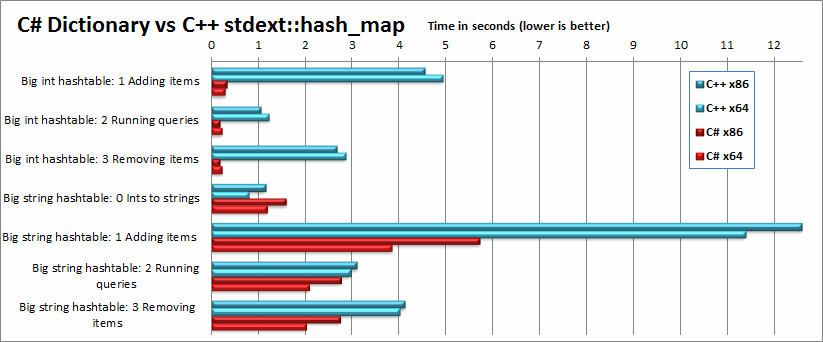
    Head-to-head benchmark: C++ vs .NET

    Hashtables.png

    Introduction
    I love the .NET Framework, C# and IntelliSense, but a lot of people are still saying it's slower than C++, pointing out that video games and "major applications" are still written in C++. Naysayers often point out that apps like Office, Internet Explorer, and Windows Media Player are still written in C++, apparently implying that C++ is still the best choice for performance. But wait, isn't this just because those applications are older than the .NET Framework itself, or because the .NET Framework has lousy support for DirectShow, or less-than-ideal support for Direct3D?
    Well, I've been using C# for years and rarely had any complaint about its performance--that is, until I wrote a program for a Pocket PC and was shocked to discover that it required 35 seconds to start up.
    With this article, I am attempting to make a fair comparison between the performance of C# and C++ (unmanaged), in both desktop and mobile (Windows CE) scenarios. So that the comparison is fair, I wrote most of the code in C# first, and manually ported it, line-by-line, to C++, replacing standard .NET classes with STL equivalents. Because this is labor-intensive, however, the variety and scope of the benchmarks are limited.
    To compile both languages I used Visual Studio 2008; I have access to Visual Studio 2010, but Microsoft dropped support for Windows CE in VS 2010 so it was easier to keep using 2008. I welcome readers to try compiling the C++ code on GCC (there is a small amount of Windows-specific code you may have to deal with) or VS 2010 to see if it performs differently. Of course, any differences you observe may be caused by using a different processor as well as a different compiler. Likewise, if someone has access to Windows Phone 7, I welcome you to run the C# benchmark there and see if you get better results than I did for Windows CE. 
    My test workstation is a Quad-core 64-bit Intel Q9500 @ 2.83 GHz (but all tests are single-threaded) on Windows 7. The mobile device is a Mentor Ranger 4 with a 600MHz ARM processor, and .NET Compact Framework 3.5.
    Read more: Codeproject

    Developing a Simple HTTP Server in C#

    This short video clip shows how to use the HttpListener class in order to develop a simple HTTP server in C#. This video clip was developed as part of the 'C# Fundamentals' course available for free personal usage at www.abelski.com.

    Read more: Life Michael

    Sunday, June 19, 2011

    C#/.NET Fundamentals: Choosing the Right Collection Class

    The .NET Base Class Library (BCL) has a wide array of collection classes at your disposal which make it easy to manage collections of objects. While it's great to have so many classes available, it can be daunting to choose the right collection to use for any given situation. As hard as it may be, choosing the right collection can be absolutely key to the performance and maintainability of your application!

    This post will look at breaking down any confusion between each collection and the situations in which they excel. We will be spending most of our time looking at the System.Collections.Generic namespace, which is the recommended set of collections.

    The Generic Collections: System.Collections.Generic namespace
    The generic collections were introduced in .NET 2.0 in the System.Collections.Generic namespace. This is the main body of collections you should tend to focus on first, as they will tend to suit 99% of your needs right up front.

    It is important to note that the generic collections are unsynchronized. This decision was made for performance reasons because depending on how you are using the collections its completely possible that synchronization may not be required or may be needed on a higher level than simple method-level synchronization. Furthermore, concurrent read access (all writes done at beginning and never again) is always safe, but for concurrent mixed access you should either synchronize the collection or use one of the concurrent collections.

    So let's look at each of the collections in turn and its various pros and cons, at the end we'll summarize with a table to help make it easier to compare and contrast the different collections.

    The Associative Collection Classes
    Associative collections store a value in the collection by providing a key that is used to add/remove/lookup the item. Hence, the container associates the value with the key. These collections are most useful when you need to lookup/manipulate a collection using a key value. For example, if you wanted to look up an order in a collection of orders by an order id, you might have an associative collection where they key is the order id and the value is the order.

    The Dictionary<TKey,TVale> is probably the most used associative container class. The Dictionary<TKey,TValue> is the fastest class for associative lookups/inserts/deletes because it uses a hash table under the covers. Because the keys are hashed, the key type should correctly implement GetHashCode() and Equals() appropriately or you should provide an external IEqualityComparer to the dictionary on construction. The insert/delete/lookup time of items in the dictionary is amortized constant time - O(1) - which means no matter how big the dictionary gets, the time it takes to find something remains relatively constant. This is highly desirable for high-speed lookups. The only downside is that the dictionary, by nature of using a hash table, is unordered, so you cannot easily traverse the items in a Dictionary in order.

    The SortedDictionary<TKey,TValue> is similar to the Dictionary<TKey,TValue> in usage but very different in implementation. The SortedDictionary<TKey,TValye> uses a binary tree under the covers to maintain the items in order by the key. As a consequence of sorting, the type used for the key must correctly implement IComparable<TKey> so that the keys can be correctly sorted. The sorted dictionary trades a little bit of lookup time for the ability to maintain the items in order, thus insert/delete/lookup times in a sorted dictionary are logarithmic - O(log n). Generally speaking, with logarithmic time, you can double the size of the collection and it only has to perform one extra comparison to find the item. Use the SortedDictionary<TKey,TValue> when you want fast lookups but also want to be able to maintain the collection in order by the key.

    Read more: James Michael Hare

    Dictionary Object (ContainsKey Vs. TryGetValue)

    Introduction 
    Here I am going to discuss about two important method of the Dictionary>tkey, tvalue< class to play with the data of the Dictionary. 
    Dictionary<tkey, tvalue> class allows us to create key , vlaue pair collection. The Dictionary<tkey, tvalue> generic class maps of keys to a set of values. Dictionary consists of a value and its associated key. Value can be retived by using its key is very fast, close to O(1), because the Dictionary>tkey, tvalue< class is implemented as a hash table.

    Now to understand what I am going to discuss in this post I am creating Dictionary object

    Dictionary dic = new Dictionary();

    Dictionary Class has method Add which allows to add the key, value pair data in the dictionary object

    dic.Add("Pranay",  "Rana");
    dic.Add("Hemang", "Vyas");
    dic.Add("Krunal", "Mevada");
    dic.Add("Hanika",  "Arora");

    Now after adding the key,value pair it's need to take out the value out of the dictionary object and use that values because after all dictionary object used to store the values and to get it back.  

     To take value back from the Dictionary object , it require to make use of key
    Type value = dic[key];

    But the problem with this is it throws KeyNotFoundException if the key is not exists in dictionary.

    ContainsKey  
    Dictionary class provide methods ContainsKey which used to check where the key is present or not.
    Signature bool ContainsKey( key)

    So most of the developer use this method to check value and if the value is exits they get the value back.

    Read more: Codeproject