Showing posts with label HTML5. Show all posts

Wednesday, June 22, 2011

15 Amazing Free HTML5 Templates

HTML5 is now supported by all major browsers in some form. HTML5 brings us easy ways to add videos, audio, graphics, etc.  HTML5 website templates are easy to use and can be modified according to your requirements, giving your website a professional look. In this post, I collected 15 Amazing Free HTML5 Templates for download. Enjoy!
1.Free HTML5 Website Template - Art of Business
Say hello to a new free HTML5 website template from TemplateMonster - this time it's designed for a premium business website. As every other free website template we deliver this one also has all of the PSD source files included into the download package for you to be able to fine tune the result.
freehtml5template1.jpg

Read more: Web Builder Zone

Thursday, June 16, 2011

Announcing the Web Standards Update - HTML5 Support for the Visual Studio 2010 Editor

vshtml5_thumb.png

Folks have been asking "When will VS2010 support HTML5?" I've been saying, jokingly, that the answer is "yesterday" as there's nothing keeping you from creating HTML5 in Visual Studio or ASP.NET today. However, there's no intellisense and there's lots of squiggly lines that make people uncomfortable. Combine all that with the fact that HTML5 is a moving target, and it's unclear. We've said before that the next version of Visual Studio will have better support HTML5, but what about today?

Today, a rogue faction of the Web Platform and Tools team, spearheaded by Mads Kristensen, is pleased to announce the Visual Studio Web Standards Update. This adds better support for HTML5, CSS3 and new JavaScript features to ALL versions of Visual Studio.

Download the first Visual Studio Web Standards Update

HTML5 moves fast, and this update will aim to keep up with it. It adds support to Visual Studio and the editor for HTML5, CSS3 and new JavaScript features. The goal is perhaps an update every quarter or so as new features or elements emerge.  We want ASP.NET web developers to always be able to use the latest standards, as well as being able to choose from existing standards. Remember that you can use HTML5 today along with JavaScript libraries like Modernizr that allow you to create pages that work across nearly all browsers, including old crappy ones.

Wednesday, June 15, 2011

HTML 5 vs Silverlight 5

Philosophy
The goal of this paper is to present an objective comparison between Silverlight 5 and HTML 5 (with: JavaScript / ECMAScript 5 + CSS3 + any required additional frameworks and APIs). We will only focus on some features: covering these technologies entirely would require a whole book. 
The main idea is to provide a guide to help you choose a technology as part of a planned project. 
All decisions elements could not be presented here of course. You should take this document as a help to decide rather than as an absolute truth.
In each chapter we will focus on functionalities but also on ease of implementation and performance. The goal here is not to study in detail the features of HTML 5 or Silverlight 5. 
Sample source code is available here.
To install Silverlight 5 beta you can go here.


HTML vs XAML
The two competitors are tied on the philosophy as they are both based on a markup language (HTML and XAML). They also both make extensive use of attributes.


Extensibility
Silverlight 5 allows you to add custom attributes to existing tags via attached properties. It is also feasible in HTML 5, but through the use of an inelegant hack (if HTML 5 does not recognize a tag or an attribute, it will just ignore it. Javascript can then process this information to add the required behavior). An implementation example of this usage is the project KnockOut.
On top of that, Silverlight has the Markup Extensions that add behavior to existing attributes (including Binding or even custom behaviors). Moreover, the list of tags is not fixed since it is possible to develop ones own controls providing a real advantage in the industrialization of a Silverlight solution.


DOM access
In Silverlight, each tag can be accessed directly from the code behind using association by name (x: Name). In HTML 5, it is possible to do the same with the attribute 'id' but only in certain browsers (IE, Chrome). We must therefore go through Javascript’s location services by id, which slightly penalizes ease of development:

var toto = document.getElementById('toto');
toto.style.visibility = 'hidden';

Regarding the traversing of logic trees, Silverlight and HTML provide equivalent related services. 
It is however worth noting that HTML 5 offers a query tool for its DOM named Selectors API. This enables very efficient search across the objects on the page using selection queries: 
var alerts = document.querySelectorAll("p.warning, p.error");
In this example, we ask the API to return the list of paragraphs whose class is "warning" or "error". You can also query for IDs, types and many other criteria.


Read more: Eternal Coding

Tuesday, June 14, 2011

Learning HTML5 from Disney Tron:Legacy Digital Book

Thanks to the amazing teamwork of Disney and Vectorform, it took just about 1 month to build the new Disney TRON: Legacy Digital Book Site, an immersive HTML5 experience built on top of Internet Explorer 9 Hardware Accelerated HTML5. In this post I’d like to share some of the “behind the scenes” stories from the team involved in the project,
Read more: Giorgio Sardo Blog

Tuesday, June 07, 2011

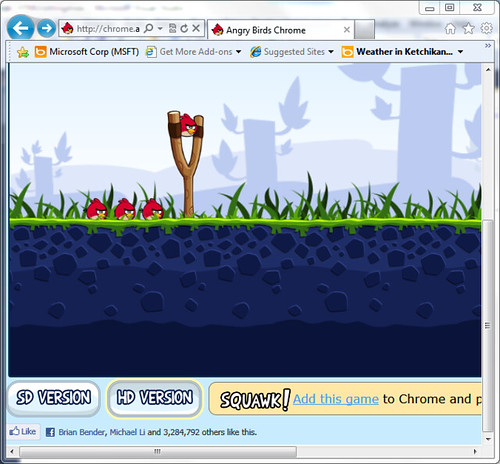
Angry Birds on IE9

5804918304_01ddf8066e.jpg


I was asked recently where "angry birds for ie9" was. My answer was Angry Birds is already there, kind of, for IE9.   Actually its there for HTML5 browsers.  Angry Birds was released as a HTML5/Flash app targeted for Chrome at http://chrome.angrybirds.com recently.
Accordingly, ChromeBirds works pretty good on IE9 too. Simply point your IE9 browser to http://chrome.angrybirds.com and you'll have Angry Birds up and going in IE9. 
Why Blog this? Truthfully I was asked if there was angrybirds for IE9. I'm using this article this as a ref to email them.

Tuesday, May 24, 2011

WebWorker - html5

אחד מהחידושים ב - HTML5 הוא WebWorker.
בפוסט זה אני אראה את ההתחלה של עבודה עם WebWorker,
כידוע בעולם ה - javascript כל העבודה היא סינכרונית ולפעמים זה יכול להעיק על ה - UI, הדבר היחיד שיודע לעבוד בצורה אסינכרונית אלו קריאות ajax, בעזרת WebWorker אפשר להגדיר כל דבר שיעבוד בצורה אסינכרונית.
העבודה היא מאוד פשוטה, נגדיר קובץ js שיעבוד בצורה אסינכרונית ובקוד שלנו נייצר מופע של Worker וכפרמטר ניתן לו את שם הקובץ.
 var worker = new Worker('worker.js');
הקוד שלנו והקובץ Worker.js מתקשרים בעזרת postMessage כדי לשלוח הודעות מאחד לשני ובעזרת רישום ל - onmessage כדי לקבל הודעות, לדוגמה הקוד אצלנו יכול להיראות כך:
function webworkers2() {
    var worker = new Worker('worker.js');
    worker.onmessage = function (event) {
        document.getElementById('result2').textContent = event.data;
    };
    worker.postMessage('99945784');
}
בהתחלה יצרנו מופע של Worker, נרשמנו ל - onmessage והגדרנו שכאשר נקבל תשובה נציג את התוצאה על span כלשהו, בנוסף שלחנו הודעה (מספר כלשהו - כמובן שאפשר לשלוח כל מחרוזת שגם יכולה להיות אובייקט בפורמט JSON)

Sunday, May 08, 2011

HTML 4 to 5 Cheat sheet, see what's new and removed for Tags and Attributes.

How To Code HTML, What's New and Obsolete HTML Tags and Attributes
A great quick reference for the transition from HTML 4 to HTML 5. Designed to help authors create polyglot HTML documents, this can also help in creating HTML 4 and XHTML documents, in addition to upgrading to HTML 5. Most HTML cheat sheets, usually based on the technical specifications for a specific version of HTML, show only the valid features in that version of the HTML specs. In contrast, this one helps developers transition from earlier versions of HTML by indicating new features in HTML 5 with a "New" flag and using a strike-through font to indicate the tags and attributes previously used in HTML 4, XHTML 1 and earlier versions that are now obsolete in HTML 5.
For a quick reference of HTML character entities, see the HTML character codes reference.
Required or recommended HTML attributes for the HTML tags are shown in bold.

Sunday, April 17, 2011

WebSockets in 5 minutes

 HTTP is by design an asymmetric protocol: clients can contact the server whenever they want (without the user having to issue a command, thanks to Ajax requests). The server instead cannot normally send updates at the client at the time of its choosing.

Connections are made as HTTP requests, GET or POST in nearly all web browsers, from the client to the server, and never the opposite. This mechanism simplifies the protocol in many ways, but raises issues whenever a real-time interaction is desiderable. How to implement a chat in a browser?
There are some work arounds but...

The simplest solution is polling the server continuously: every 5 seconds we send a request, and the server tells us which messages are arrived in the chat room. However this raises the load on the server, which must manage a huge number of new connections at the same time.
A slightly better model is long polling (and other similar techniques which collectively go under the name of Comet), where each connection made by the client is kept open until there are some data to return to the client. The connection may also have a timeout, but it's very simple to just restart one after a 60-second timeout has expired.

The problem with both styles is that they are not really scalable with the current HTTP servers. Apache dedicates one process to each connection - if you have to keep open a process for every user in a chat, the server will quickly halt. There are however different HTTP servers, like CouchDB and Node.js, which do not allocate multiple processes and are capable of handling this large number of simultaneous open connections.
WebSockets

Since we already have to change some server-side infrastructure to support the server pushing to the client on certain events, let's do it with a standard protocol. HTML 5 WebSockets promise a bidirectional full-duplex connection, which is not closed after the first data returned by the server along with headers, but remains open like any TCP connection.
Technically speaking in fact, WebSockets are a mechanism for tunneling a TCP connection over HTTP: you can send whatever you want in the communication channel, but the communication is wrapped into a text stream with HTTP headers such as Host and Origin.

Read more: WebBuilder home

Tuesday, April 12, 2011

IBM getting into the HTML5 authoring game with open source Maqetta

IBM announced Maqetta, an HTML5 authoring tool for building desktop and mobile user interfaces, and also announced the contribution of the open-source technology to the Dojo Foundation.
LAS VEGAS – At the IBM Impact 2011 conference here, IBM announced both Maqetta as well as the open source contribution of its Maqetta HTML5 visual authoring tool to the Dojo Foundation.
Maqetta is an open source project that provides WYSIWYG visual authoring of HTML5 user interfaces using drag and drop assembly, and supports both desktop and mobile user interfaces. The Maqetta application itself is authored in HTML, and therefore runs in the browser without requiring additional plug-ins or downloads. Maqetta is available under a commercial-friendly open source license. Ands users can download the source code and install it on their own server, customize the code to fit their needs and contribute improvements to the open source project.

IBM officials said HTML5 is an umbrella term for dozens of new features that ship in modern browsers (desktop and mobile) that allow rich user interfaces, graphics, multimedia and fast performance using open standards. HTML5 ships in the latest versions of Microsoft Internet Explorer, Mozilla Firefox, Google Chrome and Apple Safari, and on modern smartphones, including iPhone, Android, RIM BlackBerry and Windows 7 Mobile.

Read more: eWeek

Monday, April 11, 2011

What They Didn’t Tell You About Creating Scalable HTTP Web Services

Important (performance) factors to keep in mind when creating HTTP web services (with or without libSXE):

1. Accept()ing new sockets is an expensive and generally single-threaded kernel operation. Therefore it’s important to consider having as many long-lived ‘keep-alive’ HTTP 1.1 connections as possible. For example, your multi-threaded HTTP server might be able to have 500,000 simultaneous HTTP connections and perform at 250,000 keep-alive requests per second, but the server will still only be able to accept() new connections at a rate of 30,000 per second.

2. Parsing HTTP headers can be done with the sub-library lib-sxe-http. However, parsing the key/value structured headers is (unnecessarily) slow. Why slow? Because it’s necessary for the parser to loop over and examine each and every character in the headers in order to determine e.g. whether it’s an end of line character, or whether it’s one of the end of header characters etc. Although such a loop seems simple and fast, when we loop over, say, 250,000 or more headers per second then all that looping adds up into a lot of CPU instructions. Why unnecessarily slow? If you have control over the peer sending the HTTP request — e.g. because the peer is another of your servers or your javascript library etc — then it’s possible to build the never ‘pipelined’ requests and/or responses in such a way that it’s not necessary for your HTTP server to parse the headers. For simple GET requests, your server only needs to examine the last characters read in order to determine if they are the end of header characters. For POST requests and responses, the ‘content-length’ header is useful but in order to avoid parsing the headers then we can embed this info at the end of our body at a fixed, known location. And this technique works even if third-party HTTP proxies manipulate the headers en-route. Conclusion: Avoid parsing HTTP headers if possible. This blog post shows how parsing HTTP headers using node.js causes node.js to more than halve in perfermance: Node.Js Versus SXE “Hello World”; Node.Js Performance Revisited

3. The general rule of thumb is that the HTTP server nearly never has to close() a socket. The close() function is not as slow at the accept() function but it’s not for free either. Using close() might just lead to a malicious peer to connect again causing an expensive accept(). So assuming your server has a lot of memory then it’s probably a better trade off to just keep a badly behaving HTTP peer connection, and maybe even ‘tar pit’ it etc. The idea is that a little bit of memory for the peer buffers is a lesser evil than the potentially expensive close()/accept() bottleneck.

Read more: SIMONHF'S BLOG

Thursday, April 07, 2011

Microsoft clarifies HTML5 v Silverlight

Microsoft has learned its lesson and, not wanting to alienate or spook its Silverlight developers yet again, has posted a carefully crafted blog post that explains its position vis-a-vis Sliverlight and HTML5.
Only a short time ago Microsoft upset a lot of developers by claiming that HTML5 was the way of the future, a fine sentiment, and that Silverlight was only for Windows Phone 7 - not such an OK thing to say. Lots of Silverlight developers were feeling a little worried that the technology that they had invested in might be about to be sidelined.

Read more: I Programmer

HTML vs. Silverlight vs. WPF

At Readify we focus on the Microsoft stack - WPF, Silverlight, and ASP.NET. The bulk of our projects are ASP.NET, some are Silverlight, and even less are WPF (though the WPF projects tend to be bigger in scope, so they're probably about even).

Usually the customer has decided on a technology stack before we arrive, and they've engaged us to help plan/design/build/ship the application. Sometimes it's too late to suggest technology changes, but other times we can influence the technology they decide to use.
When I'm faced with deciding on a technology, here is my workflow.

presentation.png

Read more: Paul Stovell

Tuesday, March 08, 2011

Adobe Releases Flash-to-HTML5 Converter, Codenamed Wallaby

Monday night, Adobe released a new, experimental Flash-to-HTML5 conversion tool codenamed Wallaby.

Wallaby is an AIR app that lets devs and designers quickly and simply convert Flash Professional files to HTML5 — and when we say “simply and easily,” we mean it’s a matter of dragging and dropping. The company is specifically hoping this tool will make it easier for designers and developers to get their content onto iOS devices like the iPhone and iPad.

We saw a demo of Wallaby last fall; while some of the company’s CS5 software offered HTML5 plugins already, we said Wallaby was different because it supported elements and resources within animations, not just the animations themselves.

Wallaby is being released on Adobe Labs; Adobe is asking devs and designers to take it for a test drive, see how the HTML5 code looks, and give feedback accordingly.

Adobe has had an interesting time trying to articulate its position on Flash and HTML5 over the past year or so. To put it briefly, the company feels there’s still room in the current technological and creative spaces for Flash, but it doesn’t think that either Flash or HTML5 has to exist to the exclusion of the other. Therefore, as a company that, to a large extent, exists to serve the creative and development communities, it wants to create great tools for both the HTML5 and the Flash camps.

Read more: Mashable

Thursday, March 03, 2011

Sencha Touch

touch-hero.png
Built with Web Standards
Sencha Touch is the world's first app framework built specifically to leverage HTML5, CSS3, and Javascript for the highest level of power, flexibility, and optimization. We make specific use of HTML5 to deliver components like audio and video, as well as a localStorage proxy for saving data offline. We have made extensive use of CSS3 in our stylesheets to provide the most robust styling layer possible.
Altogether, the entire library is under 120kb (gzipped and minified), and it's trivial to make that number even smaller by disabling unused components or styles.

The World’s Best Devices

Sencha Touch is a cross-platform framework aimed at next generation, touch enabled, devices. It's currently compatible with Apple iOS and Android devices, and very soon with RIM Blackberry 6 devices. Together these devices represent over 95% of current US mobile traffic. Android and Blackberry developers can also make use of special themes we've created just for those devices. With the ever-rising number of Android models and the widespread popularity of WebKit on mobile devices, we expect our supported device list to grow very rapidly.

Read more: Sencha Touch

Monday, February 14, 2011

MotherEffin HTML5 Boilerplate MVC 3 Site Template

This past week I’ve been reading up on the HTML5 Boilerplate project by Paul Irish (of the Google Chrome and jQuery teams fame).  The HTML5 Boilerplate project is a collection of all the best practices for modern day web development in one easy to use project template.

Read more: Clarity consulting

Tuesday, February 08, 2011

es5-shim: use ECMAScript 5 in older browsers

ECMAScript 5 (ES5) brings with it some nice improvements. The only problem is that only newer browsers (Internet Explorer 9, Firefox 4, Chrome 5, Safari 5) support it, or at least its most interesting parts. es5-shim provides a neat solution: It checks for each ES5 feature whether it is present and if not, it provides its own implementation. As an aside: es5-shim originated as a Narwhal module and was then turned into a stand-alone library, to encourage broader adoption. es5-shim is the more current version of the two.

Read more: 2 ality

Thursday, February 03, 2011

Julia Meets HTML5

Google labs has created a demo web page where fractals combine with HTML5 to give a fully interactive viewer that uses nothing but JavaScript and as many cores as you care to offer it and not a plug-in in sight

Read more: Slashdot
Read more: Google

Sunday, January 16, 2011

XHTMLr

Project Description
Normalizes HTML into XML that can be parsed and manipulated.

HTML can be really ugly. Even valid HTML can be (and most often is) invalid XML. This small, fast little library is able to parse the HTML tree and create XML that can be read into System.Xml.XmlDocument or System.XML.Linq.XDocument.
Consider the following ugly HTML:
    <p>First paragraph
    <p style=color:red>Second paragraph

Running this command:
XHTML.ToXml(html, XHTML.Options.Default | XHTML.Options.Pretty);
Will produce the following XML:
<html>
 <body>
     <p>First paragraph
                   </p>
     <p style="color:red">Second paragraph</p>
 </body>
</html>

Read more: Codeplex

Thursday, January 13, 2011

3D (well actually 2.5D) in HTML5

It’s been released for a little while now, but I just wanted to make sure you hadn’t missed this rather cool HTML5 demo that was developed by the National Museum of China.
You’ll need a HTML5 capable browser, I tested Google Chrome, FireFox, Safari and IE9 Beta. All Browsers except Safari were capable of running the site, however, IE9 performs slightly better due to it’s full hardware rending support.

Read more: thebeebs

Sunday, December 26, 2010

Unique Authentication using Magic of HTML5 and WCF

Table of Contents
Introduction
System Requirements
What You Can Learn
Fancy Signup Form
Image Upload
Ajax Calls to WCF Service
Login Form
Conclusion
History


Introduction
This is my first hands on in HTML5. One day I thought about making an application which is simple and fancy looking as well. I had not worked earlier in HTML5, but once I saw the new features and tags in HTML5, I decided to make something new in core HTML. The biggest advantage in using HTML5 is that it is light weighted, platform independent and best for mobile applications like Iphone, Android (For Win 7 mobile, it’s not supported because Microsoft is still experimenting with HTML5 and has not yet introduced HTML5 in mobile). Enough about my thoughts, let's moves on to the application. This application is based on Login form, but it is not a simple authentication form.
In this article, we'll build a innovative login form, where the user drops a “webid” file in the login form to authenticate. The file contains an image and some information about the card holder. It uses a great feature of HTML5, WCF and feature called WebId.

System Requirements
The most essential requirement to run this application is HTML5 supported browser.
Browser: Firefox 3.6.3, Google Chrome 5.0, Apple Safari 4.05, Opera 10.53
What You Can Learn
As a beginner, you can learn the following features:
HTML5, CSS3, WebKit
Ajax call to WCF service using JavaScript
JSON Operation in JavaScript.

Read more: Codeproject