Chapter 5: Implementing the MVVM Pattern

Monday, February 28, 2011 0 comments
The Model-View-ViewModel (MVVM) pattern helps you to cleanly separate the business and presentation logic of your application from its user interface (UI). Maintaining a clean separation between application logic and UI helps to address numerous development and design issues and can make your application much easier to test, maintain, and evolve. It can also greatly improve code re-use opportunities and allows developers and UI designers to more easily collaborate when developing their respective parts of the application.

Using the MVVM pattern, the UI of the application and the underlying presentation and business logic is separated into three separate classes: the view, which encapsulates the UI and UI logic; the view model, which encapsulates presentation logic and state; and the model, which encapsulates the application's business logic and data.

Prism includes samples and reference implementations that show how to implement the MVVM pattern in a Silverlight or Windows Presentation Foundation (WPF) application. The Prism Library also provides features that can help you implement the pattern in your own applications. These features embody the most common practices for implementing the MVVM pattern and are designed to support testability and to work well with Expression Blend and Visual Studio.
This chapter provides an overview of the MVVM pattern and describes how to implement its fundamental characteristics. Chapter 6 describes how to implement more advanced MVVM scenarios using the Prism Library.

Class Responsibilities and Characteristics

The MVVM pattern is a close variant of the Presentation Model pattern, optimized to leverage some of the core capabilities of WPF and Silverlight, such as data binding, data templates, commands, and behaviors.

In the MVVM pattern, the view encapsulates the UI and any UI logic, the view model encapsulates presentation logic and state, and the model encapsulates business logic and data. The view interacts with the view model through data binding, commands, and change notification events. The view model queries, observes, and coordinates updates to the model, converting, validating, and aggregating data as necessary for display in the view.

The following illustration shows the three MVVM classes and their interaction.

IC448690.png

Read more: MSDN

Validating our ViewModel

0 comments
One of the key features that need to be implemented in a Line of Business application. Although Silverlight supports validation very well it’s not that easy compared to enabling Data Binding your ViewModel.

When we want our ViewModel to be fully Data Bindable we implement the INotifyPropertyChanged interface. It’s really an easy interface with an Event that needs to be called when the value of a property has changed. A lot of people don’t implement this interface themselves but use a framework like MVVM Light. I’m using that as well.

To make the validation work in a similar way we will have to implement INotifyDataErrorInfo. This is similar but I haven’t found a framework implementing it for me, so I wrote my own implementation of a ViewModelBase that both supports INotifyPropertyChanged and INotifyDataErrorInfo.

Declaring the validation rules

Now that we have a ViewModel which supports validation we need to use it in our ViewModels. Let’s say that we have a LoginViewModel, which requires a Username and Password to be filled in.
So we need to declare our properties Username and Password as Required. Besides that we also want the message text to be changed to something different than the default, so we set the ErrorMessage property.

public class Login : ViewModelBase
{
   private string _password;
   private bool _rememberMe;
   private string _userName;
   [Required(AllowEmptyStrings = false, ErrorMessage = "Username is required")]
   public string UserName
   {
       get { return _userName; }
       set
       {
           if (_userName != value)
           {
               ValidateProperty("UserName", value);
               _userName = value;
               base.RaisePropertyChanged("UserName");
           }
       }
   }
   [Required(AllowEmptyStrings = false, ErrorMessage = "Password is required")]
   public string Password
   {
       get { return _password; }
       set
       {
           if (_password != value)
           {
               ValidateProperty("Password", value);
               _password = value;
               base.RaisePropertyChanged("Password");
           }
       }
   }
   public bool RememberMe
   {
       get { return _rememberMe; }
       set
       {
           if (_rememberMe != value)
           {
               _rememberMe = value;
               base.RaisePropertyChanged("RememberMe");
           }
       }
   }
}

Alright this was the usage of one of the most rudimentary validation types. A small overview of all the different supported validation types.

- RequiredAttribute used to check if a property has a value and will return invalid in case of null, empty string, or only white space characters.
- DataTypeAttribute like it’s name the data type validator validates a value against certain ‘data types’: DateTime, Date, Time, Duration, PhoneNumber, Currency, Text, Html, MultilineText, EmailAddress, Password, Url, ImageUrl.
- RangeAttribute is used to validate int, decimal and double values which need to fall between certain min and max values.
- RegularExpressionAttribute can be used for more advanced scenario’s where you can write the full regular expression which should be used to validate against.
- StringLengthAttribute can be used to validate the length of a string in characters, you can specify both the maximum length and minimum length, but one of them is also possible. Be aware that a null value will be seen as valid!
- CustomValidationAttribute used in the most complex validation scenario’s. The CustomValidationAttribute needs to be used in conjunction with a static method which returns a ValidationResult. This static method can be used to implement your very complex validation rules.
And if the above validation types don’t fit, you can always derive from the ValidationAttribute and write your own implementation. It’s important to know that in case of a null-value the properties won’t be validated. This is something that’s not always helpful, specially in case of the CustomValidation where you want to implement a conditional required field validation. The Required validation does get fired in case of null-value.

Read more: Mark Monster

Be Inspired – Creative Web Interfaces #26

0 comments
Here we are, our twenty sixth web interface showcase. Showcasing the latest design trends within the community, this round-up of fresh showcasing e-commerce, blogs and portfolio designs.
We would love to know your feedback on our web interface showcase, how can we can we make them better? What should we not do? Should we have a voting system? Feel free to drop us a tweet with your suggestions or post in the comments below

As always we would love to know which interface is your favourite in the comments.
Please note that clicking on the web interface below will take you to the full sized version and will also give you the opportunity to visit the the rest of the designers full portfolio.

web-interface-26-5.jpg  web-interface-26-11.jpg

Read more: nenunocreative

How much traffic does your website create with each request? Use IISExpress 7.5 to find out.

0 comments
If you are currently using Cassini (the Visual Studio Development Web Server) – you will definitely want to switch to  IIS Express 7.5 because it is more aligned (feature wise) with IIS. Much has been written about IIS Express 7.5. The one feature I want to focus on here is IIS Express’ command prompt interface. Compliments of WebMatrix, IIS Express 7.5 has a nice GUI admin tool. What if however, you want to monitor traffic as part of your development activities. Sure, we can log that activity. But what if you want to see it real time. This is an area where IIS Express 7.5 shines.

Once IIS Express is installed, you will find it in Program Files (x86)\IIS Express. The configuration files can be found in Documents\IISExpress\config. The file you will be interested in is applicationhost.config. There is a lot going on with this XML configuration file. To get up and running, you can ignore most of it. The one section you will be interested in is <sites>. In VS 2010 SP 1, we will have the ability to configure IIS Express 7.5 within the IDE. For those that have not installed SP 1, getting up and running with IIS Express is actually quite simple.

By default, there is one site setup for you already:

1: <site name="WebSite1" id="1" serverAutoStart="true">
 2:     <application path="/">
 3:         <virtualDirectory path="/" physicalPath="%IIS_SITES_HOME%\WebSite1" />
 4:     </application>
 5:     <bindings>
 6:         <binding protocol="http" bindingInformation=":8080:localhost" />
 7:     </bindings>
 8: </site>
To demonstrate, let’s setup NerdDinner to run under IIS Express. All we need to do is add an entry to applicationhost.config:
 1: <site name="NerdDinner" id="2" serverAutoStart="true">
 2:    <application path="/">
 3:       <virtualDirectory path="/" physicalPath="C:\NerdDinner" />
 4:    </application>
 5:    <bindings>
 6:       <binding protocol="http" bindingInformation=":50799:localhost" />
 7:    </bindings>
 8: </site>

Two requirements: 1 – the site name has to be unique. 2 – the id also has to be unique. Once you supply those two items, you need to specify the port. In the Project Properties Dialog, select the Web Tab. Make sure the Specific Port Option is selected. You can specify a port # or use the one that VS assigned. All you need to do is specify that port # in the bindingInformation attribute.

Read more: Los Techies

C#. Пишем google-переводчик

0 comments
Сегодня мы с тобой напишем свой собственный переводчик. Сам функционал перевода мы, конечно же, реализовывать не будем, а обратимся к всемогущему Google, в частности, к Google API Translate. Также немного поковыряем связывание данных в WPF и немного коснемся библиотеки Json.NET, в результате чего у нас получиться свой собственный переводчик. Вперед!

Схема работы

Итак, прежде чем приступать к самому интересному (написанию кода, конечно же  ) надо сначала набросать небольшой план работ. Предлагаю разбить весь процесс на следующие этапы:
1. Разобраться с взаимодействием Google API Translate.
2. Спроектировать WPF приложение.
3. Написать код на C# для взаимодействия с Google.
4. Реализовать связь интерфейса WPF приложения с кодом на C#.

Google API Translate

Итак, сначала нам надо разобраться с тем, как мы будем взаимодействовать с переводчиком от google, так как именно его услугами мы будем пользоваться для непосредственного перевода текста. Небольшие поиски в самом же google подскажут, что для перевода строки текста нам надо послать запрос по такому адресу.

<a href="http://ajax.googleapis.com/ajax/services/language/translate?v=1.0&q=" >http://ajax.googleapis.com/ajax/services/language/translate?v=1.0&q=</a>[текст для перевода]&langpair=[направление перевода]

Это так называемый REST-запрос, самый просто способ для работы с разного рода API различных веб-сервисов. Например, с теми же вконтакте, твитером можно работать с помощью REST.
В результате Google вернет нам следующий ответ:

{"responseData": {"translatedText":"[Переведенный текст]"}, "responseDetails": null, "responseStatus": [статус перевода]}

Это строка в формате JSON (произносится “джейсан”, насколько я знаю). Нам в нашей программе надо будет только отпарсить этот ответ и выдать результат перевода пользователю. Для того чтобы приложение могло разбирать ответы в виде JSON-строки, нам понадобится библиотека Json.NET. Слить ее можно отсюда: http://json.codeplex.com. Есть и другие библиотеки, но я остановился на этой. В принципе, в нашем случае можно было бы обойтись и регулярными выражениями, но для расширения кругозора я предлагаю попробовать Json.NET.

ПРОЕКТИРОВАНИЕ WPF-ПРИЛОЖЕНИЯ
Теперь разберемся, как будет выглядеть и работать наше WPF-приложение. Я предлагаю особо не заморачиваться и сделать простой интерфейс с двумя TextBlock’ами, TextBox’ами и одной кнопкой. Мой вариант на рисунке 1.
Но хочу тебе напомнить, чтобы мы имеем дело с WPF, а потому, ты можешь сделать по-настоящему красивый дизинг, все ограничивается твоей фантазией. Моей, как видишь, хватило не намного
Основной функционал, а именно перевод текста предлагаю возложить на отдельный класс. Это нам позволит максимально разделить движок и интерфейс, а также облегчит нам процедуру связывания данных, о которой мы поговорим чуть позже.
Класс будет содержать три закрытых метода:

• Stream GetHttpStream(string url).Получаем поток данных с сайта с адресом url.
• String ConvertStreamTostring(Stream stmSource).Преобразуем полученный поток stmSource в строку.
• void GetTranslateDirection ().Определяем направление перевода, т.е. язык, с которого будем переводить. Делать это будет элементарным анализов первых нескольких символов.

Кстати, первые два метода из примеров программ на C# под названием “101 C# Samples”. Поковыряй на досуге, много интересного .
Затем нам понадобятся 4 закрытых объекта:

• объект типа HttpWebResponse, который будет содержать ответ от сервера google для его последующего анализа;
• логическая переменная, определяющая направление перевода bEnRus. Наш переводчик будет переводить только в 2-х направлениях: с английского на русский и обратно. Поэтому хватит одной переменной для определения направления перевода. Значение данной переменной, кстати, мы и будем устанавливать в описанном выше методе GetTranslateDirection().
• Оригинальный текст для перевода strOriginal;
• переведенный текст strResult;

Read more: Virtual Reality online

Google Releases GWT Designer

0 comments
Last week, Google released the GWT 2.2 update. While this was a relatively minor update, at least compared to previous version updates, there was one new feature mentioned in the release notes that was much needed: GWT Designer.

UiBinder’s Missing Cousin

The GWT 2.0 version saw the release of the UiBinder framework, a technique for creating GWT components in HTML, analogous to building applications in MXML over ActionScript in Flash/Flex. For example, the following UiBinder snippet creates a GWT panel and list box in an HTML-based template:

<ui:UiBinder xmlns:ui=‘urn:ui:com.google.gwt.uibinder’    xmlns:g=‘urn:import:com.google.gwt.user.client.ui’>
      <g:HTMLPanel>
             Hello, <g:ListBox ui:field=‘listBox’ visibleItemCount=’1′/>.
      </g:HTMLPanel>
</ui:UiBinder>

What was severely lacking in the GWT 2.0, though, was the ability to edit this layout using a visual tool. There was really no compelling reason to switch to UiBinder, since it required learning a new syntax with limited benefits over writing it directly in Java.

Read more: Down Home Country Coding

Transactions with Parameters

0 comments
Introduction
This time I want to share something about committing multiple queries to the database with the ability of rolling back if one of them fails (we all know transactions) but taking advantage of the goodness of SQL parameters. I've been searching for something like this, and I couldn't find it, so I made my own attempt.

Background

I had a function that received a connection string and an array containing SQL queries to execute, and that function handled the Transaction. Everything was happiness with MySQL and this function working together. No errors, no problems, until I started using MS SQL instead.
My first error came when trying to execute a SQL Query with a date. Something like "cannot convert string into date type" appeared when debugging.
As queries are being passed in an array, would be a mess to try to find values in the query, see if it's a date, cast it, and reconstruct our query. So the reasonable solution for me seemed to be using SQL parameters. This solution not only solves the error I was facing, but also gives us security from SQL injection, validation between data and types, etc.

Using the Code

The calling code to the TryTransactionWithParams Function

Dim sql As String = "INSERT INTO clientes_contactos_modificaciones(ClienteContactoId,fecha,campoModificado,valor,modificador)" _
                         & "VALUES(@ClienteContactoId,@Fecha,@CampoModificado,@Valor,@Modificador)"
       Dim transCmd As New SqlCommand
       transCmd.Parameters.Add("@Field1", SqlDbType.BigInt)
       transCmd.Parameters.Add("@Field2", SqlDbType.DateTime)
       transCmd.Parameters.Add("@Field3", SqlDbType.VarChar, 50)
       transCmd.Parameters.Add("@Field4", SqlDbType.VarChar, 255)
       transCmd.Parameters.Add("@Field5", SqlDbType.BigInt)
       Dim dtParams As New DataTable
       dtParams.Columns.Add("Field1")
       dtParams.Columns.Add("Field2")
       dtParams.Columns.Add("Field3")
       dtParams.Columns.Add("Field4")
       dtParams.Columns.Add("Field5")
       Dim row1 As DataRow = dtParams.NewRow
       row1(0) = "value 1"
       row1(1) = CType(Now, DateTime)
       row1(2) = "value 2"
       .....

This is just a sample code. I just hard-coded values and number of queries that we are going to have for demonstration, but you can modify this for a real scenario where you don't know how many queries are you going to have.

We are just creating a SqlCommand object and giving it parameters for the fields we are going to insert/update. Now we create a DataTable where we are going to store the values for the parameters for each query (as said, this is just a sample and I hard-coded two transactions: row1 and row2)
Now, we just call the function TryTransactionWithParams. This function receives four parameters:
Connection string
SqlCommand object
SQL query
A DataTable with the values for each query

The TryTransactionWithParams Function

Friend Function tryTransactionWithParams(ByVal connString As String, ByVal cmd As SqlCommand, ByVal sqlQuerie As String, ByVal dtParams As DataTable) As Boolean
        Dim ok As Boolean
        Dim c As New SqlConnection(connString)
        c.Open()
        'Start the transaction    
        Dim myTrans As SqlTransaction = c.BeginTransaction()
        Try
            Dim sql As String = sqlQuerie
            cmd.CommandText = sql
            cmd.Connection = c
            cmd.Transaction = myTrans
            'lets loop the dtParams (wich contains the parameters for the sql command, each row is a sql command) and associate the values of each row with the parameters.
            'Then lets execute the query
            For i = 0 To dtParams.Rows.Count - 1
                For j = 0 To cmd.Parameters.Count - 1
                    cmd.Parameters(j).Value = dtParams.Rows(i).Item(j)
                Next j
                cmd.ExecuteNonQuery()

Read more: Codeproject

Why does WaitForMultipleObjects return ERROR_INVALID_PARAMETER when all the parameters look valid to me?

0 comments
A customer asked for assistance with the WaitForMultipleObjects function:

I am getting ERROR_INVALID_PARAMETER when calling WaitForMultipleObjects even though all the parameters are valid as far as I can tell. I've narrowed it down to this simple program.

int main()
{
int i;
HANDLE Handles[4];
// Create the events
for (i = 0; i < 4; i++) {
 Handles[i] = CreateEvent(NULL, FALSE, FALSE, TEXT("Test"));
 if (Handles[i] == NULL) {
  printf("Failed to create event - test failed\n"); return 0;
 }
}

// Set them all to signaled
for (i = 0; i < 4; i++) SetEvent(Handles[i]);
// Wait for all of them - we expect this to return WAIT_OBJECT_0
printf("WaitForMultipleObjects returned %d\n",
       WaitForMultipleObjects(4, Handles, TRUE, INFINITE));
return 0;
}

First of all, thank you for narrowing the issue down to a minimal program that illustrates the problem. You'd be surprised how often a customer says, "I'm having problem with function X. Here's a program that illustrates the problem." And then attaches a huge project that doesn't compile because it is written in some development environment different from the one you have on your machine.
The problem here is that you are passing four handles to the same event to WaitForMultipleObjects with the bWaitAll parameter set to TRUE. The WaitForMultipleObjects function rejects duplicates if you ask it to wait for all of the objects. Why is that?

Well, consider this program: It creates a named auto-reset event (as is "obvious" from the FALSE second parameter passed to CreateEvent) and stores a handle to it in Handles[0]. The second through fourth calls to CreateEvent merely create new handles to the same auto-reset event because the name matches an existing event. The second loop sets that same event four times. And then the WaitForMultipleObjects asks to wait for all of the handles to be signaled. But since all four handles refer to the same object, it's being asked to wait until the event has reached the state where the wait can complete four times simultaneously. (Huh?)

Read more: The old new thing

GWT Event Bus Basics

0 comments
This screencast explains why MVC applications benefit from an event bus, and it demonstrates how to create, wire, and respond to events in Google Web Toolkit (GWT). Not bad for just six and a half minutes. 

Read more: JetBrains

Cumulative Update package 6 for SQL Server 2008 R2

0 comments
This build of this cumulative update package is also known as build 10.50.1765.0
CU 6 for SQL Server 2008 R2 RTM includes fixes for better performance for some self joins, Filestream with third party filters, and a number of SSAS filters

it can be found here: http://support.microsoft.com/kb/2489376
Read more: BILive - Business Intelligence

Randolph

0 comments
Randolph Overview

Randolph is a new and unique solution that revolutionizes the way version control and change management is done for SQL Server. It shifts the responsibility for versioning from the users to the software. Its light-weight, easy to use tool that runs in the background and keeps track of all your databases schema and data changes over time, and enables full review of databases' history, and full rollback to any point in time, as well as optionally push changes into existing systems (Subversion, SourceSafe or Team Foundation Server)

Randolph Features

  • Full save of the database's entities
  • An effective GUI: Enables an efficient browsing through the database’s entities - Their various properties, their complete history, and an easy retrieval of each entity’s full source code at every point in time
  • Elaborate reports: Know exactly what happened on your database across time
  • Searching and filtering through entities
  • Comparing Entities - what exactly has changed with each database entity at any point in time
  • Integration with SourceSafe, Subversion and Microsoft Team Foundation Server
  • Built-in scripting engine
  • Not just the databases: full monitoring of server level entities (Logins, Jobs...)

Read more: Randolph

Mono.Addins

0 comments
Mono.Addins is a generic framework for creating extensible applications, and for creating add-ins which extend those applications. This framework has been designed to be useful for a wide range of applications: from simple applications with small extensibility needs, to complex applications which need support for large add-in structures.

The main features of Mono.Addins are:

  • Supports descriptions of add-ins using custom attributes (for simple and common extensions) or using XML manifests (for more complex extensibility needs).
  • Supports extension metadata and data-only extensions.
  • Support for add-in hierarchies, where add-ins may depend on other add-ins.
  • Lazy loading of add-ins.
  • Dynamic activation / deactivation of add-ins at run time.
  • Allows sharing add-in registries between applications, and defining arbitrary add-in locations.
  • Allows implementing extensible libraries.
  • Supports add-in localization.
  • Provides an API for accessing to add-in descriptions, which will allow building development and documentation tools for handling add-ins.
  • In addition to the basic add-in engine, it provides a Setup library to be used by applications which want to offer basic add-in management features to users, such as enabling/disabling add-ins, or installing add-ins from on-line repositories.

Read more: Codeplex

New release of Mvc Controls Toolkit on Codeplex

0 comments
Hi, for thes one using my Mvc Controls Toolkit library. The new version targetted also for MVC 3 is ready and available for download on Codeplex. Now the Mvc Controls toolkit is a complete set of server Controls (or helpers..). Have fun...

I apologize for some bug that you might find using it :)
I would like to thank the whole Microsoft Mvc Team for the great job done in connecting Asp.net Mvc with both JQuery Ajax and jQuery Validation in a server side transparent way. Not only a good job, it is Art!

Read more:  ASP .NET Forum
Read more: Codeplex

Why do I have this long GC pause?

0 comments
Just recently I ran into a question; why did this collection take 9 seconds to complete. It's a question that comes up reasonably often and how to answer it is a topic that I give considerable attention to in my performance tuning workshop. Fortunately the question was accompanied with a garbage collection log fragment and so I though it would be fun to work through the analysis here.

Here are some details before we take a look at the gc log. The application is running in a 6.0 32 bit VM. Max heap configured to 1536mb which is about as big as your going to get in a 32 bit JVM. The Concurrent Mark Sweep collector was explicitly set. MaxPermSize was set to a healthy 256m. Now, lets look at the log record to see what it is telling us.

70314.666: [GC {Heap before gc invocations=1105:
par new generation   total 72512K, used 72448K [0x85800000, 0x89ee0000, 0x8b800000)
 eden space 72448K, 100% used [0x85800000, 0x89ec0000, 0x89ec0000)
 from space 64K,   0% used [0x89ec0000, 0x89ec0000, 0x89ed0000)
 to   space 64K,   0% used [0x89ed0000, 0x89ed0000, 0x89ee0000)
concurrent mark-sweep generation total 1085184K, used 740804K [0x8b800000, 0xcdbc0000, 0xe5800000)
concurrent-mark-sweep perm gen total 262144K, used 138639K [0xe5800000, 0xf5800000, 0xf5800000)
70314.668: [ParNew: 72448K->0K(72512K), 0.0537868 secs] 813252K->756978K(1174720K)Heap after gc invocations=1106:

Read more: Java Performance Services

FAQ: Running Coded UI Test on a machine without VS

0 comments
Another one of commonly asked question is how can I run Coded UI Test (or any other test type) on a machine without installing Visual Studio on it?
You can install Test Agent – the Test Agent is a light-weight install and it is free if you already have appropriate Visual Studio or Test Profession SKU.

Read more: Gautam Goenka (MSFT)

CameraTutorial - Android Camera Integration

0 comments
Introduction
A simple guide for integrating the Camera Hardware inside your Android App.
Step 1: Create a class that extends SurfaceView and implements SurfaceHolder.Callback
Before you can integrate the Camera hardware with your Activity, you must provide a Preview screen. The camera's Preview output is supplied to this screen. The SurfaceView instance with a SurfaceHolder.Callback implementation provides such a View

public class CameraSurfaceView extends SurfaceView implements SurfaceHolder.Callback
{
       private SurfaceHolder holder;
       private Camera camera;
     
       public CameraSurfaceView(Context context)
       {
               super(context);
             
               //Initiate the Surface Holder properly
               this.holder = this.getHolder();
               this.holder.addCallback(this);
               this.holder.setType(SurfaceHolder.SURFACE_TYPE_PUSH_BUFFERS);
       }
Step 2: In the surfaceCreated method, get an instance of the Camera

       @Override
       public void surfaceCreated(SurfaceHolder holder)
       {
               try
               {
                       //Open the Camera in preview mode
                       this.camera = Camera.open();
                       this.camera.setPreviewDisplay(this.holder);
               }
               catch(IOException ioe)
               {
                       ioe.printStackTrace(System.out);
               }
       }

Step 3: In the surfaceChanged callback

       @Override
       public void surfaceChanged(SurfaceHolder holder, int format, int width, int height)
       {
               // Now that the size is known, set up the camera parameters and begin
               // the preview.
               Camera.Parameters parameters = camera.getParameters();
               parameters.setPreviewSize(width, height);
               camera.setParameters(parameters);
               camera.startPreview();
       }

During this callback, you get an idea of how big your preview screen is going to be. Based on that, assign the proper size to the Camera.
Step 4: Implement surfaceDestroyed to cleanup

Read more: Openmobster

Advanced TSQL Tuning: Why Internals Knowledge Matters

0 comments
There is much more to query tuning than reducing logical reads and adding covering nonclustered indexes.  Query tuning is not complete as soon as the query returns results quickly in the development or test environments.  In production, your query will compete for memory, CPU, locks, I/O and other resources on the server.  Today’s entry looks at some tuning considerations that are often overlooked, and shows how deep internals knowledge can help you write better TSQL.

Read more: Paul White: Page Free Space

Среда разработки Sharpdevelop 4

0 comments
sharp_logo.png

Прочитав больше месяца назад на хабре о появлении SharpDevelop 4.0 я не придал этому значения, но чуть позже коллега напомнил мне об этом посте и сказал, что нужно обязательно попробовать (раньше мы эту IDE в глаза не видели). Забегаю вперед и говорю, что он её так и не запустил, а вот я, на днях всё же установил её и решил написать небольшое приложение на C#, которое будет взаимодействовать с базой MySQL. Весь интерес к данной IDE вызван тем, что я ничего кроме MS Visual Studio не использовал, начиная с 6-й версии, и плавно перешёл уже на 2010. Под катом я расскажу о впечатлениях, которые получил от использования Sharpdevelop, покажу основные окна (для тех, кому просто интересно, что она из себя представляет) и немного расскажу о разработке.

Прежде всего нам нужно скачать среду: SharpDevelop. Сразу что бросается в глаза — это размер 15535 KB, т.к. у меня стоит Visual Studio 2010, то больше мне ничего ставить не нужно (речь идёт о framework 4).

project_created_small.png

Read more: Habrahabr.ru

JVM Tutorials - Herong's Tutorial Examples

0 comments
This free book is a collection of notes and sample codes written by the author while he was learning JVM himself. Topics include JVM (Java Virtual Machine), HotSpot, JRockit, GC (Garbage Collection), Memory, Stack overflow, CDS (Class Data Sharing), Runtime, Reflection.

Read more: JVM Tutorials - Herong's Tutorial Examples

hibernate-mapping.xsd with comments is ready!

0 comments
Hi!
As I promised in an earlier post, I’m publishing the hibernate-mapping.xsd to which I’ve added the documentation, and you’re the first to know! So now you can enjoy IntelliSense tooltips while your editing your *.hbm.xml files, like this:

image_thumb_5DF7B96D.png

Read more: ArnonA

Some Useful Features of C#

0 comments
Introduction
In this article, I am going to discuss some important facts which might be unknown to most developers. I am going to discuss about three different topics which are related to C# and are more helpful when building your application.

  • Why use StringBuilder over String to get better performance
  • Structure initialization in C#
  • Checked operator
  • Go To with Switch... Case
I am going to discuss the above list one by one.

Why use StringBuilder over String to get better performance

There are a number of articles and posts that say that StringBuilder is more efficient because it contains a mutable string buffer. .NET Strings are immutable, which is the reason why a new String object is created every time we alter it (insert, append, remove, etc.).
In the following section, I am going to explain this in more detail to give beginners a clear view about this fact.
I wrote the following code, and as you can see, I have defined a String variable and a StringBuilder variable. I then append a string to both of these variables:

using System;
using System.Collections.Generic;
using System.Linq;
using System.Text;
namespace StringTest
{
   class Program
   {
       static void Main(string[] args)
       {
           string s = "Pranay";
           s += " rana";
           s += " rana1";
           s += " rana122";
           StringBuilder sb = new StringBuilder();
           sb.Append("pranay");
           sb.Append(" rana");
       }
   }
}
After the execution of the above code, we get:
s= "pranay rana rana1 rana12"
sb = "pranay rana"
To get in to the details of what happened when I appended the string, I used the RedGate .NET Reflector. The image below shows the IL of the code that I executed above. As you can see:

The String calls the Concat(str0,str1) function to append the string.
The StringBuilder calls the Append(str) function to append the string.

Read more: Codeproject

DataNucleus 3.0 vs Hibernate 3.5

0 comments
DataNucleus Access Platform, as stated at the official product site, is the most standards-compliant Open Source Java persistence product in existence. It is fully compliant with the JDO1, JDO2, JDO2.1, JDO2.2, JDO3, JPA1 and JPA2 Java standards. It also complies with the OGC Simple Feature Specification for persistence of geospatial Java types to RDBMS. It utilities an OSGi-based plugin mechanism meaning that it is extremely extensible.

Hibernate, as stated at the official “about” page of the product, is a high-performance Object/Relational persistence and query service. The most flexible and powerful Object/Relational solution on the market, Hibernate takes care of the mapping from Java classes to database tables and from Java data types to SQL data types. It provides data query and retrieval facilities that significantly reduce development time.
For the purpose of this article we will use the aforementioned, well known, products as the actual implementations of the persistence API. Our goal is to be able to compare their performance when applying CRUD (Create – Retrieve – Update – Delete) operations against a database.

To do so, we are going to implement two distinct Spring based WEB applications that will act as our “test bases”. The two applications will be identical in terms of their service and data access layer definitions – interfaces and implementation classes. For data access we will utilize JPA2 as the Java Persistence API. For the database we will use an embedded Derby instance. Last but not least we are going to implement and perform the same suit of performance tests against the five “basic” data access operations described below :


Persist a record
Retrieve a record by its ID
Retrieve all records
Update an existing record
Delete a record

Read more: Java Code Geeks

Advantages of git over Subversion (SVN): A Brief Summary

0 comments
I've been using SVN for years. And git is continuously popping out in front of me. I thought that I need to learn more about it. After reading an article over here (http://bit.ly/why-you-should-switch-from-svn-to-git) I wanted it to be summarized to make it understandable "briefly" in a short time!
Please do not forget that these are only the advantages. I willfully didn't tell about the disadvantages.

Major Advantages:

  • Backup: Files are stored on each committer's own storage. Along with all of the details like commit logs etc.
  • Work Offline: Use your own computer as a git repository then if you want, you can synchronize it with other developers easily.
  • Small: 20x smaller than SVN repositories. For details click here.
  • Fast: You can get an entire git repository at the same time of a SVN checkout from a SVN repository. For details click here.
  • Flexible: You can implement whatever workflow you want even an SVN workflow. For details you know you should click here.
Other Advantages:
  • Synchronize: You can synchronize (push/pull) changes in every direction. Even you can use it as a deployment mechanism via a 'push' command as can be seen in Heroku deployments.

Read more: Inanc Gumus

A Brief Explanation of HttpModule and HttpHandler

0 comments
An HTTP request from client to server can be explained as a chain of IIS, AspNET_ISAPI, Asp.NET Work Processor, HttpModules and HttpHandlers. The last part of the chain which is HttpHandler, creates the HTML and sends the result to HttpModule. AspNet_IASPI.dll is used for Asp.NET pages. And chain completes in reverse order this time, as shown below:

httphandlersandmodules.PNG


HttpModules and Usage:
We can use several predefined methods of the Global.asax file to perform actions on start/end of the application, on start/end of the request etc., and an HttpModule  do the same thing with more modularity. So, an HttpModule can be thought as a modular alternative of Global.asax file and its usage is recommended.

For creating an HttpModule, you should implement IHttpModule interface, and then Init and Dispose methods. We can use HttpApplication object:

using System;
using System.Web;
namespace CodeBalance.Web
{
   public class ExampleHttpModule : IHttpModule
   {
       public void Init(HttpApplication app)
       {
           app.BeginRequest += new EventHandler(newBeginRequest);
       }
       public void Dispose()
       {
           // dispose operations, if necessary
       }

Read more: CodeBalance

managedCUDA

0 comments
Project Description
managedCUDA aims an easy integration of CUDA in .net applications. For this it includes:
  • A complete wrapper for the  CUDA Driver API, version 3.2 (CUDA, DirectX, cuFFT)
  • Based on this, wrapper classes for Cuda context, kernel, device variable, etc.
  • All these wrapper classes exist also in a so called dispatched version, i.e. they include a System.Windows.Threading.Dispatcher used to invoke all member methods. Doing so, using CUDA in multi-threaded applications or with more than one graphics card, is as easy as using a single threaded application with only one GPU
  • CUDA vector types like int2, float3 etc. with proper ToString() methods and operators (+, –, *, /)

Read more: Codeplex

Android for .NET Developers - Getting started

0 comments
Introduction
To call you a real mobile programmer, Windows Phone 7 (WP7) is not enough. WP7 is the youngest mobile platform and far from being the most used. Being part of a mobile project today means dealing with two major platforms - iOS and Android. For any .NET developer making the jump to WP7 is no big deal. Getting started with iOS and Android is quite another story. Of the two, Android is definitely the easiest to address and learn. Note that I'm talking about the ability of writing native applications using the native SDK. For .NET developers, in fact, the MonoTouch framework and the upcoming MonoDroid framework from Novell represent a shortest and viable path as they let you use C# and the .NET programming model. For MonoDroid, you can also stick to Visual Studio.

Starting with this article, I'll discuss what you need to know to approach Android programming without any aid from your .NET expertise. Therefore, be prepared to switch to another IDE and to use the Java language and a brand new SDK.
For the purpose of this article, I'll be using JetBrains' IntelliJ IDEA Community Edition, a free IDE for Java and Android development. I chose IntelliJ over the classic Eclipse IDE empowered with the Android plug-in and I'm using it for all of my Android development.

Getting Up and Running

There a couple of important things you need to do before you can install the IDE and proceed to your first hello- world Android application. First and foremost, you must install the latest JDK from the Oracle’s site. Next up is installing the Android SDK for Windows. Note that during the Android SDK installation process, you need to set up an Android Virtual Device (AVD) to run applications in the emulator. Also, don't be too surprised if you end up facing some problems with a USB driver (which is required for Windows but not for Mac and Linux). The USB driver is required to debug applications on the real device. Whether you face problems or not may depend on the specific device you use. However, information on how to work around problems is easy to find.
At this point, you go with the IDE of choice and if any of the previous steps completed successfully, you should be ready to create your first project. JetBrains has an excellent tutorial on how to get started with IntelliJ IDEA. You can find it here.

IntelliJ IDEA gives you an experience that is kind of comparable to that of Visual Studio. Don't get me wrong. however. I'm not saying that IntelliJ IDEA, or any other current IDE available, is really like Visual Studio. What I'm saying is that IntelliJ IDEA provides a seamless integration between the code editor and all the command line tools you need to use in order to compile the source, build the Android package and start the emulator. Figure 1 shows the window through which you can create and edit the AVD for testing your applications.

Figure 1: The AVD manager in IntelliJ IDEA for Android.

android-for-net-developersgetting-started-1.jpg

Read more: dotNetSlackers

Object Oriented Programming Concepts – Interview Questions

0 comments
These Questions are common to C++, C#, Java Interviews. Questions are related to software design

1. What is Loosely Coupling in Object Oriented Programming or Software Design?
System should have as many dependencies as is needed to do their job - and the dependencies should be few.

2. What is the advantage of Loosely Coupling?
Loose Coupling helps in reusability, easier maintainability, and allows providing "mock" objects in expensive services as opposed to creating new objects.

3. What is a Concrete Object?
A concrete object is any object created with the keyword new.

4. What is Dependency Injection (DI) in Object Oriented Programming (OOP)?
This is also known as “Inversion of Control" (IoC). It refers to the process of supplying an external dependency in order to reduce more dependencies to a software component. This is implemented to achieve loosely coupling. Object's dependencies should be on interfaces but not on concrete objects.

5. What are the term SOLID stands in OOPs? Explain about it?
SOLID stands for Single Responsibility Open Closed Liskov Substitution Interface Segregation Dependency Inversion .
SOLID Principles of Object-Oriented Design, as introduced by Robert C Martin.
Single Responsibility Principle
A class (or method) should only have one reason to change.
Open Closed Principle
Extending a class shouldn't require modification of that class.
Liskov Substitution Principle
Derived classes must be substitutable for their base classes.
Interface Segregation Principle
Make fine grained interfaces that are client specific.
Dependency Inversion Principle
Program to the interface, not the implementation.

6. What is Single Responsibility Principle of a class?
There should never be more than one reason for a class to change. The classes should exist for one purpose only.

7. What are open closed principles of class?
Read more: Beyond Relational

How to invoke C++ member operations from inline-assembler code segments

Sunday, February 27, 2011 0 comments
Introduction
Back in the late '80s, when I first started programming on Commodores famous Amiga PC, there was no alternative than using Assembler for optimizing your code to squeeze out any resources your hardware had. Although things have changed and compiler vendors have done a great job on code optimization, there are still some cases where you can do a better job than compilers do (presuming you know a lot about Assembler programming and your processor's architecture). By the way, if I talk about code optimizing I only mean optimizing the machine code for a given algorithm, not the algorithm itself. In most cases, it is more accurate to do optimizing on the algorithm. If you compare the computational complexity between the bubblesort (n2) and heapsort (n * log n) algorithms, you will see that code optimization of the bubblesort algorithm will not prevent the heapsort algorithm being faster for a definite n1 > n.

Because this article is not intended to be an introduction on code optimization, let us just assume that you have a piece of Assembler code in your C++ project (whether or not this is due to optimization purposes) and you want to invoke a member function of a given object within this Assembler code fragment. Due to the different concepts between the Assembler (procedural paradigm) and the C++ (object-oriented paradigm) programming language, I will first give you a brief overview of how C++ concepts like virtual function calls are implemented in Assembler. Afterwards, we will see how C++ member function pointers can be used to invoke member functions from Assembler code sections.

Calling non-virtual and virtual functions

Although the syntax between non-virtual and virtual function calls does not differ in C++, the Assembler code generated by the compiler differs a lot. The reason is that virtual function calls are dynamic calls. This means that the actual callee is determined during runtime. That's why this is also called late binding. Virtual functions are essential for the realization of polymorphism which is one of the key paradigms of object-oriented languages. Let's take a look at the following class hierarchy:

class ServiceA
{
public:
 void sub(int a, int b) {
   printf("ServiceA: %d - %d = %d\n", a, b, a-b);
 }
 virtual void add(int a, int b)  {
   printf("ServiceA: %d + %d = %d\n", a, b, a+b);
 }

Read more: Codeproject

Drawing lines in Mozilla based browsers and the Internet Explorer

0 comments
Introduction
In this article, I want to explain and deduce the line drawing algorithm by Bresenham. Afterwards, I will show an optimized version which can be used to draw lines in Gecko based browsers like Mozilla or Firefox and Microsoft's Internet Explorer. As you know, HTML itself is not able to describe lines. Therefore, there is no built-in features in the above-mentioned browsers for drawing lines. By implementing the Bresenham algorithm with JavaScript while applying some tricks, we will be able to draw lines in a good manner in respect to the browser's runtime and memory footprints.

The Bresenham algorithm
The Bresenham algorithm aims at drawing an approximation of the mathematically correct line, which can be described in the form of a linear mathematical function. The demand for this algorithm came to hand when the first raster display or digital plotters were developed. These devices were unable to draw a continuous line in a strict mathematical sense. Rather, they were designed to plot a single pixel with a certain height and width on a screen coordinate. The approximation is based on finding the best and closest path on this raster display from the starting point to the end point.

The ideal line
The mathematical formula for describing a line is the following linear equation: y = m*x + b. In other words, a mathematical line is defined by a slope (variable m) and a pitch from the x-axis (variable b). By choosing two different points, we can, therefore, exactly define a line. To determine the two missing pieces of information (the slope and the pitch), we have to solve the following two equations:

I) y1 = m*x1 + b
II) y2 = m*x2 + b
=> I)
b = y1 - m*x1
=> II)
y2 = m*x2 + y1 - m*x1
y2 = m*(x2 - x1) + y1
m = (y2 - y1) / (x2 - x1)      | x1 != x2

Read more: Codeproject

5 reasons why Silverlight sucks in LOB (compared to WPF)

0 comments
Recently, Brian Noyes and  Rob Relyea have touched the “WPF VS Silverlight” subject and considering the fact I was also recently thinking about it I wanted to share my thoughts on that topic too.
As I said in previous post, I’ve started at home blogging about the accountingLOB applications in Serbia and one of the questions I got challenged by one of my readers (who knows how BIG Silverlight fan I am)  is
“Would you be using Silverlight for your own accountingLOB application?”

Initially answer looked very clear to me: with all the improvements Silverlight 4 brought to LOB game, desktop like programming model and web deployment looks like a perfect fit for public facing application (outside of intranets)
But, after doing some more thinking on this subject, to my surprise I came up with the opposite conclusion:
WPF is better choice for serious LOB applications.
And here are 5 most important reasons why I think like this:

Silverlight 4 is not cross platform environment any more

The biggest advantage SL had over the WPF (in my mind at least) is ability to be deployed to non-windows machines (MacOS and Linux powered machines).
Having Silverlight 4 with a whole slew of COM+ dependable features virtually prevents creating a Silverlight 4 siteapplication which would run on Mac and Linux. At least, that is the state as of today I am aware – somebody please correct me if I am wrong in this.
The way I see this change is that Silverlight 4 is shifting toward being unique “cross-screen” (desktop, mobile and TV) platform which is perfectly fine with me just it doesn’t have any particular value in context of LOB applications).
UPDATE: I did found a couple of folks with Mac which were kind enough to tell me that on Silverlight.net site there is Silverlight 4 plug-in for Mac which (as long as COM+ features are not used) works fine.

Silverlight adoption rate is not good enough

According to later RIA Stats adoption rate of Silverlight is around 60%. I’ll put aside the fact that I am not seeing that number around me in Czech Republic and accept it as correct one with slightly different interpretation: 40% of PCs are not having Silverlight installed.
The funniest thing is that WPF has 99% adoption rate because every PC with Windows newer then Windows XP SP2 (including Vista and Windows 7) has  WPF installed on it. I am not sure how many Windows 2000 and Windows 98 machines are out there but whatever the number that is personally I don’t think anyone should care targeting that segment as very unlikely to invest any money in purchasing your LOB product.
Even if a PC is not having the .NET framework at all, the download size to get it on PC is just 28 MB which is bigger then 9 Mb size of MacOs Silverlight 3 plug in but who cares (with any non dial up connection it is matter of seconds). In my personal opinion, this is one of the most important WPF features in .NET 4

Silverlight tooling is good enough. WPF tooling is better

Starting with VS 2010 and Blend 4 we can work in SL4 and Silverlight is getting much more attention (just look at the paces of silverlight and wpf toolkits and everything gets to be clear there) but using WPF allows me to use all of the memory profilers, dbg viewers, any framework I want etc. If you are in doubt what exactly I think with this here’s an example: Silverlight does support printing but in case of serious LOB applications you need all the muscle WPF offers. Think something like Crystal Reports for example.

Silverlight programming model is more constrained then the WPF one

Read more: .NET DEVELOPMENT AND ARCHITECTURE

Win32 Tips and Tricks

0 comments
Introduction
In this article, I'm going to present a number of small tips and tricks when using the Win32 API. None of them are interesting enough to warrant a separate article, but together they make an interesting collection. Some are workarounds for shortcomings in Windows, some aim to improve usability for you as a developer and for your users, and some describe common gotchas in Win32.
Note: The code in this article is tested on Windows 2000 and Windows XP. Some of it may also apply to older or newer versions of the OS.

Contents
Common Dialogs

  • How to set the initial folder in SHBrowseForFolder
  • Browse for folder using GetOpenFileName
  • How to restore the size of the file dialog
  • How to restore the view settings of the file dialog
Common Controls
  • Reducing flicker in a group box
  • How to correctly resize a static control
  • Handling selection in a list view
  • Structure sizes
Resources
  • Support for multiple languages in one RC file
  • Database for all string resources
Wait, There's More
  • Control the tab order of MDI windows
  • Asserts in a GUI application
Sample Projects
History

Common Dialogs
How to set the initial folder in SHBrowseForFolder
The standard way to let the user select a folder is the SHBrowseForFolder function. It is very clunky, and hasn't been updated much since Windows 95. One problem is that, by default, it starts from the root of the file system. Imagine you have a path setting with a browse button [...] to pick a folder:

Read more: Codeproject

An Introduction to Sql Server 2011 (Code Name Denali)

0 comments
Table of Content

  • Introduction
  • Background
  • Installation
  • Launch Screen
  • SSMS Enhancements
  • Object Undocking /Multi Monitor Support
  • Cycle Clipboard Ring
  • Task List
  • Zoom/Magnify
  • Inclusion of Sequence Nodes
  • Surrounded With
  • Code Snippets
  • References
  • Conclusion


Introduction
One of the hottest and awesome developments by Microsoft in the technology field was come into picture on 8th November, 2010 when they released the Community Technology Preview 1 (CTP 1) version of Sql Server 2011(Code name Denali). The CTP1 is available both in 32-bit and 64-bit versions
As expected, Denali has brought some new features for Sql lovers may that be developers, Administrators or Business Intelligence (BI) professionals. In this series we will explore on the enhancements and new features of SSMS. About the rest of the features will look into the subsequent series.

Background
In the last few years, Microsoft has brought many technologies under the developers’ hood. A drastic change has been made in the Sql Server jargon with the advent of Sql Server 2005(code name Yukon) and in the subsequent releases like Sql Server 2008(code name Katmai) and Sql Server 2011(code name Denali), the same pace has been kept with introduction to new features and enhancements as well as improvements.
In this article we will explore more on the new features that Denali has already offer us from a SSMS perspective. The subsequent articles will focus on the enhancements made in the TSql, Administrators and BI areas.

Installation
As this article will focus on the Denali’s SSMS feature, henceforth, this is beyond the scope of this article to give a complete description of the installation. However, kindly refer to the article for the same. It gives a detailed approach of how to install Denali, the hardware and software requirements.
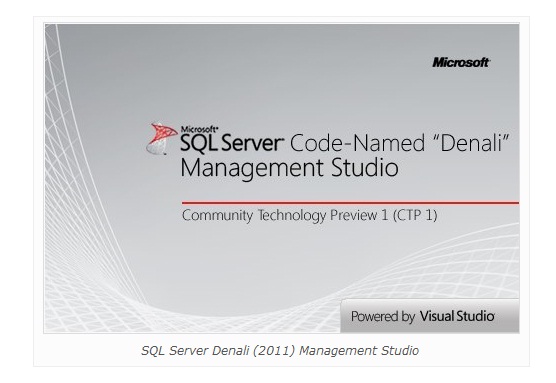
Launch Screen
The launch screen looks as under

See and hear the effects of Garbage Collection

0 comments
Sometimes you forget that GC’s occur: it’s hard to see it’s effect, but what does Garbage Collection do to your code?
A long time ago (3 decades!) I used Fortran and Assembly code for a PDP-11 16 bit computer to design real time signal processing systems. Two of these were used to detect submarines: one would make a very loud noise (think a very big sonar Ping), and the other would pretend to be a submarine by listening to the sound and echoing back, at various set strengths (1X, 10X, 100X), as if it were a particular kind of submarine pointing in various directions. “I’m a Submarine”, “I’m a Submarine” “I’M A SUBMARINE”. If all 3 of these echoes were heard, then we know we heard all signal strengths. If only 2,then we know by how much the target was missed.

The sound maker generated a huge amount of noise underwater via controlling precisely the release of an array of high pressure air guns. The sound wavefront could be steered via subtle variations in firing timing. Sound travels so well and fast underwater!
A typical scuba tank is about 8 inches in diameter and 20 inches long, holding maybe 3000 PSI and is very dangerous (think exploding shark a la Jaws). Our array of 10 air guns were 10 inches in diameter and 20 feet long, with 10,000 PSI.

The listener computer on  a different boat hundreds of miles away used an underwater microphone to record the sounds into memory at a sub 1Khz sampling rate using an Analog to Digital converter. The code received the data via DMA (Direct Memory Access) and double-buffered it: as one buffer was being filled, the other would be processed, such as copied to an Array Processor to do a Fourier Transform.

The signal would then be convolved (multiplications, additions) with various prerecorded echoes from a submarine, and then the signal was D-A converted to a sound blasted via an underwater speaker.
The CPU needed to be fast enough to keep up with the incoming raw data: if I tuned it to sample a little bit faster, bad things would occur: missing data, distortion, etc.
I had to have precise control of these real time systems for accuracy and reliability.
Designing a real-time system with a Garbage Collected system could be quite difficult in tight performance scenarios. A GC during a sampling could cause lost data.

Read more: Calvin Hsia's WebLog

ASP.NET MVC Data Access Videos & Tutorials (17)

0 comments

ASP.NET MVC App Building Videos (61)

0 comments

Binding Events to Methods in the Silverlight MVVM View Models

0 comments
Introduction
This article introduces a simple method to bind UI events to the corresponding methods in the MVVM view models in Silverlight applications.

Background
In order to fully conform to the MVVM design pattern in Silverlight, we may want to move the event handling functions into the view models. Generally speaking, we have two types of UI components and two types of UI events in Silverlight applications.

UI controls like a Button have a property called Command. We can create a command property in the view model to handle the click event of the button by binding this command property in the view model to the button control's command property in the XAML. For detailed information about the command bindings, you can take a look at my recent article "Data and Command Bindings for Silverlight MVVM Applications".

Unfortunately though, most of the UI events like "MouseEnter", "MouseLeave", and "SizeChanged", etc. do not have the corresponding Commands, so we are unable to implement the ICommand interface to handle these events in the MVVM view models.

This article is to introduce a method to bind these events to the corresponding methods in the view models in Silverlight applications, so we can implement all the event handling functions in the view models, thus minimizing the code-behind files of the XAML views.

Read more: Codeproject

Programmatically finding Binding Elements in WCF Binding

0 comments
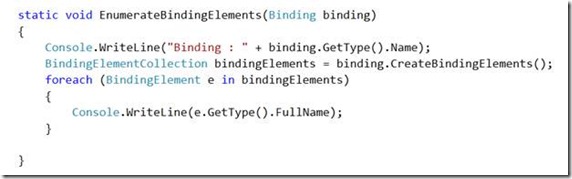
Binding is one of the important aspect of WCF Programming. It deals with, “How Service and client will talk to each other?” Binding is made up of different binding elements. When different binding elements are stacked together they form a Binding. Different binding types are made up of different binding elements.
Always a question arises that, “What are the different binding elements of a particular binding? “ And we can find solution of above question through code. What all we need to do

1. Create instance of Binding
2. Enumerate through Binding elements.

We are going to create console application to enumerate through all the binding elements in a binding. Add below references in console application project,

We are going to write a function. This function will take object of a Binding as input parameter and prints all the binding elements.

clip_image003_thumb4.jpg?w=572&h=179

Read more: DEBUG MODE……

Creating Code Snippets with Replacements

0 comments
Code Snippets
In an earlier example I described how you can create your own code snippets, register them and insert them using Visual Studio. The example snippet contained static code for the basic IDisposable pattern. Using the snippet the entire pattern could be added to a C# class file with a few keystrokes.

Replacements
Snippets can be made more useful with the use of replacements. These are named placeholders that are highlighted within the code when the snippet is inserted. You can use the tab key to jump between the placeholders and overtype the default values. This is useful when a snippet includes a variable or member name that you will want to change. The same placeholder literal may be used multiple times for such an item, with all instances being replaced with the typed text.

An example of a standard snippet with replacements is used to create a new property definition. If you type "prop" within a C# code file and then press the tab key twice, a property with a default type and name is inserted. You can tab between these elements and replace the names easily. NB: In Visual Studio 2005 the property also includes a backing store variable that can be renamed.

In this article we will create a new snippet that inserts the basic code for an event that is based upon the EventHandler delegate. I will not explain the basics of creating or registering the snippet, as this was covered in the earlier article.

Creating the Snippet File
We will start by creating the XML for a snippet that includes the basic layout for the event without placeholders. Add the following to a new XML file:

<?xml version="1.0" encoding="utf-8"?>
<CodeSnippet
   Format="1.0.0"
   xmlns="http://schemas.microsoft.com/VisualStudio/2005/CodeSnippet">
   <Header>
       <Title>Create Event</Title>
       <Author>BlackWasp</Author>
       <Shortcut>ehevent</Shortcut>

Read more: Black Wasp

C# Compiler as a Service Update

0 comments
Our C# compiler-as-a-service library can now process any C# construct, it is no longer limited to expressions and statements.
This means, that you can now enter entire class definitions in the command line:

csharp> class Demo {
     >     public int Add (int a, int b)
     >     {
     >          return a + b;
     >     }
     > }
csharp> new Demo ().Add (1, 3);
4

csharp>

This work was done by the amazing Marek and is now available on Mono's master branch in github.
This functionality can also be used for scripts, in particular in Unix, you can now create C# "source executable" files, like this:

bash$ cat demo.cs
#!/usr/bin/csharp
class Demo {
public dynamic Add (dynamic a, dynamic b)
{
return a + b;
}
}
Console.WriteLine (new Demo ().Add ("this is", " cute"));

bash$ chmod +x demo.cs

bash$ ./demo.cs
this is cute

bash$


Multiple Compiler Instances
In addition, we turned the static API Evalutor.Eval (string expression), into an instance API. The instance API allows developers that are embedding the C# compiler-as-a-service in their application to have different contexts.

Read more: Personal blog of Miguel de Icaza

Building a Windows Phone 7 Application with UltraLight.mvvm

0 comments
I recently released a new open source project called simply UltraLight.mvvm. The purpose of this project is to make it easier to build MVVM-based applications that support tombstoning (a must) on Windows Phone 7. The DLL is 22KB and the source is less than 300 lines of code.
With that, the framework supports:

  • Commands
  • Command binding for buttons (with parameters)
  • Support for binding commands to application buttons on the application bar
  • Dialogs, both notification and confirmation
  • Messaging using the event aggregator publisher/subscriber model
  • Service location
  • Design-time friendly view models
  • Tombstone-friendly view models with control hooks for tombstone events
  • Decoupled navigation support from the view model
  • Decoupled visual state support from the view model
  • Notify property changed using expressions instead of magic strings
  • Dispatcher helper for UI thread access


Why not Jounce?
I think Jounce is overkill for the phone. Jounce specifically and explicitly relies on the Managed Extensibility Framework which is a phenomenal tool for building modular line of business applications for Silverlight. While the phone is Silverlight, and while there are certainly business applications on the phone, there are several reasons why I think it requires a completely different framework.

Read more: C#er: IMage

SpyDllRemover

0 comments
SpyDllRemover is the specialized tool for detecting spyware & hidden Rootkit Dlls in the System. It can also detect & remove user-land Rootkit processes as well as other spyware processes using multiple [user-land] Rootkit detection algorithms coupled with in-house Process heuristics. This makes it a generic tool for detecting & removing any known as well as unknown threats compared to traditional Antivirus Softwares which can detect only known threats.

One of the unique feature of SpyDllRemover is its ability to completely remove Spyware/Rootkit Dlls from any running Process across session boundaries using its 'Advanced Dll Ejection Method'. SpyDllRemover uses low level (user-land) Anti-Rootkit techniques which can defeat all tricks by such Rootkits to evade its detection and removal.

Read more: Security Exploded

Monodroid preview 13

0 comments
General Enhancements

Mono.Android.dll Moved to Debug Shared Runtime Packages
In addition to the regular shared runtime used for debug builds, there are now target version specific ones that contain Mono.Android.dll. This dramatically reduces the size of debug .apks, resulting in much faster deploys, making the change/deploy/test cycle much quicker. Linking is now turned off by default for debug builds.

Versioned Debug Shared Runtimes
Shared runtimes are now versioned, so the IDE can detect if you are running an old shared runtime and automatically remove it. This means you should never need to manually remove the shared runtime again.

Visual Studio Plugin Enhancements
Debugging Enhancements

  • Breakpoints in class libraries should now function as expected.
  • Disabled breakpoints are now skipped.
  • Starting the debugger via "Start New Instance" now works.

Bug Fixes

Read more: Monodroid Preview 13
Related Posts Plugin for WordPress, Blogger...