Wednesday, February 29, 2012
Microsoft(R) Visual Studio(R) 11 Developer Preview
Overview
Visual Studio 11 Developer Preview is an integrated development environment that seamlessly spans the entire life cycle of software creation, including architecture, user interface design, code creation, code insight and analysis, code deployment, testing, and validation. This release adds support for the most advanced Microsoft platforms, including the next version of Windows (code-named "Windows 8") and Windows Azure, and enables you to target platforms across devices, services, and the cloud. Integration with Team Foundation Server allows the entire team, from the customer to the developer, to build scalable and high-quality applications to exacting standards and requirements.
Visual Studio 11 Developer Preview is prerelease software and should not be used in production scenarios.
This preview enables you to test updates and improvements made since Visual Studio 2010, including the following:
Support for the most advanced platforms from Microsoft, including Windows 8 and Windows Azure, as well as a host of language enhancements.
New features such as code clone detection, code review workflow, enhanced unit testing, lightweight requirements, production IntelliTrace® exploratory testing, and fast context switching.
This preview can be installed to run side by side with an existing Visual Studio 2010 installation. The preview provides an opportunity for developers to use the software and provide feedback before the final release. To provide feedback, please visit the Microsoft Connect website.
The .NET Framework 4.5 Developer Preview is also installed as part of Visual Studio 11 Developer Preview.
Note: This prerelease software will expire on June 30, 2012. To continue using Visual Studio 11 after that date, you will have to install a later version of the software.
In order to develop Metro style applications, the Visual Studio 11 Developer Preview must be installed on the Windows Developer Preview with developer tools English, 64-bit. Developing Metro style applications on other Preview versions of Windows 8 is not supported.
Read more: Download the full ISO Image (.ISO)
Tuesday, February 28, 2012
Take a screenshot with Silverlight 5.0 and pInvoke
PInvoke is a new entry in Silverlight 5.0 runtime. For the one that are not aware of what is pInvoke I will say it stands for "Platform Invoke". It is a set of classess and attributes that allows the Silverlight runtime to access the low-level Win32 API of Windows Operating System.
After Silverlight 4.0 brought COM interop in Silverlight, the team decided to accomplish the last step and integrate also pInvoke. As you understand, it is only restricted to Windows OS, but is some scenario it may be a very useful thing to cross the subtle line from "can't do" to "can do". Wether you have to detect USB keys, interact with devices and so on, pInvoke require you to directly access the API preparing the mapping to the OS funzions and handling unmanaged resources.
As a littel sample I ported an old example to Silverlight. The code below implements a simple funzion that is able to take a screenshot of the desktop.
1: public static class ScreenCapture
2: {
3: public static WriteableBitmap GetDesktopImage()
4: {
5: WriteableBitmap bmap = null;
6:
7: // initialize unmanager pointers
8: IntPtr hDC = IntPtr.Zero,
9: hMemDC = IntPtr.Zero,
10: desktop = IntPtr.Zero;
11:
12: try
13: {
14: // get a reference to desktop
15: desktop = User32.GetDesktopWindow();
16: // get an handle to Device Context
17: hDC = User32.GetDC(desktop);
Read more: Silverlight & XAML Playground
QR: 
Using a Server Certificate to Protect Web.Config
Using ASP.NET’s protected configuration feature is recommended when your Web.Config file contains sensitive information. The .NET Framework gives you two protected configuration providers, DpapiProtectedConfigurationProvider and RsaProtectedConfigurationProvider. Depending on your application requirements, you can use either of these to get the job done.
You can also create your own protected configuration provider and there is a sample here that shows an implementation using the TripleDESCryptoServiceProvider for encrypting and decryption. Implementing your own protected configuration provider is simply a matter of writing a class that derives from ProtectedConfigurationProvider. In this blog post, I’m going to show a another custom provider option using a server certificate for the encryption and decryption.
Implement the Provider
Using Visual Studio 2010, create a new Class Library project and inherit your class from ProtectedConfigurationProvider. The ProtectedConfigurationProvider class is located in the System.Configuration assembly. So, you will need to add a .NET Reference to System.Configuration and also add a using statement to the top of your class for the System.Configuration namespace.
This provider will perform encryption and decryption using the keys from an X509 Certificate. The X509Certificate2 class is located in the System.Security assembly. So, you will need to add a .NET Reference to System.Security and also add a using statement for the System.Security.Cryptography.X509Certificates namespace. Next, add a private X509Certificate2 member to the class that will be used as a reference to the server certificate.
Read more: Rick Rainey's Blog
QR: 
Rufus: Create Bootable USB To Install Windows & Linux, Flash BIOS And More

Read more: Addictive tips
QR: 
Learn About Windows 95 with Jennifer Aniston and Matthew Perry
In this mid-1990s promotional film you’ll be treated to a first hand tour of Windows 95 by none other than a partial cast of the show Friends.
Although we’re sure this video answered a lot of questions for people at the time of its release, it raises quite a few for us in the present. How much money did it take to pull two of the most popular television stars of the day into this silly marketing film? Did they pay to use that Seinfeld’esque back beat in the beginning? Was there really a computer dark ages so dark that people needed to be told how to open and close a file (and that the file didn’t actually vanish)?
Read more: How-to geek
QR: 
Invisible browsing VPN
Okay there are a few things you should look for when considering a vpn service and here is what i look at.
1. is the company based outside of the U.S. ?
2. do they log?
3. do they have a good amount of non U.S. vpn servers?
4. do they allow P2P traffic ?
5. do they have any network restrictions?
6. do they use openvpn (which uses tls or ssl encryption)
7. do they support windows/mac/and linux ?
8. are they reasonably priced?
Now the one company that meets all of this criteria is ibvpn.com I have been using them now for months and they are great! I never have any problem connecting to any of their servers and their speeds are great! I am in the U.S. and when i use their canada vpn server i still get speeds around 10mbps/10mbps which is really fast for a vpn. Best of all they are based outside of the united states which does not restrict them to any logging laws and they do not keep any logs. They allow p2p traffic on certain servers which is great, and they have great customer service.
Also, their prices are the best. You can get 6 months of their premium package which gives you access to everything plus 20+ vpn servers from different countries to choose from for $36 for 6 months! That is cheap.
You should check them out...
Read more: ibvpn.com
QR: 
Simple Virtual Machine
In computing, Virtual Machine (VM) is a software implementation of either existing or a fictional hardware platform. VM's are generally divided into two classes - system VM (VM which is capable of running an operating system) and process VM (the one that only can run one executable, roughly saying). Anyway, if you are just interested in the definition of the term, you better go here.
There are tones of articles dedicated to this matter on the Internet, hundreds of tutorials and explanations. I see no reason to just add another "trivial" article or tutorial to the row. Instead, I think it may be more interesting to see it in action, to have an example of real application. One may say that we are surrounded by those examples - Java, .NET, etc. It is correct, however, I would like to touch a slightly different application of this technology - protect your software/data from being hacked.
Data Protection
Millions of dollars are being spent by software (or content) vendors in an attempt to protect their products from being stolen or used in any other illegal way. There are numerous protection tools and utilities, starting with simple packers/scramblers and ending with complex packages that implement multilevel encryption and virtual machines as well. However, you may disagree, but you wont convince me, an out-of-the-box solution is good until it gains popularity. There is enough evidence for this statement. In my opinion, no one can protect your software better than you. It only depends on how much protected you want it to be.
Although, there are numerous protection methods and techniques, we are going to concentrate on a virtual machine for data coding/decoding. Nothing special, just a trivial XOR method, but, in my opinion, enough to demonstrate the fundamentals.
Design Your VM
While in real life, hardware design precedes its software counterpart, we may let ourselves to do it in reverse order (it is our own VM, after all). Therefore, we will begin with the pseudo executable file format which will be supported by our VM.
Pseudo Executable File Format
Well, it is a good idea to put a header in the beginning of the file. In order to do so, we have to think what our file is going to contain. The file may be a raw code (remember DOS com files?), but this would not be interesting enough. So, let our file be divided into three sections:
code section - this section would contain code written in our pseudo assembly language (we'll cover it a bit later);
data section - this section would contain all the data needed by our pseudo executable (PE :-) );
export section - this section would contain references to all the elements that we want to make visible to the core program.
Let us define the header as a C structure:
typedef struct _VM_HEADER
{
unsigned int version; /* Version of our VM. Will be 0x101 for now */
unsigned int codeOffset; /* File offset of the code section */
unsigned int codeSize; /* Size of the code section in bytes */
unsigned int dataOffset; /* File offset of the data section */
unsigned int dataSize; /* Size of the data section in bytes */
unsigned int exportOffset; /* File offset of the export section */
unsigned int exportSize; /* Size of the export section in bytes */
unsigned int requestedStack; /* Required size of stack in 4 bytes blocks */
unsigned int fileSize; /* Size of the whole file in bytes */
}VM_HEADER;
Read more: System Programming
QR: 
Встраиваемые системы: Windows специального назначения
Привет!
О могущественные хабрамэн и прекраснейшие хабравимен! Ничтожный заметил, что сура о блистательной Windows Embedded ещё не записана в книге мудрости хабра. Да будет дозволено мне, недостойному, поведать вам одну поучительную историю о том как был построен и внедрён особо пуленепробиваемый Windows ® ™ на объектах одной российской железнодорожной корпорации.
Как мы дошли до жизни такой
Итак, одним утром, в нашу скромную обитель Системного ПО прибыл гонец от программистов с ужасными и печальными новостями. Истинно говорю вам — программцы в командировке не смогли обновить ПО на рабочем месте, т.к. оное обуял шайтан и заселил его вирусами, троянами, порнобаннерами и контерстрайком (сауирщенно неуиновные пользователи были сауирщенно ни при чём).
ПО представляет собой АРМ электромеханика СЦБ, написано на VC++ 6 + MFC + WINAPI.
Наш мудрейший халиф, узнав о таком непотребстве, созвал диван. И так говорили придворные мудрецы и звездочёты:
Антивирус не был установлен по причине отсутствия на станциях интернета (станции раскиданы по всей поверхности России и ездить с офлайн базой для обновления — как-то не вариант). На некоторых станциях есть выход в интранет, где есть корпоративный антивирус, но во-первых: не на всех, во-вторых: антивирус там — хтонический Symantec, старый и добрый.
Спустя некоторое количество служебок, было принято решение заменить десктопный Windows на что-то более прочное и надёжное, но при этом win32-совместимое. Из всей массы подходящих платформ был выбран Windows XP Embedded, т.к. по нему уже имелись наработки да и вообще, классная себе такая система.
Windows XP Embedded — это встраиваемая компонентная операционная система на базе Windows XP Professional Edition и предназначена для применения в различных встраиваемых системах: системах промышленной автоматизации, банкоматах, медицинских приборах, кассовых терминалах, игровых автоматах, VoIP-компонентах и т. п. Windows XP Embedded включает дополнительные функции по встраиванию, среди которых фильтр защиты от записи (EWF и FBWF), загрузка с флеш-памяти, CD-ROM, сети, использование собственной оболочки системы и т. п.
В настоящий момент известна как Windows Embedded Standard.
Windows on steroids
Мы прикинули что можно сделать встроенными средствами IDE Windows Embedded:
запретить запись на диск
ограничить учётку пользователя в правах
лишить пользователя возможности запуска чего-либо кроме АРМ
закрыть неиспользуемые порты
отключить монтирование внешних USB-накопителей
исключить из системы прикладное и системное ПО, не требующееся для непосредственной работы АРМ (Media Player, Outlook Express, Paint, Проводник и т.п.)
Но это всё скучно и просто. Начальство прониклось идеей модульного ПО™, которая заключается в разделении прикладного, системного ПО и конфигурации на «модули» — образы ФС, объединяющие ПО по функциональным признакам. Плюсы такого подхода:
структура ПО становится более упорядоченной
более удобная система версионирования ПО (прошу прощения за этот чудо-термин, лучшего не придумалось)
повышение скорости развёртывания\обновления ПО — большой файл пишется быстрее множества мелких
повышение гибкости системы, например — системное ПО (ОС) можно смонтировать в read-only, не затронув при этом прикладные программы
Read more: Habrahabr.ru
QR: 
Task Parallelism benefits
בפוסט זה אסביר מה הם היתרונות בשימוש ב- System.Threading.Tasks.Task אשר זמין החל מ-.net framework 4.0 ומדוע כבר אין כל סיבה לעבוד מול System.Threading.Thread, אך תחילה אסביר מי מחלקה זו ומתי נרצה להשתמש בה.
אנו נרצה להשתמש במחלקה זו במקרים בהם נרצה לבצע פעולות במקביל, כאשר זה מאפשר למפתחים למנף את העוצמה של מעבדים מרובי ליבה בצורה יעילה
ה-Task הוא אובייקט קל-משקל לניהול יחידות עבודה אשר עובדות במקביל, הוא מונע את התקורה של יצירת Thread ייעודי לכל פעולה אשר צריכה להתבצע במקביל, במקום זאת הוא עובד מול ה-thread pool (גם ThreadPool.QueueUserWorkItem משתמש באותו ה-thread pool) ומספק לדורש thread אשר זמין לעבודה (זוהי ההתנהגות הדיפולטיבית, ניתן להגדיר אחרת)
לדעתי אלו היתרונות המרכזיים של השימוש ב-Task:
Waiting on Tasks
Handling Exceptions in Tasks
Return a Value from a Task
Canceling Tasks
Continuation Tasks
Waiting on Tasks
כאשר לדוגמא אנו רוצים שהתכנית שלנו תחכה לכל הפעולות הקורות במקביל ותסתיים רק לאחר שכל הפעולות הסתיימו נשתמש בפונקציה הסטאטית Task.WaitAll אשר יכולה גם מוגבלת בזמן ע”י טיים אאוט או לחילופין ע”י הפונקציה Task.WaitAny אשר תחכה לאחת מן הפעולות
1: public static void Main()
2: {
3: Task task1 = new Task(printDate);
4:
5: Task task2 = new Task(printDate);
6:
7: task1.Start();
8: task2.Start();
9: Task.WaitAll(task1, task2);
10:
11: Console.WriteLine("End of the program");
12:
13: }
14: private static void printDate()
15: {
16: Console.WriteLine(DateTime.UtcNow.ToString("dd/MM/yyyy HH:mm:ss:fff"));
17: }
פלט התוכנית:
27/02/2012 08:01:13:539
27/02/2012 08:01:13:539
End of the program
Press any key to continue . . .
Handling Exceptions in Tasks
ניתן לתפוס כל Exception הנזרק בפעולה המקבילה בצורה קלה מאוד, רק צריך לעטוף את פונקציית ה-Wait ע”י try catch ובמידה ונזרק שם Exception כלשהוא אזי הוא ייעטף ב-AggregateException אשר מכיל בתוכו את כל ה-Excetions אשר נזרקו משם, שוב פשוט וקל
Read more: הבלוג של יוסי חביה
QR: 
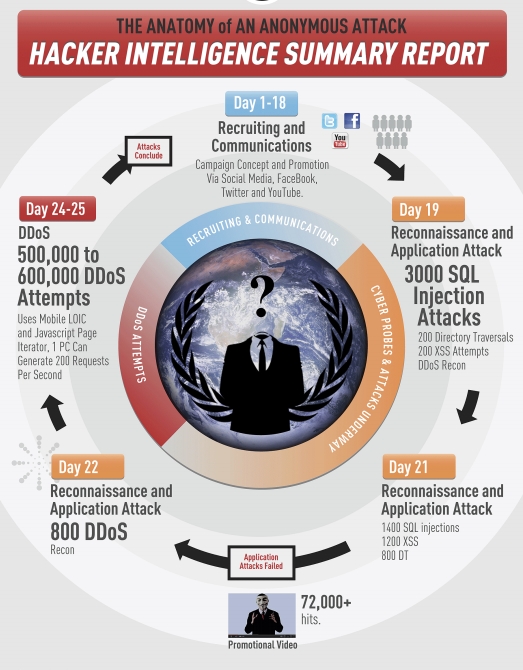
«Анатомия анонимных атак» — как работают Anonymous?

Американская компания Imperva, которая занимается разработкой решений для защиты данных, опубликовала свой 17-страничный отчёт, посвященный исследованию работы известной группы хактивистов Anonymous. Нельзя сказать, что отчёт вскрывает страшные тайны подпольной организации злоумышленников, но, тем не менее, в качестве систематизированной картины он весьма удобен.
Итак, согласно отчёту, Anonymous — это не группа сверхгениальных хакеров, способных в считанные часы или дни взломать любой сервер и украсть любую информацию. Хотя и имели место прецеденты с успешными атаками на столь солидные организации как StratFor и ряд других, успешность атаки объясняется скорее безалаберностью администраторов ресурсов, а не какой-либо сверхизобретательной технике злоумышленников. Так исследователи считают, что хотя у Anonymous и имеются некоторые специфические приёмы, тем не менее, группа предпочитает широко известные методы — прежде всего, это SQL-инъекции и DDOS-атаки, причём, Anonymous, как правило, сначала пробуют украсть данные, а потом, если это не увенчивается успехом, организуют DDOS на ресурс жертвы.
Саму группу исследователи делят на две неравные части: квалифицированных хакеров (Skilled hackers) и добровольцев (Laypeople). Первая представляет из себя группу экспертов, число которых не превышает 10-15 человек с весьма высоким уровнем знаний в различных областях IT и реальным опытом взлома сложных систем. Добровольцы — значительно более многочисленная группа, число участников которой оценивают от нескольких десятков до нескольких сотен человек, уровень квалификации и знаний которых чаще всего средний или ниже среднего и которые руководствуются указаниями первой группы — квалифицированных хакеров.
Типичную атаку Anonymous на ресурс жертвы исследователи делят на три части:
(Дни 1-18) Набор участников и их координация. На этом этапе, используя возможности социальных сетей, группа руководителей собирает будущую команду и организовывает её для координации действий.
(Дни 19-22) Разведка и, собственно, атака. В течении этого периода группа квалифицированных хакеров, тщательно скрывая следы своей деятельности, ищет слабые места на ресурсе, подвергающемся взлому, используя такие инструменты как Acunetix и (или) Havij. Если прорехи в безопасности обнаружены, группа злоумышленников эксплуатирует их и похищает требуемые данные, выводя атакуемый ресурс из строя, если считает это необходимым (так, StratFor не работал около двух недель после кражи переписки).
(Дни 24-25) DDOS-атака. На этом этапе, который следует, как правило за тем, что кража данных не увенчалась успехом, добровольцы Anonymous с помощью таких средств как Low Orbit Ion Cannon (LOIC) осуществляют, собственно, DDOS-атаку, используя для этого, в том числе, и мобильные браузеры.
Read more: Habrahabr.ru
QR: 
How to Communicate between Silverlight Client and Java Application

Introduction
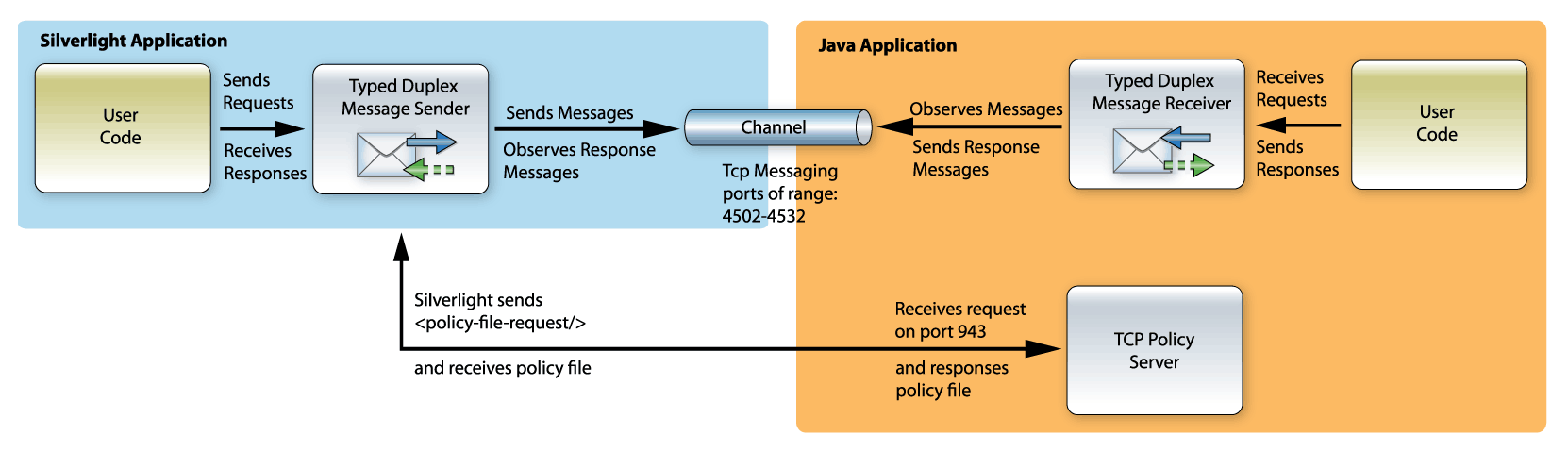
The example bellow implements a simple request-response communication between Silverlight application and Java desktop application.
The Silverlight client application sends a request to calculate two numbers. The Java service application receives the request, performs the calculation and sends back the result.
The example bellow uses Eneter Messaging Framework that provides functionality for various communication scenarios. (The framework is free for non-commercial use and can be downloaded from http://www.eneter.net. More detailed technical info can be found at technical info.)
Policy Server
The Policy Server is a special service listening on the port 943. The service receives <policy-file-request> and responses the policy file that says who is allowed to communicate.
Silverlight automatically uses this service when creates the Tcp connection. It sends the request on the port 943 and expects the policy file. If the policy server is not there or the content of the policy file does not allow the communication, the Tcp connection is not created.
Read more: Codeproject
QR: 
DotNet Watcher
Project Description
This is a open source tool for monitoring the activities happening in an .Net application using MDbgCore.dll debugging extension.
Why this project?
This project mainly targeting the developers who are coding in .Net for years but don't know how the .Net application executes internally such as when a class is being loaded to an application etc...
There are lot more tools available in the internet with similar features.But I didn't feel those as right fit for me and hence started this.
Read more: Codeplex
QR: 
Avoiding Performance Pitfalls With XAML
The DependencyProperty and DependencyObject which form the building blocks for most XAML features come with a performance cost. An MSDN article “Optimizing C# for XAML Platforms” discusses this in detail along with ways to minimize its impact.
Response Times for accessing and setting DependencyProperty values are a couple of orders of magnitude higher compared to accessing values from CLR Properties. This gets heightened on lower capacity hardware (say a Windows 7 Phone) and when this is done in tight loops or with complex LINQ statements. A few of the solutions that the article suggests -
Avoid Dependency properties if the job can be done by CLR Properties
Cache the DependencyProperty for gets and compare the new value with existing value before setting (since setting the property to even the same value is just as expensive as setting to a new value). This can either be done in the class having the property, or in case of even in the calling code (say just before iterating in a loop).
Consider the complexity of the LINQ query (how many times the query has to iterate through all the items) when deciding whether to use them or just revert to writing loops
Avoid lazy initialization when it could lead to more work (like inside a loop)
If you are using Panels within ItemControl for realizing multiple items, provide a panel that supports virtualization, such as VirtualizationStackPanel
Read more: InfoQ
QR: 
How to download a file from Dropbox using the Dropbox .NET wrapper
So far we’ve covered the following topics in the Dropbox series:
Part 1: Authentication
Part 2: API Requests
Part 3: Create, Delete and Move Folders
Once you are authenticated you can make API requests such as requesting your account information, creating, deleting folders…etc. One particular type of request is downloading a file from your Dropbox account. Once you’ve worked your way through the previous 3 parts this becomes trivially easy.
If you want to follow along go to the download page and download the code for the third part (article #65). Unzip it and open it up in Visual Studio.
A New Method
Let’s add a new method to the DropboxApi type called DownloadFile(…).
public FileSystemInfo DownloadFile(string root, string path)
{
// ...
}
Read more: .NET Zone
QR: 
Stylecop 4.7.11.0 Released
Stylecop 4.7.11.0 has been released at http://stylecop.codeplex.com/releases/view/79972
I urge all C# developers to use StyleCop and Resharper.
Read more: Tatworth
QR: 
Microsoft Research. Будущее рядом: интерактивный рабочий стол, Illumishare и Holoflector
Группа Applied Sciences Team из Microsoft Research представила свои новые разработки.
Одним из проектов является интерактивный рабочий стол.
Read more: Habrahabr.ru
QR: 
Microsoft RPC programming guide (c1995)

Microsoft RPC (Microsoft Remote Procedure Call) is a modified version of DCE/RPC. Additions include support for Unicode strings, implicit handles, inheritance of interfaces (which are extensively used in DCOM), and complex calculations in the variable-length string and structure paradigms already present in DCE/RPC. Remote Procedure Call (RPC) is the glue that holds together MS-DOS, Windows 3.x, and Windows NT. It is a client-server technology -- a way of making programs on two different systems work together like one. The advantage of RPC over other distributing programming techniques is that you can link two systems together using simple C calls, as in a single-system program. The most common use for client-server is to combine the graphical display capabilities of a desk-top PC with the database and number-crunching power of a large central system. But peer-to-peer programs can run equally well. Like many aspects of Microsoft programming, RPC forms a small world of its own, with conventions and terms that can be confusing. But once you understand the purpose behind each feature, programming with RPC is not difficult. This book lays out the concepts and the programming tasks so that you can use this powerful API. Read more: Internet Archive
QR:
Monday, February 27, 2012
How to Add High-Performance Runtime Tracing to your Application
For logging, we’d like you to use Event Tracing for Windows (ETW) instead of creating your own. There are several reasons: ETW is fast—probably faster than most custom solutions that are implemented as part of an app
Good tools support with Xperf, Windows Performance Toolkit, and so on.
Traces are stored in kernel buffer—any traces your app has written aren’t lost if your app terminates unexpectedly
Your support staff can work with other support organizations, such as Microsoft CSS, seamlessly, because ETW is a common infrastructure Dan Ruder has provided a sample C++ application covering how to add Event Tracing for Windows (Logging) to a Windows application and has also written an article on how to add Event Tracing for Windows to a C++ Application (copied below). See Also Download the Windows SDK Use this not thisThe following article, authored by Dan Ruder to compliment the aforementioned sample, covers how to add ETW to your app:
How to Add High-Performance Runtime Tracing to your Application
Applies ToWindows API programming for the following versions of Windows:Client: Windows 7, Windows VistaServer: Windows Server 2008 R2, Windows Server 2008
SummaryThis article explains how to use the Event Tracing for Windows (ETW) functions to add runtime trace logging to your application. The ETW system provides high-speed logging that can be enabled and disabled dynamically without restarting the application. This makes ETW useful for diagnosing application behavior without invasive debugging. It can be used to: Record how users interact with your application
Record resource consumption and release patterns
Record performance statistics
Create a history of operations to verify correct application behavior
Create a history to troubleshoot incorrect application behavior
Enable advanced end-to-end diagnostics across multiple software layers This article will focus on the manifest-based ETW functions which are available starting in Windows Vista and Windows Server 2008.
PrerequisitesList of technologies and software that you need to understand or install in order to create and run this code. Microsoft Windows 7 Software Development KitSolutionThe design of the Event Tracing for Windows (ETW) API is that an application does not write the whole trace message at runtime; instead, it writes an event descriptor plus parameter data to a trace session which saves the data into a log. Later, the trace log is processed by matching the event descriptors with a list of events in an XML manifest file and formatting message strings with event parameter data. Therefore, the steps to use the ETW API in your application are: Design the trace events your application will report.
Create an event manifest to describe the event messages.
Add tracing functions to your source code.
Add the event manifest to your project.
Build the project.
Read more: See Also:
QR:
Good tools support with Xperf, Windows Performance Toolkit, and so on.
Traces are stored in kernel buffer—any traces your app has written aren’t lost if your app terminates unexpectedly
Your support staff can work with other support organizations, such as Microsoft CSS, seamlessly, because ETW is a common infrastructure Dan Ruder has provided a sample C++ application covering how to add Event Tracing for Windows (Logging) to a Windows application and has also written an article on how to add Event Tracing for Windows to a C++ Application (copied below). See Also Download the Windows SDK Use this not thisThe following article, authored by Dan Ruder to compliment the aforementioned sample, covers how to add ETW to your app:
How to Add High-Performance Runtime Tracing to your Application
Applies ToWindows API programming for the following versions of Windows:Client: Windows 7, Windows VistaServer: Windows Server 2008 R2, Windows Server 2008
SummaryThis article explains how to use the Event Tracing for Windows (ETW) functions to add runtime trace logging to your application. The ETW system provides high-speed logging that can be enabled and disabled dynamically without restarting the application. This makes ETW useful for diagnosing application behavior without invasive debugging. It can be used to: Record how users interact with your application
Record resource consumption and release patterns
Record performance statistics
Create a history of operations to verify correct application behavior
Create a history to troubleshoot incorrect application behavior
Enable advanced end-to-end diagnostics across multiple software layers This article will focus on the manifest-based ETW functions which are available starting in Windows Vista and Windows Server 2008.
PrerequisitesList of technologies and software that you need to understand or install in order to create and run this code. Microsoft Windows 7 Software Development KitSolutionThe design of the Event Tracing for Windows (ETW) API is that an application does not write the whole trace message at runtime; instead, it writes an event descriptor plus parameter data to a trace session which saves the data into a log. Later, the trace log is processed by matching the event descriptors with a list of events in an XML manifest file and formatting message strings with event parameter data. Therefore, the steps to use the ETW API in your application are: Design the trace events your application will report.
Create an event manifest to describe the event messages.
Add tracing functions to your source code.
Add the event manifest to your project.
Build the project.
Read more: See Also:
QR:
Writing events with System.Diagnostics.Eventing
... or, how the hell to use Vista and 2008's new ETW stuff with managed code. And, introducing ecmanaged: A decent way to do all this stuff.Quick ETW OverviewActually, the real ETW overview is here: http://msdn.microsoft.com/msdnmag/issues/07/04/ETW/ <-- This is some of the best overview and documentation on it (the other good stuff is the ecmangen documentation in the Windows SDK bin folder). The MSDN stuff is terribly confusing for the most part. Or maybe I'm too spolied by how easy it is to find stuff in the BCL. My overview is on what you gotta do to make things work in .NET. ETW is a real pain to use with .NET. Even so, ETW starts off looking really promising. You define everything in a nice XML manifest file, and everything is based off that. But wait, everything? Shouldn't the manifest be the end-all? Yea, that'd make logical sense. No, you run some tools from the Windows SDK. First you run MC, which generates a .h header file. Managed devs are growning now -- why the hell should something as general as event tracing be language specific? The .h file contains the processed event descriptors, ready for C consumption. It worsens: MC also generated a resource script. You have to compile that with RC and it'll create a Win32 .res resource. Then you compile that into a binary (the C# compiler has the /win32res option). Then you go back and edit your XML manifest and make sure it points to the final binary. Wait, what? Yes. The resources that MC generates for RC contain all the messages that are in your XML manifest. Someone thought it was a really cute idea to go and make the Event Viewer not only read all the data from your manifest, but also have to go look it up from some binary resources. Actually, this probably made sense to someone on the Windows team since I'm guessing they already have tools to go and localise Win32 resources or something. Unfortunately, it sucks and makes no sense for anyone NOT in their particular position. Now, I hope I'm wrong (I really, really want to be wrong), but I think there's no way to force the message strings to just stay in the XML file and be read from there. Finally, things get easy again. Just run "wevtutil install-manifest Some.man" (wevtutil is in system32). In fact, this utility is so user friendly, it even lets you type "im" instead of "install-manifest". At this point, assuming the other steps went well, your provider shows up in Event Viewer. ECManGenBut wait, how do I actually make that manifest? This part is almost the easiest. In the Windows SDK, there's a lovely little tool called ECManGen. Just fire it up, and go to town adding Providers, Channels, Templates, and Events. Providers are the main things that show up in your Event Viewer, such as MyApp-FooProduct-LameComp. Channels separate Admin/Operational/Debug and others. Templates are an argument list for Events. If you have, say, a bunch of events that take the same kinds of parameters, you can share templates among them (I find it helpful to create a "SingleStringTemplate".) It's very straightforward. *Note: I can't actually get Admin channels to work. If I create an event and stick it in an Admin channel and set its level to Informational, MC complains (as does ECManGen) that the level has to be Critical, Error, or Informational. Uh, OK. Instead, just use Operational. Except... ECManGen is a free utility. (Free? Perhaps not, seeing as the annual MS bill for a 4-person dev team is around $20,000 (counting just MSDN) -- but it's well worth it.) Part of the docs say: "NOTE: For the Manifest Generator Tool to function correctly, the file winmeta.xml (which contains pre-defined metadata values) must either be in the Include directory of the SDK or in the same directory as the Manifest Generator tool." OK, easy enough. Except... it doesn't work that easily. The only way I got it to work was to copy the xml file over to the same directory, *and* start ECManGen from that directory. Oh yea, ECManGen won't open your manifest file if you pass it as an argument, so forget about cute VS integration. Just Google ecmangen and go rate up the bugs on Connect :).Going ManagedOK, so you're not living in the last century and use decent tools -- how does this map to C#? First off, you create an EventProvider with the right Guid (the one from your manifest). Then you create an EventDescriptor for each event, matching up all the little parameters (the MSDN docs for EventDescriptor have more details). Finally, you can call WriteEvent, passing the EventDescriptor *by ref* for some reason (no, I can't figure out why). Oh yea, and you have to hookup that Win32 resource to your C# project, so if you needed another resource (like another app manifest?), you'll have to go deal with merging them and all that hassle. And, don't forget to make sure the parameters you pass into the object[] array of WriteEvent line up with what your manifest has. And also, the .NET API won't even handle the Boolean->BOOL (4 byte) silliness for you. In summary, it's a lot of boring, error-prone work, and you'll have to repeat it every time you edit your manifest. Yuck. Maybe it's just easier to use the old event log stuff and forget about all this fancy ETW stuff. Read more: Atrevido
QR:
QR:
Intro to WinDBG for .NET Developers
When your code goes into production, you usually no longer have access to its binaries when they reach their final destination. Whether that is someone’s desktop or a set of servers, you no longer have access to directly observe your code and its environment. Operating system patches are applied, network policies are changed, firewall rules are restricted, disks are configured… as your code lives its life in its new home, there’s a wide range of things that may change in its environment and affect how it behaves (or rather misbehaves). You liberally littered your code with lines of logging logic to learn in these lulls (long alliteration!), and that gives you an idea of where the code is not performing as expected, but you still are unaware of the exact reason (and thus, the fix) that your code is not working as expected. Your challenge now is to try to figure out what is going wrong without wasting the customer’s time doing troubleshooting, because there’s nothing that a business user loves more than being asked by a technical guy which button is he really clicking to get that error. You don’t have the luxury (should have thrown that in the alliteration sentence previously) of spending days or weeks doing troubleshooting, you need to know what is happening right now. In a perfect world, you would have the stack trace, you’d be able to inspect locals, you could debug the code. Well, it turns out, you can do just that… and never attach to the customer’s environment.Download WinDbg and Get Started Download the Debugging Tools for Windows to your local developer machine. You can get them as part of the Windows SDK. Choose the Debugging Tools for Windows in the Common Tools section if you only want the debugging tools for your current machine’s platform. If it is an x86 machine, then only the x86 tools are installed. If your machine has an Intel 64-bit processor, then only the x64 tools are installed. If you choose the redistributable version, then you get all three (x86, x64, and Itanium). After you download, install to your local developer machine (not the customer’s machine). One tip is to change the installation path. By default, windbg will be copied to the Program Files directory. Instead, change the path to something like “d:\debug”. This will make it easier to add extensions. Now that you’ve installed, in the start menu you will see a new program group, “Debugging Tools for Windows (x64)”, and a new program in it called “WinDbg”. Read more: Kirk Evans Blog
QR:
QR:
Dotnet IL Editor
DescriptionDotnet IL Editor (DILE) allows disassembling and debugging .NET 1.0/1.1/2.0/3.0/3.5 applications without source code or .pdb files. It can debug even itself or the assemblies of the .NET Framework on IL level. Read more: Sourceforge
QR:
Sunday, February 26, 2012
Core OS Events in Windows 7, Part 1
Today's computer software constantly breaks new grounds. Consumer software applications offer a sophisticated set of features that enable rich new experiences. Powerful server applications are setting new records in throughput, speed and scale. These improvements have been made possible by rapid progress in hardware technologies and continuous adoption of software advancements in optimization, virtualization, and distributed and parallel computing. However, as a result, software applications have become larger and more complicated. At the same time, users' expectations about software quality are higher than ever. Fundamental characteristics such as performance, reliability and manageability have proved essential in the long-term success of software products, and they are often celebrated as primary features. Increasing software complexity and higher user expectations on quality thus present a difficult challenge in software development. When an unexpected problem occurs, predicting internal states of all relevant components is nearly impossible. Retracing the history of execution flows is cumbersome and tricky, but often necessary in finding out the root cause of software problems. When users report problems after deployment, they expect the root cause of the problem to be quickly identified and addressed. The overwhelming number of hardware and software combinations, different workload characteristics, and usage patterns of end users make such tasks even tougher. The ability to use a mechanism that enables you to understand system execution in a transparent manner, with minimal overhead, is invaluable.
Event InstrumentationInstrumentation is one such effective solution in measuring and improving software quality. Software performance counters have provided a convenient way to monitor application execution status and resource usage at an aggregate level. Event instrumentation has also been popular over the years. Events raised by a software component at different stages of execution can significantly reduce the time it takes to diagnose various problems. In addition to scanning for certain events or patterns of events, one can apply data mining and correlation techniques to further analyze the events to produce meaningful statistics and reports on program execution and problematic behavior. The ability to collect events on production systems in real time helps avoid the need to have an unwieldy debugger setup on customer machines. Introduced in the Windows 2000 operating system, Event Tracing for Windows (ETW) is a general-purpose event-tracing platform on Windows operating systems. Using an efficient buffering and logging mechanism implemented in the kernel, ETW provides a mechanism to persist events raised by both user-mode applications and kernel-mode device drivers. Additionally, ETW gives users the ability to enable and disable logging dynamically, making it easy to perform detailed tracing in production environments without requiring reboots or application restarts. ...
...The following command starts the kernel session and enables process, thread, disk, network, image, and registry events. The collected events will be stored in a file called systemevents.etl in the current directory. Controlling the kernel session and collecting core OS events require administrator privileges: > logman start "NT Kernel Logger" –p "Windows Kernel Trace" (process,thread,img,disk,net,registry) –o systemevents.etl –etsTo stop the collection, users need to issue the "logman stop -ets" command: > logman stop "NT Kernel Logger" –ets
Read more: MSDN Magazine
QR:
Event InstrumentationInstrumentation is one such effective solution in measuring and improving software quality. Software performance counters have provided a convenient way to monitor application execution status and resource usage at an aggregate level. Event instrumentation has also been popular over the years. Events raised by a software component at different stages of execution can significantly reduce the time it takes to diagnose various problems. In addition to scanning for certain events or patterns of events, one can apply data mining and correlation techniques to further analyze the events to produce meaningful statistics and reports on program execution and problematic behavior. The ability to collect events on production systems in real time helps avoid the need to have an unwieldy debugger setup on customer machines. Introduced in the Windows 2000 operating system, Event Tracing for Windows (ETW) is a general-purpose event-tracing platform on Windows operating systems. Using an efficient buffering and logging mechanism implemented in the kernel, ETW provides a mechanism to persist events raised by both user-mode applications and kernel-mode device drivers. Additionally, ETW gives users the ability to enable and disable logging dynamically, making it easy to perform detailed tracing in production environments without requiring reboots or application restarts. ...
...The following command starts the kernel session and enables process, thread, disk, network, image, and registry events. The collected events will be stored in a file called systemevents.etl in the current directory. Controlling the kernel session and collecting core OS events require administrator privileges: > logman start "NT Kernel Logger" –p "Windows Kernel Trace" (process,thread,img,disk,net,registry) –o systemevents.etl –etsTo stop the collection, users need to issue the "logman stop -ets" command: > logman stop "NT Kernel Logger" –ets
Read more: MSDN Magazine
QR:
Watch Channels From All Over The World With TV for Google Chrome

Want to watch TV on your computer and surf the web at the same time? TV For Google Chrome is a handy Google Chrome extension that lets you stream online TV channels directly from the browser. It provides TV channels from all over the world, and allows you to choose genres ranging from business, religious, educational, sports, music, news, movies, lifestyle, entertainment and more. Moreover, the channels are updated regularly and are sorted by, Countries and Categories (genres). All you need is to select the country, and then select the TV channel. It will open a separate window, and start streaming the TV channel right away. Once you’ve installed the extension, click the button in the toolbar to open a compact pop-up with a list of TV channels sorted by Countries and Categories. You will find almost every country in the list, however, some stations from specific countries might not be available. Read more: Addictive tips
QR:
Disk Investigator: View MFT Zone, Check Raw Data Saved On Disk Sectors & Clusters

Disk Investigator is a multi-purpose, powerful hard disk tool that lets you find raw data saved on disk partitions, and check unreadable disk clusters and sectors. The application is built to navigate through the disk sectors, while showing the raw data in HEX, TEXT, and Decimal form. This not only helps you identify identical data written on the disk partitions, but also verify the performance of data shredding utilities. If you’ve recently used a file shredder to securely delete data from disk partition, it lets you view the current raw data present on the disk. Moreover, the application gives detailed insight into disk structure, including total logical sectors, bytes per sector, sectors per cluster, cluster size, MFT start cluster, MFT zone clusters and more. Additionally, it includes a simple, yet feature-rich file explorer that lets you view files and folders saved on disk, check raw data (in Text, Dec, and Hex form) of selected file, and check CRC-32, and MD5, Hash, RipeMD, and SHA hash value. When launched for the first time, it starts fetching disk information, including starting sector on disk, cluster distribution, total clusters etc. Once done, you will see main window, showing all the information retrieved during the scan process. It shows drive view with complete disk information, and raw data written on first sector of disk. However, you can use Sector input field and slider to navigate through disk sectors. If you want to search a specific text string from the disk, use Search option to view specified text/hex values. Read more: Additctive tips
QR:
How To Backup Files To BitLocker-Enabled Virtual Hard Disk [Beginner's Guide]

Read more: Addictive tips
QR:
Right Inbox: Schedule Emails In Gmail To Be Sent Later [Chrome]

Right Inbox seamlessly integrates with Gmail and lets you schedule your emails to be delivered at a later time. Using this extension, you can set a date and a specific time for your emails to be sent in future. What should’ve been incorporated in Gmail by default, Right Inbox makes up for that missing scheduling feature. You can choose any date/time for your messages to be delivered, and Right Inbox will automatically send your emails at the specified time. With it, you will never forget to send an important email. Moreover, the extension has time zone support, so you can even schedule your emails if you’re sending them overseas. The extension lets you make sure people receive your emails at an appropriate time. Read more: Addicitive tips
QR:
Как Kinect встретился с Android
С развитием Интернета все мы узнали о том, что рядом с нами как-то незаметно живет целая армия изобретателей, или просто людей с креативным складом ума, которые видят окружающий мир в совершенно другом измерении ( причем не все из них работают в Microsoft ) и могут создавать вещи, которые простым смертным создавать не дано. О таких изобретениях идут передачи на каналах вроде Discovery , я уже писал о таких изобретениях и в этом блоге, например, BendDesk - сенсорный рабочий стол следующего поколения, Пивная пушка для доставки пива в кровать или к телевизору, или Android-устройство для кормления кошек . И вот не так давно в Сети появилось видео еще одной поистине адской конструкции ( в оригинале Badass tech ), о которой я не могу не написать. Read more: PlainSourceCode
QR:
QR:
Construct XAML Forms at Runtime with Resource Files
Sometimes different users need different UIs, or different sites where your application is installed need different UIs. You could add a bunch of logic that makes controls visible or invisible as needed (and best of luck testing that). Or you could just load the UI that your user or site needs. In that scenario, the ultimate form contains no content: <Window x:Class="MainWindow"
xmlns="http://schemas.microsoft.com/winfx/2006/xaml/presentation"
xmlns:x="http://schemas.microsoft.com/winfx/2006/xaml"
Title="MainWindow" Height="350" Width="525"></Window>At runtime, you'll now need to load the UI based on settings in a config file or the preferences of the currently logged on user. To support that, you can define each of those UIs in your XAML file, then paste each of them into a separate XML file. This example, in a file called MyGrid.xml, defines a Grid containing a DataGrid and two buttons: <Grid xmlns="http://schemas.microsoft.com/winfx/2006/xaml/presentation"
xmlns:x="http://schemas.microsoft.com/winfx/2006/xaml">
<DataGrid Name="DataGrid1" … />
<Button Name="UpdateBtn" … />
<Button Content="DeleteBtn" … />
</Grid>By default, any XML file you add to your project is a resource file; and when your file absolutely, positively has to be present, a resource file is your best choice. A resource file is compiled into your executable and guaranteed to be distributed with it. If you have a limited number of configurations, you can set them up as individual resource files and compile them all into your executable. However, if you don't want the file to be incorporated into your executable, you should select the XML file in Solution Explorer and set its Build Action property to Content. A content file won't be distributed with your application (at least if you use any of the standard distribution methods). Instead, it will be a separate file you must copy to the folder holding your executable, but can then replace or modify at your convenience. To ensure that the file is copied to the folder with your executable (this makes referring to the resource in your code easier), set the file's Copy To Output Directory property. To ensure you get the most recent version of the file, set the file's Copy To Output Directory to Copy If Newer. Accessing a Resource File
Now you're ready to write the code to load the UI appropriate for your user or installation. First you need to create a StreamResourceInfo class, passing the URI for your resource file. Next, create a XamlReader to pull the XAML from the file.
Read more: Visual Studio Magazine
QR:
xmlns="http://schemas.microsoft.com/winfx/2006/xaml/presentation"
xmlns:x="http://schemas.microsoft.com/winfx/2006/xaml"
Title="MainWindow" Height="350" Width="525"></Window>At runtime, you'll now need to load the UI based on settings in a config file or the preferences of the currently logged on user. To support that, you can define each of those UIs in your XAML file, then paste each of them into a separate XML file. This example, in a file called MyGrid.xml, defines a Grid containing a DataGrid and two buttons: <Grid xmlns="http://schemas.microsoft.com/winfx/2006/xaml/presentation"
xmlns:x="http://schemas.microsoft.com/winfx/2006/xaml">
<DataGrid Name="DataGrid1" … />
<Button Name="UpdateBtn" … />
<Button Content="DeleteBtn" … />
</Grid>By default, any XML file you add to your project is a resource file; and when your file absolutely, positively has to be present, a resource file is your best choice. A resource file is compiled into your executable and guaranteed to be distributed with it. If you have a limited number of configurations, you can set them up as individual resource files and compile them all into your executable. However, if you don't want the file to be incorporated into your executable, you should select the XML file in Solution Explorer and set its Build Action property to Content. A content file won't be distributed with your application (at least if you use any of the standard distribution methods). Instead, it will be a separate file you must copy to the folder holding your executable, but can then replace or modify at your convenience. To ensure that the file is copied to the folder with your executable (this makes referring to the resource in your code easier), set the file's Copy To Output Directory property. To ensure you get the most recent version of the file, set the file's Copy To Output Directory to Copy If Newer. Accessing a Resource File
Now you're ready to write the code to load the UI appropriate for your user or installation. First you need to create a StreamResourceInfo class, passing the URI for your resource file. Next, create a XamlReader to pull the XAML from the file.
Read more: Visual Studio Magazine
QR:
HijackThis gets all open. Download the VB6 (yes, VB6) code now...
HijackThis, originally created by Merijn Bellekom and later sold to Trend Micro, has now been released as Open Source by Trend Micro as of February 20, 2012. The originally written in Visual Basic is now hosted on SourceForge.net waiting to be manipulated and improved for the good. In case you are now aware, HijackThis is a free scanning utility that scans and generates an in-depth report of registry and file settings from your Windows system. In addition to its scan and remove capability, HijackThis also comes with several tools useful in manually removing malwares from your computer. HijackThis will not determine what’s good or bad, nor making any changes to your computer settings unless told too.
Read more: Greg's Cool [Insert Clever Name] of the Day
Read more: HijackThis
QR:
Read more: Greg's Cool [Insert Clever Name] of the Day
Read more: HijackThis
QR:
Microsoft offers touch guidance to Windows 8 Metro-app developers

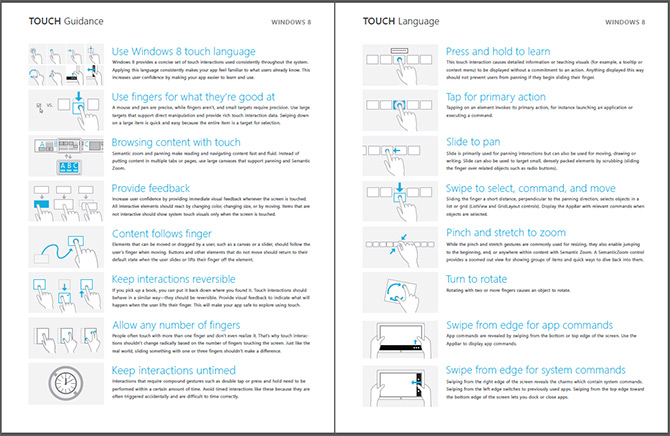
Since Metro-style applications for Windows 8 should all have a touch-first experience, Microsoft has recently released a brief but useful “Windows 8 Touch Guidance” documentation on how developers should think about touch in their applications. The four-page PDF touches (pun) on some interesting touch characteristics of Windows 8 – including but not limited to drag-down/up for select/deselect, semantic zoom and panning and swipe from edge.The document also establishes some useful guidelines on content and interactive element placements for different grip positions – landscape and portrait, and positions – one hand, two hand, rested on surface or on stand. Through user research, Microsoft has also found a 7x7mm touch target optimal for the average index finger width of 11mm. Read more: i started something
QR:
ZZFS + USB Device = Getting at local files, from across the web, even if the other PC is asleep... [Prototype from Microsoft Research]
Files on a home computer could soon be accessible from anywhere, even when the computer holding them is switched off, thanks to a prototype file-synching system developed at Microsoft's research labs. The system is designed to demonstrate an alternative to a growing array of cloud services. "One of our underlying principles is that you don't always want to put all of your data in the cloud and give it to Google or some other corporation," said Michelle Mazurek, of Carnegie Mellon University, presenting the technology at the Usenix File and Storage Technology conference in San Jose, California, last week. Cloud systems can synchronize data between computers to provide access from anywhere, but users have to plan in advance which data they want to sync, and they have to trust a third party with their files.Mazurek and researchers at Microsoft's labs in Cambridge, U.K., built an alternative in the form of a simple application that makes all the data on one of a person's computers visible and accessible from any of their others. The user's devices act as personal cloud servers, and the software, called ZZFS, uses a novel hardware trick to wake up desktop and laptop computers that are in standby or sleep mode. This means that a file left on a closed laptop sitting on the couch at home can be retrieved from work. ...A user can use the Windows Explorer file browser to see all the files and folders on other computers with ZZFS installed. Applications like Microsoft Office and iTunes can open those files normally, once they have been retrieved over the Internet. A piece of hardware called Somniloquy is the reason this system works. The USB device, which acts like a smarter version of an ordinary network card that connects a computer to the Internet, can wake a sleeping computer and retrieve data from it before powering it back down. It has its own low-power processor and a few gigabytes of storage to cache files sent its way while a computer wakes up.
Read more: Greg's Cool [Insert Clever Name] of the Day
Read more: Sync Your Data without the Cloud
QR:
Read more: Greg's Cool [Insert Clever Name] of the Day
Read more: Sync Your Data without the Cloud
QR:
WinUsbNet: A managed interface to WinUSB.sys
Project DescriptionThe WinUsbNet class library gives .NET managed code direct access to USB devices through WinUSB, the generic USB device driver included with Windows. The project also includes tools to create & install WinUSB installation files, and a sample application.
PurposeThis project is intended for developers who are creating their own USB device. Using WinUsbNet eliminates the need to understand anything about Windows device drivers. If you know what a USB endpoint is and can use the .NET Framework class Stream, you know enough to transfer data between your application and your USB device. This project could also be useful for someone who wants to make their own interface to an existing USB device. You will need to understand the data transfer protocols of the target device. Read more: Codeplex
QR:
PurposeThis project is intended for developers who are creating their own USB device. Using WinUsbNet eliminates the need to understand anything about Windows device drivers. If you know what a USB endpoint is and can use the .NET Framework class Stream, you know enough to transfer data between your application and your USB device. This project could also be useful for someone who wants to make their own interface to an existing USB device. You will need to understand the data transfer protocols of the target device. Read more: Codeplex
QR:
Запароленный iPhone взломали канцелярской скрепкой
С защищенного паролем смартфона iPhone можно совершать звонки и отправлять SMS, утверждает группа разработчиков, которые называют себя iPhoneIslam. Пароль на смартфоне удалось обойти, но доступ к некоторым функциям остался закрытым. Видео пример взлома от русских коллег: Как утверждают разработчики, для этой операции достаточно канцелярской скрепки или любого другого предмета, которым можно открыть отсек с SIM-картой.Отмечается, что операция взлома возможна лишь в том случае, если на экране есть сообщение о пропущенном вызове. Пользуясь скрепкой, нужно вытащить из аппарата лоток с SIM-картой, подождать несколько секунд, затем вставить его обратно и провести пальцем по сообщению.После этих действий должно открыться телефонное приложение iPhone. С его помощью можно совершать звонки, отправлять SMS и электронные письма, а также просматривать и редактировать список контактов. Другие возможности телефона будут по-прежнему заблокированы. Таким образом, можно взломать пароль на любом аппарате, на котором установлена iOS 5. Это может быть iPhone 4S, iPhone 4 и iPhone 3GS.Read more: Habrahabr.ru
QR:
QR:
Inside the Concurrent Collections: ConcurrentDictionary
Using locks to implement a thread-safe collection is rather like using a sledgehammer - unsubtle, easy to understand, and tends to make any other tool redundant. Unlike the previous two collections I looked at, ConcurrentStack and ConcurrentQueue, ConcurrentDictionary uses locks quite heavily. However, it is careful to wield locks only where necessary to ensure that concurrency is maximised. This will, by necessity, be a higher-level look than my other posts in this series, as there is quite a lot of code and logic in ConcurrentDictionary. Therefore, I do recommend that you have ConcurrentDictionary open in a decompiler to have a look at all the details that I skip over.
The problem with locksThere's several things to bear in mind when using locks, as encapsulated by the lock keyword in C# and the System.Threading.Monitor class in .NET (if you're unsure as to what lock does in C#, I briefly covered it in my first post in the series): Locks block threads
The most obvious problem is that threads waiting on a lock can't do any work at all. No preparatory work, no 'optimistic' work like in ConcurrentQueue and ConcurrentStack, nothing. It sits there, waiting to be unblocked. This is bad if you're trying to maximise concurrency.
Locks are slow
Whereas most of the methods on the Interlocked class can be compiled down to a single CPU instruction, ensuring atomicity at the hardware level, taking out a lock requires some heavy lifting by the CLR and the operating system. There's quite a bit of work required to take out a lock, block other threads, and wake them up again. If locks are used heavily, this impacts performance.
Deadlocks
When using locks there's always the possibility of a deadlock - two threads, each holding a lock, each trying to aquire the other's lock. Fortunately, this can be avoided with careful programming and structured lock-taking, as we'll see.
Read more: Simon Cooper
QR:
The problem with locksThere's several things to bear in mind when using locks, as encapsulated by the lock keyword in C# and the System.Threading.Monitor class in .NET (if you're unsure as to what lock does in C#, I briefly covered it in my first post in the series): Locks block threads
The most obvious problem is that threads waiting on a lock can't do any work at all. No preparatory work, no 'optimistic' work like in ConcurrentQueue and ConcurrentStack, nothing. It sits there, waiting to be unblocked. This is bad if you're trying to maximise concurrency.
Locks are slow
Whereas most of the methods on the Interlocked class can be compiled down to a single CPU instruction, ensuring atomicity at the hardware level, taking out a lock requires some heavy lifting by the CLR and the operating system. There's quite a bit of work required to take out a lock, block other threads, and wake them up again. If locks are used heavily, this impacts performance.
Deadlocks
When using locks there's always the possibility of a deadlock - two threads, each holding a lock, each trying to aquire the other's lock. Fortunately, this can be avoided with careful programming and structured lock-taking, as we'll see.
Read more: Simon Cooper
QR:
Generics: The Better Method Match
This topic came up again in on one of the C# developer mailing lists I participate in. Because there is still a reasonable amount of confusion on this topic, I thought I would post the rules and the reason behind those rules here. Everything from this post is taken from Sections 7.5.2 (Type Inference) 7.5.3 (Overload Resolution) in the C# Language Specification (4th edition).Consider these two overloads of a Log method:static void Log<K,V>(K key, V value)
static void Log<K,V>(string key, IDictionary<K, V> values)Suppose you called it with the following code:class FooDict : Dictionary<string, int>
{
}// create custom dictionary
FooDict fooDict = new FooDict();// should *not* use the IDictionary<K,V>
Log("FooDict", fooDict);// try a regular dictionary value
Dictionary<string, int> dict = fooDict; // should *not* use the IDictionary<K,V>
Log("Dictionary", dict);// now try the EXACT type
IDictionary<string, int> idict = fooDict;// should use the IDictionary<K,V> - does
Log("IDictionary", idict);The comments do explain what happens. But why?Before doing anything else, the compiler searches for all the possible candidate methods for any method call. That list of candidate methods may include generic methods. If the method call does not specify the type parameters, the compiler must infer them. Eric Lippert’s annotation in the spec is very pertinent here (emphasis his): The type inference algorithm is designed to answer one question: Given only the arguments and the formal parameter types, what is the best possible type arguments that can be inferred for each type parameter? In the first case, Log<string, FooDict> is the best possible type arguments that can be inferred.Now we come to the overload resolution algorithm. There are two candidate methods. Using the inferred type parameters, the first is a better match, because it is an identify conversion: Log<string, FooDict> is an identity conversion from Log<string, FooDict>. In the second case, there is an implicit conversion from Log<string, FooDict> to Log<string, IDictionary<string, int>>, because FooDict implements IDictionary<string, int>. The identity conversion is a better match than a conversion to an interface. Read more: SRT Solutions
QR:
static void Log<K,V>(string key, IDictionary<K, V> values)Suppose you called it with the following code:class FooDict : Dictionary<string, int>
{
}// create custom dictionary
FooDict fooDict = new FooDict();// should *not* use the IDictionary<K,V>
Log("FooDict", fooDict);// try a regular dictionary value
Dictionary<string, int> dict = fooDict; // should *not* use the IDictionary<K,V>
Log("Dictionary", dict);// now try the EXACT type
IDictionary<string, int> idict = fooDict;// should use the IDictionary<K,V> - does
Log("IDictionary", idict);The comments do explain what happens. But why?Before doing anything else, the compiler searches for all the possible candidate methods for any method call. That list of candidate methods may include generic methods. If the method call does not specify the type parameters, the compiler must infer them. Eric Lippert’s annotation in the spec is very pertinent here (emphasis his): The type inference algorithm is designed to answer one question: Given only the arguments and the formal parameter types, what is the best possible type arguments that can be inferred for each type parameter? In the first case, Log<string, FooDict> is the best possible type arguments that can be inferred.Now we come to the overload resolution algorithm. There are two candidate methods. Using the inferred type parameters, the first is a better match, because it is an identify conversion: Log<string, FooDict> is an identity conversion from Log<string, FooDict>. In the second case, there is an implicit conversion from Log<string, FooDict> to Log<string, IDictionary<string, int>>, because FooDict implements IDictionary<string, int>. The identity conversion is a better match than a conversion to an interface. Read more: SRT Solutions
QR:
Canonical reveals Ubuntu for Android

Canonical is making good on its promise to bring its popular Ubuntu flavor of Linux to a broader range of devices by announcing Ubuntu for Android, a release that will enable a full desktop computing experience on a docked Android smartphone. More than just a virtualized app that behaves like Ubuntu, the developers have melded together the Ubuntu architecture with the Android 2.3 (Gingerbread) AOSP build at the kernel level. The result is, from what we’ve seen, a harmony between the two platforms that could make a lot of sense for demanding mobile users. To begin the introduction to Ubuntu for Android, let’s start with what Ubuntu for Android isn’t: it’s not a new mobile OS. Rather than try to enter the arena to take on Apple, Microsoft, and Google, Canonical instead chose to build a package that leverages the popularity of Android. This means Canonical is building on top of the world’s fastest growing mobile platform as a value-add. It’s a move that allows Ubuntu to augment the Android experience as opposed to attempt to replace it. This new release is best understood as a convergence between your mobile and desktop computing environments. Read more: ExtremeTech
QR:
Hierarchical Data Into DataGridView in C#
Let us try a new kind of entry for DataGridViews.What kind of new entry am I talking about?I am talking about the hierarchical entry.Is it possible that we can enter hierarchical entry into the DataGrdiView? Yes of course, it's possible.How?Let's see.Ok. First of all, what kind of hierarchical entry will we enter into the DataGridView?See the following structure.
We will enter these hierarchical entries into the DataGridView. Now for the coding part.First of all we have to enter the columns into the DatGridView.
myDataGridView.Columns.Add("myColumn1", "Roll Number");
myDataGridView.Columns.Add("myColumn2", "Course");
myDataGridView.Columns.Add("myColumn3", "Subject");
myDataGridView.Columns.Add("myColumn4", "Marks(Out of 100)"); Here I have creating the four columns, but you can do as you need to. After that we have to set the DefaultCellStyle for the DataGridView to display the entry in the hierarchical manner.For that you have to use the WrapMode property. Using the WrapMode Property we can enter the data into the new line in the particular cell. For that you have to set that WrapMode property as True like below:
myDataGridView.Columns[2].DefaultCellStyle.WrapMode = DataGridViewTriState.True;myDataGridView.Columns[3].DefaultCellStyle.WrapMode = DataGridViewTriState.True;
In our case we have last the columns (column 2 & column 3) in which we will use that WrapMode property as true.Now start entering the data into the DataGridView one by one.
myDataGridView.Rows.Add(new object[] { 1, "Course 1","Sub 1\nSub 2\nSub3", "90\n95\n85" });
myDataGridView.Rows.Add(new object[] { 2, "Course 2", "Sub 1\nSub 2\nSub3", "67\n57\n84" });
myDataGridView.Rows.Add(new object[] { 3, "Course 3", "Sub 1\nSub 2\nSub3", "64\n80\n92" });
myDataGridView.Rows.Add(new object[] { 4, "Course 4", "Sub 1\nSub 2\nSub3", "94\n90\n99" });
myDataGridView.Rows.Add(new object[] { 5, "Course 5", "Sub 1\nSub 2\nSub3", "45\n58\n97" }); Read more: C# Corner
QR:
We will enter these hierarchical entries into the DataGridView. Now for the coding part.First of all we have to enter the columns into the DatGridView.
myDataGridView.Columns.Add("myColumn1", "Roll Number");
myDataGridView.Columns.Add("myColumn2", "Course");
myDataGridView.Columns.Add("myColumn3", "Subject");
myDataGridView.Columns.Add("myColumn4", "Marks(Out of 100)"); Here I have creating the four columns, but you can do as you need to. After that we have to set the DefaultCellStyle for the DataGridView to display the entry in the hierarchical manner.For that you have to use the WrapMode property. Using the WrapMode Property we can enter the data into the new line in the particular cell. For that you have to set that WrapMode property as True like below:
myDataGridView.Columns[2].DefaultCellStyle.WrapMode = DataGridViewTriState.True;myDataGridView.Columns[3].DefaultCellStyle.WrapMode = DataGridViewTriState.True;
In our case we have last the columns (column 2 & column 3) in which we will use that WrapMode property as true.Now start entering the data into the DataGridView one by one.
myDataGridView.Rows.Add(new object[] { 1, "Course 1","Sub 1\nSub 2\nSub3", "90\n95\n85" });
myDataGridView.Rows.Add(new object[] { 2, "Course 2", "Sub 1\nSub 2\nSub3", "67\n57\n84" });
myDataGridView.Rows.Add(new object[] { 3, "Course 3", "Sub 1\nSub 2\nSub3", "64\n80\n92" });
myDataGridView.Rows.Add(new object[] { 4, "Course 4", "Sub 1\nSub 2\nSub3", "94\n90\n99" });
myDataGridView.Rows.Add(new object[] { 5, "Course 5", "Sub 1\nSub 2\nSub3", "45\n58\n97" }); Read more: C# Corner
QR:
Visual Studio 11′s secret weapon for designers: PowerPoint Storyboarding

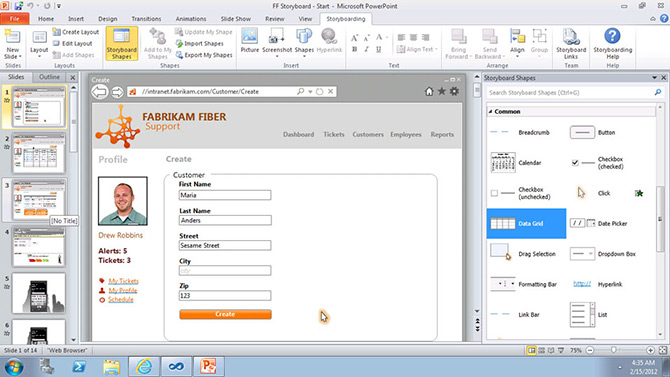
During today’s sneak peek announcement of the monochromatic Visual Studio 11 Beta to be released next week, Microsoft slipped in a new screenshot of the PowerPoint Storyboarding tool that will ship as part of Visual Studio 11. The tool which ships as an add-in for PowerPoint will allow designers and developers to quickly mock up wireframe-based prototypes of their application using familiar presentation tools and animations, along with a host of UI controls which they can drag and drop to replicate a real application experience. Windows desktop, Windows Phone mobile and web applications are all supported with a range of templates and controls suited to each scenario.Read more: i started something
QR:
Subscribe to:
Posts (Atom)