Thursday, May 31, 2012

#564 – Other Places to Get Third Party Effects

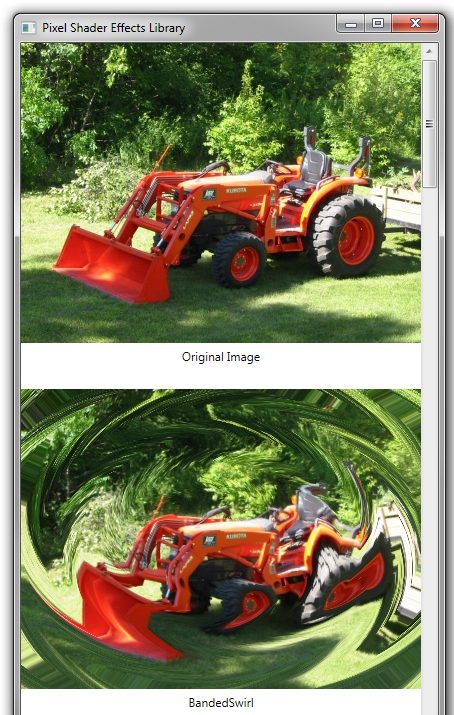
An effect in WPF changes the appearance of a visual element.  The .NET Framework comes with only a couple of effects, but you can find a few other third party effects on the web.

WPF Pixel Shader Effects Library – 23 different effects, demo here
DotWay.WPF Controls – Includes a few interesting effects

Here are some of the effects from the Pixel Shader Effects Library:

Inline image 2

QR: Inline image 1

Posted via email from Jasper-Net

Microsoft Security Bulletin MS12-035 - Critical

Vulnerabilities in .NET Framework Could Allow Remote Code Execution (2693777)
Published: Tuesday, May 08, 2012 | Updated: Tuesday, May 22, 2012

Version: 2.1

General Information
Executive Summary
This security update resolves two privately reported vulnerabilities in the .NET Framework. The vulnerabilities could allow remote code execution on a client system if a user views a specially crafted webpage using a web browser that can run XAML Browser Applications (XBAPs). Users whose accounts are configured to have fewer user rights on the system could be less impacted than users who operate with administrative user rights.

This security update is rated Critical for all supported editions of the Microsoft .NET Framework on all supported editions of Microsoft Windows. For more information, see the subsection, Affected and Non-Affected Software, in this section.

The security update addresses the vulnerabilities by correcting the manner in which the .NET Framework serialization process handles trusted and untrusted data. For more information about the vulnerabilities, see the Frequently Asked Questions (FAQ) subsection for the specific vulnerability entry under the next section, Vulnerability Information.

Recommendation. The majority of customers have automatic updating enabled and will not need to take any action because this security update will be downloaded and installed automatically. Customers who have not enabled automatic updating need to check for updates and install this update manually. For information about specific configuration options in automatic updating, see Microsoft Knowledge Base Article 294871.

For administrators and enterprise installations, or end users who want to install this security update manually, Microsoft recommends that customers apply the update immediately using update management software, or by checking for updates using the Microsoft Update service.

See also the section, Detection and Deployment Tools and Guidance, later in this bulletin.

QR: Inline image 1

Posted via email from Jasper-Net

.NET 4.5 Baby Steps, Part 6: ISourceBlock

Introduction
We have spent a number of posts looking at IDataFlowBlock, BatchedBlocks and some other interesting blocks but as a final interesting bit for blocks is the ISourceBlock interface which is implemented on the “publisher” like blocks and it has a very interesting method: LinkTo. The goal of LinkTo is to chain blocks together to do interesting and amazing things!

It's in the name
The final interesting point, and likely the most important is in the name of the assembly all this goodness comes from: System.Threading.Tasks.DataFlow. All of this is handled my multiple tasks (and likely multiple threads) under the covers without you needing to worry about it. When we look at the TPL in .NET 4 and how it made working with multi-threaded processing easier, the final goal of this is to make multi-threaded data processing easier - and it does!

static BufferBlock<DateTime> bufferPublisher = new BufferBlock<DateTime>();
static TransformBlock<DateTime, string> transformPublisher = new TransformBlock<DateTime, string>(d =>
    {
        return d.ToLongTimeString();
    });
static BatchBlock<string> batchPublisher = new BatchBlock<string>(5);

static ActionBlock<string[]> subscriber1 = new ActionBlock<string[]>(s =>
    {
        Console.WriteLine("Subscriber 1: {0}", s);
    });
static ActionBlock<string[]> subscriber2 = new ActionBlock<string[]>(s =>
{
    Console.WriteLine("Subscriber 2: {0}", s);
});

static ActionBlock<string[]> subscriber3 = new ActionBlock<string[]>(s =>
{
    Console.WriteLine("Subscriber 3: {0}", s);
});

static void Main(string[] args)
{
    batchPublisher.AsObservable().Subscribe(subscriber1.AsObserver());
    batchPublisher.AsObservable().Subscribe(subscriber2.AsObserver());

Read more: DZone .NET Zone
QR: Inline image 1

Posted via email from Jasper-Net

IIS: Handling WCF Client Certificate

WCF - TRANSPORT SECURITY – IIS -  HANDLING CLIENT CERTIFICATES

1:1 Mapping -2003

Performs the client certificate authentication and maps it to windows account.

Once the client certificate is mapped, it is authorized based on the windows account / identity associated with it.

Requirement:

       Client certificate with Public key – so that it can be attached to user Identity.
       Windows identity – which will be used to authorize the access to the service / application.
 
Steps

IIS -> Web Site -> Properties -> Directory Security -> Secure Communication - > Enable client certificate mapping

Inline image 2

Add -> Select the certificate with Public key (.cer, .crt, .spc, .key) -> Give a name and identity

Read more: saurabs
QR: Inline image 1

Posted via email from Jasper-Net

Push the Turbo button

תשתית Open Source להעברת מידע בשם ZeroMQ.

חלקכם אולי מכירים אותה אבל אני מניח שרובכם לא, אם אתם נמנים עם החלק השני של האנשים אז הפוסט הזה מיועד לכם.

ZeroMQ נכתבה ב-C תחת רשיון LGPL Open Source אולם נכתבו לה Wrappers עבור שפות רבות כגון C++, C#, F#, Java, Node.js, Objective-C, Perl, PHP, Python, Ruby ועוד.

ממבט ראשון היא נראית כמו ספריה המכילה יכולות תקשורת אבל בעצם משמשת כתשתית אסינכרונית להעברת מידע בין Threads ו-Process באמצעות שימוש ב-Queues. היא מאפשרת לכם להעביר הודעות עד גודל 1GBבמגוון שכבות תקשורת כגון In-Process, TCP, Multicast. ניתן לחבר socket בין N ל-N משתמשים באמצעות שימוש ב- Pub-Sub, fanout, task distribution ו-Requst-Reply. חשוב להדגיש שהתשתית מהירה מאוד ואסינכרונית מה שמאפשר ליצור אפליקציות שניתן לבצע להן Scale up בכמעט אפס עבודה.

שילוב של API אינטואיטיבי, יעילות, דינמיות וביצועים מדהימים הופכים את התשתית למאוד אטרקטיבית למי שמעוניין להעביר מידע בקצבים גבוהים ביותר עם זמני תגובה מהירים.

Publisher – Subscriber

מתחשק לכם לעבוד בתצורת Publisher-Subscriber? אין בעיה, בדוגמא הבאה תראו כמה זה פשוט.

Read more: Freedom Of Speach
Read more: ZeroMQ
QR: Inline image 1

Posted via email from Jasper-Net

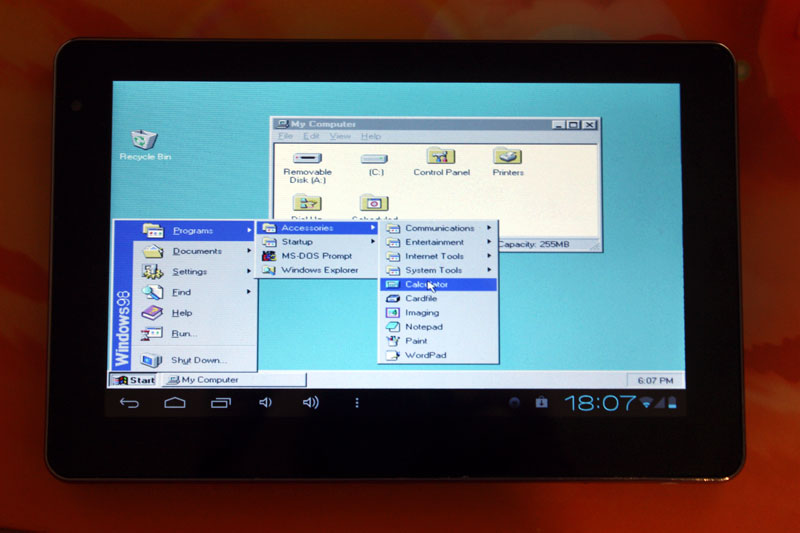
Запуск Windows 95/98/XP на ARM устройствах на базе Android

Inline image 1

Не многие знают о том, что на сегоднящний день существует несколько способов запустить полноценную ОС Windows, на ARM планшете или смартфоне, работающем на платформе Android. Зачастую, такая возможность может понадобиться не только для того чтобы удивить друзей и знакомых, но и для решения вполне серьезных задач. К примеру вам срочно требуется воспользоваться програмой, которая работает только в Windows, в пути, например в тесном метро (не будете же вы там пользоваться 15” ноутбуком). Также способы описанные в статье позволяют стабильно играть в практически любые DOS игры и некоторые для Windows (Fallout к примеру).

Планшеты на базе Windows стоят недешево, а планшет на базе Android, позволяющий нормально работать с запущенной на нем Windows сегодня можно купить дешевле чем за 100$. В этой статье я хочу рассказать о нескольких способах получения работоспособной Windows на Android планшете, а в качестве подопытного мы будем использовать дешевый китайский планшет с 1Ггц процессором и 1Гб ОЗУ.

Read more: Habrahabr.ru
QR: Inline image 2

Posted via email from Jasper-Net

WorkSmart Guides - Updated ready-made IT user documentation

Inline image 1

When I started working at Microsoft, I hadn’t been in such an open, technology rich culture before. And with so many IT systems around, and so many different software resources, my head was buzzing. In fact, I remember that at the end of the first week, the number of links in my Favourites was massive – just to internal websites.

I’d never used internet telephony, encryption, instant messaging, live meeting or SharePoint before, so I was all at sea until I could play around and work out how they were supposed to operate. Meanwhile, people who’d been at Microsoft for a while were metaphorically whizzing past me, as they collaborated, shared, published and distributed information. Whilst I was trying to work out how to answer my desk phone.

One of the godsends for me was a set of documents called Work Smart Guides, which walked me through the basics of some of the new technology I was encountering.

As our IT team describe it, Work Smart Guides bridge the gap between technology and users. Work Smart guides provide employees with scenario-based, best-use productivity aids on Microsoft products and technologies.

We produce them because we expect to see more consistent, productive, and cost-effective use of products and technologies across the company – which helps the business ROI on IT investments, as well as helping people to understand the benefit the IT team deliver to users.

Updated ready-made IT guides

The Microsoft IT Team have just updated the published versions that you could modify and publish for your users. This is a great step – I’m guessing that lots of schools, TAFEs and Universities are either producing user documentation for staff, or want to. And I bet that 80-90% of the content is identical in each institution. So these guides would make a good starter for 10, either for the format, or the instructions, or simply the screenshots. As an example, here’s the Email Basics one.

Read more: The Education Blog
QR: Inline image 2

Posted via email from Jasper-Net

Metro app development hidden gem: anonymous type binding

Just a little post to point out a hidden gem if you are a .NET developer creating a Metro style app: you can bind to anonymous types.  This came up in a discussion with a customer today that I was having and, frankly, I never tried it until then because my mind was back in Silverlight where this isn’t possible.  There may not be a tone of cases where this is valuable for you, but knowing it is there may help.

Let’s assume I have a basic class Person:

   1: public class Person
   2: {
   3:     public int Age { get; set; }
   4:     public string FirstName { get; set; }
   5:     public string Gender { get; set; }
   6: }

And in my application I have a list of that Person type that I somehow received.  In this example, I’m just hard-coding it right now.

   1: List<Person> people = new List<Person>();
   2: people.Add(new Person() { Age = 38, FirstName = "Tim", Gender = "Male" });
   3: people.Add(new Person() { Age = 9, FirstName = "Zoe", Gender = "Female" });
   4: people.Add(new Person() { Age = 5, FirstName = "Zane", Gender = "Male" });

I can then decide I want to bind to a ListView control which has a particular template:

   1: <ListView x:Name="PeopleList" Width="500" Height="300">
   2:     <ListView.ItemTemplate>
   3:         <DataTemplate>
   4:             <StackPanel Orientation="Horizontal">
   5:                 <TextBlock Text="{Binding TheName}" Margin="0,0,10,0" />
   6:                 <TextBlock Text="{Binding GuysAge}" />
   7:             </StackPanel>
   8:         </DataTemplate>
   9:     </ListView.ItemTemplate>
  10: </ListView>

Notice that I’m binding to properties (TheName and GuysAge) that don’t exist on my Person class?  In my code, I can then create a LINQ query to filter out only the “dudes” from my list and bind that result:

Read more: Tim
QR: Inline image 1

Posted via email from Jasper-Net

Wednesday, May 30, 2012

Creation of Application Pool on IIS

Note: Add Microsoft.Web.Management.dll as reference(This can be found Windows/system32/inetsrv folder)

 1)      Create a class structure to take input parameters for Creation of Application Pool

 /// <summary>
 /// This class just provides parameters for application pool creation.
 /// </summary>
 public class ApplicationPoolParams
 {
public ApplicationPoolParams(string appPoolName, 
string metabasePath, 
uint queueLength, 
string managedRuntimeVersion, 
ManagedPipelineMode managedPipeLineMode,
 ProcessModelAppPool processModel, 
RecyclingAppPool recycleAppPool,
CpuAppPool cpuAppPool)
 {
 Name = appPoolName;
 MetabasePath = metabasePath;
 QueueLength = queueLength;
 ManagedRuntimeVersion = managedRuntimeVersion;
 PipelineMode = managedPipeLineMode;
 ProcessModelData = processModel;
 RecycleAppPoolData = recycleAppPool;
 CpuData = cpuAppPool;
 }

 public string Name { get; set; }
 public string MetabasePath { get; set; }
 public uint QueueLength { get; set; }
 public string ManagedRuntimeVersion { get; set; }
 public ManagedPipelineMode PipelineMode { get; set; }
 public ProcessModelAppPool ProcessModelData { get; set;}
 public RecyclingAppPool RecycleAppPoolData { get; set; }
 public CpuAppPool CpuData { get; set; }
 
 }

 public class ProcessModelAppPool
 {
 public ProcessModelAppPool(TimeSpan idleTimeOut,uint maxProcesses)
 {
 IdleTimeout = idleTimeOut;
 MaxProcesses = maxProcesses;
 }

 public TimeSpan IdleTimeout { get; set; }
 public uint MaxProcesses { get; set; }
 }

 public class RecyclingAppPool
 {
 public RecyclingAppPool(bool isOverlappingRotation,bool isRotationOnConfigChange, PeriodicRestartAppPool periodic)
 {
 DisallowOverlappingRotation = isOverlappingRotation;
 DisallowRotationOnConfigChange = isRotationOnConfigChange;

Read more:  s.ghosh
QR: Inline image 1

Posted via email from Jasper-Net

Miguel de Icaza on ASP.NET MVC, Moonlight, and the Android Lawsuit

We had a chance to catch-up with Miguel de Icaza, founder of the Mono project and it’s new parent company, Xamarin. Some of the topics we covered include the future of ASP.NET MVC on Mono and the end of the Moonlight project.

InfoQ: Mono has supported ASP.NET since the early days. Do you see it as just a checkbox feature or is there a lot of interest in ASP.NET on the Mono platform?

Miguel de Icaza: We have not done a survey in a while, but on the last survey that we ran, ASP.NET on Unix was still a feature that people cared about. I would say that the interest declined when Microsoft fixed their licensing for Windows Servers, so the financial appeal of Mono was reduced in those cases. Nowadays, the main driver is to run ASP.NET when the rest of the stack is mostly centered around Linux.

InfoQ: ASP.NET MVC has been open source for a while now. In the past, how much effort was needed to make it compatible with Mono?

Miguel: It was very easy to get MVC 1 and MVC 2 running with Mono. With MVC3 things changed, since MVC3 was open source, but took a few dependencies on libraries that were not open source at the time, or were transitional libraries. So supporting MVC3 was easy, but deploying it was. It was a very rare to see an MVC3 site deployed with Mono, it was just too difficult.

With the recent opening up of the Microsoft ASP.NET libraries this has changed, and we managed to make MVC3 work out of the box with Mono.

Finally, for MVC4, we won’t be able to run this for a while, since MVC4 requires us to upgrade the core ASP.NET engine to support the new async pipeline and currently nobody is working on it. It will be a matter of whether people care enough to contribute those changes to Mono and make this run.

InfoQ: Do you see the ability to contribute directly to ASP.NET MVC as a significant advantage for maintaining compatibility?

The main benefit of the open sourcing of ASP.NET MVC is for its own community: for too long innovation, bug fixing an extensions has been limited to what the developers at Microsoft did, could do, or were able to specify. This will bring ASP.NET in line with other open source frameworks that evolved quickly and responded quickly to change.

InfoQ: Right now, there are four different XAML-based UI technologies: WPF, Silverlight, Silverlight for Windows Embedded and Silverlight for Windows Phone. With the introduction of Windows 8, we will be seeing a fifth version? What is your opinion of this diversification?

Miguel: We are currently focused on C# for Android, iOS and Mac so we do not tend to interact much with XAML based frameworks.

There are interesting parts to XAML, but I was never completely bought into XML for the markup. I wished for a very long time that they had adopted something simpler for humans to produce, like using Json for the markup, or the markup that was part of JavaFX. It was just as easy to consume and maintain with tools, but it was also easier on the eye for programmers and easier to type.

At one point we implemented an open source rendering engine that was capable of rendering Silverlight 3/4 markup.

Read more: InfoQ
QR: Inline image 1

Posted via email from Jasper-Net

Windows Explorer Preview Pane for .vb files

I love using the Preview Pane in Windows Explorer to quickly preview file contents:

Inline image 1

Usually, to enable this preview for a file extension I just open regedit, go to HKEY_CLASSES_ROOT –> .xxx (where xxx is the extension you’re interested in), and add a string key called PerceivedType with value of “text”: http://blog.wpfwonderland.com/2011/01/15/customize-windows-7-preview-pane-for-xaml-files/

However for some reason it didn’t work for .vb files. After some web searching, one solution I found that worked for me is to add the preview handler GUID explicitly under a “shellex” key: http://www.howtogeek.com/howto/windows-vista/make-windows-vista-explorer-preview-pane-work-for-more-file-types/

Read more: Kirill Osenkov 
QR: Inline image 2

Posted via email from Jasper-Net

Tuesday, May 29, 2012

TaskCancelledException vs OperationCancelledException

I had a conversation with Stephen Toub, Peter Ritchie and Kevin Hazzard about the different between the TaskCancelledException and the OperationCancelledException. It turns out not to be a big difference, but some understanding might keep you out of a bit of trouble.

TaskCancelledException derives from OperationCancelledException. TaskCancelledException contains a property for the cancelled task.

If you’re catching exceptions, you probably want to catch both exceptions. If you don’t care about the task, you can do this by just catching the OperationCancelledException since the TaskCancelledException derives from it. Or you can catch them both in order if you use the task in your exception response. Catching only the TaskCancelledException will not work in all cases, since it won’t catch OperationCancelledException.

If you’re throwing an exception, and there’s a task available, throw TaskCanceledException. If there isn’t a task available, throw an OperationCancelledException. This is reflected in the framework when the CancellationToken’s ThrowIfCancellationRequested method throws an OperationCancelledException.

If you’re manually throwing cancellation exceptions, check that you aren’t repeating things already handled well by the .NET framework. CancellationTokenSource and CancellationToken may take a little getting used to, but this mechanism provides a predictable approach that handles some tricky threading side cases that will ultimately make your code simpler and easier to understand.

QR: Inline image 1

Posted via email from Jasper-Net

Microsoft Posts Windows 8 App Porting Guides

A Microsoft developer evangelist has posted links to a series of Microsoft guides for porting existing mobile apps from other platforms, including the iPad, to Windows 8. These guides should be interesting to any developer thinking about, or examining, Microsoft’s platform of the future.

“Developers are excited about Metro app development, but say that the hardest part is coming up with an app idea,” Microsoft’s Jennifer Marsman writes in her MSDN blog. “Some folks want to walk through converting an existing app to Metro as a learning exercise. There are other folks who have very successful websites or apps that they would like to make available on Windows 8 too.”

Marsman offers up the following resources:

Design-focused articles

Porting an iPad app to a Metro app – Focused on design, this article explains how to transition between the iPad and Metro user experiences.

Rethinking a web site as a Metro app – This article is also focused on design, but shows the process of redesigning a web site as a Metro app.

Porting a web site

Migrating a web app to Metro app – This one is focused on the development and conversion of a web app to a Metro app using HTML and JavaScript.

Migrating a web site to Metro app – Another short article, this one discusses issues you’ll run into around communication, streaming, security, client package deployment, data sharing, and syndication while migrating a web site to Metro.

Porting a Windows Phone app

Migrating a Windows Phone 7 app to XAML Metro app – This article examines how one can port a Silverlight Windows Phone 7 app to a Metro app that is written with XAML. It discusses the differences between the WP7/Silverlight and Windows RT namespaces and provides a useful list of the differences in the UI capabilities of each.

Migrating a Windows Phone 7 app to JavaScript Metro app – This article examines porting a Windows Silverlight-based Phone 7 app to a Metro app that is written in HTML and JavaScript.

Read more: Paul Thurrots
QR: Inline image 1

Posted via email from Jasper-Net

Client-Side Logging in Silverlight

Many of us have implemented logging in our ASP.NET, Windows Forms and WPF applications, so why shouldn’t you do the same in your Silverlight applications? Well, you should. In this blog post I will show you one approach on how you might perform this logging. The class I will use is called PDSALoggingManager. This class has a method named Log() you use to publish data into a log file in your Silverlight application. A method named LogException() is also available for logging information about any exceptions that happen on the client-side of your Silverlight application. Let’s take a look at the usage of the PDSALoggingManager class.

Logging Data

The simplest way to log information using the PDSALoggingManager class is to call the Log() method with some string data as shown  below:

PDSALoggingManager.Instance.Log("Some data to log");

This will add the string passed to the Log() method to an internal StringBuilder object that contains the log information followed by a NewLine character. The Log() method also writes the string to a file located in isolated storage. What is written for each piece of data passed to the Log() method is shown here:

'Informational' log entry written on 5/22/2012 5:51:48 AM, from class: 'SL_Log.MainPage'
   Some Data To Log

If you set the LogSystemInfo property on the PDSALoggingManager class prior to calling Log(), then system information is written to the log at the same time as the log data. Below is a sample of the log data with the system information appended to the end.

---------------------------------------------------------
'Informational' log entry written on 5/22/2012 5:51:48 AM, from class: 'SL_Log.MainPage'
   Some Data To Log
System Information
   DateTime=5/22/2012 5:51:48 AM
   Current URL=file:///D:/MyStuff/BlogEntries/2012/
     Samples/SL-Log/SL-Log/Bin/Debug/SL_LogTestPage.html
   OSVersion=Microsoft Windows NT 6.1.7601 Service Pack 1
   OSName=Windows 7
   CurrentAssemblyName=PDSA.Silverlight, Version=5.0.0.0,
       Culture=neutral, PublicKeyToken=null
   MainAssemblyName=SL-Log, Version=1.0.0.0, Culture=neutral,
       PublicKeyToken=null
   AppDomainName=Silverlight AppDomain
   UserLanguage=en-US
   CompanyName=PDSA, Inc.
   ProductName=Silverlight Logging
   Description=Silverlight Logging
   Title=Silverlight Logging
   Copyright=Copyright © 2012 by PDSA, Inc.
   ApplicationVersion=1.0.0.0
   Stack Trace={LogInfoSample,btnLogInfo_Click}
-----------------------------------------------------------

The system information added to the end of the log comes from another class called PDSASystemInfo. Note that I blogged about this class earlier, so check out my previous blog entry at http://weblogs.asp.net/psheriff/archive/2012/05/20/retrieve-system-information-in-silverlight.aspx for information on this class and how that data was gathered.

Passing Extra Data to Log

You have an additional overload on the Log() method that takes a generic Dictionary<string, string> object you load with key/value pairs of data. Call this version of Log() like the following:

Dictionary<string, string> extra = 
   new Dictionary<string, string>();

extra.Add("CustomerId", "1");
extra.Add("StateCode", "CA");

PDSALoggingManager.Instance.Log("Some data to log", extra);

QR: Inline image 1

Posted via email from Jasper-Net

Мгновенный поиск файлов в Windows. Ловкость рук и никакого мошенничества

Inline image 1

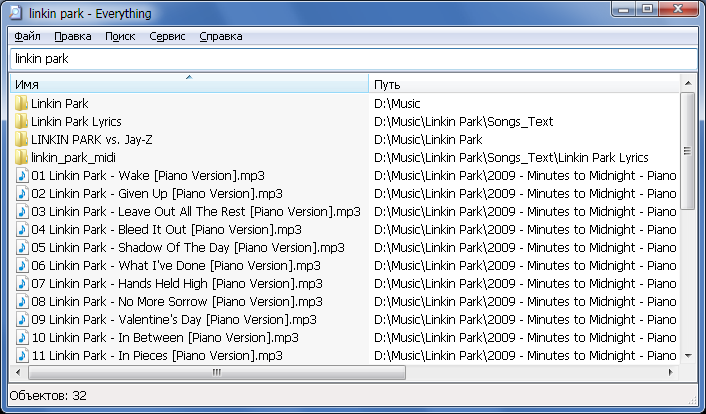
Если в Windows XP поиск файлов был хоть и медленным, но все-таки работоспособным, то в Windows 7 он превратился во что-то совсем непонятное. Многие успешно пользуются поиском в Far'е или Total Commander'е вместо стандартных средств Windows. Когда на дисках очень много файлов, такой поиск также выполняется медленно. Я бы вряд ли поверил, если бы не попробовал сам, что файлы можно находить мгновенно (!), прямо во время ввода имени файла в строку поиска. Заинтересовались?

Чудо-программа, которая сэкономила мне массу времени и продолжает выручать каждый день, называется Everything. Это бесплатное мини-приложение (размер portable-версии — 272 КБ) делает всего одну простую вещь — оно ищет файлы на дисках по части имени файла. Магия в том, что поиск происходит мгновенно, по мере ввода букв имени файла в строку поиска (как при «живом поиске» Google). Это открывает гораздо бОльшие возможности поиска файлов. Например, если вы забыли точное название файла, вы можете быстро попробовать ввести разные варианты названия. При «классическом» поиске вам пришлось бы каждый раз раз долго ждать завершения поиска, а здесь сразу видно, нашлось что-то или нет: 

Read more: Habrahabr.ru
Read more: Everything
QR: Inline image 2

Posted via email from Jasper-Net
Вышел бесплатный профессиональный видеоредактор Lightworks

Inline image 1

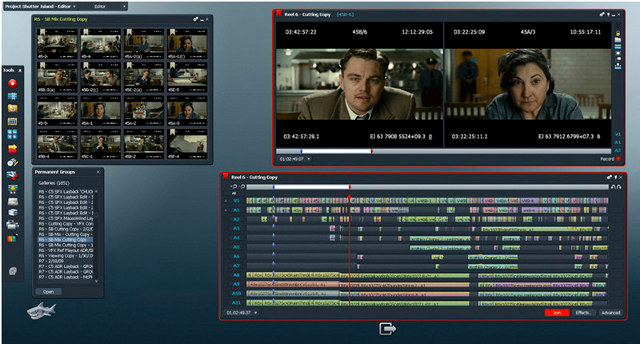
“Бэтмен навсегда”, “Остров проклятых”, “Отступники”, “Король говорит”, “Авиатор”, “Карты, деньги, два ствола”, “Криминальное чтиво” — это далеко не полный список фильмов, смонтированных с помощью Lightworks за его более чем двадцатилетнюю историю. С 1989 года Lightworks сменил несколько владельцев, пока в 2009 его не приобрела компания EditShare — производитель систем хранения видео для ТВ и киностудий. Новые хозяева решили порвать с традицией продавать подобный софт за тысячи долларов, и теперь профессиональная версия Lightworks стоит 60$, а базовая — бесплатна. Причём эта “базовая” версия мало чем отличается от платной и не уступит многим профессиональным версиям других редакторов. Но и это ещё не всё — EditShare собирается в ближайшем будущем выпустить версии для Linux и Mac (именно в таком порядке) и открыть исходники.

Read more: Habrahabr.ru
QR: Inline image 2

Posted via email from Jasper-Net
Monday, May 28, 2012

Moving Config Sections to External Files

An App.config file or a Web.config file are great places to store configurable information – information that generally doesn’t change; but we want to be able to change easily (i.e., without rebuilding and redeploying the application.) Examples include connection strings (stored in the config file’s <connectionStrings> section) and application-wide name-value pairs (stored in the config file’s <appSettings> section).

We can add more flexibility by moving a section to an external file and linking to that file from the config file.

By splitting the file, we can manage and deploy only those settings separate from the rest of the configuration.

To do so, we create a new text file and copy that section into that file; then use the configSource attribute of the section tag in the original config file to point to the new file.

For example, the following app.config contains all the application’s connection strings and application settings

<?xml version="1.0" encoding="utf-8" ?>
<configuration>
  <connectionStrings>
    <add name="MyApp_Dev" connectionString="Data Source=SQL071;Initial Catalog=Awesome_Dev;Integrated Security=True"/>
    <add name="MyApp_QA" connectionString="Data Source=SQL071;Initial Catalog=Awesome_Dev;Integrated Security=True"/>
    <add name="MyApp_Prod" connectionString="Data Source=SQL071;Initial Catalog=Awesome_Dev;Integrated Security=True"/>
  </connectionStrings>
  <appSettings>
    <add key="CompanyName" value="The Awesome Company"/>
    <add key="PhoneNumber" value="(513) 555-4444"/>
  </appSettings>
</configuration>

...
...

Then, point to these files in the app.config, as shown below:

<?xml version="1.0" encoding="utf-8" ?>
<configuration>
  <connectionStrings configSource="connections.config" />
  <appSettings configSource="appSettings.config" />
</configuration>

One caveat to doing this: The configSource files (connections.config and appSettings.config in our example) must be in the same folder as the config file. We can accomplish this by selecting each configSource file in Solution Explorer and setting its Copy to Output directory property to either “Copy always” or “Copy if newer”.

QR: Inline image 1

Posted via email from Jasper-Net

Wednesday, May 23, 2012

Assembly Language Megaprimer for Linux

In this video series, we will learn the basics of Assembly Language programming on Linux. This will help us in doing reverse engineering and writing exploits in later videos. I will be start from the absolute scratch, so no pre-requisites required.

Read more: Security Tube
QR: Inline image 1

Posted via email from Jasper-Net

Monday, May 21, 2012

Wine Mono 0.0.4 Release - I'm serious now!

I have published version 0.0.4 of Wine Mono on Sourceforge. I fully intend to make this release a part of Wine.

The source tarball is at

The binary is at

For developers, the source repository is at

Changes since 0.0.2:
 * With Wine 1.5.4 and Wine Mono 0.0.4, it's now possible to run mixed-mode assemblies.
 * The random hang that was introduced in Mono 2.11 is now fixed (0.0.2 contained a hacky work-around).
 * A replacement for XNA 4.0 based on MonoGame is now included, to be used if MS XNA 4.0 is not installed.
 * Updated Mono from 2.11.0 to 2.11.1, bringing in the changes listed here: http://mono.1490590.n4.nabble.com/Mono-2-11-1-is-out-td4575466.html
 * Changes from Hans Leidekker to make upgrading and removing the msi work better.
 * Added more registry keys to prevent native .NET from trying to install while Wine Mono is installed.
 * Various improvements to the build script.

Some programs that worked with the official Mono for Windows package will fail with this one because gluezilla (Mono's web browser component) is missing. In all other respects I expect this to work as well as or better than the official Mono for Windows package, and if not I'd like to hear about it.

Read more: WineHQ Mail list
QR: Inline image 1

Posted via email from Jasper-Net

Test Scribe for Visual Studio 11 Beta

Inline image 2

Test Scribe is a documentation power tool designed to construct documents directly from the TFS for test plan and test run artifacts for the purpose of discussion, reporting etc.

This is a popular extension for MTM, allowing users to export Test Documents, in previous posts I wrote about extending Test Scribe Template for MTM 10.

Test Scribe – Automatic Document Generating For Test Manager 2010

Test Scribe – Developer Guide

How To Change Test Scribe Template

And of course as we getting closer to VS 11 release here is Test Scribe for VS 11 Beta, Download Page

Read more: Shay Raiten
QR: Inline image 1

Posted via email from Jasper-Net
Free set Windows Performance analysis tools. From boot perf analysis, to power use, memory leaks, CPU hogs, app crashes and many more...

 In conjunction with my upcoming book and sessions at Briforum, I am releasing a number of new and updated tools involving Windows Performance analysis. These tools may be found in the Performance Tools section of the TMurgent website. These tools are generally free to download and use (the only restrictions are for ISVs that want to use them to show off how good they are).

QR: Inline image 1

Posted via email from Jasper-Net

AsyncCTP installation problems (and VS11)

The AsyncCTP is getting a bit long in the tooth. This post is to explain how, why, and what to do.

Common symptoms:

AsyncCTP fails to install -- i.e. it doesn't create the "Async CTP" folder inside "My Documents", and VS doesn't recognize the async keywords.
Installing VS11 causes AsyncCTP to stop working.
AsyncCTP doesn't work on Windows 8.

Explanation
The AsyncCTP is an update. It updates Visual Studio 2010 with modified versions of the VS IDE compilers that colorize the new keywords. It also updates the .NET4 framework with modified versions of the command-line csc.exe and vbc.exe compilers. But the AsyncCTP was never incorporated into Microsoft's official source code for VS2010 or .NET4, and was never meant to be -- it's just an experimental CTP.

And so, when Microsoft produces official updates to either VS or .NET4, and they touch the same files, then they tend to overwrite the AsyncCTP -- or prevent it from installing in the first place.

Also .NET45, which comes with VS11 and Win8, is an in-place update on top of .NET4, and so replaces the csc.exe and vbc.exe from the AsyncCTP with updated ones. As Stephen Toub explains, the new csc.exe and vbc.exe are incompatible with AsyncCTPLibrary.dll.

What to do
Best option is to upgrade to VS11 Beta and .NET45. It has much better async support (fewer bugs, more features, better debugging, better perf)
 
Failing that, if you're stuck with VS2010 + AsyncCTP, here are ideas:
If you already have VS2010 + AsyncCTP working, then don't install VS11.
 
If you have VS2010 SP1 but the AsyncCTP installer doesn't seem to have worked, the problem might be conflicting updates such as
   KB2635973, KB2615527, KB2645410
Any update after October 11 is liable to conflict, though. Go to ControlPanel > AddRemovePrograms > WindowsUpdates and uninstall them if present.
Platforms:

Targeting .NET45 with async:
you have to use VS11 Beta, which works fine.

Read more: Lucian's VBlog
QR: Inline image 1

Posted via email from Jasper-Net

Google hacking database

Welcome to the google hacking database
We call them 'googledorks': Inept or foolish people as revealed by Google. Whatever you call these fools, you've found the center of the Google Hacking Universe!

Google Hacking Database Categories

Footholds (23) 
Examples of queries that can help a hacker gain a foothold into a web server

Files containing usernames (15) 
These files contain usernames, but no passwords... Still, google finding usernames on a web site..

Sensitive Directories (65) 
Google's collection of web sites sharing sensitive directories. The files contained in here will vary from sesitive to uber-secret!

Web Server Detection (72) 
These links demonstrate Google's awesome ability to profile web servers..

Vulnerable Files (60) 
HUNDREDS of vulnerable files that Google can find on websites...

Vulnerable Servers (70) 
These searches reveal servers with specific vulnerabilities. These are found in a different way than the searches found in the "Vulnerable Files" section.

Read more: Exploit-db
QR: Inline image 1

Posted via email from Jasper-Net

Sunday, May 20, 2012

Obtaining mscordacwks.dll for CLR Versions You Don’t Have

Inline image 2

Note: This blog post assumes that you can capture and analyze managed dumps in WinDbg using SOS, and have encountered a bizarre technical problem when using dumps from a production environment. If this assumption is incorrect, feel free to peruse my .NET Debugging Resources link post.

When debugging managed dumps in WinDbg, you will need to load the SOS version that is compatible with the CLR version in the dump. SOS, in turn, requires the CLR “data access DLL” (mscordacwks.dll), which is a debugging helper shipping with the .NET Framework. If SOS and/or mscordacwks.dll are missing or have the wrong version, you will receive an error similar to the following when trying to run most SOS commands:

Failed to load data access DLL, 0x80004005 
Verify that 1) you have a recent build of the debugger (6.2.14 or newer) 
2) the file mscordacwks.dll that matches your version of mscorwks.dll is in the version directory 
3) or, if you are debugging a dump file, verify that the file mscordacwks_<arch>_<arch>_<version>.dll is on your symbol path. 
4) you are debugging on the same architecture as the dump file. For example, an IA64 dump file must be debugged on an IA64 machine.

You can also run the debugger command .cordll to control the debugger's load of mscordacwks.dll. .cordll -ve -u -l will do a verbose reload. If that succeeds, the SOS command should work on retry.

If you are debugging a minidump, you need to make sure that your executable path is pointing to mscorwks.dll as well.

Some CLR versions have been indexed by the Microsoft public symbol server, so you can instruct the debugger to download everything automatically by setting your symbol path and image path to the Microsoft symbol server.

However, some CLR versions have not been indexed and cannot be retrieved automatically—and this is where you need to crawl the Web and find the binaries manually. Today I had the chance to encounter a CLR version, 2.0.50727.3607, which WinDbg couldn’t retrieve from the Microsoft symbol server:

         mscordacwks_x86_x86_2.0.50727.3607.dll/4ADD5446590000/ 
         mscordacwks_x86_x86_2.0.50727.3607.dll not found

Doug Stewart has been collecting updates to CLR 2.0 for several years now, and has an entry on his post for the 3607 CLR build, associated with KB article 976569.

QR: Inline image 1

Posted via email from Jasper-Net

Ninite

Inline image 1

Just pick your apps and click Get Installer. Ninite does the rest — fully automatic.

No Clicking Next, Next, Next
Ninite fully automates installers offscreen.

No Toolbars
Ninite automatically says "No" to toolbars and other junk.

Always Up-to-date
A Ninite installer always gets an app's latest version no matter when you made it.

It Updates Too
Just run your Ninite installer again and it will update the apps to their latest versions.

No Signup
Ninite just works. No account, signup, or client needed.

32 and 64-bit
Ninite installs the best version of an app for your PC.

International
Ninite installs apps in your PC's language.

Faster for Business
Ninite Pro is 3x faster and allows business use.

Works with RMMs
Kaseya, Labtech, Level Platforms, KACE, GFI, Naverisk, and more. Ninite Pro integrates with everything.

Read more: Ninite
QR: Inline image 2

Posted via email from Jasper-Net

Windows 8 Comes with Built-in Option to Turn On/Off 16-Bit Application Support

UPDATE: This feature is only present in 32-bit edition of Windows 8 Developer Preview.

Time to share another interesting feature of Windows 8. Did you know Windows 8 comes with a built-in option to turn on or off 16-bit application support?

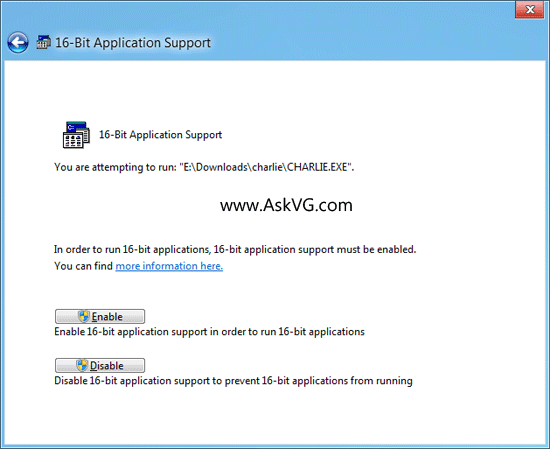
Our reader "Basil" has found a new applet "16-Bit Application Support" in Control Panel of Windows 8 Developer Preview. This new applet allows you to enable or disable 16-bit application support in Windows 8.

Inline image 1

When you open the applet in Control Panel, Windows shows a dialog box to turn 16-bit application support on or off. Simply click on Enable button and you'll be able to enjoy 16-bit applications in Windows 8.

QR: Inline image 2

Posted via email from Jasper-Net

.Net 4.5 Gets Zippy... Zip support is baked into the .Net 4.5 Framework

One of the missing feature of .NET framework was a support for Zip file manipulation such as reading the zip archive, adding files, extracting files, etc. and we were using some third party libraries such as excellent DotNetZip. In .NET 4.5, we have an extensive support for manipulating .zip files.

First thing that you should do is to add System.IO.Compression assembly as reference to your project. You may also want to reference System.IO.Compression.FileSystem assembly to access three extension methods (from the ZipFileExtensions class) for the ZipArchive class: CreateEntryFromFile, CreateEntryFromFile, and ExtractToDirectory. These extension methods enable you to compress and decompress the contents of the entry to a file.

..."

System.IO.Compression Namespace

QR: Inline image 1

Posted via email from Jasper-Net

Xceedium Xsuite

Inline image 2

Xceedium Xsuite™ protects your organization from security threats associated with privileged users, individuals and applications that have unfettered administrative access to your most sensitive IT infrastructure and business data.

Xceedium’s highly scalable solution employs role-based privilege access control, ensuring that privileged users, such as network administrators, security staff and trusted third parties, have rights to access only the specific systems, devices and commands they require. In other words, it provides “least privilege” access.

But Xsuite goes far beyond the popular least privilege concept, enabling organizations to implement the entire set of security controls necessary to protect modern networks from insider threats. We call it Zero Trust access control.

Xsuite integrates three award-winning software modules: GateKeeper™ Administrator Access Control, Password Authority™ Admin Password Management, and A2A Authority™ Application Password Management on a single, hardened appliance.

Read more: Xceedium
QR: Inline image 1

Posted via email from Jasper-Net

WCF: Serialization and Generics

Recently, I have been spending some time blogging about serialization.  This is partially in an effort to go back over some of the basics prior to starting on WCF and P2P in a week or so.  Today, I am continuing the serialization subject by taking a closer look at generics in regards to serialization.

This is actually a popular subject for a lot of newcomers to WCF.  Many developers who are fond of generics will create a service that exposes some generic method.  When they finally get ready to fire up the service and give it a trial run, they are quickly disappointed to discover that it doesn't work as expected.

So, what's the deal?

WCF does not support the use of generic methods for service operation.  In other words, only concrete types can be used for service operations.  Open generic types cannot be used.  Now, it is important to clarify this is not a limitation of WCF.  Rather, it is a limitation of WSDL, which is used to expose service metadata to consumers.  There is no construct within WSDL to define a generic type.  Generally speaking, I agree with this behavior 
since it decreases the coupling between a client and service. 

Although generic methods are not supported, it is possible to expose generic objects for the purpose of exchanging data.  However, there are some limitations.  Let's take a closer look:

Bounded Generics

In his book Programming WCF Services , Juval Lowy points out that it is possible to use "bounded generics."  This is sometimes referred to as closed generics.  Basically, it refers to defining a generic class for your data contract, but it is restricted to a specific type in the service operation.  This may sound somewhat vague.  So, here is an example to provide a better illustration:

[DataContract]
public class MyGenericObject<T>
{
    private T _id;
    private string _description;

    public MyGenericObject()
    {
    }

    [DataMember]
    public T ID
    {
        get { return _id; }
        set { _id = value; }
    }

    [DataMember]
    public string Description
    {
        get { return _description; }
        set { _description = value; }
    }
}

Read more: Jeff W. Barnes
QR: Inline image 1

Posted via email from Jasper-Net

Маленькие хитрости класса Enumerable

Сегодня речь пойдет о классе System.Linq.Enumerable. Enumerable – это один из основных классов Linq, так как содержит extension-методы, используемые при построении запросов. Мало кому известно (по крайней мере, мне так показалось), но данный класс может быть использован не только для построения Linq-запросов. Enumerable содержит несколько обычных статических методов, которые, я думаю, тебе могут пригодиться.

Enumerable.Empty<T>

Насколько часто тебе приходится создавать пустую коллекцию (IEnumerable<T>)? Обычно разработчики либо создают пустой список, либо массив, состоящий из нуля элементов.

IEnumerable<int> items = new List<int>();
...
IEnumerable<int> items = new int[]()

С этим кодом все в порядке, он работает, но, согласись, смотрится не очень эстетично. Более того, данный подход не всегда является оптимальным, если ты хочешь создать пару тысяч подобных объектов. Тут тебе может помочь метод Enumerable.Empty<T>. Задача этого метода – вернуть тебе пустую коллекцию (IEnumerable<T>).

IEnumerable<int> items = Enumerable.Empty<int>();

Согласись, подобный код смотрится немного более эстетично. Кроме того он и работает быстрее в том случае, если тебе понадобится создать пустую коллекцию несколько (сотен тысяч) раз. Прирост производительности возможен за счет того, что метод Empty<T> возвращает один и тот же объект для каждого запрашиваемого типа (паттерн Singleton): первый вызов метода инициализирует объект, поэтому он заметно медленнее, чем создание пустого массива или списка, зато следующие вызовы теоретически выполняются быстрее. Стоит отметить, что метода Empty<T> создает массив из нуля элементов.

Enumerable.Range

int[] items = new int[count];
for (int i = 0; i < count; i++)
{
    items[i] = start + i;
}

Read more: Čivava's Blog
QR: Inline image 1

Posted via email from Jasper-Net

Thursday, May 17, 2012

В Diablo III можно поиграть и бесплатно! [Diablo 3 free]

Inline image 1

Если вы не успели поиграть в DIABLO III во время народного теста (link) — не отчаивайтесь. Бесплатно поиграться можно будет уже с 15 мая! Благодаря специальной версии игры Diablo III Starter Edition.

В течение 30 дней после начала продаж игры стартовая версия Diablo III будет доступна по гостевому пропуску (Guest Pass). Эти специальные ключи входят в состав всех коробочных изданий Diablo III. 

На пользователей, играющих на стартовой версии, накладываются следующие ограничения:
  • Доступен только I акт вплоть до Короля скелетов
  • Развитие ограничено 13 уровнем
  • Подбор игроков возможен только среди игроков со стартовой версией
  • Нет доступа к денежному аукциону

Read more: Habrahabr.ru
Read more: Battle.net
QR: Inline image 2

Posted via email from Jasper-Net

Информационная анархия, или как победить торренты и легализовать копирайт

Часто можно услышать такие вопросы: «Как победить пиратство?», «Можно ли легализовать файлообмен?», «Как реформировать копирайт?»
Я думаю, адекватно ответить на эти отдельные вопросы невозможно, если не видеть большую картину, не понимать что происходит с информационным бизнесом в целом, и с его продуктами, с книгами, с периодикой — газетами, журналами, с музыкой, фотографиями, фильмами, играми, дизайном, софтом (далее в тексте — инфо-продукты).

Информационная революция
Мы являемся свидетелями двух революционных процессов:

1. Цифровые медиа: стремление к качеству и к охвату все большей аудитории привело к смене медиа (носителей) для информационных продуктов, от аналоговых медиа мы перешли к цифровым. Это дало изначальный рост доходов производителей (авторов, издательств, студий) в условиях старой бизнес-модели
2. Цифоровые каналы распространения: развитие телекоммуникаций, персональных гаджетов привело к тому, что старая бизнес-модель в распространении инфо-продуктов была убита феноменом интернета, точнее сочетанием цифровых медиа и цифровых каналов распространения.

Интернет убил старую бизнес-модель так быстро, что сейчас существует вакуум для современной бизнес-модели и в этой пустоте процветает анархия. То что мы видим — это анархия. Анархия — это распыление доходов, дисбалансы, падение производства и, потенциально, смерть бизнеса.

Информационная анархия

Инфо-продукты обладают уникальными базовыми свойствами: копирование (легкость получения копии товара высочайшего качества) и тиражирование (любая копия товара сама становится источником других копий).
Под действием этих свойств законные владельцы информационных продуктов не контролируют дальнейшую судьбу своих продуктов. В результате копирования и тиражирования создается два потока инфо-продуктов:

— первый поток условно-платных копий, который контролируется автором (это может быть не только абсолютная платность каждой копии, но и условно-платные бизнес-решения — shareware, freemium, микро-платежи, различные лицензии, закрепляющие право автора получать оплату за коммерческое использование продукта, право на бренд и рекламу, и многие другие формы относительной платности и полной бесплатности под контролем автора и/или владельца прав),

— второй поток условно-платных копий, который не контролируется автором (это все виды облачных хранений копий с общественным доступом и без общественного доступа, все торренты, все локальные копии файлов, созданные для личного пользования после официальной покупки и другие), при этом такие «левые»; копии также могут приносить доход своим новым владельцам (но не авторам), с помощью рекламы, или прямых продаж (смс за скачивание, копирование на физические носители, оплата подписки), или оказания каких-либо услуг с использованием инфо-продуктов (беслатное использование софта, видео-прокат и тд).

Информационную анархию создает именно второй поток, свободное распространение продуктов без ведома и без воли авторов и владельцев.

Read more: Habrahabr.ru
QR: Inline image 1

Posted via email from Jasper-Net

TellYouLater

What kind of service is it?
This service lets you encrypt text messages so that they cannot be decrypted and read before a predefined date.

How secure is this kind of protection?
We use the encryption algorithms 1024-bit RSA and 128-bit AES, which are considered secure enough in most cases.

How does it work?
   We use asymmetric encryption. It means that the data is encrypted using a public key, and can be decrypted only if you have the corresponding secret key. For each hour in the next few years, our system has a pair of keys, a public one and a secret one. While all public keys are openly available, the secret keys are posted only when the time comes. Select a moment in time; a respective open key will be retrieved from our web site, and your message will be encrypted. To decrypt your message, a secret key will have to be obtained from our server. If that key hasn't been published yet, the decryption of the message will be impossible.

Read more: TellYouLater.com
QR: Inline image 1

Posted via email from Jasper-Net

Fluent Interfaces

What is a Fluent Interface?

When developing software, it is important that the code that you write is easy to understand in order that it can be maintained at a later date. There are many ways in which you can structure your classes in order to achieve this and various guidelines, such as the five SOLID principles. One way to achieve improved readability for your source code is to develop libraries with fluent interfaces.

Fluent interfaces allow code to be created that appears similar to natural language, when the symbols that decorate methods are ignored. This involves choosing member names that can be combined in ways that mirror words in a language such as English. The words are then combined using method chaining, where each method returns a result that can be acted upon by the next call in the sequence. However, fluent interfaces are not designed for method chaining alone.

To understand the difference between a fluent and non-fluent interface, let's look at an example. The code below uses method chaining but if the member names are read out loud, the meaning is not perfectly clear. The code calculates the date and time one week from the current date at 9:30am.

DateTime time = DateTime.Now.AddDays(7).Date.AddHours(9).AddMinutes(30);

This simple example is reasonably easy to understand for a developer but as the complexity grows it could become more difficult. If we convert the code to use a more fluent syntax, we can make its purpose clearer. The code below, read aloud, is "One week hence at 9:30".

DateTime time = 1.Week().Hence().At(9, 30);

Fluent interfaces are used widely in frameworks and library code. Two common examples that have been examined in earlier articles are Language-Integrated Query (LINQ) and Moq. You can create your own fluent interfaces by adding suitably named methods to your classes. You can also take advantage of C# 3.0's extension methods to add fluent-style methods to existing classes, including .NET framework types. We'll use this technique in the following sections to create a small fluent interface for date and time processing that supports the code example above.

Integer Extensions

In the fluent example code above, the first method used is "Week". This is an extension method of the integer type that creates a TimeSpan value representing the specified number of weeks. The code below shows how the method is created, as well as several other integer extension methods that create TimeSpans for days, hours and minutes.

public static class FluentTimeExtensions
{
    public static TimeSpan Days(this int number)
    {
        return new TimeSpan(number, 0, 0, 0);
    }
 
    public static TimeSpan Hours(this int number)
    {
        return new TimeSpan(number, 0, 0);
    }

Read more: BlackWasp
QR: Inline image 1

Posted via email from Jasper-Net

The Task: Events, Asynchronous Calls, Async and Await

Almost any software application today will likely contain a long-running process. “Long-running” may be a relative term but in the Windows Runtime it is specifically anything that could take longer than 50ms to execute. That’s a fairly small window, and it means those operations will need to run concurrently to the main application thread. Concurrency is important in both client applications (to keep from blocking the UI) and server applications (to accommodate multiple simultaneous requests).

The new technology referred to as Visual Studio Asynchronous Programming provides a streamlined language syntax for asynchronous development. It does this by providing two new keywords: async and await. While these keywords may simplify asynchronous development, they can still be confusing to developers. There are a lot of materials out there but I thought it might help to take a very simple example and explore just what these keywords are and how they operate. In this post I’ll focus specifically on the .NET Framework 4.5 support. While they are also supported for Metro-style applications, the implementation is slightly different.

The Main Event

In the movie Mission Impossible II, the short-lived protagonist Dr. Nekhorvich says:

“…every search for a hero must begin with something every hero needs, a villain. So in a search for our hero, Bellerophon, we have created a more effective monster: Chimera.”

In the search for an elegant solution to asynchronous programming we must start with some of the rougher implementations that have plagued developers in the past.

The event-based pattern is probably one of the most well-known asynchronous patterns to .NET developers as it is prevalent throughout the base library. Let’s assume I have a method that multiplies two numbers and for some crazy reason (maybe I’m sending it over a 300 baud modem to my Commodore 64 to process the result on the 6502 chip … you know, using a bunch of ROR operations) it takes a bit longer to process than I’d like, so I want to make sure it executes asynchronously. The first thing I’ll do is create an event argument payload for the result:

public class MultiplyEventArgs : EventArgs 
{
    public int Result
    {
        get;
        private set; 
    }

    public MultiplyEventArgs(int result)
    {
        Result = result;
    }
}

Next, I’ll define an interface:

public interface IMultiplierEvent
{
    event EventHandler<MultiplyEventArgs> MultiplyCompleted;
    void MultiplyAsync(int a, int b); 
}

Finally, I’ll implement the class that executes the operation asynchronous and fires the completed event when done.

public class MultiplierEvent : IMultiplierEvent
{

    public event EventHandler<MultiplyEventArgs> MultiplyCompleted;

    private void RaiseCompleted(int result)
    {
          
        var handler = MultiplyCompleted;
        if (handler != null)
        {
            handler(this, new MultiplyEventArgs(result));
        }
    }

    public void MultiplyAsync(int a, int b)
    {
        Task.Run(() => RaiseCompleted(a * b));
    }
}

Read more: C#:IMage
QR: Inline image 1

Posted via email from Jasper-Net

Simplify Syntax with Extension Methods

Extension methods were first introduced with LINQ in C#3.0. They are just a syntactic construct, but as we’ll see in this post they can make a huge difference. What’s easier to read of these two?

string[] wishList1 =
    Enumerable.ToArray(
    Enumerable.Select(Enumerable.Where(Animals, a =&gt; a.StartsWith("A")),
    a =&gt; string.Format("I want a {0}.", a)));
 
string[] wishList2 = Animals.Where(a =&gt; a.StartsWith("A"))
    .Select(a =&gt; string.Format("I want a {0}.", a)).ToArray();

To me, the second alternative has several advantages:

Get rid of the name of the helper class declaring the method. Writing out the Enumerable class name doesn’t add any relevant information. On the contrary, it forces the reader to actively think of it to find out that it is irrelevant.
Left-to-right reading order instead of inside-out when following the evaluation order.
The method name and the parameters are written together. In the first example Select and the relevant code is splitted by the call to Enumerable.Where.
Extension methods creates a syntactic possibility to do two important things that are not allowed by the language.

Add methods to existing classes.
Add methods to interfaces.

Add Methods to Existing Classes

Sometimes it would be beneficial to extend existing classes with own methods. An example would be to add an IsEmail() method to the string class. The checking will be done using a regular expression, but using the name IsEmail makes the intent much more clear.

foreach (string s in strings)
{
    if (s.IsEmail())
    {
        Debug.WriteLine("{0} is a valid email address", (object)s);
    }
    else
    {
        Debug.WriteLine("{0} is not a valid email address", (object)s);
    }
}

Read more: Passion for Coding
QR: Inline image 1

Posted via email from Jasper-Net

Интегрируем TortoiseSVN в Total Commander

Inline image 1
Преамбула:

Имеем в наличии TortoiseSVN и Total Commander, и активно их используем в работе. 
Практически все действия в Total Commander'e успешно совершаются одной только клавиатурой, без использования мышки, какими-либо горячими клавишами. Главное их найти/знать/привыкнуть, и работа становится в разы проще и быстрее.
TortoiseSVN же из коробки предоставляет нам только пункты в контекстном меню, до которого можно добраться двумя способами:
  • Мышкой. При активной работе, тянуться каждый раз до мышки, реально начинает напрягать уже через пару дней/часов/минут работы (зависит от крепости нервов разработчика) и времени занимает это довольно много.
  • Через клавишу контекстного меню + стрелок. Этот вариант конечно чем-то проще и быстрее (ибо не надо тянуться за мышкой), но всё так же не удобен и всё такой же медленный.

Хочется все действия с TortoiseSVN выполнять так же быстро, как и действия в самом Total Commander'e. 
Т.е. через горячие клавиши, в одно нажатие.

Облазив просторы интернета, не смог найти ни одной инструкции, как можно по-человечески интегрировать TortoiseSVN в Total Commander и сделать это возможным.
Поэтому решил написать свой небольшой простенький мануал.

Реализация.

По факту, всё достаточно просто.
В комплекте с TortoiseSVN идёт exe'шник, как раз для автоматизации: TortoiseProc.exe 
Он то нам и нужен. Полный список параметров для него доступен на официальном сайте.
В Total Commander'e, в свою очередь, имеется возможность создавать кастомные команды. 
Сделать это можно несколькими способами:
Через меню настроек: Инструменты -> Список команд ТС…

Read more: Habrahabr.ru
QR: Inline image 2

Posted via email from Jasper-Net