Thursday, March 29, 2012

How to use the IEnumerable/IEnumerator interfaces

Introduction

IEnumerable is an interface implemented by the System.Collecetion type in .NET that provides the iterator pattern. The definition according to MSDN is:

“Exposes the enumerator, which supports simple iteration over non-generic collections.”

It’s something that you can loop over. That might be a List or Array or anything else that supports a foreach loop. IEnumerator allows you to iterate over List or Array and process each element one by one.

Objective

Explore the usage of IEnumerable and IEnumerator for a user defined class.

Using the code

Let’s first show how both IEnumerable and IEnumerator work: Let’s define a List of strings and iterate each element using the iterator pattern.

// This is a collection that eventually we will use an Enumertor to loop through
// rather than a typical index number if we used a for loop.
List<string> Continents = new List<string>();

Continents.Add("Asia");
Continents.Add("Europe");
Continents.Add("Africa");
Continents.Add("North America");
Continents.Add("South America");
Continents.Add("Australia");
Continents.Add("Antartica");
Now we already knows how to iterate each element using a foreach loop:

// Here is where loop iterate over each item of collection
foreach(string continent in Continents)
{
    Console.WriteLine(continent);
}

Read more: Codeproject
QR: Inline image 1

Posted via email from Jasper-Net

Why can't I delete a file immediately after terminating the process that has the file open?

A customer discovered a bug where terminating a process did not close the handles that the process had open, resulting in their emergency cleanup code not working:

TerminateProcess(processHandle, EXITCODE_TERMINATED);
DeleteFile(someFile);

Their workaround was to insert a call to Wait­For­Single­Object(process­Handle, 500) before deleting the file. The customer wanted to know whether they discovered a bug in Terminate­Process, and they were concerned that their workaround could add up to a half second to their cleanup code, during which the end user is sitting there waiting for everything to clean up.

As MSDN notes,

TerminateProcess initiates termination and returns immediately. This stops execution of all threads within the process and requests cancellation of all pending I/O. The terminated process cannot exit until all pending I/O has been completed or canceled.
(Emphasis mine.)

Read more: The old new thing
QR: Inline image 1

Posted via email from Jasper-Net

WinRT Samples: Running Background Tasks

The next Win8 sample shows the general form of the background task contract for Windows 8 Metro applications.

There are two parts to implementing a background task for a Metro style application: 

Implement the IBackgroundTask interface (contract).
Register the background task with the system so that Windows starts the task at the appropriate time.
The IBackgroundTask interface has only one method: Run().  The only parameter to Run() is an IBackgroundTaskInstance.  Your background task will communicate with the Windows system through the IBackgroundTaskInstance. In this sample, the background task registers to receive the Cancelled event from the IBackgroundTaskInstance if it should stop working on the current problem. The background task also updates the IBackgroundTaskInstance.Progress property to notify the system of its progress on the current problem.

You can think of the IBackgroundTask.Run() method as similar to the Task.Run() method in today’s .NET environment: it’s the entry point for your background task.

Registering a background task in WinRT is a bit more involved. Remember that this background task is not the same as just running something asynchronously. Instead, these background tasks communicate with the OS, so that they can receive events while your application is suspended. For example, a Mail client will be awakened, check mail, then update its live tile periodically when suspended. That requires using the Windows system Background Task contract.

You register a Background Task in a few steps, using a BackgroundTaskBuilder object. There are several properties you need to set on the BackgroundTaskBuilder:

var builder = new BackgroundTaskBuilder();
builder.Name = name;
builder.TaskEntryPoint = taskEntryPoint;
builder.SetTrigger(trigger);
The name is simply a name you use to identify the task (uniquely) in your application. The TaskEntryPoint is the fully qualified class name for the type that implements IBackgroundTask.

Read more: SRT Solutions
QR: Inline image 1

Posted via email from Jasper-Net

SignalR

Async signaling library for .NET to help build real-time, multi-user interactive web applications.

Install
Install-Package SignalR

To install SignalR, run the following command in the Package Manager Console

PM> Install-Package SignalR

Documentation
Read the docs to get started.

License
MIT

Example: DarksideCookie

Read more: SignalR
QR: Inline image 1

Posted via email from Jasper-Net

Monday, March 26, 2012

Build p2p chat application with WPF and ASP.NET Web API

Inline image 2

Recently I’ve been really enjoying myself with ASP.NET Web API. It is a tremendous beast, and with it’s self-hosting capabilities, it’s suitable as an HTTP-channeled-communication not only for ASP.NET websites, but also for any other .NET applications. In this post, I’m gonna try to show you the outcome of my weekend mash up – a peer-to-peer WPF chat application (clients connect directly to each other), fueled by ASP.NET Web API.

More after the jump.

What are we gonna do

So, as mentioned, we’ll try to build a chat application with WPF. It’s gonna be targeted for .NET 4.5 (possible to refactor it into .NET 4 easily as well), make use of of ASP.NET Web Api self-host, and allow us to communicate smoothly over the network through HTTP. Heck, we might even have to ditch Live and Skype by the end of this article.

With ASP.NET Web Api self-host, we can turn any C# product into a web server. What this means, is that each of our chat apps (or “clients”) will essentially be web servers, listening to incoming HTTP requests on a certain port. The idea is simple – if we have two chat “clients” out there in the network, and each of them is a web server with IP address and a port to which they listen – they can easily communicate between each other in a P2P way. We are going to use POST requests as a way to transport messages between the clients.

Getting started

We’ll start off with a normal WPF project, target it to .NET 4.5 and get the necessary self host packagaes from Nuget. To do that, go to Nuget and grab AspNetWebApi.SelfHost. If you do it from VS, it will automaticall get all dependencies as well. If not, you need the Core as well.

Read more: Strath Web
QR: Inline image 1

Posted via email from Jasper-Net

30 Free UI Kits

Inline image 2 Inline image 3

The graphic interface is the first thing our users see on our websites. To have a good interface is key to guide them through the content and meet their expectations. A good UI is consistent and can make a website easier to understand and use. Also, a beautiful UI can be a critical point for users when deciding between two websites or applications.

Having a set of editable UI elements is essential for every web-designer to make fast layouts and prototypes for their projects. We have collected 30 of the best free UI kits you can find around the Internet and gathered them for you in this post. We hope you find them useful.

Read more: Awwwards
QR: Inline image 1

Posted via email from Jasper-Net

Metro XAML and HTML Control Sample Packs (Two downloads, bunches of controls sampled, lots of code examples, hours of...)

Inline image 2

A set of Metro style app samples that demonstrate how to use controls.

Description
A set of Metro style app samples that demonstrate how to use controls.

The Windows Samples Gallery contains a variety of code samples that exercise the various new programming models, platforms, features, and components available in Windows 8 Consumer Preview and/or Windows Server 8 Beta. These downloadable samples are provided as compressed ZIP files that contain a Visual Studio solution (SLN) file for the sample, along with the source files, assets, resources, and metadata necessary to successfully compile and run the sample. For more information about the programming models, platforms, languages, and APIs demonstrated in this sample, please refer to the guidance, tutorials, and reference topics provided in the Windows 8 documentation available in the Windows Developer Center. This sample is provided as-is in order to indicate or demonstrate the functionality of the programming models and feature APIs for Windows 8 and/or Windows Server 8 Beta. Please provide feedback on this sample!

QR: Inline image 1

Posted via email from Jasper-Net

MSBuild tracing using MSBUILDDEBUGCOMM

We know that building in parallel feature is not new in MSBuild.

Here is how it works. When we start a build using IDE/command-line options, the first instance or the parent MSBuild instance starts. The project / solution dependency graph suggests if parallel builds can be spawned or not. If yes, the parent MSbuild process spawns several new instances.

Between the child and the parent instances, there is a handshaking that needs to take place.

In case of unsuccessful handshaking, newer instances cannot be spawned and ultimately the entire build process may fail. It was felt that we should know where the failure is.

Following is the basic criteria for successful handshaking:

The location and version of “microsoft.build.dll” loaded by parent and child msbuild instances should be same.
Recently I was working on an issue where an antivirus was interrupting the build process and we were getting MSB4014 error.

MSbuild team has come up with a logging mechanism which can help us diagnose whether the handshaking between different instances of MSBuild is successful or not.

This mechanism is dependent on the environment variable MSBUILDDEBUGCOMM which enables tracing.

Here is how we can do this:

  1. Make sure no instance of MSBuild.exe are running and that any instance of MSBuild_CommsTrace_xxxx.txt files in %TEMP% are removed.
  2. Close all instances of Visual Studio if any.
  3. Set the environment variable MSBUILDDEBUGCOMM=1.
  4. Run visual studio in that environment. (We can also open up a Visual Studio Command Window from the start menu, set the environment variable, then run devenv.exe.).
  5. Build the project / solution.
  6. Click Start->Run->%TEMP%
  7. Some files will get generated to called MSBuild_CommsTrace_xxxx.txt.

QR: Inline image 1

Posted via email from Jasper-Net

Windows 8: 1,000 Metro icons you already have installed

Inline image 2

Windows 8 metro applications have a few things in common. One of them is typography. Segoe (pronounced “se-go” not “see-go” or anything else), specifically we’re talking about the Segoe UI font (or a derivative of it), is the standard san serif font in Windows 8 metro applications – and more.

Preview Segoe UI
What does Segoe UI look like? Take a look:

“Segoe is either a registered trademark or a trademark of Microsoft Corporation in the United States and/or other countries.” In all reality, Segoe UI has become “the Microsoft font”, and it’s beautiful.

Wikipedia: [Microsoft] uses Segoe in their online and printed marketing materials, including recent logos for a number of products. Additionally, the Segoe UI family of fonts is utilized by numerous Microsoft applications, and may be installed by applications (such as Microsoft Office 2007 and Windows Live Messenger 2009) or bundled with certain operating systems (including Windows Vista and Windows 7).

Bruce: Segoe UI is an approachable, open, and friendly typeface, and as a result has better readability than Tahoma, Microsoft Sans Serif, and Arial. It is smoother and more book-like than ITC Franklin Gothic. It has the characteristics of a humanist sans serif: the varying widths of its capitals (narrow E and S, for instance, compared with Helvetica, where the widths are more alike, fairly wide); the stress and letterforms of its lowercase; and its true italic (rather than an “oblique” or slanted roman, like many industrial–looking sans serifs). The typeface is meant to give the same visual effect on screen and in print while being highly readable on its own. It was designed to be a humanist sans serif with no strong character or distracting quirkiness.

Read more: Jerry Nixon
QR: Inline image 1

Posted via email from Jasper-Net

An easy way to create awesome looking Windows Phone7 icons using expression Design

I am always having problems when it comes to creating icons for my Wp7 apps. I am a coder and not a designer, so drawing something nice looking is really really out of my comfort zone.

Previously I spent hours trying to draw symbols myself, but I never really liked the outcome. But lately, I found a quick and effective way to create nice looking icons for my Windows Phone 7 apps. Here it goes:

The Noun project

First, I go to the nounproject website to find some nice looking symbols. This website has hundreeds of symbols and you can download them for free in vector format. The graphics comes with a Creative Commons license, so you’re free to do whatever you want with them. Sounds pretty neat, if you ask me!

Inline image 1

Once, you found the symbol you like, download and extract it. The symbol is in SVG format. I am using Expression Design for drawing my icons, but Design unfortunately does not support SVG yet. I need a tool that can convert SVG to something that I can import to Expression Design.

Inline image 2

Inkscape

With Inkscape I can do exactly this. Inkscape can import SVG and can export .PDF and .PDF can be imported to Expression Design. Inkscape is a very cool, free and open source drawing application. You can download it from here.

Read more: littlebigtomatoes
QR: Inline image 3

Posted via email from Jasper-Net

How to disable Windows 8 toaster notification

Toaster notification is one of thousand new features that you’ll see built-in to Windows 8.

This may well be a good feature to alert the user for certain events that may be happening inside of your system, but for many users will feel that it can get in the middle of what they are doing.

So in Pureinfotech How-To you are going to learn how easy is to disable toaster notification in Windows 8 for all or just for certain applications .

Disabling toaster notification

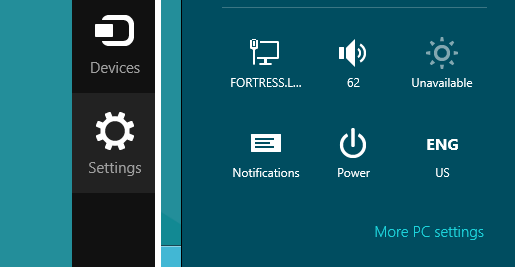
1 Use the Inline image 1 + I to bring the Desktop menu and click Notifications.
Inline image 3

Read more: PureInfoTech
QR: Inline image 2

Posted via email from Jasper-Net

SCSS — немного практики, часть I

Inline image 2

Статей про SASS(SCSS), Less на хабрахабре уже полно, но на мой взгляд не хватает такой, в которой было бы немного реальной практики. Я постараюсь восполнить этот пробел. Около года назад одна из SASS-статей меня «зацепила», и с тех пор я полюбил эту технологию настолько, что ручной набор обычного CSS кода представляется мне лишней тратой времени. Сия статья посвящается тем верстальщикам (или web-программистам), которые про SCSS ещё не слышали, или же ещё не пробовали в деле. Более опытным товарищам, полагаю, в ней ловить нечего.

Что такое SCSS

SCSS — «диалект» языка SASS. А что такое SASS? SASS это язык похожий на HAML (весьма лаконичный шаблонизатор), но предназначенный для упрощения создания CSS-кода. Проще говоря, SASS это такой язык, код которого специальной ruby-программой транслируется в обычный CSS код. Синтаксис этого языка очень гибок, он учитывает множество мелочей, которые так желанны в CSS. Более того, в нём есть даже логика (@if, @each), математика (можно складывать как числа, строки, так и цвета). Возможно, некоторые возможности SCSS покажутся вам избыточными, но, на мой взгляд, лишними они не будут, останутся «про запас».

Отличие SCSS от SASS заключается в том, что SCSS больше похож на обычный CSS код. Пример SASS-кода:
$blue: #3bbfce
$margin: 16px

.content-navigation
  border-color: $blue
  color: darken($blue, 9%)

.border
  padding: $margin / 2
  margin: $margin / 2
  border-color: $blue

И тоже самое на SCSS:
$blue: #3bbfce;
$margin: 16px;

.content-navigation {
  border-color: $blue;
  color: darken($blue, 9%);
}

.border {
  padding: $margin / 2;
  margin: $margin / 2;
  border-color: $blue;
}

Read more: Habrahabr.ru
QR: Inline image 1

Posted via email from Jasper-Net

New Duqu Sample Found in the Wild

Inline image 1

We recently received a file that looked very familiar. A quick investigation showed it to be a new version of W32.Duqu. The file we received is only one component of the Duqu threat however—it is the loader file used to load the rest of the threat when the computer restarts (the rest of the threat is stored encrypted on disk). The component we received has been highlighted below (Driver file .sys) in an image taken from our Duqu whitepaper:

Read more: Symantec
QR: Inline image 2

Posted via email from Jasper-Net

כיצד ניתן לבטל את ההתראה לפני מחיקת קבצים במערכת ההפעלה ?

בשימוש היום יומי במחשב אנו מבצעים פעולות רבות עם הקבצים השונים במערכת ההפעלה ; שולחים אותם בדואר אלקטרוני , מעתיקים , מוחקים  משנים את שמותיהם ועוד פעולות רבות ומגוונות . כל אחת מהפעולות הנ"ל מתבצעות באופן מיידי ברגע בו נתנו פקודה למערכת לבצען למעט פקודת המחיקה . פקודה זו תגרום להופעת חלון התראה לפני מחיקת הקובץ אשר בו יהיה עלינו לאשר את הפעולה על מנת לבצע את המחיקה בפועל  – אם כך כיצד ניתן לבטל את ההתראה לפני מחיקת קבצים במערכת ההפעלה ?

שלום לכולם ,

כאן רותם כהן מצוות התמיכה של Microsoft והיום נלמד כיצד לבטל את ההתראה לפני המחיקה וכיצד לאפשר למנהל המחשב או הרשת למנוע את היכולת לבטל התראה זו .

קבצים הנמחקים במערכת ההפעלה אינם נמחקים מיידית אלא מועברים אל תקיית סל המיחזור עד למחיקה סופית שלהם מתקיה זו . על אף קיומו של סל המחזור במערכת ההפעלה עדיין מופעלת במערכת הגנה נוספת בדמות התראה על המסך אותה המשתמש צריך לאשר על מנת לבצע את העברת הקובץ אל סל המחזור .

Inline image 1

משתמשים מתקדמים וודאי מכירים את האפשרות להחזיק את כפתור SHIFT במקלדת וללחוץ על כפתור DELETE על מנת למחוק את הקובץ ישירות ממערכת ההפעלה מבלי להעבירו אל סל המחזור תחילה .

מאחד , משתמשים מתקדמים ומנוסים יכולים למצוא את התראת המחיקה כגורם מעכב בשימוש במערכת אך מנגד עומדים מנהלי הרשת או מנהלי המחשב שרוצים להגן על המשתמשים ממחיקת קבצים בטעות. על מנת לשרת את שני הצדדים נלמד כיצד לבטל את הופעת ההתראה ומנגד נלמד כיצד למנוע מהמשתמשים את היכולת לבטלה .

ביטול ההתראה לפני מחיקת קבצים במערכת ההפעלה

על מנת לבטל את התראה המחיקה כל שעלינו לעשות הוא לפעול על פי השלבים הבאים :

1.לחצו מקש ימני על סל המחזור ובחרו במאפיינים

QR: Inline image 2

Posted via email from Jasper-Net

Debugging C/C++ and CPython using GDB 7′s new Python extension support

I’ve recently been looking into ways to improve my debugging experience with mixed Python and C/C++ programs. I spend a fair amount of time working on systems built using both languages in tandem, and the tools available for debugging across the languages have historically been very limited. Often, logging and/or intimate knowledge of the Python C-API (and, in my case, boost.python) were the primary tools available.

I was naturally very excited, then, when GDB 7 introduced support for extension via Python. This seemed like an obvious step towards a “unified” debugging environment, one where I could step naturally between the languages, set breakpoints, etc. This new GDB feature doesn’t solve the problem directly, but it opens the door for more sophisticated extensions to GDB than were previously practical.

Building on this new GDB feature, recent Python source releases include GDB extensions as a build product. That is, starting at around python-3.2, when you build Python from source one of the build products is a set of GDB extensions that make it possible to do very natural debugging of Python from inside GDB. These extensions allow you, for example, to step up and down the Python call stack, display frame information (locals), and so forth. And this can be done while also navigating the base C call stack. This provides a very intuitive and productive debugging environment for anyone working across the two runtime environment.

edit: It was pointed out on reddit that gdb’s embedded Python interpreter has been around since 2009 and is thus not particularly new.

GDB 7′s Python extension system

What exactly is GDB’s new Python extension system? Broadly speaking, it’s a way to script GDB using Python rather than GDB’s own internal language. From around version 7 onward, GDB embeds a Python interpreter that you can invoke from the prompt and from scripts. For example:

(gdb) python
&>import sys

To support writing extensions, you can import the module “gdb” from this embedded interpreter. This module provides access and hooks into GDB so that you can control it via Python scripts. You can read all about this Python extension support in GDB’s documentation.

This new facility has been used to implement, for example, pretty printers for STL containers. But in this article we’re interested in improving the CPython debugging experience, so we’ll cover that in the next section.

Read more: Misspent
QR: Inline image 1

Posted via email from Jasper-Net

Saturday, March 24, 2012

Chrome Remote Desktop

Inline image 2

Chrome Remote Desktop is a new Chrome extension that lets you remotely control a computer from your browser. It's the first software that uses a technology code-named "chromoting" and it's especially useful if you have a Chromebook.
The goal of this beta release is to demonstrate the core Chrome Remoting technology and get feedback from users. This version enables users to share with or get access to another computer by providing a one-time authentication code. Access is given only to the specific person the user identifies for one time only, and the sharing session is fully secured. 

One potential use of this version is the remote IT helpdesk case. The helpdesk can use the Chrome Remote Desktop BETA to help another user, while conversely a user can receive help by setting up a sharing session without leaving their desk. Additional use cases such as being able to access your own computer remotely are coming soon.

Chrome Remote Desktop BETA is fully cross-platform, so you can connect any two computers that have a Chrome browser, including Windows, Linux, Mac and Chromebooks.

Read more: Chrome web store
QR: Inline image 1

Posted via email from Jasper-Net

Mono 2.11.0 is out

After more than a year of development, we are happy to announce Mono 2.11, the first in a series of beta releases that will lead to the next 2.12 stable release.

Continuous Integration

To assist those helping us with testing the release, we have setup a new continuous build system that builds packages for Mac, OpenSUSE and Windows at http://wrench.mono-project.com/Wrench.

Runtime Improvements in Mono 2.11

There are hundreds of new features available in this release as we have accumulated them over a very long time. Every fix that has gone into the Mono 2.10.xx series has been integrated into this release.

In addition, here are some of the highlights of this release.

Garbage Collector: Our SGen garbage collector is now considered production quality and is in use by Xamarin's own commercial products.

The collector on multi-CPU systems will also distribute various tasks across the CPUs, it is no longer limited to the marking phase.

The guide Working with SGen will help developers tune the collector for their needs and discusses tricks that developers can take advantage of.

ThreadLocal<T> is now inlined by the runtime engine, speeding up many threaded applications.

Full Unicode Surrogate Support this was a long standing feature and has now been implemented.

C# 5.0 -- Async Support

Mono 2.11 implements the C# 5.0 language with complete support for async programming.

The Mono's class libraries have been updated to better support async programming. See the section "4.5 API" for more details.

QR: Inline image 1

Posted via email from Jasper-Net

Need a portable "What version of .Net do you have installed?" utility that you can even redistribute? Check out the .NET Version Detector XI

Inline image 1

ASoft .NET Version Detector is a lightweight tool that gives information on the different versions of Microsoft .NET that are installed on a machine.

If a certain version isn't on the machine, you can simply follow the link that .NET Version Detector suggests, so it is easier for the novice user to find the runtimes. 
Also detailed information is given on where the .NET Frameworks are installed with links to the directories. 
The details can easily be copied by a user, to paste in a mail. 
.NET Version Detector is a native application, which means it isn't dependent on any version of .NET to run.

.NET Version Detector is a handy tool for vendors of .NET applications also. 
Knowing which versions a user has installed and where they are located on the hard drive. 
ASoft allows for a vendor to bundle .NET Version Detector with its application (for free!) so that it is easier to get some generic and exact information on the frameworks. 
But before doing so, contact us first!

New Features: 
- Supports commandline option to export data to file (txt/xml) and not show the user application

QR: Inline image 2

Posted via email from Jasper-Net

Design case study: iPad to Windows 8 Metro style app

Inline image 2Inline image 3

[This documentation is preliminary and is subject to change.]

iOS is a popular platform for creating apps that are touch first, fun, and engaging. With the introduction of Windows 8 Consumer Preview, designers and developers have a new platform to unleash their creativity.

In this case study we want to help designers and developers who are familiar with iOS to reimagine their apps using Metro style design principles. We show you how to translate common user interface and experience patterns found in iPad apps to Windows 8 Metro style apps. We draw on our experience building the same app for the iPad and for Windows 8. We use common design and development scenarios to show how to leverage the Windows 8 platform and incorporate Metro style design principles.

To learn more about the business opportunity of Windows 8, see Selling apps. For more info about the features used to build Metro style apps, see the Windows 8 Product Guide for Developers.

Read more: MSDN
QR: Inline image 1

Posted via email from Jasper-Net

Metro XAML and HTML Control Sample Packs Available

A set of Metro style app samples that demonstrate how to use controls.

Description
A set of Metro style app samples that demonstrate how to use controls.

The Windows Samples Gallery contains a variety of code samples that exercise the various new programming models, platforms, features, and components available in Windows 8 Consumer Preview and/or Windows Server 8 Beta. These downloadable samples are provided as compressed ZIP files that contain a Visual Studio solution (SLN) file for the sample, along with the source files, assets, resources, and metadata necessary to successfully compile and run the sample. For more information about the programming models, platforms, languages, and APIs demonstrated in this sample, please refer to the guidance, tutorials, and reference topics provided in the Windows 8 documentation available in the Windows Developer Center. This sample is provided as-is in order to indicate or demonstrate the functionality of the programming models and feature APIs for Windows 8 and/or Windows Server 8 Beta. Please provide feedback on this sample!

QR: Inline image 1

Posted via email from Jasper-Net

Thursday, March 22, 2012

SSLyze

Hi everyone,

We just released a new version of SSLyze, our Python SSL scanner.

Here's what's new in version 0.4:
* Support for OpenSSL 1.0.1 and TLS 1.1 and 1.2 scanning. See
--tlsv1_1 and --tlsv1_2.
* Support for HTTP CONNECT proxies. See --https_tunnel.
* Support for StartTLS with SMTP and XMPP. See --starttls.
* Improved/clarified output.
* Various bug fixes.

Read more: Google code
QR: Inline image 1

Posted via email from Jasper-Net

Wednesday, March 21, 2012

«Воскрешаем» HDD

Хочу поделиться опытом восстановления жесткого диска Seagate Barracuda 7200.11 ST3500320AS после сбоя. Короткая предыстория: один мой друг решил сделать полное форматирование своему жесткому диску, после чего тот больше не определялся в BIOS. Выкидывать 500-гигабайтный винчестер было жалко, и он отдал жесткий диск мне на растерзание. Забегая наперед, скажу, что прокачанные навыки «гугление» и «очумелые ручки» позволили добиться отличных результатов.

Итак, данный метод подходит для жестких дисков Seagate и Maxtor (для Samsung существует похожий способ, но в этой статье он не освещен). Информации касательно жестких дисков остальных производителей найдено не было. В конце статьи рассматриваются возможные проблемы. Я настоятельно рекомендую прочитать статью полностью, перед тем как повторять описанные здесь действия.

Конвертер

Конвертер можно купить (в продаже есть USB-TTL и COM-TTL) или сделать самому (привожу несколько схем ниже).

Подключение

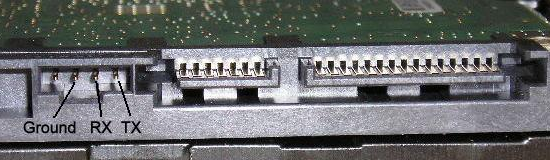
Подключаем RX и TX, как на рисунке ниже, отключаем SATA-кабель, подключаем питание.

Inline image 1

Для работы с COM-портом я использовал PuTTY, с задачей также отлично справится ваша любимая программа. Итак, открываем PuTTY, выбираем тип подключения Serial, вводим порт и остальные настройки:

Открываем окно терминала, нажимаем Ctrl+Z и видим приглашение:

F3 T>

Read more: Habrahabr.ru
QR: Inline image 2

Posted via email from Jasper-Net

Tuesday, March 20, 2012

צפייה ישירה: חומרים מיום העיון על פיתוח אפליקציות מטרו לחלונות 8 באמצעות HTML5 ו- JavaScript

בתאריך 19.3.2012 קיימנו במיקרוסופט ישראל את יום העיון השני בנושא פיתוח אפליקציות מטרו לסביבת Windows 8 והפעם על הפרק: כיצד לפתח אפליקציות מטרו באמצעות שימוש בכלים שכל מפתח ווב מכיר: HTML5 ו- JavaScript.

Windows 8 עם ממשק המטרו המהפכני אשר מותאם למכשירים שונים, מציבה אתגרים חדשים ומלהיבים לחברות תוכנה ומפתחים. מטרת יום העיון היתה להציג את העקרונות הבסיסים והחשובים ביותר בבואנו לפתח אפליקציות מטרו וללמד מפתחים כיצד להשתמש בכלים ובטכנולוגיות מוכרות  על מנת להכנס לעולם חדש ומופלא של פיתוח אפליקציות Windows 8 שגם מאפשרת הזדמנות עסקית מצויינת לכל אחד ואחת ממכם: להפיץ ולמכור בקלות את האפליקציה שפיתחתם באמצעות ה- Windows 8 Store. אז בהצלחה!..

ביום עיון זה, למדנו על עקרונות הפיתוח ל- Windows 8 ב- HTML5, ראינו איך ניתן לקחת את הידע והניסיון מעולם ה- Web לעולם ה- Desktop והבנו את ההבדלים בין העולמות. כמו כן הכרנו את WinJS – ספריית ה- JavaScript של מיקרוסופט המכילה פקדים ורכיבים המותאמים לסוג החדש של האפליקציות, ואת WinRT – שכבת ה- API החדשה לגישה ליכולות של Windows מקוד JavaScript.  

QR: Inline image 1

Posted via email from Jasper-Net

Windows 8 Camp: סרטוני הוידאו מיום העיון למפתחים בנושא פיתוח אפליקציות מטרו ל- Windows 8 זמינים להורדה וצפייה ישירה

בתאריך 12.3.2012 קיימנו במיקרוסופט ישראל את יום העיון הראשון בנושא פיתוח אפליקציות מטרו לסביבת Windows 8.

Windows 8 עם ממשק המטרו המהפכני אשר מותאם למכשירים שונים, מציבים אתגרים חדשים ומלהיבים לחברות תוכנה ומפתחים. מטרת יום העיון היתה להציג את העקרונות הבסיסים והחשובים ביותר בבואנו לפתח אפליקציות מטרו ולא פחות חשוב – להציג את ההזדמנות העסקית שנוצרה למפתחים אשר מעוניינים לפתח אפליקציות Windows 8 ולמכור ולהפיץ אותן באמצעות Windows 8 Store.

שימו לב: כל ההרצאות הן באנגלית.

במפגש היה לנו את הכבוד לארח את מקייל פלט, דירקטור בכיר במיקרוסופט בחטיבת המפתחים, אשר הגיע היישר מרדמונד להסביר לכם על הדרך הנכונה לפתח אפליקציות מטרו ולהראות דוגמאות חיות.

האג’נדה המלאה של יום העיון וכל הנושאים עליהן דיברנו
 
The Windows 8 Platform for Metro Style App
Designing Apps with Metro Principles and the Windows Personality
Everything Web Developers Must Know to Build Metro Style Apps
Building Metro Style Apps with XAML: What .NET Developers Need to Know
Building Windows 8 Metro Style UIs
Integrating with the Windows 8 Experiences
Bring Your Apps to Life with Tile and Notifications
How and When Metro Style Apps Run
Building Metro Style Apps that Take Advantage of Modern Hardware
The Developer Opportunity: Introducing the Windows Stor

QR: Inline image 1

Posted via email from Jasper-Net

16 Linux Server Monitoring Commands You Really Need To Know

Want to know what's really going on with your server? Then you need to know these essential commands. Once you've mastered them, you'll be well on your way to being an expert Linux system administrator.

Depending on the Linux distribution, you can run pull up much of the information that these shell commands can give you from a GUI program. SUSE Linux, for example, has an excellent, graphical configuration and management tool, YaST, and KDE's KDE System Guard is also excellent.
However, it's a Linux administrator truism that you should run a GUI on a server only when you absolutely must. That's because Linux GUIs take up system resources that could be better used elsewhere. So, while using a GUI program is fine for basic server health checkups, if you want to know what's really happening, turn off the GUI and use these tools from the Linux command shell.

This also means that you should only start a GUI on a server when it's required; don’t leave it running. For optimum performance, a Linux server should run at runlevel 3, which fully supports networking and multiple users but doesn't start the GUI when the machine boots. If you really need a graphical desktop, you can always get one by running startx from a shell prompt.

If your server starts by booting into a graphical desktop, you need to change this. To do so, head to a terminal window, su to the root user, and use your favorite editor on /etc/inittab.

Once there, find the initdefault line and change it from id:5:initdefault: to id:3:initdefault:
If there is no inittab file, create it, and add the id:3 line. Save and exit. The next time you boot into your server it will boot into runlevel 3. If you don't want to reboot after this change, you can also set your server's run level immediately with the command: init 3
Once your server is running at init 3, you can start using the following shell programs to see what's happening inside your server.

iostat
The iostat command shows in detail what your storage subsystem is up to. You usually use iostat to monitor how well your storage sub-systems are working in general and to spot slow input/output problems before your clients notice that the server is running slowly. Trust me, you want to spot these problems before your users do!

meminfo and free
Meminfo gives you a detailed list of what's going on in memory. Typically you access meminfo's data by using another program such as cat or grep. For example,

cat /proc/meminfo

Read more: InputOutput
QR: Inline image 1

Posted via email from Jasper-Net

Windows 8 Consumer Preview Power User How To Series

Inline image 2

Windows 8 Consumer Preview (aka beta version) has just been released. This prerelease version of Windows 8 focuses on people and apps and gives you powerful new ways to use social technologies to connect with the people who are important to you. It's Windows reimagined. Windows 8 Consumer Preview is built on the rock-solid foundation of Windows 7 and has the security and reliability features you expect from Windows, but we’ve made it even better. It’s fast, and it’s made to work on a variety of form factors—especially the new generation of touch devices.

Windows 8 How To: 1. Switch Between Metro UI and Desktop Mode 
Windows 8 How To: 2. Switch Between Apps or Snap Apps 
Windows 8 How To: 3. How to Power Off Your Device 
Windows 8 How To: 4. Show and Access the Control Panel 
Windows 8 How To: 5. Show and Access Administrative Tools 
Windows 8 How To: 6. Show All Apps 
Windows 8 How To: 7. Switch Between Windows Accounts and Local Accounts 
Windows 8 How To: 8. Set up a Picture Password 
Windows 8 How To: 9. Set Up a Printer 
Windows 8 How To: 10. Customize Metro UI – App Tiles and Groups 
Windows 8 How To: 11. Install Language Packs for Multilingual Support 
Windows 8 How To: 12. Show and Use “Run” Command 
Windows 8 How To: 13. Show and Use cmd Prompt (DOS Mode) 
Windows 8 How To: 14. Show and Use PowerShell 
Windows 8 How To: 15. Show and Use Desktop Applications 
Windows 8 How To: 16. Install .NET 3.5 and Windows Live Essentials 
Windows 8 How To: 17. Add New Tab or New InPrivate Tab in Metro Style IE Browser 
Windows 8 How To: 18. Configure WiFi Connection and Airplane Mode 
Windows 8 How To: 19. Show Hidden Files, Folders and Drives 
Windows 8 How To: 20. How to Start Windows 8 in Safe Mode 
Windows 8 How To: 21. Install and Uninstall Metro Style Apps 
Windows 8 How To: 22. Enable or Disable Sharing Between PCs Using HomeGroup 
Windows 8 How To: 23. Find and Use Windows Help and Support 
Windows 8 How To: 24. Show and Configure Free Anti-Virus App (Windows Defender) 
Windows 8 How To: 25. Show and Enable Split Touch Keyboard (On-Screen) 
Windows 8 How To: 26. Set up Remote Desktop Connection 
Windows 8 How To: 27. Backup your Files Using File History 
Windows 8 How To: 28. Restore Files Using File History 
Windows 8 How To: 29. Restore System to a Previous State Using Restore Point 
Windows 8 How To: 30. Restore your Device using Refresh and Reset

QR: Inline image 1

Posted via email from Jasper-Net

AddressSanitizer

Introduction
AddressSanitizer (aka ASan) is a memory error detector for C/C++. It finds:

Use after free (dangling pointer dereference)
Heap buffer overflow
Stack buffer overflow
Global buffer overflow
Use after return

This tool is very fast. The average slowdown of the instrumented program is ~2x (see PerformanceNumbers).

The tool consists of a compiler instrumentation module (currently, an LLVM pass) and a run-time library which replaces the malloc function.

The tool works on x86 Linux and Mac.

See also:

AddressSanitizerAlgorithm -- if you are curious how it works.
ComparisonOfMemoryTools
Getting AddressSanitizer
The Chromium team periodically updates LLVM/Clang binaries, which now include AddressSanitizer support. Simply execute the following:

mkdir -p tools/clang
cd tools/clang
cd ../../
tools/clang/scripts/update.sh
# Now use third_party/llvm-build/Release+Asserts/bin/{clang,clang++}

Read more: Google code
QR: Inline image 1

Posted via email from Jasper-Net

Lesser Known CLR Custom Attributes -- UnsafeValueType

In a comment to the previous post about CLR Custom Attributes I listed some other custom attributes that the CLR recognizes (by name). Some of them I previously thought were compiler only custom attributes, so I decided to investigate them.

System.Runtime.CompilerServices.UnsafeValueTypeAttribute

The documentation for this attribute, somewhat uncharacteristically, actually explains what it does, but I decided to try it out.

Here's an example that demonstrates what it does:

using System;
using System.Runtime.CompilerServices;

//[UnsafeValueType]
struct Foo {
  public int field;
}

class Program {
  [MethodImpl(MethodImplOptions.NoOptimization)]
  static void Main() {
    int i = 1234;
    Foo foo = new Foo();

Read more: IKVM.NET Weblog
QR: Inline image 1

Posted via email from Jasper-Net

Buffer overflow protection

Buffer overflow protection refers to various techniques used during software development to enhance the security of executable programs by detecting buffer overflows on stack-allocated variables as they occur and preventing them from becoming serious security vulnerabilities. There have been several implementations of buffer overflow protection.

This article deals with stack-based overflow; similar protections also exist against heap-based overflows, but they are implementation-specific.

How it works

Main article: Stack buffer overflow
Typically, buffer overflow protection modifies the organization of data in the stack frame of a function call to include a "canary" value which, when destroyed, shows that a buffer preceding it in memory has been overflowed. This gives the benefit of preventing an entire class of attacks. According to some software vendors[who?], the performance impact of these techniques is negligible.

Canaries

Canaries or canary words are known values that are placed between a buffer and control data on the stack to monitor buffer overflows. When the buffer overflows, the first data to be corrupted will be the canary, and a failed verification of the canary data is therefore an alert of an overflow, which can then be handled, for example, by invalidating the corrupted data.
The terminology is a reference to the historic practice of using canaries in coal mines, since they would be affected by toxic gases earlier than the miners, thus providing a biological warning system.
There are three types of canaries in use: Terminator, Random, and Random XOR. Current versions of StackGuard support all three, while ProPolice supports Terminator and Random canaries.

Terminator canaries

Terminator Canaries use the observation that most buffer overflow attacks are based on certain string operations which end at terminators. The reaction to this observation is that the canaries are built of NULL terminators, CR, LF, and -1. The undesirable result is that the canary is known. Even with the protection, an attacker could potentially overwrite the canary with its known value, and control information with mismatched values, thus passing the canary check code, this latter being executed soon before the specific processor return-from-call instruction.

Random canaries

Random canaries are randomly generated, usually from an entropy-gathering daemon, in order to prevent an attacker from knowing their value. Usually, it is not logically possible or plausible to read the canary for exploiting; the canary is a secure value known only by those who need to know it—the buffer overflow protection code in this case.
Normally, a random canary is generated at program initialization, and stored in a global variable. This variable is usually padded by unmapped pages, so that attempting to read it using any kinds of tricks that exploit bugs to read off RAM cause a segmentation fault, terminating the program. It may still be possible to read the canary, if the attacker knows where it is, or can get the program to read from the stack.

Read more: Wikipedia
QR: Inline image 1

Posted via email from Jasper-Net

Защита в виртуальной среде: чеклист угроз

Inline image 2

Защита данных в виртуальной среде — это «дивный новый мир», означающий серьёзное изменение мировоззрения в отношении понимания угроз. 

Я работаю с защитой персональных данных, у меня и коллег собралась огромная таблица возможных угроз безопасности, по которой можно проверять, что не так на конкретных объектах.

Ликбез

Стандартные понятия ИТ (сервер, кабель, сетевой коммутатор и так далее) из области физических объектов переходят в виртуальные. В среде виртуализации они начинают представлять собой элементы настройки программного кода виртуальной среды (гипервизора).

Меняется и сама форма угроз. С одной стороны в виртуальной среде исчезают угрозы «реального» мира (например, разрыв кабеля, выход из строя платы конкретного сервера и так далее), но возникают другие (например, некорректная программная настройка логических связей между объектами виртуальной среды, возможность кражи/уничтожения виртуальной среды целиком благодаря тому, что виртуальные машины представляются собой файлы, которые можно скопировать на съемный носитель или удалить).

Кроме того, существует вопрос как «натягивать» требования регулирующих органов (ФСТЭК) на виртуальную среду, поскольку существующие требования описывают требования к защите, предполагающей, что кабели, серверы и сетевое оборудование – это физические объекты. 

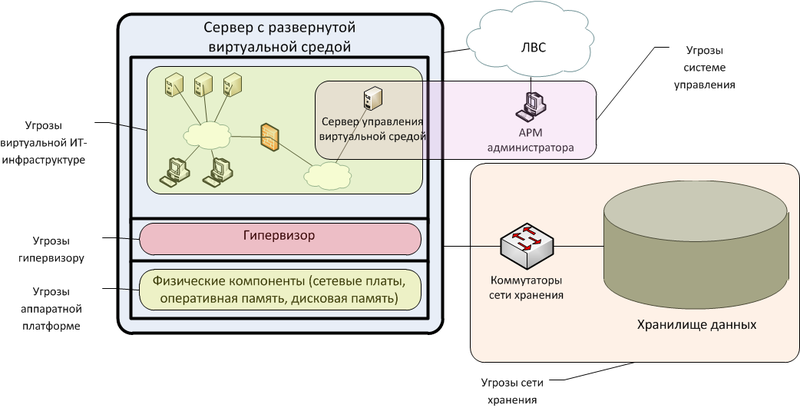
Структурируем угрозы безопасности в виртуальной среде в соответствии с ее архитектурными уровнями:
Аппаратная платформа, на которой разворачивается виртуальная среда;
Системное ПО виртуализации (гипервизор), выполняющее функции управления аппаратными ресурсами и ресурсами виртуальных машин;
Система управления виртуальной средой (серверные и клиентские программные компоненты, позволяющие локально или удаленно управлять настройками гипервизора и виртуальных машин);
Виртуальные машины, включающие в свой состав системное и прикладное программное обеспечение;
Сеть хранения данных (включающая коммутационное оборудование и систему хранения) с размещаемыми образами виртуальных машин и данными (сеть хранения данных может быть реализована на основе SAN, NAS, iSCSI).

Read more: Habrahabr.ru
QR: Inline image 1

Posted via email from Jasper-Net

Log Parser Studio

Microsoft released a new updated version of the Log Parser Studio. Log Parser Studio allow you to review and query logs files (e.g. Exchange, IIS, SQL etc.). The tool can be downloaded from the following link.

Read more: Yuval Sinay
QR: Inline image 1

Posted via email from Jasper-Net