Sunday, July 31, 2011

25 Intelligent Resume Ideas

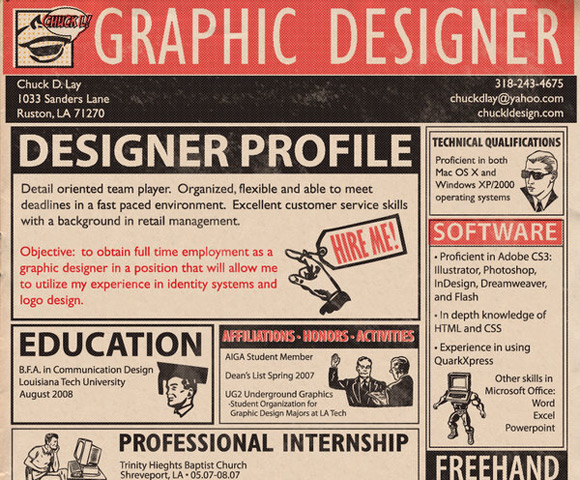
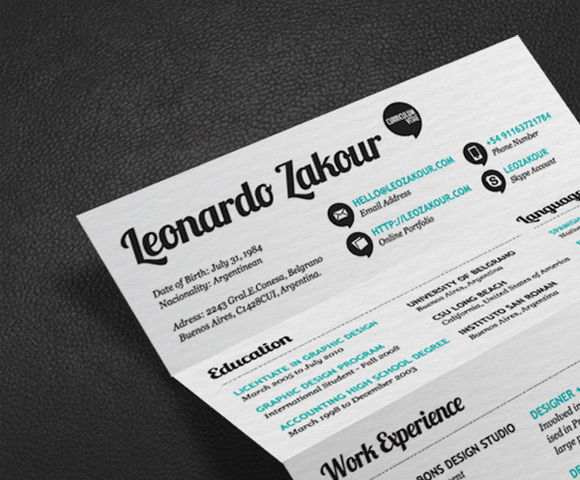
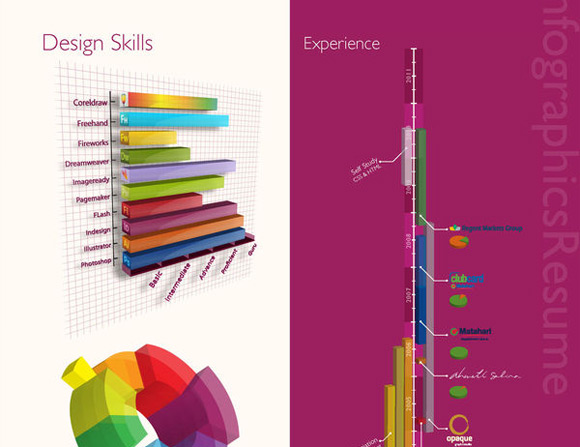
02_intelligent_resume_ideas_my_resume.jpg  04_intelligent_resume_ideas_self_promotion.jpg  24_intelligent_resume_ideas_infographics_resume.jpg

   Resumes are one of the most important documents needed when applying for any kind of a job. If you’re wondering how to get a job of your dreams, first of all consider creating an impressive and outstanding resume with a custom design. It’s your opportunity to create personality, show off your skills and creativity. In this post you will find 25 intelligent resume ideas for your inspiration revealing smart ways of presenting technical information by using some creativity.


Read more: WDL
QR: 25-intelligent-resume-ideas

Posted via email from Jasper-Net

Microsoft has $250,000 for you - some strings attached

Recently published on Microsoft's Technet Blogs site, nestling between Haiku #154 and Bloom's Taxonomy for Learning Objectives, you will find an unassumingly erudite, if lawyerly, posting.

You probably want to read it.

It could be worth US$250,000.

To get all the money for yourself, there are, of course, conditions. You will need to rat out your buddies to the point that they get convicted in a court of law, and you'll need to be the only person who does so. You may have to pay tax on the reward, too, depending on the regulations where you live, how law-abiding you are, and how willing you are to let it be known where you got the money.

Flushed with success at disrupting the Rustock botnet by taking down its primary command and control servers earlier in the year, Microsoft is now offering the abovementioned cash prize.

A cool quarter of a million: that's the reward Microsoft is offering for "new information that results in the identification, arrest and criminal conviction" of the individuals behind the Rustock botnet.

Rewards like this aren't new to Microsoft - nearly eight years ago, the software giant announced a US$5 million fighting fund to encourage people to dob in their virus-writing chums.

What's interesting is that the reward hasn't changed since then. Microsoft offered a quarter-mil each for turning in the authors of the Blaster and Sobig worms back in 2003 (the authors were never found), and a further quarter-mil each for outing the authors of Netsky or Sasser.

Read more: Naked security
QR: https://chart.googleapis.com/chart?chs=80x80&cht=qr&choe=UTF-8&chl=http://nakedsecurity.sophos.com/2011/07/19/microsoft-has-250000-for-you-some-strings-attached/

Posted via email from Jasper-Net

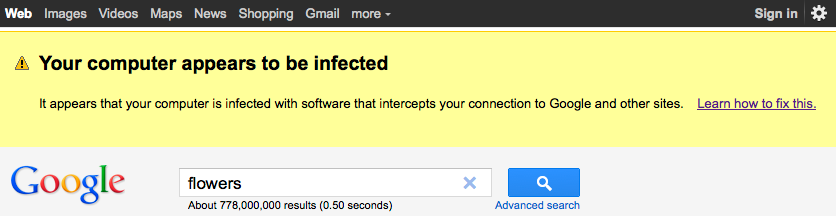
Google: Your Computer Appears to Be Infected

googhij.png

Google today began warning more than a million Internet users that their computers are infected with a malicious program that hijacks search results and tries to scare users into purchasing fake antivirus software.

Google security engineer Damian Menscher said he discovered the monster network of hacked machines while conducting routine maintenance at a Google data center. Menscher said when Google takes a data center off-line, search traffic directed to that center is temporarily stopped. Unexpectedly, Menscher found that a data center recently taken off-line was still receiving thousands of requests per second.

Read more: Krebs on security
QR: https://chart.googleapis.com/chart?chs=80x80&cht=qr&choe=UTF-8&chl=http://krebsonsecurity.com/2011/07/google-your-computer-appears-to-be-infected/

Posted via email from Jasper-Net

Data stolen from 35 million South Korean social networking users

cyworld-170.jpg?w=640

Hackers have broken into the popular South Korean websites Nate and Cyworld earlier this week, and stolen information about 35 million social networking users.

Names, email addresses, phone numbers and resident registration numbers of users are said to have been compromised.

The BBC reports that the Korean Communications Commission has pointed the finger of blame at Chinese hackers, after it was discovered that the IP addresses of intruding computers were based in the country.

SK Communications, which owns both websites, have published an apology in the form of a website pop-up which offers more information (sorry, it's in Korean), including links for how users can change their passwords.

Read more: Naked security
QR: https://chart.googleapis.com/chart?chs=80x80&cht=qr&choe=UTF-8&chl=http://nakedsecurity.sophos.com/2011/07/28/data-stolen-from-35-million-south-korean-social-networking-users/

Posted via email from Jasper-Net

А вот и настал момент

30 Must See HTML5 Tutorials

HTML5 and CSS3 expanded the possibilities of web design. There are lots of designers and developers who started practicing HTML5 and implementing it in their web designs. In this roundup we have featured 30 useful HTML5 tutorials that will definitely help developers increase their skills..

Making a Beautiful HTML5 Portfolio
128.jpg

Create Vector Masks using the HTML5 Canvas
226.jpg


Read more: SpyreStudios
QR:https://chart.googleapis.com/chart?chs=80x80&cht=qr&choe=UTF-8&chl=http://spyrestudios.com/30-must-see-html5-tutorials/

Posted via email from Jasper-Net

Initial Test Points for Getting Your Environment Under Control

Starting a job with a running system and real users is a nice “problem” to have but it presents some unique challenges as well. Especially if server monitoring isn’t robust and there are absolutely zero automated tests. Without these two critical components, you’re both operating and developing completely blind.

Without monitoring, server changes can’t be analyzed to see you’ve really made things better (or even worse). And without testing, every commit you make is a risk to the running site.
Monitoring made easy

Pingdom is perhaps the simplest monitoring tool that literally anyone with a browser can setup. Even if you don’t want to (or can’t) spend a penny, they will track one URL on your site for free. Be smart, and point this URL to a critical, complex page on your site to verify as many running pieces as possible. Once entered, Pingdom starts collecting data on the page’s general availability and even response time (world-wide).

With the single free URL check from Pingdom, you literally have zero excuses for flying blind. As outages crop up, get the URLs that demonstrate these failures added to Pingdom. Stop being the last guy to find out that the web service is down and start being the one reporting it’s outage to team.

Getting your SNMP configured correctly is the next step and will allow you to do real low-level monitoring of disks, cpu, network, etc. If you don’t have the time (or know-how) to setup a front-end to report on all these data points, think about having an external service provider do it for you. Logicmonitor and Cloudkick are both excellent and reliable monitoring services.

Read more: DevOps zone
QR: initial-test-points-getting

Posted via email from Jasper-Net

35 Brilliant Unusual Layout Websites

426.jpg  1117.jpg


Read more: AcrisDesign
QR: https://chart.googleapis.com/chart?chs=80x80&cht=qr&choe=UTF-8&chl=http://acrisdesign.com/2011/07/35-brilliant-unusual-layout-websites/

Posted via email from Jasper-Net

Google Code Finally Adds Git Support

It’s been a long time coming, but Google Code has finally added support for the wildly popular Git version control system. Git is a distributed version control system used by many popular projects including the Linux kernel, Ruby on Rails and Android.

Google Code, which offers free public hosting for collaborative software projects, started life as an SVN-based host and later added support for Mercurial. Google Code’s lack of Git support helped drive the meteoric rise of GitHub, one of the most popular places to host Git-based projects on the web today.

Now Google Code can compete with GitHub. But, thanks to GitHub’s slick interface and well-thought out features, Google Code seems unlikely to lure many away from their existing GitHub hosting. Still, if you’re a Google Code fan, but want to use Git, well, now you can.


Read more: WebMonkey
QR: https://chart.googleapis.com/chart?chs=80x80&cht=qr&choe=UTF-8&chl=http://www.webmonkey.com/2011/07/google-code-finally-adds-git-support/

Posted via email from Jasper-Net

70 бесплатных PSD шаблонов для сайтов

2-free-psd-layout-template-48.jpg  6-free-web-design-layout-12.jpg  64.jpg

Read more: 205k.in
QR: 70-besplatnyh-psd-shablonov-dlya-saytov

Posted via email from Jasper-Net

Silverlight Wizard Control

Project Description
Building a multi-step UI in Silverlight can easily be done using this refined Silverlight Wizard control. This project provides a comparable port of the ASP.NET wizard in a Silverlight control following the similiar method constructs and overall architecture.

You can find out more about this project at the following location:

http://www.sharepointsecurity.com/sharepoint/sharepoint-development/free-silverlight-wizard-control/


Read more: Codeplex
QR: https://chart.googleapis.com/chart?chs=80x80&cht=qr&choe=UTF-8&chl=https://silverlightwizard.codeplex.com/

Posted via email from Jasper-Net

Object Initializer in C#

Let us play around with some new features of C# 3.0 or above and you can say .Net framework 3.0 and above, like Object initializer, implicitly typed variables, extension methods, anonymous types, object initializer, Collection initializer, and automatic properties.

Let's start with Object and collection initializes.

Just refer to the following code of style. Definitely all .Net coders are aware of these lines.

...
...

Regular method of initializing an instance of the Customer class.

 Phone oPhone = new Phone();
 oPhone.CountryCode = "+91";
 oPhone.AreaCode = "0999";
 oPhone.PhoneNumber = "999999";

 Customer oCustomer = new Customer();
 oCustomer.CustomerID = 101;
 oCustomer.CompanyName = "oTest Corporation";
 oCustomer.Phone = oPhone;

By taking advantage of Object Initializers an instance of the Customer class

Customer nCustomer = new Customer()
 {
     CustomerID = 102,
     CompanyName = "nTest Corporation",
     Phone = new Phone()
     {
         CountryCode = "+91",
         AreaCode = "09999",
         PhoneNumber = "999999"
     }
 };


Read more: C# Corner
QR: https://chart.googleapis.com/chart?chs=80x80&cht=qr&choe=UTF-8&chl=http://www.c-sharpcorner.com/UploadFile/hirenvisavadiya/8528/

Posted via email from Jasper-Net

Red Cyan 3D Camera

FileDownload.aspx?ProjectName=redcyan3d&DownloadId=263633&Build=17950

What is it
'Red Cyan 3D camera' uses two webcams to capture 3D image. Place the two camera about 4" appart and plug them in to the USB. Turn on the software and capture. Its that easy. You will require a red cyan 3d glass to watch the pictures.

Please note that:

    You should use identical cameras.
    Software does the processing, placing and focusing the camera to get better 3D is your art. (you will get used to it)


If you don't have a identical web cams, Don't worry
You can do it manually using your mobile phone.

    Capture the object you want to capture using your mobile
    move it around 4 inch left or right now capture another shot.
    open the software, Click on add manually.
    now add the left and right image using the dialogue
    click ok and you will notice a progress bar at the bottom of the software.
    Large size pictures it take some time to be processed but you don't have to wait to add more images or capture more. Once you are done leave it for few minutes to complete the processing. Your images will be ready in the selected folder.


Read more: Codeplex
QR: https://chart.googleapis.com/chart?chs=80x80&cht=qr&choe=UTF-8&chl=https://redcyan3d.codeplex.com/

Posted via email from Jasper-Net

Accessing local assemblies in XAML

If you are new to WPF, you must know that XAML can define or declare any object under your local / global namespace just like your code does. It has full capability to load up your types based on the namespace you provide in your XAML.

Lets look how you can load your own namespace in XAML.

<Window x:Class="TestImagesApp.MainWindow"
        xmlns="http://schemas.microsoft.com/winfx/2006/xaml/presentation"
        xmlns:x="http://schemas.microsoft.com/winfx/2006/xaml"
        Title="MainWindow" Height="418" Width="530">
</Window>

This is the basic XAML that appear from template when you just create a new project. Now if you see minutely, you can see xmlns is there which points to some url of presentation layer. This will ensure that all the references of WPF objects is itself available to your XAML and you do not need to refer its namespace. Now what if you need to use something other than this ? As I told you that XAML can load any external type. You need to add a namespace to the XAML, which will instruct the Loader to load the CLR assembly and expose the Type that you use in the XAML.
For simplicity lets add a string as resource in the Window.

<Window x:Class="TestImagesApp.MainWindow"
        xmlns="http://schemas.microsoft.com/winfx/2006/xaml/presentation"
        xmlns:x="http://schemas.microsoft.com/winfx/2006/xaml"
        xmlns:System="clr-namespace:System;assembly=mscorlib"
        Title="MainWindow" Height="418" Width="530">
    <Grid>
        <Grid.Resources>
            <System:String x:Key="strString">This is a string</System:String>
        </Grid.Resources>
        <TextBox Text="{StaticResource strString}" />
    </Grid>
</Window>

So here the xmlns:System will load the assembly mscorlib and expose the namespace System to your XAML. Clr-namespace :System specifies the namespace and assembly=mscorlib refer the assembly. You should remember that the assembly should exist on GAC or local bin folder to make sure the XAML can load it properly.

Read more: Daily .Net Tips
QR: https://chart.googleapis.com/chart?chs=80x80&cht=qr&choe=UTF-8&chl=http://dailydotnettips.com/2011/07/28/1377/

Posted via email from Jasper-Net

Page State Step-by-Step

The Windows Phone life cycle is not terribly complicated, but it can be the source of some LifeCycle  confusion, and managing the life-cycle can be intimidating to new Windows Phone programmers.  This posting will review the basic life-cycle of a Windows Phone application and will show you what you need to do to preserve state and give your users a rewarding phone experience.

Reviewing the Life Cycle

When your application is launched (e.g., from the start menu) the Application Launching event is fired. You can hook this event in App.xaml.cs in the Application_Launching event handler, as described in yesterday’s posting on Fast Application Switching.

Once the application is started, and every time the user navigates to your page, you  will receive the OnNavigatedTo method, after which your page will be in the Running state.

If the user starts a new application your application receives the Application Deactivated event and is put in the Dormant state.  If the phone runs low on memory, your application may be Tombstoned.

From either Tombstoned or Dormant your application may be terminated or it may be restored.  What we care about right now is what happens when your application is restored.

If your application is Dormant, you not only don’t have to take any action when you are restored, you don’t want to take any action; all your state was preserved when you were dormant, and you are ready to go.

If on the other hand, your application was tombstoned, then you do want to restore your page state when you return so that it appears to the user that your application was running (or at least dormant) while it was switched away.

Managing Page State

The best way to see how to manage Page State is to build a small application.  Open Visual Studio and create a new Windows Phone application and on the main page add a prompt and a TextBox for the user’s name, and a CheckBox for whether the user is a Geek, as shown in the following code,


Read more: Jesse Liberty
QR: https://chart.googleapis.com/chart?chs=80x80&cht=qr&choe=UTF-8&chl=http://jesseliberty.com/2011/07/27/page-statestep-by-step/

Posted via email from Jasper-Net

Difference between a UserControl and a CustomControl

Tweet

If you are thinking to build a control and apply the same to more than one place, you can take two kinds of approaches. Either you can create an User control inheriting from UserControl and adding a XAML for your control or use CustomControl to write yourself. Either one of them you choose they have their own pros and cons. Here in this post I will define what are the differences between the two approaches so that you can choose either one of them based on your requirement.

Before we start lets define both the terms:

UserControl : A usercontrolis a reusable chunk of user interface that is built up as a composition of other UIElement in the same style the main UI is built. In other words, a user control is just like a normal application block that can be used as Reusable component, and can be defined both using XAML and code together. It gives you a fresh UI canvas where you can define your custom reusable component that can be used widely in the application. In WPF, UserControl acts as a base class for any reusable component, but if you are looking for inheriting some other base, you can look into this.

Limitation of UserControl :

1. Appearance of an UserControl cannot be changed using a Template. Even though it has a property for Template, but it is of no use, as you cannot change the appearance of UserControl through this property.

2. UserControl is derived from ContentControl, thus if you change the Content of an usercontrol the entire UI will be replaced with that content.

3. As UserControl has both XAML and code behind. But as XAML can be used only once for entire inheritance hierarchy, you cannot use XAML for any class that inherits from your userControl. This is actually because Application.LoadComponent loads up the XAML once and is incompatible with inheritance. Thus when loading the XAML, the IComponentConnector interface is used to hook events and fields from XAML, hence you cannot replace XAML from your base class.

Custom Control: A customcontrol is a User interface element that has a distinct behaviour. A CustomControl is just a class that has one default appearance defined in Generic.xaml style which can be replaced by Template and Style at runtime but the behaviour you define for the control remains the same. So choose a CustomControl only when you need a certain kind of behaviour which is not there with the existing controls you have.


Read more: Daily .Net Tips
QR: https://chart.googleapis.com/chart?chs=80x80&cht=qr&choe=UTF-8&chl=http://dailydotnettips.com/2011/07/27/difference-between-a-usercontrol-and-a-customcontrol/

Posted via email from Jasper-Net

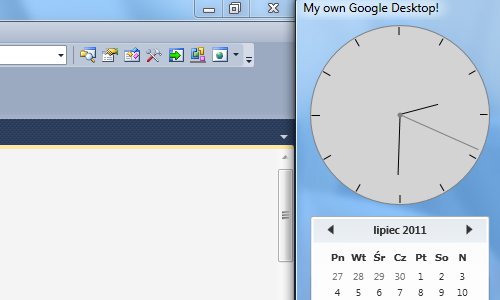
Creating an application like Google Desktop in WPF and C#

screenshot0.jpg

Introduction

Google Desktop docks to the left or right edge of the screen and displays some gadgets. It is always visible. It does not cover other windows, and other windows do not hide it. To do that, we have to use the AppBar - the taskbar is an AppBar too. This article explains how to create an application like Google Desktop in WPF.
Background

I implemented AppBar functionalities based on this article. Yet another article helped me to create a window with extended glass.
WndProc hook

For some functions in this project, we must receive window messages. In Windows Forms, it is sufficient to override the WndProc function, but in WPF, we must add a hook. First, we create a callback for the hook:

IntPtr WndProc(IntPtr hwnd, int msg, IntPtr wParam,
               IntPtr lParam, ref bool handled)
{
    return IntPtr.Zero;
}

hwnd is the handle to the window, msg is the ID of the window message, wParam and lParam are message parameters. If we process a message, we have to set handled to true. The WndProc does not receive messages, because we haven't added a hook. So add a hook using the following code:

protected override void OnSourceInitialized(EventArgs e)
{
    base.OnSourceInitialized(e); // Raising base method.

    IntPtr hwnd = new WindowInteropHelper(this).Handle; // Getting our window's handle.
    HwndSource source = HwndSource.FromHwnd(hwnd);
    source.AddHook(new HwndSourceHook(WndProc)); // Adding hook.
}

The OnSourceInitialized method is raised when the window's handle is created. The Loaded event is called after this. Now we can receive the window's messages.

Read more: Codeproject
QR: gdesktop.aspx

Posted via email from Jasper-Net

How to fix Subversion merge

Having done quite a bit of branching in centralized and distributed source control systems, I’m intimately aware of the additional (and I would say, unnecessary) pain centralized source control systems like Subversion and TFS bring to more powerful branching strategies used in teams today. Release branching, branch-per-feature and the like are very powerful tools of delivering software effectively, if you know how to properly set these things up.

However, merging has always been the linchpin in the branching story. Branching is easy, but because merging is the last step in a branching workflow, it’s the merging that determines the difficulty in branching. And merging in SVN, especially across branches, has always been….challenging. Along those lines, I saw an interesting proposal to fix Subversion merge.

Read more: Los Techies
QR: https://chart.googleapis.com/chart?chs=80x80&cht=qr&choe=UTF-8&chl=http://lostechies.com/jimmybogard/2011/07/28/how-to-fix-subversion-merge/

Posted via email from Jasper-Net

Preprocessor? .NET don't need no stinkin' preprocessor! [DebugEx.Assert provides meaningful assertion failure messages automagically!]

If you use .NET's Debug.Assert method, you probably write code to validate assumptions like so:

Debug.Assert(args == null);

If the expression above evaluates to false at run-time, .NET immediately halts the program and informs you of the problem:
Typical Debug.Assert

The stack trace can be really helpful (and it's cool you can attach a debugger right then!), but it would be even more helpful if the message told you something about the faulty assumption... Fortunately, there's an overload of Debug.Assert that lets you provide a message:

Debug.Assert(args == null, "args should be null.");

The failure dialog now looks like this:
Debug.Assert with message

That's a much nicer experience - especially when there are lots of calls to Assert and you're comfortable ignoring some of them from time to time (for example, if a network request failed and you know there's no connection). Some code analysis tools (notably StyleCop) go as far as to flag a warning for any call to Assert that doesn't provide a custom message.

At first, adding a message to every Assert seems like it ought to be pure goodness, but there turn out to be some drawbacks in practice:

  • The comment is often a direct restatement of the code - especially for very simple conditions. Redundant redundancy is redundant, and when I see messages like that, I'm reminded of code comments like this:
  • i++; // Increment i
  • It takes time and energy to type out all those custom messages, and the irony is that most of them will never be seen at all!

Read more: Delay's Blog
QR: preprocessor-net-don-t-need-no-stinkin-preprocessor-debugex-assert-provides-meaningful-assertion-failure-messages-automagically.aspx

Posted via email from Jasper-Net

Using WPF Converters to Affect Multiple Properties

I’m working on my first WPF application.  I’ve done a ton of reading on WPF and it’s helped me in my understandings of how WPF works.  So far, I’m really liking the data binding flexibility WPF gives you.  That, along with a very testable MVVM-based architecture, has made the experience a fun one!

Yesterday, I came across a situation where I needed a single item from my view model (an enum value) to affect two properties on a  WPF element (the Foreground and Background colors of a DataGridCell).  I’m familiar with value converters, but they only convert to a single value.  I did some research on MultiValueConverters, but, as seasoned WPF developer Anne Marsan pointed out, they take multiple inputs but still only produce a single output.  How to proceed?

NOTE: I’ve provided sample code in a BitBucket project here.  Each “attempt” that I detail below is tagged in the repository so you can easily see the implementations of each approach by switching your working directory to a certain tag.
First Attempt (Tag: Attempt1)

My first attempt was brute force and worked, but was messy – I simply created two value converters: both would take my enum, but one would return the background color and one would return the foreground color.

[ValueConversion(typeof(CompareResult), typeof(String))]
class ForeColorConverter : IValueConverter
{

    public object Convert(object value, Type targetType, object parameter, CultureInfo culture)
    {
        var result = (CompareResult)value;
        var ci = ColorInformation.FromResult(result);
        return ci.ForeColor;
    }


Read more: Patrick Steele's .NET Blog
QR: using-wpf-converters-to-affect-multiple-properties.aspx

Posted via email from Jasper-Net

20 smashing e-commerce icons, free to use, no restrictions

full_preview%25255B4%25255D.png?imgmax=800

Today, we are glad to release a set of 20 high quality E-commerce Icons in 64×64px, available in .png-format. This set was designed by Web Icons Set with the purpose to be used in e-commerce websites and has been exclusively released for Smashing Magazine and its readers. The set includes icons such as Empty Basket, Full Basket, Credit Cards, Delivery, Secure Payment, Checklist, Gifts, Shop Open, Shop Closed, Contact, Wallet and others.

Read more: Greg's Cool [Insert Clever Name] of the Day
QR: 20-smashing-e-commerce-icons-free-to.html

Posted via email from Jasper-Net

More on Microsoft ‘Jupiter’ and what it means for

     Following a very first suggestion this week on Microsoft;s Jupiter — a new “application model” for Windows 8 — I started nosing around to learn more about this mysterious new Microsoft codename.Here;s a brain dump of what I learned right after talking to a couple of sources of mine who spoke on the condition of anonymity, but whom I believe are in the know about the project.Jupiter is going to be a new user interface (UI) library for Windows, built alongside Windows 8. It will be a thin XAML/UI layer on top of Windows application programming interfaces and frameworks for subsystems like graphics,Buy Office 2010, text and input. The idea is Jupiter will bring support for smoother and more fluid animation, rich typography,Office 2007 Standard, and new media capabilities to Windows 8 devices. (Not surprisingly, the more fluid UI capabilities also are on the feature set list for Silverlight 5.)The high-level goal for Jupiter is to help Microsoft revitalize a world where developers write applications tailored for a specific platform. The days of “killer apps” optimized for Windows driving demand for Windows PCs are waning (if not already long gone). Microsoft;s hope with Jupiter is to provide Microsoft and third-party developers with a new framework, plus the next versions of Microsoft;s various development tools, to build what Microsoft is calling “immersive” applications.Immersive apps are not meant to be Windows desktop apps. Nor are they necessarily pure Web apps. They are applications that will be built using C#, Visual Basic (and maybe C++). These apps will be developed using the new Windows 8 app model and take advantage of its inherent servicing and packaging technologies and that will be available via the anticipated Windows 8 app store.Because Jupiter will be built off the same core XAML technology used in Windows Phone and Silverlight, there;s a good chance some of the Silverlight code developers already have written will be able to be reused to develop this new class of apps. Does this mean Windows Phone apps will automatically work on Windows 8 and be available from the Windows 8 app store? I don;t know but I am doubtful.One of my contacts described Jupiter this way: “It has to do with XAML + Native Code on slate/iPad-like devices. I think this is Microsoft;s approach for putting Windows on the smaller device without the bloat.”For now,Office 2010 Sale, Jupiter is supposedly a Windows 8 thing only, but could potentially be adapted to work with older versions of Windows and maybe Windows Embedded operating systems,Windows 7 Key, as well. Jupiter will actually ship as part of Windows 8, I am hearing from my contacts. A subset of Jupiter also will ship as part of a future version of the .Net Framework, according to what my sources said of Microsoft;s plans.

Read more: Portal v1.0
QR: https://chart.googleapis.com/chart?chs=80x80&cht=qr&choe=UTF-8&chl=http://blogaboutlifeview.amritsarhelp.com/2011/07/26/more-on-microsoft-jupiter-and-what-it-means-for/

Posted via email from Jasper-Net

10 ways to secure your Apache installation

File permissions play an important part in website security, particularly if you are running your own web server. A few simple steps when setting up a website can save you a lot of trouble inapache-logo the future and can be vitally important if you want to keep your company data secure. Therefore I have devised in no particular order a list of the top 10 things you should do to secure your Apache server from hackers.


1. File permissions

 Changing your file permissions are one of the most important things which you can do to secure your website. This is especially true if you have PHP files containing password information, you do not want any unwanted hackers reading or writing to these types of files.

 File permissions can be modified using the chmod command in Linux, this command uses octal file permissions to set read, write or execute to user, group or world. User refers to the user that owns the file, group refers to the group that the file belongs to and world is anyone else. If you are unfamiliar with octal permissions they are calculated by splitting the numbers into lots of 3 and then calculating the total number of bits.

Each bit has its own particular value

For example:

Read = 4
Write = 2
Execute = 1

So if you split the octal permission 745 into 3 sections, user, group and world, you have the following permissions.

 User = 7 (4+2+1 or RWX)
Group = 4 (4 or R)
World = 5 (4+1 or RX)

 You can then modify a file by using the command

 chmod 745 file.txt

 2. Ownership

 Ownership is a very important aspect of Apache security. You should never run any files in Apache as the root user, if a hacker is able to read or write server files through a certain file or script they will potentially gain full access to the whole server.

 File ownership is also important if you are running multiple websites for multiple users. Each user on the server should own their individual files as to separate file permissions so that others on the server cannot read, write or execute your files.

 By default most versions of Linux that come with apache also come with the apache user. You can take ownership of all of the files inside your apache directory by using the following command

chown –R apache /var/www/html


Read more: Unixmen
QR: 1839-10-ways-to-secure-your-apache-installation

Posted via email from Jasper-Net

50+ PSD UI Web design elements

I’m a big believer in not reinventing the wheel when it comes to web design.

If someone has already created something that fits what you need and/or want, and especially if that element is available for free, then why waste your time designing something that turns out virtually identical?

Your time and effort is better spent on creating new and unique parts of your design, while using what’s already available for other parts.

Below are more than 50 free UI element packs from a variety of designers. Buttons, form elements, media players, and similar stock elements are the most popular, though there are other elements included also.

And as a bonus, there are over half a dozen premium element packs at the end. Enjoy!


Soft UI Kit: Free PSD for Mocking Up Web Designs

softuikit.jpg

A set of common web elements for mockups, designed by Adrian Pelletier and provided by Six Revisions.

Transparent Glass UI: Free PSD for User Interface Design

transparentglass.jpg

This set of dark UI elements was created by PixelsDaily, and is also provided by Six Revisions.


Read more: WebDesigner Depot
QR: https://chart.googleapis.com/chart?chs=80x80&cht=qr&choe=UTF-8&chl=http://www.webdesignerdepot.com/2011/07/50-psd-ui-web-design-elements/

Posted via email from Jasper-Net

Internals of Array

Arrays are most important part of your program. Almost most of the collection that you work with in .NET framework is internally maintains Array. Say for instance, if you take the List it actually internally represents T[], while Dictionary is actually an array of structure KeyValuePair internally. Hence, array forms a very important part of your program.

Few days back while browsing over internet when I found an article written one of my buddy Dhananjay Kumar here, I thought how could I forget this important section of C# language, hence in this post, I will cover some of the important things that you need to remember while you use arrays in .NET.

Arrays Vs IEnumerables

Well, when working with Collections, the first thing that will come in your mind is the IEnumerables. Well, IEnumerable is the generic implementation of any iterators. In .NET every array internally implements an IEnuerable. You may think IEnumerable as a iterable sequence, which could be applied to anything that is iterable while array on the other hand has a fixed set of values contiguously allocated. By the way, each arrays actually implements an IEnumerable internally, so eventually in .NET every array is by default an IEnumerable.

How does an array automatically implements an IEnumerable ?

Yes, if this is in your mind, then you should read this. Actually when you declare an array the C# compiler translates it into a declaration of a class System.Array.

So, if you declare

string[] xx = { "aa" };

it is same as

Array arr = {"aa"} //even though this will produce an error


Hence, even though you think that you have declared a raw array just like what you do in Say C++, you are eventually creating an instance of a class. As this class implements IEnuerable internally, you would find the GetEnumerator inside it.

Hence you can say as any array in .NET is generally an implementation of System.Array, hence you will find few methods inside an object of it like Length, Clone, GetUpperBound, GetLowerBound etc.

How about Multi-Dimensional Arrays ?

A multi-dimensional array is also the same as Single Dimentional array and actually a System.Array inside with  a Rank of anything other than 1 (based on the number of dimensionns).
Hence

int[,] dimarray = new int[2, 3];


actually represents a multi-dimentional array. Now this is actually logically separated while you access its values.


Read more: Beyond Relational
QR: internals-of-array.aspx

Posted via email from Jasper-Net

Synchronous & Asynchronous Operations on Silverlight

A few days ago I wrote a very simple Silverlight application. Unfortunately I ended up with an infinitely locked UI thread.

Basically, the application was supposed to fetch configuration data from my server and use it. I added a reference to my server side service, and of course, Visual Studio generated an asynchronous proxy for me.

For a reason that is irrelevant for this post, I decided to wrap the asynchronous server call with a synchronous helper class. My helper class exposed a synchronous method which his parameters are the same as the server method except for the callback parameter that is not needed.

“One code of block worth a thousand words”, that’s the saying, right? :)

Let’s have a look at my helper class:

    class SynchronousConfigReader
    {
        private AutoResetEvent m_callbackCompleted;
        private string m_configValue;

        public SynchronousConfigReader()
        {
            m_callbackCompleted = new AutoResetEvent(false);
        }

        public string GetConfigData(string configKey)
        {
            ConfigServiceProxy proxy = new ConfigServiceProxy();
            proxy.GetConfigData(configKey, GetConfigData_Completed);
            m_callbackCompleted.WaitOne();
            return m_configValue;
        }

        private void GetConfigData_Completed(object sender, GetConfigDataEventArgs e)
        {
            m_configValue = e.ConfigValue;
            m_callbackCompleted.Set();
        }
    }


Read more: Shimi Rokah
QR: synchronous-amp-asynchronous-operations-on-silverlight.aspx

Posted via email from Jasper-Net

Ten Stupid Contractor Tricks and How to Avoid Them

ou negotiated hard. You spent days and nights working on the bid. Now you’ve signed the paperwork and it’s going to happen. Or is it?

Of the many post-mortems (note that the word “mortem” is Latin for “death”) in which I’ve participated, the lessons learned ranged from easy (we needed more coffee) to tough (several hundred thousand dollars in rework, three employee terminations, post-arbitration litigation pending, and even sliced tires).

I’ve worked with great professionals with credentials from the Project Management Institute, as well as many “old salt” program managers. A commonality between them is not only keeping their eye on the ball—the goals of the projects and programs—but also ensuring that contractor eyes are looking at the same balls and therefore, goals. Some contract management processes require constant realignment, while others are surprisingly smooth.

The basic facts of contract management are that they follow time-lines that mesh skill sets from two or more organizations. The life of a contract and its contractor are about the life and work described by the contract, its impact, then “goodbye.” Call it lifecycle because in many ways, it’s a living document. With perseverance, tenacity, and clear instructions, many projects start, work, and everything’s accomplished according to plan. The contract lived a good life. Others, however, had something change in the middle, perhaps expected, or unexpected. This is about preparing yourself for both kinds of changes: expected and unexpected.

Program and project management personnel have seen a lot of interesting contractor tricks. Some involved bid/tender execution basics. Others are more novel and ingenious. We’ll cover the top ten.

Contractor Trick #1: Contractor turnover causing additional costs through constant retraining.

The trick was a possible “bait-and-switch” between possible work candidates and the ones actually supplied. There are multiple possible solutions.

During the bid/tender phase, discover the typical turnover rates for individuals in the work categories that you need. If it’s possible – and sadly, it rarely is — try to learn what the certifications were for the individuals. Some contracting organizations have a cadre of high profile, experienced, and highly certified staff working for them. But these individuals are “mastheads” and give you the perception that these individuals may work for you. Watch for re-orgs just after the onset of the contract period.


Read more: InputOutput
QR: 246

Posted via email from Jasper-Net

Security Development Lifecycle Document Templates

SNAGHTML57bcce81%25255B6%25255D.png?imgmax=800

The templates for Security Development Lifecycle (SDL) practices are a collection of documents that are designed to be used as a starting point for creating your own SDL process documents.

Read more: Greg's Cool [Insert Clever Name] of the Day
Read more: Templates for SDL Practices
QR: security-development-lifecycle-document.html

Posted via email from Jasper-Net

Using Reflection and Attributes for better Tracing and Logging data rendering

In most projects there is always a requirement for tracing and/or writing debugging information along with writing out log information. When dealing with objects it is usually up to the developer to override the ToString() method to ensure meaningful information is presented. However this does not always happen. Reflection presents an alternative solution to this problem, and one that i recently adopted on a project.
Rendering an Object using Reflection

The power of reflection, in this scenario, is that it allows one to easily navigate through an object’s properties and determine the corresponding name value pair. This then allows one to construct a string that can be easily rendered.

Rather than run through small code snippets I have included is a helper class that will support passing in either an object, or an object collection, and creates a string representation of the object. The complete listing can be found at the bottom of this blog.

The key to making this work is the ability of reflection to iterate through an objects properties and determine the associated value.

Type objectType = item.GetType();
foreach (PropertyInfo propertyInfo in objectType.GetProperties(BindingFlags.Public | BindingFlags.Instance))
{
    if (propertyInfo.CanRead)
    {
        string value = ProcessProperty(propertyInfo.PropertyType, propertyInfo.Name, propertyInfo.GetValue(item, null));

        // Code goes here
     }
}


Once the value has been determined, the type is inspected, and converted to a string. You should also notice that if an object returns a meaningful value from the ToString() call this this value is returned.

string valueString = item.ToString();
Type objectType = item.GetType();
if (!objectType.IsValueType && valueString == objectType.FullName)
{   
    valueString = GetObjectValues(item, multipleLine);
}


In terms of using the code it is as easy as calling the ParameterCollectionToString or ParameterObjectToString method, within the debugging, logging, or tracing call.
Dealing with Sensitive Information

One issue that will arise in adopting such a generic solution, rather than one specific to each object (the ToString() solution) is how we hide Sensitive or Personally Identifiable Information. Take banking or medical applications for instance. Any tracing or logging solution should never disclose information such as bank account numbers or sensitive medical information. This is where attributes can help.


Read more: Carl's Blog
QR: using-reflection-and-attributes-for-better-tracing-and-logging-data-rendering.aspx

Posted via email from Jasper-Net

40 Excellent Tools for Designers and Developers

Designing has become a difficult job these days because of competition in the market these days. Designers who wish to excel must have access to all the tools necessary to make their designs better but these tools might be expensive for many people. Today, we have gathered a huge list of 40 different tools which designers can use in their future projects.


1. 256Pixels

With 256Pixels, users can easily create favicon designs either by uploading a picture or color the pixels by choosing any color. Designers can test their skills as well by completing different challenges that are posted on the website.

2. AjaxLoad

Ajaxload enable users create ajax icons by selecting the indicator type, background and foreground color.


Read more: SmashingHub
QR: 40-excellent-tools-for-designers-and-developers.htm

Posted via email from Jasper-Net

Auto Updatable Application

Introduction

Some applications may need to update themselves periodically. Typically the applications which are designed to be highly extensible usually may update few modules and thus can get new capabilities and functionality dynamically, just like plugins.

.Net applications can take advantage of loading updatable modules in separate AppDomain and unload them when update is available and reload them with updated assemblies. One problem that you may encounter is that the assembly files which are loaded gets locked and this prevents to replace them. If you are using separate AppDomain to load assemblies then solution is easier. You can enable shadow copy feature for AppDomain which actually makes copy of assembly before loading thus original assemblies remain unlocked and you can replace them while application is running.

If you are not using separate AppDomain and you want to update the assemblies including your application exe, then you need to do some tricky things as explained in rest of the article.

Background

I wanted to basically run the application and let the application update its own exe and other assemblies from some remote location. This requires to start the application in such a way that it do not locks its assemblies as normally happens when application starts. If application can update itself distribution of application can be done from centralized location. I am not including any logic to download the assemblies in this article.

Using the code

I found two solutions for the problem as below:

Solution one : Here I have used an additional application (i.e.Starter.exe) along with the main application.The Starter.exe should be present in application's start up directory. If you are downloading code then make sure that you copy the Startup.exe after building.


Read more: Codeproject
QR: AutoUpdatableApplication.aspx

Posted via email from Jasper-Net

Thursday, July 28, 2011

OK Go Goes HTML5

The YouTube sensation OK Go has just released their latest video using HTML5. The video is pretty cool itself, but the interactive feature is great.

It looks like the interactive stuff only works in Chrome.

Read more: Slashdot
Read more: Youtube
QR: watch?v=ur-y7oOto14&

Posted via email from Jasper-Net