Monday, October 31, 2011

Four CAs Have Been Compromised Since June

     The EFF, through the use of its SSL Observatory, has taken a look at the data from certificate revocation lists for SSL certificates in recent months, and found that there were four separate CAs compromised in the last four months. The only widely known CA compromise since June is the attack on DigiNotar this summer that completely compromised that company's CA infrastructure and eventually led to it being shut down. All of the major browser vendors were forced to revoke their trust in the DigiNotar root certificates and the attacker who claimed credit for the attack said that he also had compromised several other CAs. There are apparently three other CAs that have discovered compromises since June, but have not made them public.

Read more: Slashdot
QR: four-cas-have-been-compromised-since-june

Posted via email from Jasper-Net

Introducing Android WebDriver

[This post is by Dounia Berrada, an engineer on the EngTools team. — Tim Bray]

Selenium WebDriver is a browser automation tool which provides a lightweight and elegant way for testing web apps. Selenium WebDriver is now available as an SDK extra in the Android SDK, and supports 2.3 (Gingerbread) and onwards!

Whether or not your site is optimized for mobile browsers, you can be sure that users will be accessing it from their phones and tablets. WebDriver makes it easy to write automated tests that ensure your site works correctly when viewed from the Android browser. We’ll walk you through some basics about WebDriver and look at it in action.


WebDriver Basics

WebDriver tests are end-to-end tests that exercise the web application just like a real user would. WebDriver models user interactions with a web page such as finger flicks, finger scrolls and long presses. It can rotate the display and interact with HTML5 features such as local storage, session storage and the application cache. Those tests run as part of an Android tests project and are based on Junit. They can be launched from Eclipse or the command line. WebDriver tests can be wired with a continuous integration system and can run on phone and tablet emulators or real devices. Once the test starts, WebDriver opens a WebView configured like the Android browser and runs the tests against it.

WebDriver is an Android SDK extra and can be installed following these instructions. Once you’ve done that you’ll be ready to write tests! There is a comprehensive WebDriver user guide on the Selenium site, but let’s start with a basic example using www.google.com to give you a taste of what’s possible.

Getting Started

First, create an Android project containing an empty activity with no layout.

public class SimpleAppActivity extends Activity {
    @Override
    public void onCreate(Bundle savedInstanceState) {
        super.onCreate(savedInstanceState);
    }
}

Then create the Android test project that will contain the tests. WebDriver will create the WebView and set the layout automatically in the main Activity.

Let’s write a test that opens the Google home page on Android and issues a query for “weather in San Francisco”. The test will verify that Google returns search results, and that the first result returned is giving the weather in San Francisco.

public class SimpleGoogleTest extends ActivityInstrumentationTestCase2<SimpleAppActivity> {

    public void testGoogleShouldWork() {
      // Create a WebDriver instance with the activity in which we want the test to run
      WebDriver driver = new AndroidDriver(getActivity());
      // Let’s open a web page
      driver.get("http://www.google.com");

      // Lookup for the search box by its name
      WebElement searchBox = driver.findElement(By.name("q"));

Read more: Android developers
QR: introducing-android-webdriver.html

Posted via email from Jasper-Net

Sunday, October 30, 2011

Starlight Live Wallpaper For Android Adds A “Dreamy” Landscape To Your Home Screen (Video)

Star1-240x360.jpg

As one who is always on the lookout for the next awesome Live Wallpaper, it was clear that Starlight Live Wallpaper for Android was the next wallpaper to hit my device.  Offering wispy clouds that drift across a soft purple’ish start lit landscape, you’re bound to be thrusted into a serene mood regardless of what kind of day you’re having.

    Hand-painted starlight vista by Anne Paetzke. Wispy clouds drift dreamily across a distant landscape while the silver moon glows in the twilight.


Read more: Talk Android
QR: https://chart.googleapis.com/chart?chs=80x80&cht=qr&choe=UTF-8&chl=http://www.talkandroid.com/69674-starlight-live-wallpaper-for-android-adds-a-dreamy-landscape-to-your-home-screen-video/

Posted via email from Jasper-Net

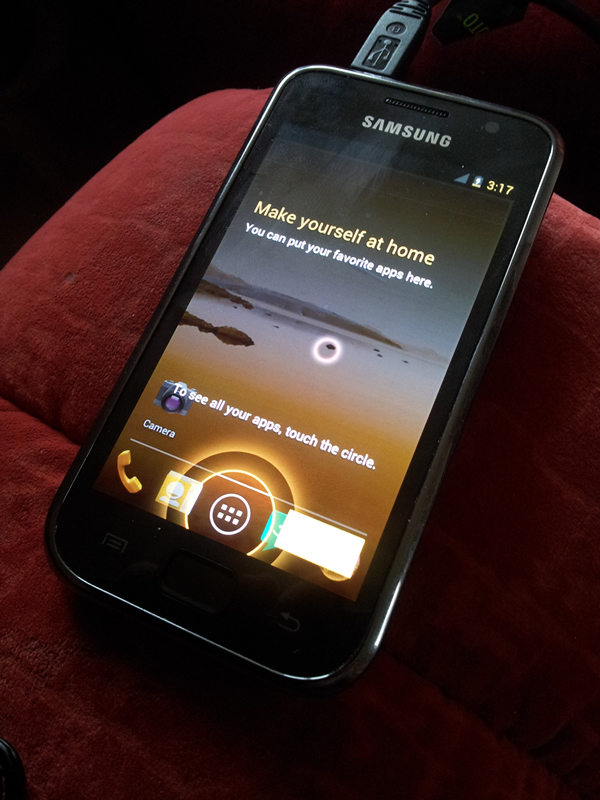
Ice Cream Sandwich Ported to the Samsung Galaxy S

icecream2.jpg

   Ice Cream Sandwich is taking the limelight in development. Recently ported to the Nexus S, many are curious and excited to know which device is next. ASUS said their “aim is to bring the latest Android update to the Eee Pad Series.”  Motorola’s Droid RAZR, Droid Bionic, and XOOM are definitely getting the update, and they will announce more “devices for ICS 6 weeks after Google releases the final version of it.” If you’re looking to get a new device soon, it’ll likely come stocked with Ice Cream Sandwich.

For those who haven’t upgraded in a while, the Samsung Galaxy S is now on the list of devices with successful Ice Cream Sandwich ports. When I say it’s successful, I mean it’s not released, in alpha, and facing a lot of work before decently working.  But it’s there and still worth mentioning.


Read more: XDA developers
QR: https://chart.googleapis.com/chart?chs=80x80&cht=qr&choe=UTF-8&chl=www.xda-developers.com/developments/ice-cream-sandwich-ported-to-the-samsung-galaxy-s/

Posted via email from Jasper-Net

Microspeak: Bug jail

Bug jail is not a place where bugs are sent as punishment for their crimes. Rather, it's a (virtual) place that developers are sent when they have too many bugs.

Project management establishes some maximum number of bugs (known as a bug cap) each developer is permitted to have on his or her plate, and developers whose bug count exceeds the specified maximum are placed in bug jail. The precise triggers for bug jail vary from team to team, and it may vary based on the nature of the bug. For example, one trigger might be that any Priority 0 bugs more than 24 hours old will land you in bug jail.

Once you land in bug jail, you are not allowed to do feature work, be it coding, writing specifications, whatever. The precise triggers for getting out of bug jail also vary from team to team, but one rule might be that you need to get your bug count back down to 50% of the bug jail trigger level before you are allowed to exit.

Staying on top of your bug count is an important part of the software development process, and the primary motivation behind bug jail is not to punish developers, although I'm sure that's how most developers perceive it. Rather, it serves as an early-warning system to highlight things that are not going smoothly. There may be a bug farm developing in that feature area. Or the team needs to revise its idea of what it means to be "done" with the feature. And it's a signal to project management that they may need to scale back their plans so as not to compromise quality and the ship schedule.

Read more: The old new thing
QR: 10222997.aspx

Posted via email from Jasper-Net

WineHQ database compromise

Hi,

I am sad to say that there was a compromise of the WineHQ database system.

What we know at this point that someone was able to obtain unauthorized access to the phpmyadmin utility.  We do not exactly how they obtained access; it was either by compromising an admins credentials, or by exploiting an unpatched vulnerability in phpmyadmin.

We had reluctantly provided access to phpmyadmin to the appdb developers (it is a very handy tool, and something they very much wanted).  But it is a prime target for hackers, and apparently our best efforts at obscuring it and patching it were not sufficient.

So we have removed all access to phpmyadmin from the outside world.

We do not believe the attackers obtained any other form of access to the system.

On the one hand, we saw no evidence of harm to any database. We saw no evidence of any attempt to change the database (and candidly, using the real appdb or bugzilla is the easy way to change the database).

Unfortunately, the attackers were able to download the full login database for both the appdb and bugzilla.  This means that they have all of those emails, as well as the passwords.  The passwords are stored encrypted, but with enough effort and depending on the quality of the password, they can be cracked.

This, I'm afraid, is a serious threat; it means that anyone who uses the same email / password on other systems is now vulnerable to a malicious attacker using that information to access their account.

We are going to be resetting every password and sending a private email to every affected user.

This is again another reminder to never use a common username / password pair.  This web site provides further advice as well:
http://asiknews.wordpress.com/2011/03/02/best-practice-password-management-for-internet-web-sites/


Read more: WineHQ list
QR: 097753.html

Posted via email from Jasper-Net

Authorization in Silverlight, part 1: Authorized navigation

Introduction

As we know, Silverlight is very capable platform for building Line of Business applications today, both in and out of the browser. It’s come to the point that – at least in my experience – a lot of desktop applications are now built with Silverlight instead of WinForms, skipping over WPF completely.

With that in mind, it’s pretty weird that there’s an essential part that seems to be missing: authentication & authorization. When you look at the Silverlight Core CLR, there’s not much there concerning this – although it’s a no-brainer for business and enterprise applications: you need to make sure certain parts of your application are only available to users that are authenticated or have a specific role. Sure, you can use the hosting web page & ASP .NET authentication to ensure only authenticated persons can reach your Silverlight application, but there’s no out of the box way to enable or block a user from navigating to a specific view in your application.


Luckily, it only requires a little bit of coding and all in all: it’s quite easy to enable authenticated & authorized navigation in your Silverlight applications, mainly thanks to the introduction of a new class in Silverlight 4: the custom content loader.

In this article, we’ll look into enabling scenarios to enable/disable certain parts of your application for authenticated users, and to automatically ask the user for his credentials if he’s trying to access a part of the application that requires him to be authenticated or to have a specific role. But let’s start with the beginning: the custom content loader.

The accompanying source code for this article can be downloaded here.

This is the first of a two-part article series on authorization in Silverlight.  In the second part, we’ll look into automatically manipulating (disabling, hiding) UI elements depending on the credentials of the authorized user.


Introducing: the Custom Content Loader.

In Silverlight 4, a new interface was introduced: the INavigationContentLoader interface. Together with that, a Navigation Frame was given a ContentLoader property, which can be set to any class implementing said INavigationContentLoader. As the name implies, the content loader is responsible for (asynchronously) loading the content that’s associated with the target Uri. This opens up a whole load of possibilities (I’ve seen the content loader being used for, for example, loading content from a different XAP), one of which is authorized navigation.

This is how this interface looks:

public interface INavigationContentLoader
{
        IAsyncResult BeginLoad(Uri targetUri, Uri currentUri, AsyncCallback userCallback, object asyncState);

        void CancelLoad(IAsyncResult asyncResult);

        bool CanLoad(Uri targetUri, Uri currentUri);

        LoadResult EndLoad(IAsyncResult asyncResult);
}

As you can see, one of the methods is named CanLoad: this is the perfect method for what we’re trying to do: we can test if a user has the rights to navigate to a specific view, returning true or false to the CanLoad method of a custom content loader.


Read more: SilverlightShow
QR: Authorization-in-Silverlight-part-1-Authorized-navigation.aspx

Posted via email from Jasper-Net

MonoGame Goes Multi-platform: MonoGame 2.0 Announced

Hello everyone

I am pleased to be the one, on behalf of the MonoGame team, to announce to the world that MonoGame 2.0 has been released today. Here is the official release announcement below:

    MonoGame is an open source implementation of the XNA APIs that allows developers to build 2D games that run on Android, iPhone, iPad, Mac, Linux and Windows using the same code base, or reusing existing XNA code that runs on Xbox 360 or Windows Phone 7.

    MonoGame 2.0 release is a major evolution of the platform. We went from only supporting the iPhone to becoming a cross-platform stack that now also runs on Android, Mac, Linux and Windows. To help developers get started, more than twenty individual samples and more than five complete starter kits are shipped with this release.

    On the iOS platform, MonoGame runs on top of MonoTouch and there are at least eighteen games published on Apple’s AppStore built using the technology. This new release opens the doors for developers to publish games to the Mac AppStore using MonoMac, to Android Market using Mono for Android, and also to Windows and Linux systems using Mono.

    This major advance in the MonoGame platform was made possible by an exponential growth in the number of contributors to the project in the last seven months.   New contributors took over major components of the stack, tuned the performance, added new platforms, tuned the engine and fixed hundreds of bugs to turn MonoGame into a solid 2D gaming platform.

Read more: Cocoa-mono
QR: https://chart.googleapis.com/chart?chs=80x80&cht=qr&choe=UTF-8&chl=http://cocoa-mono.org/archives/400/monogame-goes-multi-platform-monogame-2-0-announced/

Posted via email from Jasper-Net

The Dart Hello World

Via @qrush, a nice analysis of the compiled JavaScript code from a small Dart Hello World gist. Basically, this Dart code:

// Copyright (c) 2011, the Dart project authors.  Please see the AUTHORS file
// for details. All rights reserved. Use of this source code is governed by a
// BSD-style license that can be found in the LICENSE file.
// Simple test program invoked with an option to eagerly
// compile all code that is loaded in the isolate.
// VMOptions=--compile_all

class HelloDartTest {
  static testMain() {
    print("Hello, Darter!");
  }
}

main() {
  HelloDartTest.testMain();
}

Compiles to 17259 lines of JavaScript code. Now, most of it is just the library core, but it shows what you have to do to bolt static typing on top of a prototype-based, dynamic, truly object-oriented language.

I don’t really understand the point of Dart personally, it seems like all that’s left is some 100K line XML file to drive behavior, and now we’ve built Java executing in the browser.

Read more: LosTechies
QR: https://chart.googleapis.com/chart?chs=80x80&cht=qr&choe=UTF-8&chl=lostechies.com/jimmybogard/2011/10/12/the-dart-hello-world/

Posted via email from Jasper-Net

Top 100 Utilities & Addins for Visual Studio 2010 & TFS 2010

Since the release of Visual Studio 2010 and Team Foundation Server 2010, many tools & utilities have been released by the Open Source Community, Partners and Microsoft. The best place to discover these is via the Visual Studio Extensions Gallery, but others like CodePlex and the MSDN site also will serve you well. In the hope it accelerates your project or adoption of Visual Studio & TFS, I've jotted down my Top 100 or so that have risen to the top for me:

If you'd like to check out the additional info & links to each, here's the full Excel spreadsheet.

Read more: davidbaliles | Developer Platform Evangelism
QR: top-100-utilities-amp-addins-for-visual-studio-2010-amp-tfs-2010.aspx

Posted via email from Jasper-Net

VSTalk

twokp.png

Project Description
Instant Messaging within Visual Studio 2010.
Extension is working via XMPP/Jabber protocol.

Read more: Codeplex
QR: https://chart.googleapis.com/chart?chs=80x80&cht=qr&choe=UTF-8&chl=http://vstalk.codeplex.com/

Posted via email from Jasper-Net

The Security of SSL

EFF reports on the security of SSL:

    The most interesting entry in that table is the "CA compromise" one, because those are incidents that could affect any or every secure web or email server on the Internet. In at least 248 cases, a CA chose to indicate that it had been compromised as a reason for revoking a cert. Such statements have been issued by 15 distinct CA organizations.

Read more: Bruce Schneier
QR: the_security_of_4.html

Posted via email from Jasper-Net

Mysql – Resetting root password

Once in a while you want to reset your mysql root password, here is how you can do it.

Stop the MySql service

    sudo /etc/init.d/mysql stop

Restart MySql in safe mode and skip grant table so that you can login with root without any password.

    sudo mysqld_safe --skip-grant-tables &

Login with root

    mysql -u root

Connect to MySql database

    use mysql;

Reset the password to a new password

    update user set password=PASSWORD("password") where User='root';

Read more: Hussain Anjarwala
QR: https://chart.googleapis.com/chart?chs=80x80&cht=qr&choe=UTF-8&chl=http://hussainanjar.com/2011/10/mysql-resetting-root-password/

Posted via email from Jasper-Net

Subversion Best Practices: Repository Structure

Maintaining a Subversion repository can become a complex task, and implementing the right project layout from the very beginning is crucial. As Subversion doesn’t impose a strict file structure, users are free to tailor Subversion repositories to their project’s needs. Users can organize Subversion on a ‘one project per repository’ basis or create multiple projects within the same repository; and have considerable freedom when it comes to how they use Subversion’s trunk and branches. In this post, we’ll look at some guidelines and best practices on how to keep Subversion files, for users who are embarking on a new project in Subversion.

Multiple Projects: Single Repository vs. Multiple Repositories

In modern software development, it’s normal for teams to be working on multiple projects simultaneously. If this sounds like your organization, the first question you’ll need to answer is: should I set up a single repository for multiple projects, or create one repository per project? Although the experience will be slightly different for each project, there are some general benefits and drawbacks to each approach.

Single Repository

Single repositories are typically suited to organizations managing multiple, small projects that require cross references, cross tracking, etc.

Positives:

    there is a single location where all the code is stored, even for projects you aren’t directly involved in.
    ability to reuse common libraries.
    lack of duplicated maintenance (e.g only one repository needs to be backed up.)
    the ability to move data between projects more easily, and without losing any versioning information.
    all projects share the same repository history.
    typically less administration – new projects can be created without creating a new repository, and without the help of sysadmin.
    you can delete entire projects without losing the record from Subversion.


Read more: Blogging from Disco
QR: ?=kt_tw

Posted via email from Jasper-Net

Adding full Coded UI support to third party WinForm components that don't already have it...

Here is how one can add FULL Coded UI Test support for a 3rd party control based on Windows Forms technology.

Implementation Method – Accessibility

Accessibility means having equal access to web-based information and services regardless of physical or developmental abilities or impairments. Once implemented, it helps developers make their programs more compatible with accessibility aids (help users with impairment to use programs more effectively).

Microsoft has developed two accessibility standards - Microsoft Active Accessibility (MSAA) and Microsoft UI Automation (UIA)

MSAA is designed to help Assistive Technology (AT) products interact with standard and custom user interface (UI) elements of an application (or the operating system), as well as to access, identify, and manipulate an application's UI elements including enabling automation testing.

UIA is a newer technology that provides a much richer object model than MSAA, and is compatible with both Win32 and the .NET Framework. It is designed so that it can be supported across platforms other than Microsoft Windows.

We recommend MSAA for Windows Forms because Windows Forms natively supports MSAA and not UIA. Although there is MSAA to UIA & vice-versa conversion available via built-in proxy\bridge but the results in an extra layer of dependency which could eat into performance, hence MSAA.

Why Accessibility for Coded UI Test?

1. Implementing accessibility is simpler because one needs to follow established guidelines that serve the purpose of developing testable as well as accessible controls in one go

Read more: Greg's Cool [Insert Clever Name] of the Day
Read more: Coded UI Test Extension for 3rd party Windows Forms controls–How to?
QR: coded-ui-test-extension-for-3rd-party-windows-forms-controls-how-to.aspx

Posted via email from Jasper-Net

Introducing Managed Bootstrapper Applications

Now that WiX v3.6 has been released, I introduce the managed bootstrapper application (MBA) interoperability layer. It’s been available for a while actually, and if you’ve installed any builds of WiX v3.6, or the Microsoft Visual Studio 11.0 Developer Preview you’ve seen it in action.

While Burn – the WiX bootstrapper engine – and the core bootstrapper application interfaces are native and allow you to develop completely native bootstrapper applications, MBA allows managed code developers to utilize their skills to develop rich interactive setups. WPF designers can also utilize their skills to make the setup UI look great. In fact, both of the setup applications mentioned above are written for WPF and running atop the MBA interop layer.

The MBA interop layer leverages COM interoperability features of the CLR, but without requiring previous registration of the assemblies as COM servers as in previous examples. The MBA interop layer is composed of both a native CLR host and the managed framework. It’s in this native CLR host that the managed framework assembly is loaded and COM interfaces marshaled as in-process pointers. Message passing is not required since the Burn engine is written as a free-threaded component. Once the managed framework assembly is loaded, a class factory will create the actual managed bootstrapper application authored in the configuration file and pass its IBootstrapperApplication interface pointers back to the engine.

Because MBA is managed, the .NET Framework is of course required. A simple native bootstrapper application (BA) written atop wixstdba is used to bootstrap the .NET Framework. When you use the WixBalExtension to author your MBA you define the WixMbaPrereqPackageId WixVariable to reference the package ID of the .NET Framework you want to install.

In the following example the .NET Framework 4.0 will be installed if required.

<Wix xmlns="http://schemas.microsoft.com/wix/2006/wi"
     xmlns:util="http://schemas.microsoft.com/wix/UtilExtension">
    <Bundle
        Name="Test"
        Version="1.0.0.0"
        IconSourceFile="Setup.ico">
        <BootstrapperApplicationRef
            Id="ManagedBootstrapperApplicationHost">
            <Payload
                Name="BootstrapperCore.config"
                SourceFile="$(var.TestUX.TargetDir)\TestUX.BootstrapperCore.config"/>
            <Payload
                SourceFile="$(var.TestUX.TargetPath)"/>
            <Payload
                SourceFile="NetfxLicense.rtf"/>


Read more: Heath Stewart's Blog
QR: introducing-managed-bootstrapper-applications.aspx

Posted via email from Jasper-Net

VS11DP Microsoft Parallel Visualization Pack

The Visual Studio 11 Developer Preview brings some excellent additions to the experience of debugging parallel computing applications for both multi-core CPUs and GPUs. One of the key new areas is the Parallel Watch Window, allowing you to set up watches on variables across many threads and contexts. When the contexts get as high as thousands, you can use data visualizers in the window to more easily sort, arrange, and view the values, helping you identify issues and outliers very quickly.

This is a pack of 4 visualizers for the parallel data, created by a brilliant team of interns who came up with some very useful and attractive ways to display this information.

    Histogram bucketizes the thread values, making it easy to identify and flag outliers in the data distribution.
    Scatterplot graphs 1 or 2 dimensions of values, and is another great way to spot outliers.
    Heatmap is an attractive visualizer that’s useful for spotting strange distributions of data.
    Object Expander helps drill into all of the members and classes of specific objects, find errors, and minimum and maximum values.

Read more: Greg's Cool [Insert Clever Name] of the Day
Read more: Microsoft Parallel Visualization Pack
QR: 384b40c9-b27f-4e32-a4df-1aab4c4c9c27

Posted via email from Jasper-Net

Thursday, October 27, 2011

Powerful, simple new mass SQL injection attack opens 180K sites

October 24, 2011, 4:16 PM — A new, prepackaged set of SQL injection techniques are circling the Internet, injecting malicious JavaScript into sites that run on ASP.NET with code that allows attackers to open a door on the sites and slip in malware or other exploits that they can use to take over or sabotage the site.

According to Alex Rothacker, director of security research for Application Security, Inc.'s Team Shatter, which lists SQL injections with data-base access components the No. 2 security risk.

So far, 180,000 sites have had been penetrated by the new attack, which differs from existing SQL injections like the ones that cracked Sony 17 or 18 times because it attacks not one site at a time, but dozens.

Once they're cracked, the infected sites start serving copies of the malware to their visitors, extending the attack even further.

The attacks started Oct. 9, according to web security provider Armorize, which also found only six of 43 virus detectors can pick up the malicious code.

The attack injects malicious JavaScript code into ASP.NET sites that store HTML content in SQL Server databases – content that acts as a cache to make subsequent visits to that page far quicker because the main page is coming out of a local database rather than through the Internet, according to Rothacker, whose analysis ran in HelpNet Security

When a visitor hits the site, the pages link the browser to a site called jighui.com, which runs a script that infects it with botnet-control code that gives the botnet owner control to run code or make changes on the newly zombified machine.

Read more: ITWorld
QR: powerful-simple-new-mass-sql-injection-attack-opens-180k-sites

Posted via email from Jasper-Net

? למה אנחנו צריכים אותו– Observer design pattern

בזמן האחרון כל הפיתוח של אתרי ווב מתקדמים עוברים לצד לקוח וככל שזה כך, אנחנו בתור מפתחי ווב נדרשים לרכוש ידע רחב בנושא, מאחר וזה צד לקוח השפה הברורה והיחידה כרגע היא שפת JavaScript.

אני אסביר לצורך מה אנחנו צריכים את ה-Observer Pattern.

מה זה Observer (משקיף)?

זה בעצם מה שזה אומר משקיף על האירועים שאליהם אנו נרשמים , עיקרון זה ממומש בתוך Knockout.JS ועוד פריימוורקים אחרים.

לצורך הבנה מה קורה מאחורי הקלעים של כל הפריימוורקים אני אדגים Template של Observer ואיך הוא עובד ב-JS.

בדוגמא הזו אני מייצר instance אחד של Observer פר Context , אפשר לוותר על זה אם ישנו צורך ביותר ממשקיף אחד על האירועים , אפשר כמובן להשתמש עם הרבה אירועים על משקיף אחד או הרבה משקיפים על אירוע אחד תלוי בצורך שלכם ובמקרה בו אתם מטפלים.

var Observer = {};


Observer.init = (function () {

  var observableCollection = [];

  return {
    register: function (fn) {
      console.log("registered");
      observableCollection.push(fn);
    },


Read more: genadysh
QR: observer-design-pattern.aspx

Posted via email from Jasper-Net

מה חדש ב Windows 8 למפתחי Device Drivers ולכל מי שמה שקורה מתחת למכסה המנוע של Windows 8 מענין אותו

תהליך פיתוח ה Device drivers עובר מהפכה עם ההכרזה על חלונות 8. הכלים עברו שידרוגים, יש סביבת פיתוח חדשה Visual Studio 2011, יש פרוטוקולים חדשים לחיבור Kernel Debugger למערכת ההפעלה, יש הנחיות חדשות לגבי תאימות לתכנית ה Logo, יש כלי Debug ו Testing משופרים, ויש כלי אנליזה ואיתור בעיות חדשים ומשופרים, שמאפשרים לאתר בעיות ותקלות בתחום ה Device Drivers מהר יותר.

החלטתי להרים את הכפפה וביחד עם ג'ון ברייס מכללת הי-טק, אני מרים יום הדרכה שלם, שמוקדש לכל מה שחדש ב Windows 8, מנקודת מבט של תשתית ה Drivers של מערכת ההפעלה. אני יודע שכולם (כולל אני) מתלהבים מממשק המשתמש החדש Metro UI. אבל כל התמיכה של מערכת ההפעלה החדשה ב Sensors וב Touch, מבוססים בסופו של דבר על היכולת של מערכת ההפעלה לתמוך בחמרה שמספקת את המידע הזה. ויש המון חידושים מעניינים בתחום הזה ב Windows 8.

מה יהיה לנו ביום העיון ? מה לא !

Read more: GadiM - Gad J. Meir
QR: 920997.aspx

Posted via email from Jasper-Net

Wednesday, October 26, 2011

mobile.slashdot.org/story/11/10/19/1222218/android-ice-cream-sandwich-sdk-released

   The highly anticipated Android 4.0 (codenamed Ice Cream Sandwich) has been released and finally brings the features of 3.x Honeycomb to smaller devices. Some of the highlights include: a revamped UI, a much faster browser, face unlock, a vastly improved camera app, improved task switching, streaming voice recognition, Wi-Fi Direct, and Bluetooth Health Device Profile. ... The API level is 14, download the new SDK here.

Read more: Slashdot
QR: android-ice-cream-sandwich-sdk-released

Posted via email from Jasper-Net

Nautilus Terminal: Embed Linux Terminal To Nautilus File Browser

Terminal.png

The Terminal is perhaps one of the most integral parts of any Linux OS, even if a non-GUI-based, Slackware-style operating system seems a thing of the past. This is because, despite the introduction of Ubuntu-based operating system with Software Centers, one often requires using the Terminal for executing system-related commands, adding/removing repositories and downloading application packages. While opening the Terminal can be a bit irritating, particularly if you’re using the classic start menu, it might be quite handy to embed Terminal to the Nautilus file browser. Nautilus Terminal is an extension that adds Terminal to the file browser, following navigation with automatic execution of the “cd” command when you move between folders.

Nautilus terminal fully supports all common functions such as copy/paste (using Ctrl+Shift+C and Ctrl+Shift+V) and drag & drop functionality.

Read more: Addictive tips
QR: https://chart.googleapis.com/chart?chs=80x80&cht=qr&choe=UTF-8&chl=www.addictivetips.com/ubuntu-linux-tips/nautilus-terminal-embed-linux-terminal-to-nautilus-file-browser/

Posted via email from Jasper-Net

Impersonation and Delegation in WCF

Impersonation is a technique that WCF Services use to authorize the caller’s identity to access to service resources such as files and database tables. Service resources can be located either on local service machine or remotely hosted. The resources are being accessed by WCF Service’s process identity or specific windows identity.    

Difference between Impersonation and Delegation in WCF?

Impersonation is used to access the resources when the resources are on the same machine as the service. Delegation is used to access the resources that are remotely hosted.

There are two types of Impersonation in WCF

    Imperative Impersonation – Perform programmatically at run time
    Declarative Impersonation – Applied with a static attribute which associated with an operation.

Use Impersonation when

    You want to access windows resources that are protected with access control lists(ACL’s).
    You need to use specific identity or several windows identities to access resources.

Use Delegation when

    You need to access network resources.

Declarative Impersonation

[OperationBehavior(Impersonation = ImpersonationOption.Required)]
public string GetData(int value)
{
    return “test”;
}


Read more: Techbubles
QR: https://chart.googleapis.com/chart?chs=80x80&cht=qr&choe=UTF-8&chl=http://www.techbubbles.com/webservices/impersonation-and-delegation-in-wcf/

Posted via email from Jasper-Net

New Attack Tool Exploits SSL Renegotiation Bug

    A group of researchers has released a tool that they say implements a denial-of-service attack against SSL servers by triggering a huge number of SSL renegotiations, eventually consuming all of the server's resources and making it unavailable. The tool exploits a widely known issue with the way that SSL connections work. The attack tool, released by a group called The Hacker's Choice, is meant to exploit the fact that it takes a lot of server resources to handle SSL handshakes at the beginning of a session, and that if a client or series of clients sends enough session requests to a given server, the server will at some point fail. The condition can be worsened when SSL renegotiation is enabled on a server. SSL renegotiation is used in a number of scenarios, but most commonly when there is a need for a client-side certificate. The authors of the tool say that the attack will work on servers without SSL renegotiation enabled, but with some modifications.

Read more: Slashdot
QR: new-attack-tool-exploits-ssl-renegotiation-bug

Posted via email from Jasper-Net

QuickSharp

A minimalist IDE for Microsoft .NET

quicksharp_11.png

Take control of your development tools...

QuickSharp is a streamlined integrated development environment for Microsoft's .NET platform. It provides a simple, uncluttered development approach that lets you get programming in an instant. QuickSharp doesn't use solutions or projects, programs and libraries are developed as individual files making development a breeze. With QuickSharp you can work closer to the .NET Framework development tools and get to grips with the most advanced development platform for Windows from the ground up.

QuickSharp is not just a development environment, it's also a lightweight application framework which can be easily modified and extended using a simple plugin-based architecture. The QuickSharp IDE is developed entirely using this framework and you can use it to create your own highly customized development environments.

Read more: QuickSharp
QR: https://chart.googleapis.com/chart?chs=80x80&cht=qr&choe=UTF-8&chl=http://quicksharp.sourceforge.net/

Posted via email from Jasper-Net

לאונרדו דיקפריו משקיע ב-Mobli הישראלית [גיוס]

בהודעה ששיחררה לפני דקות אחדות (ג') חברת מובלי (Mobli) הישראלית, הצהירה החברה על השקעתו של השחקן לאונרדו דיקפריו שתצטרף לסבב גיוס ראשון שחותם הסטארטאפ הישראלי יחד עם השקעות פרטיות נוספות על סך כולל של 4 מיליון דולרים. מובלי אחראית לפיתוח פלטפורמה חברתית ויזואלית שמאפשרת למשתמשים לשתף תמונות וקטעי וידאו באופן אינטואיטיבי במיוחד, לפני כחודש השיקה החברה אפליקציות לאנדרואיד ובלקברי שהצטרפו לאפליקציה הותיקה שלה לאייפון.
"גאה להיות חלק ממובלי"

בדברים שמסר דיקפריו מוקדם יותר באשר להשקעה הטרייה טען השחקן: "אני מתרגש מאוד להוות חלק ממובלי, חברה פורצת דרך שנוטלת תפקיד פעיל במהפכה הקשורה לדרך שבה אנשים יוצרים אינטרקציה עם מידע ויזואלי, יוצרים אותו או צורכים אותו. מובלי מאפשרת למשתמשים מכל רחבי העולם לחלוק רגעים".

מובלי היא פלטפורמה חברתית ויזאולית שמבוססת בעיקר על שיתוף באמצעות מכשירי סמארטפון ומאפשרת, כך על פי הסלוגן שלה: "להביט בעולם דרך עיניים של אנשים אחרים". הרעיון של מובלי, אותה ייסד משה חוגג, היא למקסם את חווית השיתוף באמצעות המכשירים הניידים שהפכו זמינים כל כך בשנים האחרונות והופיעו למעשה מעט אחרי שרשתות חברתיות פופולאריות כמו פייסבוק נולדו והחלו לעבור התאמה איטית ומסורבלת לעולם החדש שנוצר. פלטפורמת השיתוף של מובלי מבוססת על חוויה ויזואלית הרבה יותר ומתמקדת בתמונות וקטעי וידאו יחד עם שימוש נרחב בשירותים מבוססי מיקום. כך למשל במידה ואתם בהופעה, במשחק טניס או בכל מקום אחר, תוכלו לאתר ולצפות באינספור זוויות שונות של משתמשים שנמצאים באותו מקום ועושים שימוש באפליקציה, או לחילופין לשבת בבית ולצפות בחוויה של אנשים אחרים שנמצאים במקומות שמסקרנים אתכם.

Read more: newsGeek
QR: https://chart.googleapis.com/chart?chs=80x80&cht=qr&choe=UTF-8&chl=www.newsgeek.co.il/leonardo-dicaprio-invests-in-mobli/

Posted via email from Jasper-Net

Office 2007 Family Service Pack 3 Released

The 2007 Microsoft Office Servers Service Pack 3 (SP3), 32-bit Edition

‎Service Pack 3 provides the latest updates to the 32-bit editions of all of the 2007 Microsoft Office System servers.

The 2007 Microsoft Office Servers Service Pack 3 (SP3), 64-Bit Edition

‎Service Pack 3 provides the latest updates to the 64-bit editions of

Service Pack 3 for Windows SharePoint Services 2007 (KB2526305), 86-Bit Edition

‎Service Pack 3 provides the latest updates to Windows SharePoint Services 2007, 86-Bit Edition.

Service Pack 3 for Windows SharePoint Services Language Pack 2007 (KB2526305), 86-Bit Edition

‎Service Pack 3 provides the latest updates to Windows SharePoint Services Language Pack 2007, 86-Bit Edition.

Service Pack for SharePoint Designer Language Pack 2007 (KB2526089)

‎Service Pack 3 provides the latest updates to SharePoint Designer Language Pack 2007.

Service Pack for Windows SharePoint Services Language Pack 2007 (KB2526305), 64-Bit Edition

‎Service Pack 3 provides the latest updates to Windows SharePoint Services Language Pack 2007, 64-Bit Edition.

Service Pack 3 for SharePoint Designer 2007 (KB2526089)

‎Service Pack 3 provides the latest updates to Microsoft SharePoint Designer 2007.

(more...)

Read more: Bink.nu
QR: office-2007-family-service-pack-3-released.aspx

Posted via email from Jasper-Net

Tuesday, October 25, 2011

.Net Framework 4.0.2 Release Information Rollup

Multi-Targeting Pack for Microsoft .NET Framework 4.0.2 (KB2544526)

    This update adds support for designing and developing applications for the Update 4.0.2 for Microsoft .NET Framework 4 by using Microsoft Visual Studio 2010 SP1 or later. The MT Pack adds new reference assemblies, IntelliSense files, and other supporting files. For further details about the contents of this Targeting Pack refer to the Knowledge Base Article KB2544526.

Update 4.0.2 for Microsoft .NET Framework 4 – Design-time Update for Visual Studio 2010 SP1 (KB2544525)

    This package contains updated design-time files for Visual Studio 2010 SP1 corresponding to Update 4.0.2 for Microsoft .NET Framework 4. For further details about the contents of Update 4.0.2 for Microsoft .NET Framework 4 – Design-time Update please refer to the Knowledge Base Article KB2544525.
    This design time package installs the following individual packages:

        Update 4.0.2 for Microsoft .NET Framework 4 – Runtime Update (KB2544514)
        Multi-Targeting Pack for the Microsoft .NET Framework 4.0.2 (KB2544526)
        Visual Studio 2010 SP1 Update for enabling workflow state machine designer (KB2495593)

Update 4.0.2 for Microsoft .NET Framework 4 – Runtime Update (KB2544514)

    Update 4.0.2 for Microsoft .NET Framework 4 package contains updated runtime files. For further details about the contents of this Runtime Update please refer to the Knowledge Base Article KB2544514.

Multi-Targeting Pack for Microsoft .NET Framework 4.0.1 (KB2495638)

    This update adds support for designing and developing applications for the Update 4.0.2 for Microsoft .NET Framework 4 by using Microsoft Visual Studio 2010 SP1 or higher. The MT Pack adds new reference assemblies, IntelliSense files, and other supporting files. For further details about the contents of this Targeting Pack refer to the Knowledge Base Article KB2495638.


Read more: Greg's Cool [Insert Clever Name] of the Day
QR: net-framework-402-release-information.html

Posted via email from Jasper-Net

Functions in Python

I have just completed to update the functions topic in my Python Fundamentals course. You can find its community version available for free personal usage at www.abelski.org. The slides are available for free download. The professional version is available at www.abelski.com.

You can find below the new video clips I have just completed to create in order to assist learning this topic.

Read more: Life Michael
QR: functions-in-python.aspx

Posted via email from Jasper-Net

Debugging NHibernate: Session Management

Introduction

NHibernate session is a gateway for all operations that you perform on your datastore. It also plays a role of the first-level cache, minimizing the number of roundtrips between your application and the database server. As NHibernate documentation states, session is "a single-threaded, short-lived object representing a conversation between the application and the persistent store". Pay special attention to the bolded words: single-threaded and short-lived. Single-threaded in web-development world basically means that you should not use the same session instance in two or more concurrent requests. Short-lived on the other hand instructs you not to "overuse" the session instance so it does not become a copy of the database. It's on the developer's shoulders to meet those requirements and implement a correct session management. Fortunately, there are several patterns already created for this purpose: session-per-request, session-per-conversation, session-per-thread, etc. with their implementation exemplars easily accessible in the Internet. But even if you take one of those examples and adapt it to your application needs, it may happen that the session does not behave in a way that you would expect: objects are not persisted, events are not fired or you get LazyLoadException. Those nasty bugs are usually quite tricky to resolve, especially in enterprise-level applications where objects lifetime is controlled by some kind of Inversion of Control container. In this article, I would like to show you how to find the exact moments when the session is created and destroyed (and by whom) and what information can be retrieved from its properties.

The usual approach in investigating NHibernate internals would be to turn on its fine-grained logging and check the log4net appenders output. However it's not the approach that I would like to describe in this post (please make a comment if you wish to read an article about detailed NHibernate logging). Today, we will focus on how to use the Visual Studio debugger to examine the session management. I prepared a sample application on which you may train the debugging process (details of the configuration are provided at the end of the post).


Prepare NHibernate Symbols

To be able to debug the NHibernate source code, the debugger must know how to find it. If you are using the 3.0.0 version of NHibernate, you may use http://www.symbolsource.org configuring Visual Studio to use their symbol store. If your NHibernate version is different, you need to either compile NHibernate on your own and reference the produced binaries in your project or make use of the sourcepack script. Here I will describe the second approach (especially because I'm the author of the sourcepack and I need to advertise it somehow ;)). To use sourcepack, you will need to install Debugging Tools for Windows (you may install them from the WDK image) and powershell v2. The next step is to download NHibernate binaries (you should have them already in your application bin folder) and NHibernate sources from their sourceforge page.


Read more: Codeproject
QR: DebuggingNHibernate.aspx

Posted via email from Jasper-Net

Internals of Interface and its Implementation

As many of my followers requested me to write few things that I missed out from the Internals Series, I should continue with it. In this post, I will cover the internals of Interface implementation and mostly talk about explicit interface implementation, as most of the developers seems to be in confusion with it. I hope you will like the post.

Beginning from the basics, Interfaces are the most important part of any application. Interfaces are language construct that does not implement anything but declares a few members upfront. Generally we use interfaces to create a contract between the two or more communication agents. Another important thing that everyone would be knowing already, Interfaces are meant to be implemented. That means whenever you are creating a class, all the members that were there in the interface are meant to be implemented completely. .NET (or probable any other standard language) disallows the creation of objects on types that are not fully defined. Hence abstract classes also coming into play here. They are classes that have few members undefined or abstract. Once you don't have concrete implementation, you cannot create an instance of a type. Notably, you can say "Interface is a types that does not belong to the System.Object or implement it when it reside inside an assembly". But ironically you could also says that once the type is implemented, it would probably inherit from System.object by default.

Another important OOPS feature is that you can hold reference of any concrete type to any of its base implementations. By this what I mean, if say class X derived from Y and implements Z (where Z is an interface) you can say either Y y1 = new X() or Z z1 = new X().

Now lets define an interface and start some tweaks some of its behaviors.

public interface IA
{
    void GetX();
}


Let us suppose we have an interface IA which has a method GetX(). Now you should remember, it is not allowed to use access specifier for members of an interface as that mean the implementers of this interface needs to specify access specifiers for its members and it would appear to all implemtors that these members are public.  Now lets see one implementation of it.

public class A : IA
{
    public void GetX()
    {
        Console.WriteLine("Here is X: Normal");
    }
    void IA.GetX()
    {
        Console.WriteLine("Here is X: Explicitely");
    }
}


Read more: Beyond relational
QR: internals-of-interface-and-its-implementation.aspx

Posted via email from Jasper-Net

The Noob's Guide to Open XML Dev (If you know how to spell OpenXML but that's about it, this is your Getting Started guide...)

    "This blog post introduces the first in a series of screen-casts that are specifically for a developer starting development with Open XML for the first time. It is a project that I've been meaning to work on for some time, and I recently received the mandate that this should get done, so this is the start of it. In this video, I discuss the Open XML standard from a high level, discuss the resources that helped me get started, and point you to places to find additional resources. I've already recorded the second video, in which I discuss the various tools that you will want to be familiar with in order to do Open XML development. In the third video, I'll discuss the various typical development scenarios for Open XML. In the fourth video, I'll discuss platforms, languages, and libraries, and in the fifth, I'm going to discuss my current thoughts on development approaches. (At least, this is my current plan. We'll see how it proceeds.)

    If you are an experienced Open XML developer, this first video in the series is probably not for you. This first video is targeted towards developers who know Open XML is a document format based on XML, and maybe not much more. Experienced developers may get something from subsequent videos, though.

    ..."

There's some things I love about the OpenXML SDK/format and some I hate (mostly how different the SDK API's are from the Office API's) but the like easily overrides the dis-like. Having an open format that's fully documented and easy(er) to spelunk is a night and day difference over trying to work directly with the Office binary formats.

Read more: Greg's Cool [Insert Clever Name] of the Day
Read more: Getting Started with Open XML Development
QR: getting-started-with-open-xml-development.aspx

Posted via email from Jasper-Net

Open Kernel Crash Dumps in Visual Studio 11

A dream is coming true. A dream where all the debugging you’ll ever do on your developer box is going to be in a single tool – Visual Studio.

In a later post, I will discuss device driver development in Visual Studio 11, which is another dream come true. For now, let’s take a look at how Visual Studio can open kernel crash dumps and perform crash analysis with all the comfy tool windows and UI that we know and love.

To perform kernel crash analysis in Visual Studio 11, you will need to install the Windows Driver Kit (WDK) on top of Visual Studio. Go on, I’ll wait here.

First things first – you go to File | Open Crash Dump, and you’re good to go:

image_thumb_735FD7B2.png

Read more: All Your Base Are Belong To Us
QR: open-kernel-crash-dumps-in-visual-studio-11.aspx

Posted via email from Jasper-Net

Hello World in IronPython

We can download  a .NET version for Python at IronPyhon.net. Once we download and install it on our PC we can use Visual Studio to develop in Python. The code we write will be compiled into CLR code. The code we write can use the .NET framework.

Read more: Life Michael
QR: hello-world-in-ironpython.aspx

Posted via email from Jasper-Net

הכירות עם LocalDB: גירסת SQL Express משופרת למפתחים

הוא גירסא חדשה של SQL Server המיועדת למפתחים. זהו DB קל להתקנה ושימוש, שאינו דורש ניהול מורכב אך עדיין מספק את כל יכולות ה- T-SQL שיש לגירסאות ה- MS SQL המלאות להציע וכן תומך באותם Providers של SQL Server. בפוסט הזה נסקור את הרקע לשינוי ואת ההשפעה על המפתחים המשתמשים במסד נתונים ממשפחת SQL Server.

את כלי הפיתוח החדשים ב- SQL Server 2012 כבר הכרתם?
הקדמה

כיום, משתמשים ב- SQL Server Express בשתי דרכים נפוצות:

    כמסד נתונים חינמי עבור אפליקציות קטנות עד בינוניות. אפליקציות רבות מסתפקות ב- SQL Express בתחילת דרכן ומתבססות על כך שהוא זהה מבחינת הקונפיגורציה והניהול לשאר הגירסאות בתשלום של SQL Server. תהליך המעבר מהגרסה החינמית לגירסאות בתשלום הוא עניין של הזנת Product Key בלבד, כשמגיע השלב לעשות זאת.
    כמסד נתונים לצורכי פיתוח. SQL Express הוא קטן יותר להורדה וקל יותר להתקנה מאשר שאר הגירסאות ומפתחים משתמשים בו כדי לצאת לדרך בפיתוח אפליקציות מבוססות נתונים.

עם השנים, בשל הרצון לשמור על אחידות ביכולות של SQL Server Express לעומת הגירסאות המורחבות יותר בתשלום, הוא נהפך לגדול יותר להורדה, מורכב יותר לקונפיגורציה וניהול ההרשאות – מורכב מדי לצרכי פיתוח בלבד.
הכירו את LocalDB

החל מ- SQL Server 2012 (עד לאחרונה הייתה ידועה בשם “Denali”) מצטרף מסד נתונים חדש למפתחים בשם LocalDB המשלב את הפשטות בהתקנה וקונפיגורציה שמפתחים צריכים לצורך פיתוח מצד אחד, ובו זמנית את התאימות לשאר הגירסאות של SQL Server.

Posted via email from Jasper-Net

Monday, October 24, 2011

What DX level does my graphics card support? Does it go to 11?

Recently I run into a situation that I have run into quite a few times. Someone encounters a machine and the question arises: "Is there a DirectX 11 card in this machine?". Typically the reason you are interested in that is because cards with DirectX 11 drivers fully support DirectCompute (and by extension C++ AMP) for GPGPU programming. The driver specifically is WDDM (1.1 on Windows 7 and Windows 8 introduces WDDM 1.2 with cool new capabilities).

There are many ways for figuring out if you have a DirectX11 card, so here are the approaches that you can use, with a bonus right at the end of the post.


Run DxDiag

WindowsKey + R, type DxDiag and hit Enter. That is the DirectX diagnostic tool, which unfortunately, only tells you on the "System" tab what is the highest version of DirectX installed on your machine. So if it reports DirectX 11, that doesn't mean you have a DX11 driver! The "Display" tab has a promising "DDI version" label, but unfortunately that doesn't seem to be accurate on the machines I've tested it with (or I may be misinterpreting its use). Either way, this tool is not the one you want for this purpose, although it is good for telling you the WDDM version among other things.


Use the Microsoft hardware page

There is a Microsoft Windows 7 compatibility center, that lists all hardware (tip: use the advanced search) and you could try and locate your device there… good luck.


Use Wikipedia or the hardware vendor's website

Use the Wikipedia page for the vendor cards, for both nvidia and amd. Often this information will also be in the specifications for the cards on the IHV site, but is is nice that wikipedia has a single page per vendor that you can search etc. There is a column in the tables for API support where you can see the DirectX version.


Read more: The Moth
QR: What-DX-Level-Does-My-Graphics-Card-Support-Does-It-Go-To-11.aspx

Posted via email from Jasper-Net

Creating a basic code analysis with Roslyn

If you’ve installed the Roslyn CTP, you can go to the installation folder and look inside the Documentation folder, there’s a lot of interesting information here that you can make use of. I’ve got my documentation here:

    C:\Program Files (x86)\Microsoft Codename Roslyn CTP\Documentation

Now there’s one document here that is a bit extra interesting, at least for me, it talks about how we can make basic code analysis with Roslyn ( How to Write a Quick Fix (CSharp).docx ). The basic idea is to identify whenever a variable can be made const. So for those of you that haven’t had the time to download and install Roslyn yet, I’ll show you how to do exactly that with the help of their sample. It’s essentially the same outcome and code as they use in their documentation, but I will try explain a little bit more about each piece and add some extra things as well. But be sure to check out the documentation that comes with Roslyn as well!

However, the sample in the document has an error to it so it doesn’t run out of the box!

First thing is to open up an instance of Visual Studio and create a new Code Issue project, I’ll call it MyFirstCodeIssueFix

roslyn_code_fix_1.png

Read more: Filip Ekberg's blog
QR: https://chart.googleapis.com/chart?chs=80x80&cht=qr&choe=UTF-8&chl=http://blog.filipekberg.se/2011/10/23/creating-a-basic-code-analysis-with-roslyn/

Posted via email from Jasper-Net

SQL Server Stored Procedure best practices

Project Description

 
This SQL Server stored procedure best practice guide contains documentations of best practices and helper tools to enhance further match with the best practices.


This project is for SQL Server 2005 (and above) stored procedures, although I have included some notes to indicate supports for large databases. It also means to sync with the EF supports from many database providers.

Other databases beside SQL Server as interoperability:

    Oracle version 9i
    IBM DB2 (8.2.x or higher)
    MySql 5.1 or higher


Read more: Codeplex
QR: https://chart.googleapis.com/chart?chs=80x80&cht=qr&choe=UTF-8&chl=http://sqlsprocbestpractice.codeplex.com/

Posted via email from Jasper-Net

Simple Style Definition in Silverlight

Instead of specifying separately for each and every element how exactly it should look we can define a style and then apply it on various elements. Using styles promotes code reuse, makes our code shorter and assists with the code maintenance in the long run. Defining a style is about defining a collection of property values we can then apply to any element we select. Using styles is very similar to using CSS. In both cases we reuse a style definition.

The style is a resource. We define it as any other resource. Each style includes a collection of Setter elements .Each Setter element sets a specific property. The property must be a dependency one.

Unlike WPF we cannot apply the same style on different types of elements and we cannot use triggers in order to change the style of a given control when a specific property changes its value.

The following code sample includes the definition of a simple style that targets buttons.

<UserControl x:Class="SilverlightApplication30.MainPage"
    xmlns="http://schemas.microsoft.com/winfx/2006/xaml/presentation"
    xmlns:x="http://schemas.microsoft.com/winfx/2006/xaml"
    xmlns:d="http://schemas.microsoft.com/expression/blend/2008"
    xmlns:mc="http://schemas.openxmlformats.org/markup-compatibility/2006"
    mc:Ignorable="d"
    d:DesignHeight="300" d:DesignWidth="400">
    <UserControl.Resources>
        <Style x:Key="CuteButton" TargetType="Button">
            <Setter Property="FontFamily" Value="Arial" />
            <Setter Property="FontSize" Value="18" />
            <Setter Property="Foreground" Value="Blue" />
            <Setter Property="Padding" Value="10" />
        </Style>
    </UserControl.Resources>
    <Canvas x:Name="LayoutRoot" Background="White">
        <Button Name="MyBt" Content="Click Here" Style="{StaticResource CuteButton}" />       
    </Canvas>
</UserControl>


Read more: Life Michael
QR: simple-style-definition-in-silverlight.aspx

Posted via email from Jasper-Net

Obtaining Results from Parallel Tasks

Task Results

So far in our examination of parallel tasks we have looked at the Task class. This allows an action delegate to be executed with the possibility of parallelism. The delegate can access variables that are outside of its scope in order to communicate with the main thread of execution or with other tasks, allowing you to simulate a return value. However, an alternative Task class is available for more elegant generation of return values.

The Task<T> generic class inherits much of its functionality from its non-generic counterpart. Tasks are created using a delegate, often a lambda expression, started using the Start method and executed in parallel where it is efficient to do so. The key difference is that the lambda expression returns a value of the type defined by the task's type parameter. This return value can be accessed by reading the task's Result property.

The Task<T> class is found in the System.Threading.Tasks namespace so to simplify the examples, add the following using directive:
using System.Threading.Tasks;
Synchronisation

As with other parallel and multi-threaded scenarios, synchronisation is required. In this case, it is necessary to ensure that the result of a parallel task is not read before it has been set. Luckily, the Task Parallel Library takes care of this for you. If you attempt to read the result too early, the current thread is blocked until the task has completed executing. This is the same as calling the Wait method manually before reading the result.

The following sample shows the use of a parallel task with a return value. Here a long calculation is performed and the returned result is extracted from the Result property. You can see that the main thread is blocked until the parallel calculation completes to ensure that the correct value is obtained.

Task<long> taskWithResult = new Task<long>(() =>
{
    long total = 0;
    for (int i = 1; i < 1000000000; i++);    // Adjust this loop according
    {                                        // to your computer's speed
        total += i;
    }
    return total;
});
taskWithResult.Start();

Console.WriteLine("Result = {0}", taskWithResult.Result);

/* OUTPUT

Result = 499999999500000000

*/

Read more: BlackWasp
QR: TaskResult.aspx

Posted via email from Jasper-Net

Upcoming Mono Releases: Change in Policies

We have historically made stable releases of Mono that get branched and maintained for long periods of time. During these long periods of time, we evolve our master release for some four to five months while we do major work on the branch.

Historically, we have had done some of these large changes since we have rewritten or re-architected large parts of our JIT, or our garbage collector, or our compilers.

There were points in the project history where it took us some 9 months to release: seven months of new development followed by two months of beta testing and fixing regressions. With Mono 2.6 we tried to change this, we tried to close the release time to at most six months, and we were relatively good at doing this with 2.8 and 2.10.

We were on track to do a quick Mono 2.12 release roughly around May, but with the April bump in the road, this derailed our plans.

Since 2.10.0 was released two things happened:

    On Master: plenty of feature work and bug fixing.
    On our 2.10 branch: bug fixes and backporting fixes from master to 2.10

Now that things have settled at Xamarin and that we are getting Mono back into continuous integration builds we are going to release our first public beta of the upcoming Mono, it will be called Mono 2.11.1. We will keep it under QA until we are happy with the results and we will then release Mono 2.12 based on this.

Read more: Personal blog of Miguel de Icaza
QR: Oct-14.html

Posted via email from Jasper-Net

Drawbridge: A new form of virtualization for application sandboxing

Drawbridge is a research prototype of a new form of virtualization for application sandboxing. Drawbridge combines two core technologies: First, a picoprocess, which is a process-based isolation container with a minimal kernel API surface. Second, a library OS, which is a version of Windows enlightened to run efficiently within a picoprocess. Drawbridge combines two ideas from the literature, the picoprocess and the library OS, to provide a new form of computing, which retains the benefits of secure isolation, persistent compatibility, and execution continuity, but with drastically lower resource overheads.

The Drawbridge library OS is an experimental Windows 7 library OS - a research project and proving ground for a larger concept: application virtualization and sandboxing. Drawbridge is capable of running the latest releases of major Windows applications such as Microsoft Excel, PowerPoint, and Internet Explorer with very little overhead compared to the traditional virtualization techniques. The experiment is going well! Now, what's going on here, exactly?


Read more: Channel9
QR: Drawbridge-An-Experimental-Library-Operating-System

Posted via email from Jasper-Net

Google Code-in: Are you in?

GCI_2011_logo_URL_blueborder-nowww.jpg

Listen up, future coders of the world: today we’re launching the second annual Google Code-in competition, an open source development contest for 13-17 year old students around the world. The purpose of the Google Code-in competition is to give students everywhere an opportunity to explore the world of open source development. We not only run open source software throughout our business, we also value the way the open source model encourages people to work together on shared goals over the Internet.

Open source development involves much more than just computer programming, and the Google Code-in competition reflects that by having lots of different tasks to choose from. We organize the tasks into eight major categories:

1. Code: Writing or refactoring code
2. Documentation: Creating and editing documents
3. Outreach: Community management and outreach, as well as marketing
4. Quality Assurance: Testing and ensuring code is of high quality
5. Research: Studying a problem and recommending solutions
6. Training: Helping others learn more
7. Translation: Localization (adapting code to your region and language)
8. User interface: User experience research or user interface design and interaction

Read more: Google code blog
QR: google-code-in-are-you-in.html

Posted via email from Jasper-Net