Tuesday, November 30, 2010

Part 2 of 4 : Tips/Tricks for Silverlight Developers.

I wanted to create a series of blog post that gets right to the point and is aimed specifically at Silverlight Developers. The most important things I want this series to answer is :
What is it?
Why do I care?
How do I do it?
I hope that you enjoy this series. Let’s get started:

Tip/Trick #6)
What is it? Create a Notification Window in a Silverlight Out Of Browser Application.
Why do I care? Its a great way to alert users of something that needs their attention. It works similar to the notification you would get with a new email in Outlook.
How do I do it:
1) Make sure you are developing an OOB application. Right click on your Silverlight Project and make sure there is a check in “Enabled running application out of the browser” as shown below:

Tip/Trick #7)
What is it? You can increase isolated storage if you need more space.
Why do I care? Eventually you will get a requirement that will call for more space than what is originally allocated by default.
How do I do it: This trick has to come from a Button click Event. So drop a button on the Silverlight Page and paste the following code inside of it.

Tip/Trick #8)
What is it? Use the StringFormat in XAML to format your data (for example a Birthdate).
Why do I care? It allows you to use standard formatting expressions in XAML rather than put it in code behind.
How do I do it: To format a string into a Birthdate then do the following: add a TextBlock to your main page.

Read more: Michael Crump

Setting mouse cursor position with WinAPI

Setting the mouse cursor position on a Windows machine with the help of .NET Framework shouldn't be that big of a problem. After all, there is the built-in Cursor class that lets you do that by executing a simple line of code:

Cursor.Position = new System.Drawing.Point(0, 0);

Of course, here 0 and 0 are the absolute coordinates for the mouse cursor on the screen. One thing to mention about this type of position setting is that Cursor requires a reference to System.Windows.Forms. And in some cases you don't want this extra reference. If that's the case, WinAPI is your solution. It requires some more work compared to the regular .NET way (class instance -> method call) but at the end you get more control than you would expect.
When using WinAPI to set the cursor position, there are two ways you can go:
  • mouse_event
  • SendInput

mouse_event is the very basic function that is only able to set the mouse coordinates. It was superseded and Microsoft recomends using SendInput instead. Nonetheless, it still works (although I cannot say for sure whether it will be working in future releases of Windows).
So to start, I have a very basic class:

class WINAPI_SUPERSEDED
{
   [DllImport("user32.dll",SetLastError=true)]
   public static extern void mouse_event(uint dwFlags, uint dx, uint dy, uint dwData, int dwExtraInfo);
   public enum MouseFlags
   {
       MOUSEEVENTF_ABSOLUTE = 0x8000,
       MOUSEEVENTF_LEFTDOWN = 0x0002,
       MOUSEEVENTF_LEFTUP = 0x0004,
       MOUSEEVENTF_MIDDLEDOWN = 0x0020,
       MOUSEEVENTF_MIDDLEUP = 0x0040,
       MOUSEEVENTF_MOVE = 0x0001,
       MOUSEEVENTF_RIGHTDOWN = 0x0008,
       MOUSEEVENTF_RIGHTUP = 0x0010,
       MOUSEEVENTF_WHEEL = 0x0800,
       MOUSEEVENTF_XDOWN = 0x0080,
       MOUSEEVENTF_XUP = 0x0100
   }
   public enum DataFlags
   {
       XBUTTON1 = 0x0001,


Read more: .NET Zone

BCL Extensions Source Code released on CodePlex

We (Solutions Design, creators of LLBLGen Pro) are in the process of releasing some of our general frameworks as open source, namely BCL Extensions and Algorithmia. Yesterday we released BCL Extensions on CodePlex, using Mercurial as the source-control system. Algorithmia will follow soon, likely later this week. We also re-released our Helpdesk / forum system HnD again to the public, on bitbucket.org and plan to add new features soon. We decided to release BCL Extensions and Algorithmia (algorithm/datastructures library) as open source as it was the plan all along anyway: for so long I've been talking about algorithms and I can never point to example code and give you a solid piece of code into your hands, and with Algorithmia soon out in the open and BCL Extensions (which is used by Algorithmia) as well, I can. Both are also written with this in mind, to function both as a critical pillar of our work and also as an educational tool, so it isn't a lot of work.

About BCL Extensions
BCL Extensions is a small .NET 3.5+ extension method library which contains some handy and sophisticated extension methods for various .NET Base Class Library (BCL) classes. The main purpose of BCL Extensions was to form a central place for us to store our generic extension methods we wrote to avoid clutter in our .NET 3.5+ codebase, namely the LLBLGen Pro v3 designer. We tried to avoid defining an extension method for everything, that's why there's not a tremendous amount of extension methods on a lot of types, just a couple. The main reason is that the more extension methods you define, the more you pollute intellisense dialogs and often you don't need the extension method anyway, or there's a better way to write the functionality.

"Why CodePlex / Mercurial?"
After we decided to release HnD again for LLBLGen Pro v3 as an example project, we looked into which repository sites we could use for this. Before, we hosted the subversion repository ourselves, but nowadays it's not really necessary to host your own repositories anymore. There are really just 5 candidates: Sourceforge, Google Code, Bitbucket, GitHub and CodePlex. I can be short about Sourceforge: not ever will I go back there. Google Code, it's OK, but to me the site feels a bit too simplistic, as if I'm using a v0.1 system. I know most of what you need is there, but one thing feels missing: it's as if you and your project are all alone on a big site.

Read more: Frans Bouma's blog

How to send an email in Silverlight

Introduction
Welcome again to Dotnetfunda. In this article I am going to demostrate on how to send an email in Silverlight. I have previously wrote an article on how you can do that in asp.net, but now in Silverlight the approach is different and a newbie or even an experienced person can get lost. I am known by writing easly interpreted articles and I will keep on doing that , by even providing you with screenshots. Thanks again to Sheo who take my article as word document and post them on my behalf. I am a programmer who does not like to spent to much time on a word processing program like ms word.

Background
In this Article we are going explain how you can send an email from your silverlight appplication , with gmail or other email accounts that you know the smtp and port.

Using the code
We are going to user C# as our language and we will have some xaml to build our UI.
What do I need to Follow this article Examples
You need Visual Studio 2010  or Visual Studio 2008 SP1 and if 2008 version make sure that you have installed the Silverlight Tools. We are going to use WCF to send an email and you need a Gmail account or any account that you know the smtp name and port name. Below is a list of checklist to make sure that you have everything before you start following the examples.

Create a WCF Service
Right click on your Solution Explorer and click on new Project as depicted below

Read more: .Net Funda Part 1, Part 2

Special features of Linux memory management mechanism

MemoryMS.png
Introduction
In this article, I am going to describe some general features and some specific ones of the memory management in Linux. It will be mainly on dynamic memory allocation and release, as well as the management of the free memory. The article concerns the Linux kernel versions 2.6.X.

Structure of the Linux memory management
The term “memory management” refers to the mechanisms implemented by an operating system to provide applications with memory-related services. These services include usage of virtual memory (utilizing of a hard disk or other non-RAM storage media to provide additional program memory), protected memory (exclusive access to a region of memory by a process), and shared memory (cooperative access to a region of memory by multiple processes).

Memory management services in the Linux are built on a programming foundation that includes a peripheral device called Memory Management Unit (MMU). MMU translates physical memory addresses to linear addresses used by the operating system, and requests a page fault interrupt, when the CPU tries to access memory that it is not entitled to.

Not all processors have MMUs. Therefore, the uClinux distribution (Linux for microcontrollers) supports a single address space of operation. This architecture lacks the protection provided by MMU but makes it possible for Linux to run on another class of processors.

For further understanding of structure of the MM services, we need to know that a basic unit of memory under Linux is page, a non-overlapping region of contiguous memory. All available physical memory is organized into pages towards the end of the kernel’s boot process. Size of page depends on processor architecture. Processor designs often allow to have two or more, sometimes simultaneously, page sizes.
Traditional page size used by Linux is 4096 bytes.

Read more: Codeproject

SQL injection with raw MD5 hashes (Leet More CTF 2010 injection 300)

The University of Florida Student Infosec Team competed in the Leet More CTF 2010 yesterday. It was a 24-hour challenge-based event sort of like DEFCON quals. Ian and I made the team some ridiculous Team Kernel Sanders shirts at our hackerspace just before the competition started. The good colonel vs. Lenin: FIGHT!
Here’s a walkthrough/writeup of one of the challenges.

Injection 300: SQL injection with raw MD5 hashes

One challenge at yesterday’s CTF was a seemingly-impossible SQL injection worth 300 points. The point of the challenge was to submit a password to a PHP script that would be hashed with MD5 before being used in a query. At first glance, the challenge looked impossible. Here’s the code that was running on the game server:

<?php
require "inc/mysql.inc.php";
?>
<html>
<head><title>Oh, Those Admins!</title></head>
<body><center><h1>Oh, hi!</h1>
<?php
if (isset($_GET['password'])) {
$r = mysql_query("SELECT login FROM admins WHERE password = '" . md5($_GET['password'], true) . "'");
if (mysql_num_rows($r) < 1)
 echo "Oh, you shall not pass with that password, Stranger!";
else {
 $row = mysql_fetch_assoc($r);
 $login = $row['login'];
...

The only injection point was the first mysql_query(). Without the complication of MD5, the vulnerable line of code would have looked like this:

$r = mysql_query("SELECT login FROM admins WHERE password = '" . $_GET['password'] . "'");

If the password foobar were submitted to the script, this SQL statement would be executed on the server:

SELECT login FROM admins WHERE password = 'foobar'

That would have been trivial to exploit. I could have submitted the password ' OR 1 = 1; -- instead:

SELECT login FROM admins WHERE password = '' OR 1 = 1; -- '

…which would have returned all the rows from the admins table and tricked the script into granting me access to the page.
However, this challenge was much more difficult than that. Since PHP’s md5() function was encrypting the password first, this was what was being sent to the server :

SELECT login FROM admins WHERE password = '[output of md5 function]'

So how could I possibly inject SQL when MD5 would destroy whatever I supplied?

The trick: Raw MD5 hashes are dangerous in SQL
The trick in this challenge was that PHP’s md5() function can return its output in either hex or raw form. Here’s md5()’s method signature:

string md5( string $str [, bool $raw_output = false] )

If the second argument to MD5 is true, it will return ugly raw bits instead of a nice hex string. Raw MD5 hashes are dangerous in SQL statements because they can contain characters with special meaning to MySQL. The raw data could, for example, contain quotes (' or ") that would allow SQL injection.

Read more: cvk | nc -l -p 80

Writing a Managed Internet Explorer Extension: Part 4–Debugging

7041.debuggerattach_5F00_thumb_5F00_32559525.png

Picking up where we left of with Writing a Managed Internet Explorer Extension, debugging is where I wanted to go next. I promise I’ll get to more “feature” level stuff, but when stuff goes wrong, and it will, you need to know how to use your toolset. .NET Developers typically write some code and press F5 to see it work. When an exception, the debugger, already attached, steps up to the plate and tells you everything that is wrong. When you write an Internet Explorer Extension it isn’t as simple as that. You need to attach the debugger to an existing process, and even then it won’t treat you like you’re use to. Notably, breakpoints aren’t going to launch the debugger until the debugger is already attached. So we have a few options, and some tricks up our sleeves, to get the debugger to aide us.

Explicit “Breakpoints”
The simplest way to emulate a breakpoint is to put the following code in there:

System.Diagnostics.Debugger.Break()

Think of that as a breakpoint that is baked into your code. One thing to note if you’ve never used it before is that the Break method has a [Conditional(“DEBUG”)] attribute on it – so it’ll only work if you are compiling in Debug. When this code gets hit, a fault will occur. It will ask you if you want to close, or attach a debugger. Now is your opportunity to say “I want a debugger!” and attach.
It’ll look like just a normal Internet Explorer crash, but if you probe at the details, “Problem Signature 09” will tell you if it’s a break. When working on a BHO, check this every time IE “crashes” – it’s very easy to forget that these are in there. It’s also important that you compile in Release mode when releasing to ensure none of these sneak out into the wild. The user isn’t going to look at the details and say, “Oh it’s just a breakpoint. I’ll attach and hit ‘continue’ and everything will be OK”. Once that’s done, choose Visual Studio as your debugger of choice (more on that later) and you should feel close to home.

Read more: vcsjones

Bit twiddling: What does warning CS0675 mean?

From the sublime level of continuation passing style we go back to the mundane level of twiddling individual bits.

int i = SomeBagOfBits();
ulong u = SomeOtherBagOfBits();
ulong result = u | i; // combine them together

Whoops, that's an error. "Operator | cannot be applied to operands of type int and ulong." There are bitwise-or operators defined on int, uint, long and ulong, but none between int and ulong. You cannot use the int version because the ulong might not fit, and you cannot use the ulong version because the int might be negative.
I demand that the compiler do my bidding regardless!
ulong result = u | (ulong) i;
There, now the compiler has to choose the ulong operator, and the explicit conversion from int to ulong we know never fails.
Argh, now we've got a warning! "CS0675: Bitwise-or operator used on a sign-extended operand; consider casting to a smaller unsigned type first."
I am often asked what the meaning of this warning is. The crux of the matter is that the conversion from int to ulong does sign extension. Let's make a more concrete example:

int i = -17973521; // In hex that is FEEDBEEF
ulong u = 0x0123456700000000;
ulong result = u | (ulong)i;
Console.WriteLine(result.ToString("x"));

What is the expected result? Most people expect that the result is 1234567FEEDBEEF. It is not. It is FFFFFFFFFEEDBEEF. Why? Because when converting an int to a ulong, first the int is converted to a long so that the sign information is not lost. The long -17973521 is in hex FFFFFFFFFEEDBEEF. That long is then converted to that ulong, which is then or'd in the natural way to produce the unexpected result.

Read more: Fabulous Adventures In Coding

50 Open Source Apps You Can Use in the Cloud

The cloud computing boom has brought a surge of opportunity to the open source world. Open source developers and users are taking advantage of these opportunities in three key ways.
First, many open source applications are now available on a Software-as-a-Service (SaaS) basis. For open source project owners, hosting apps in the cloud offers a new revenue stream. And for users, it means access to excellent programs and support without the need to maintain their own hardware or hire additional support personnel.
Also, because these apps are accessed via a browser, they're generally multi-platform and enable more workforce mobility—not to mention that they usually costs less than proprietary alternatives.
Other open source projects aren't available on an SaaS basis, but their project owners have taken the steps necessary to make them easy to use in the cloud. By making pre-configured images available through Amazon Web Services or other public clouds, these developers are finding a wider audience. And users benefit from easy-to-deploy solutions that offer the other advantages of cloud computing as well.
Finally, some open source developers are contributing to the growth of cloud computing by creating the tools that make cloud computing feasible. They offer infrastructure, middleware and other software that make it easier for companies to develop and run their applications in the cloud.

Accounting
1. Phreebooks This Web-based accounting and ERP package for small businesses compares favorably with Sage and QuickBooks. It's available on a SaaS basis from Phreebooks hosting partner UniMatrix. Operating System: OS Independent.


Backup
2. Amanda/Zmanda Amanda (Advanced Maryland Automatic Network Disk Archiver) is a popular network backup system that works on multiple platforms. Zmanda offers enterprise support for Amanda, as well as a Windows-only cloud-based backup system that works in conjunction with Amazon Web Services. Operating System: Windows.


Budgeting and Forecasting
3. Adaptive Planning An alternative to Excel-based processes, Adaptive Planning calls itself "the worldwide leader in on-demand budgeting, forecasting, and reporting solutions." In addition to the free open-source version, it offers paid corporate and enterprise editions that can be installed on-premise or accessed on demand. Operating System: Windows, Linux.


Business Intelligence
4. Jaspersoft "The world's most widely used business intelligence software," Jaspersoft was named the fastest growing BI vendor by Gartner in 2009. Currently, more than 100 companies use its award-winning cloud-based service, Jaspersoft Live. Operating System: OS Independent.
5. Pentaho Pentaho's business intelligence suite includes reporting, analysis, dashboards, data integration and data mining modules. The on-demand version also includes "data services on–demand," a thin-client Agile BI data wizard. Operating System: Windows, Linux, OS X.

Read more: Datamation

Blend Extensions

FileDownload.aspx?ProjectName=BlendExtensions&DownloadId=173337
Project Description
This shows you how to extend blend. It provides the basic plumbing for adding custom menu items, panes etc.
Twitter me any questions : @josefajardo

To extend blend you need to use the undocumnted, un-supported "Addins" api. There are a couple of approaches to getting your addin into blend, the one i like to use is to get the dll's containing the extensions into an "Addins" folder under the Blend install path.
The demo project does just that, when you open up the project in Visual Studio 2010 and run it, it will copy the files to an "Addins" folder under blend then it will run blend. Blend will detect the addin and if successful will load it into the UI.
Everytime you run blend this addin will be present, to remove it you need to delete the "addins" folder from blend.
This assumes that blend is installed in "C:\Program Files (x86)\Microsoft Expression\Blend 4". If not then you may need to do some re-referencing and changes to the properties in the VS solution.
At anytime should you want to remove the addin just delete it from the addins folder, or if this is the only addin you've ever installed then just delete the addins folder. Blend installs without the the addins folder so all should be good if you want to delete this folder!

Read more: Codeplex

Choosing a .NET 4 Content Management System

Utilize, Learn & Contribute to an Open Source, Microsoft .NET based Content Management System
My justification for the project is primarily to learn, and at the same time investigate ways to use the CMS to better manage my expanding list of websites and content.  I have used a lot of Open Source software and felt that it would be a good time to give back to the community and contribute to an Open Source project.
Some of the personal self-improvement goals I had in mind

  • Become more proficient in the latest Microsoft .NET technologies, in particular ASP.NET MVC, LINQ data access, XSLT and Workflow Foundation.
  • Experience contributing to an Open Source Project.
  • Better understand content management systems.
The main factors used in making my final decision on which content management system to use
  • Microsoft .NET based, preferably MVC
  • Ideally using the .NET 4 Framework
  • Utilizing cutting edge technologies
  • A relatively active developer community
  • An impressive product, one that I’d be proud to be a part of and one I felt could grow to be one of the leading CMS’s
The list of content management systems that I considered
  • BlogEngine.Net
  • DasBlog
  • Orchard
  • AtomSite
  • N2 CMS 2.0 MVC Edition
  • Umbraco CMS
  • Composite C1

Read more: The Displaced Guy

Loading 1TB in 10 Minutes in SSIS – SQL Server Scalability on high end hardware

This is a live post from the session of Henk van der Valk  at Tech Ed Israel 2010 .
This session has great tips and tricks for you in SSIS and is in English (just in case you're reading this blog and don't understand Hebrew :))
Checking for problems when test loading data:
Select * from sys.dm_os_wait_stats
Number 1 wait: pageiolatch_up
Solution: add more spindles
So - just add more hardware?
Number 2 pagelatch_up
Solution: add more database files
Configure 1 to 4 files per filegroup to get 200+ KB writes IOs.
Use Soft Numa - assign a specific port for it
Use money data type instead of integer
Use Fast Parse
New to SQL Server 2008 R2:
Support for 64+ cores
Enterprise class SSD (Solid State Disks)
Unisys SQL Server SSD Solution codename SQL PowerRack
Bulk Insert file in SSIS - how can you speed it up?
Use a conditional split + modulo to double the speed (increasing the throughput)
Reading from a table as fast as possible
Read the data from 3 sources (all are the same table) using the union all to connect the data inside a new table. Use maxdop 1 for each OLEDB source.

Read more: Ella Maschiach's BI Blog

"You Cannot Install Mac OS X on This Volume: How to resolve ?

Most of the Mac users who use the Intel based Mac night have not faced the error but if you try to Install a Mac OS X on the hard drive that uses the Intel based Mac, you will encounter this error.
The error message will sound something of this sort.

Error: You cannot install Mac OS X on this volume

This error usually occurs as the Mac Installer doesn't allow you to install on to a disk that uses a non-native partition scheme. There exists two types of native schemes; one for the Intel based Mac and the other is the Power Based Mac. The Intel Based Mac is compatible with the Apple_partition_scheme. The Power Based Mac is compatible with the GUID_partition_scheme. So if you are trying to install an Intel based Mac onto the Power based Mac, thats the reason you are unable to select the drive. You can see that the Operating system is installed but you will still encounter an error as the issue is related to the hard disk partitioning.

This error is not a big one; to resolve the issue you need to repartition the hard drive to match the native partition scheme. When such a partition is created you won't face the error. To partition the hard drive or resize the Mac Partition you can opt for a Mac Utility that is a partition manager or if you do not want to spend money for such an issue lets see what one should do.
Here is what we can do:

  • Open disk utility from the Utilities menu or from the Utilities folder. 
  • Now you need to select the disk on which you want to install Mac OS X.
  • Select the partition tab in the Disk utility Windows.
  • You will then see a pop up menu from which you have to choose the desired number of partitions you are looking for.
  • Now choose GUID Partition scheme from the pop up menu and then click OK.
  • On the partition tab click erase data.
  • Now you will see that you are able to install Mac OS X on the updated partition scheme.

Read more: C# Corner

Monday, November 29, 2010

Hundreds of unknown Picasso works discovered in Paris

Painting-of-a-hand-by-Pic-004.jpg

An extraordinary cache of hundreds of works by Pablo Picasso, painted during his most creative period and worth a conservative estimate of €60m (£50.5m), has been uncovered at the home of a retired French electrician.
The collection of 271 paintings, drawings, sketches and lithographs, many of which were previously unknown, dates from 1900 to 1932.
Among the works are nine cubist collages worth at least €40m, a painting from his celebrated blue period, drawings and models for some of his most important works and portraits of his first wife, the Russian ballerina Olga Khokhlova.
French art experts have been poring over the unexpected treasures since they were discovered nearly three months ago. Extraordinary as the collection is, the story of how it was uncovered is almost as sensational and is now at the heart of a police investigation into how the works first disappeared and then remained hidden for almost 40 years.
On 9 September this year, an elderly man calling himself Pierre Le Guennec travelled from his home on the Côte d'Azur to Paris and made his way to the offices of the Picasso Administration, which manages the artist's legacy in rue Volney in the second arrondissement.
He was carrying an unremarkable suitcase and was accompanied by his wife who, like him, is in her 70s.

Read more: Guardian

Как обмануть NET.Reflector

Сегодня я задумался о том, как обфускаторы скрывают код методов от утилит деобфускации вроде NET.Reflector. Как ни странно, но я не нашел в интернете никакой полезной информации по этому вопросу (возможно, плохо искал) и поэтому пришлось провести маленькое исследования самостоятельно. Под катом краткая заметка о результатах. В примере кода будет снова использоваться Mono.Cecil и генерация кода, так что не забудьте прочитать статью 1, статью 2, статью 3.
Начнем с теории. Каждый код MSIL инструкции в памяти представляет собой 1 или 2 байта. Например, инстукция nop представляется как 0x00. Таким образом мы имеем 256*256 различных вариантов. На текущий момент некоторая часть этого пространства занята валидными кодами MSIL инструкций, однако большая часть свободна. Переход JIT компилятора на инструкцию с некорректным кодом приведет к аварийному завершению приложения. NET.Reflector, натыкаясь на некорректную инструкцию прекращает разбор кода метода и выводит сообщение "Invalid method body", что нам и требуется.
Таким образом, наша цель - вставить в метод некорректную инструкцию, но так, чтобы переход на нее не мог произойти ни при каких условиях. Для этого можно использовать безусловный переход:

goto MethodCode;
// здесь некорректная инструкция
MethodCode:
// основной код метода

Reflector не будет анализировать достижимость кода и при анализе плохой инструкции споткнется и дальше метод анализировать не станет. Приложение же будет работать нормально, так как перехода на плохую инструкцию никогда не произойдет. Дело несколько осложняется тем, что Mono.Cecil не даст нам так просто вставить плохую инструкцию - все валидные коды представлены в виде перечисления и добавить свой стандартными средствами нельзя. Конечно, всегда можно поменять исходники Mono.Cecil, благо система с открытым кодом, но мне хотелось, чтобы работало на стандартной сборке. После получаса анализа исходников Mono.Cecil я нашел, как вставить некорректную инструкцию 0x0024 так, чтобы Mono.Cecil пропустил ее и не выдал исключения. Посмотрим на код:

static void ProtectMethod(string path, string methodName)
   {
     var assembly = AssemblyDefinition.ReadAssembly(path);
     foreach (var typeDef in assembly.MainModule.Types)
     {
       foreach (var method in typeDef.Methods)
       {
         if (method.Name == methodName)
         {
           var ilProc = method.Body.GetILProcessor();
           // здесь получаем internal конструктор для класса OpCode
           var constructor = typeof(OpCode).GetConstructor(BindingFlags.Instance | BindingFlags.NonPublic, null, new Type[] { typeof(int), typeof(int) }, null);

           // в Mono.Cecil инструкции создаются оригинальным способом - в конструктор передается два 4х-битных(int) числа, из которых операциями побитового сдвига получается 8 байт, а каждый байт отвечает за определенный параметр MSIL иструкции. Соответственно, такими же операциями побитового сдвига мы превращаем 8 байт в 2 числа. Каждый байт отвечает за определенную характеристику OpCode, но нам важны только первые два. Остальные тоже имеют некоторое значение для нашей задачи, так как если задать их абы как, Mono.Cecil может не допустить такую инструкцию и выкинет Exception, но я не буду останавливаться на подробностях.

           int x =
             0xff << 0  | //это первый байт IL инстуркции
             0x24 << 8  | //это второй байт IL инструкции
             0x00 << 16 |
             (byte) FlowControl.Next << 24;
           // дальнейшее не имеет отношения к нашей цели, однако необходимо для того, чтобы Mono.Cecil корректно обработал нашу инстукцию
           int y = (byte) OpCodeType.Primitive << 0   |
                   (byte) OperandType.InlineNone << 8 |
                   (byte) StackBehaviour.Pop0 << 16   |
                   (byte) StackBehaviour.Push0 << 24;
         
           var badOpCode = (OpCode) constructor.Invoke(new object[] {x, y});

Read more: gotDotNet

How to Add Google Documents to the Windows Explorer “New” Menu

image157.png

We’ve already shown you how to create shortcuts to create new Google Docs easily, but what if you want total Windows integration? Here’s how to add them to the Windows Explorer “New” menu for easier access.
This should work for all versions of Windows, and you can modify it to work with Google Apps for your Domain as well. Keep reading for the full instructions.
Import the Registry Hack
The first step is to download and extract the package we’ve provided at the end of the article. Once you’ve done that, you’ll want to import the registry hack file, since there are just way too many keys to manually create them all.
Just double-click on the AddGoogleDocsToNewMenu.reg file, provided in the zip file at the bottom of the article, and you’ll see a message saying it was successful.

Read more: How-to-geek

Aging Reversed In Mice

The Guardian reports that scientists claim to be a step closer to reversing the aging process after experimental treatment developed by researchers at Harvard Medical School turned weak and feeble old mice into healthy animals by regenerating their aged bodies. 'What we saw in these animals was not a slowing down or stabilization of the aging process. We saw a dramatic reversal – and that was unexpected,' says Ronald DePinho, who led the study. The Harvard group focused on a process called telomere shortening where each time a cell divides, the telomeres are snipped shorter, until eventually they stop working and the cell dies or goes into a suspended state called 'senescence.' Researchers bred genetically manipulated mice that lacked an enzyme called telomerase that stops telomeres getting shorter causing the mice to age prematurely and suffer ailments, including a poor sense of smell, smaller brain size, infertility and damaged intestines and spleens. When the mice were given injections to reactivate the enzyme, it repaired the damaged tissues and reversed the signs of aging raising hope among scientists that it may be possible to achieve a similar feat in humans – or at least to slow down the aging process

Read more: Slashdot

WikiLeaks: China directed Google hacking

The United States believes that Chinese authorities orchestrated a hacking campaign into computers of Google and Western governments, according to leaked documents cited by The New York Times.
The secret cables released by whistleblower site WikiLeaks included one in which the US embassy in Beijing cited "a Chinese contact" who pointed to a government role in the hacking, the newspaper said.
"The Google hacking was part of a coordinated campaign of computer sabotage carried out by government operatives, private security experts and internet outlaws recruited by the Chinese government," the newspaper said, citing the cable.
Chinese operatives are also believed to have broken into computers of US and Western allies along with those of Tibet's exiled spiritual leader, the Dalai Lama, it said.
Google announced in March that it would no longer follow the communist government's instructions to filter searches for sensitive material after what it said were coordinated cyberattacks against the internet company.
The hacking included infiltration of the Gmail accounts of Chinese dissidents.
Hacking campaigns originating from China have been reported before, including in a recent study by the US-China Economic and Security Review Commission.

Read more: ABC News

How Microsoft IT Leverages Security Enhancements from Windows Server 2008 R2

Introduction
Windows Server 2008 R2 is an incremental upgrade that builds on the Windows Server 2008 foundation. By simultaneously releasing Windows Server 2008 R2 and Windows 7, Microsoft was able to build significant synergy between the two products. This article focuses on some of the technologies made possible by that synergy, including DirectAccess, BranchCache™, Network Access Protection (NAP), and AppLocker™. The article shows how the Information Security and Risk Management (InfoSec) team in Microsoft IT use these technologies and Extended Protection for Integrated Windows Authentication (IWA) to fulfill their mission of enabling secure and reliable business for Microsoft and its customers.

DirectAccess

DirectAccess is a new feature in Windows Server 2008 R2 and Windows 7 that provides increased productivity for the mobile work force by offering the same connectivity experience inside and outside the office. With DirectAccess, trusted users on healthy devices on the Internet can securely access corporate resources such as e-mail servers, shared folders, or intranet Web sites without connecting through a Virtual Private Network (VPN). DirectAccess is on whenever the user has an Internet connection, giving users seamless access to intranet resources whether they are traveling, at the local coffee shop, or at home.
DirectAccess combines multiple Windows technologies to enable IP-layer connectivity between Windows computers and any other devices inside the corporate network. It is secured with Internet Protocol Security (IPsec) and strong host protections, including the Trusted Platform Module (TPM) and NAP. IPsec is used to enforce several security requirements that were traditionally implemented by VPNs, including encryption and user authentication.

Situation

Multiple remote access methods at Microsoft led to end user confusion about which technology to use at which time. And with the previous VPN solution, users had to wait through a long quarantine period while the system checked to see if the user's computer had the latest software patches, anti-virus signatures, and so on. Having multiple remote access technologies also led to increased overall overhead at Microsoft IT.

Deployment
Microsoft IT first offered DirectAccess as a pilot to a subset of employees. Microsoft IT is currently deploying DirectAccess globally in a phased manner to all employees.

Read more: Technet

Getting Real

Want to build a successful web app? Then it's time to Get Real. Getting Real is a smaller, faster, better way to build software.
Getting Real is about skipping all the stuff that represents real (charts, graphs, boxes, arrows, schematics, wireframes, etc.) and actually building the real thing.
Getting real is less. Less mass, less software, less features, less paperwork, less of everything that's not essential (and most of what you think is essential actually isn't).
Getting Real is staying small and being agile.
Getting Real starts with the interface, the real screens that people are going to use. It begins with what the customer actually experiences and builds backwards from there. This lets you get the interface right before you get the software wrong.
Getting Real is about iterations and lowering the cost of change. Getting Real is all about launching, tweaking, and constantly improving which makes it a perfect approach for web-based software.
Getting Real delivers just what customers need and eliminates anything they don't.
The benefits of Getting Real
Getting Real delivers better results because it forces you to deal with the actual problems you're trying to solve instead of your ideas about those problems. It forces you to deal with reality.

Read more:  Getting Real

Uncovering the Hidden DLL Function Callback Feature

I took a little break today and dropped-in on the REBOL3 AltME world to find an interesting question being asked by Cyphre and a few other users: The word CALLBACK appears in the REBOL binary, but what does it do? Here is some little known information about this feature.
Callbacks in DLL Functions (Routines)
When using the External Library Interface (DLLs), you can pass a REBOL function to be called back from within a DLL function. REBOL will deal with the argument conversions in both directions, but you still have to write it with great care, because interfacing in this way to DLL code is tricky business.
Example of a Callback
Here is an example written by Cyphre that helps show the way a callback function works. In REBOL you would write a routine (a DLL interface function) such as:

test: make routine! [
   a [int]
   b [int]
   c [callback [int int return: [int]]]
   return: [int]
] test-lib "test"

Here the c argument is a callback function interface specification that takes two integers and returns an integer result. Note that the argument names are not provided, only their datatypes.
Then, in the test.dll code you might write the something like:

extern "C"
MYDLL_API int test(int a, int b, int (*pFunc)(int, int))
{
  int result = pFunc(a, b);
  return result;
}

And finally, try it out, you would write the actual callback function such as:
add-it: func [a b][return a + b]

Read more: Rebol

If programming languages were religions...

C would be Judaism - it's old and restrictive, but most of the world is familiar with its laws and respects them. The catch is, you can't convert into it - you're either into it from the start, or you will think that it's insanity. Also, when things go wrong, many people are willing to blame the problems of the world on it.
Java would be Fundamentalist Christianity - it's theoretically based on C, but it voids so many of the old laws that it doesn't feel like the original at all. Instead, it adds its own set of rigid rules, which its followers believe to be far superior to the original. Not only are they certain that it's the best language in the world, but they're willing to burn those who disagree at the stake.

PHP would be Cafeteria Christianity - Fights with Java for the web market. It draws a few concepts from C and Java, but only those that it really likes. Maybe it's not as coherent as other languages, but at least it leaves you with much more freedom and ostensibly keeps the core idea of the whole thing. Also, the whole concept of "goto hell" was abandoned.

C++ would be Islam - It takes C and not only keeps all its laws, but adds a very complex new set of laws on top of it. It's so versatile that it can be used to be the foundation of anything, from great atrocities to beautiful works of art. Its followers are convinced that it is the ultimate universal language, and may be angered by those who disagree. Also, if you insult it or its founder, you'll probably be threatened with death by more radical followers.

C# would be Mormonism - At first glance, it's the same as Java, but at a closer look you realize that it's controlled by a single corporation (which many Java followers believe to be evil), and that many theological concepts are quite different. You suspect that it'd probably be nice, if only all the followers of Java wouldn't discriminate so much against you for following it.

(more..)

Read more: AegiSub

Swarm: A true distributed programming language

Fundamentals

The fundamental concept behind Swarm is that we should “move the computation, not the data”.
The Swarm prototype is a simple stack-based language, akin to a primitive version of the Java bytecode interpreter. I wanted the proof of concept to be quick to implement, while demonstrating that the concept could work for a popular runtime like the JVM or Microsoft’s CLR.
Update (Sept 17th 09): Swarm is now implemented as a Scala library, so you program in normal Scala, rather than a custom stack-based library as with the prototype described here.  It uses the Scala 2.8 Continuations plugin to achieve this.  See end of blog post for further information.

The Prototype

The prototype is implemented in Scala, and I will use snippets of Scala code below, but a knowledge of Scala won’t be required to understand the rest of this article. I chose Scala because I wanted to learn it, and because its rich semantics tends to make coding easier and faster than Java (my normal language of choice).
As with the JVM, there are three places to store data in the Swarm VM: the stack, a local variable array, and the store. The stack is used for intermediate values in computations, data here tends to be very short-lived. In the prototype it is implemented as a List[Any]. The local variable array is for data that is used within a block of code (its implemented as a Map[Int, Any]).

The “Store”

The “store” is somewhat analogous to the JVM heap. It is used for long-term storage of data, indeed, in an actual implementation it may be persistent, and/or transactional, but in the prototype it is in-memory. The store contains “objects”, each of which is a list of key-value pairs. The values may be references to other objects. The store is implemented as a Map[Int, Map[String, Any]].

Read more: Hypergraphia Indulged

SQL with Hibernate Criteria

Hibernate's Criteria is a very comprehensive API which provides the user alot of flexibility to write dynamic queries. But of course nothing is perfect. I came across a situation where i had to truncate a date field in order to get the correct result set without considering the time portion. While going through the Criteria API I did not find anything which allowed me to do this. And hence in the path for a solution i found out that Criteria allows for plain SQL syntax to be included which i thought was a big plus point because it gives the developer the flexibility without restricting him/her just to the API.
The following code depicts the way you can incorporate plain SQL to your criteria API.

DetachedCriteria testCirteria = DetachedCriteria.forClass(Employee.class);
SimpleDateFormat dateFormatForSearch = new SimpleDateFormat("dd/MM/yyyy");
Calendar joinDate = empSearchDTO.getJoinDate();
if (joinDate != null)
{
     /**
     The following uses DateUtils of apache commons to truncate the  date object.
     **/
     joinDate = DateUtils.truncate(joinDate, Calendar.DATE);
     String dateAsStr = dateFormatForSearch.format(joinDate.getTime());
     testCirteria.add(Restrictions.sqlRestriction("trunc(emp_join_date)=to_date('" + dateAsStr + "','dd/mm/yyyy')"));
}

Read more:  My Journey Through IT

HTML5 Techniques – Ultimate Collection of Tutorials

As my experience we always close to the latest technologies as we have one step ahead on web development techniques as HTML5. HTML 5 is the advanced version of  HTML.  HTML 5 is giving  new techniques and advanced features/structure in designing. These new features and tags makes designing very easy to create a web page.
CSS3 and HTML 5 are capable of revolutionizing the way we design websites. Both include so many new features and functions that it can be hard to wrap your head around them at times. HTML5 is giving web designers and developers new capabilities that were things of fantasy with previous versions of HTML. Web pages will now be more semantic with the use of structure specific tags. The inclusion of native support for things like rounded corners and multi-column layouts are just the tip of the ice berg.
When saying about HTML5, developers mean the new semantic structural tags, API specs like canvas or offline storage, new inline semantic tags, etc. HTML5, in fact, is aimed at creating a comprehensive markup language for front-end development, able to provide qualitative information on the different elements of the page. But to help make some sense of what’s new and essential in HTML5, you could review some helpful and indispensable HTML5 tutorials that go over many of the major HTML5 aspects and new standards.

How to Make an HTML5 iPhone App
A Marriage Made in Heaven? HTML 5 and CSS3
HTML 5 and CSS 3: The Techniques You’ll Soon Be Using
When can I use…

Read more: Tutorial lounge

Revisiting Normalization and Denormalization

In this blog I have done at many articles on Normalization and Denormalization, but I have never put all of the arguments together in one place, so that is what I would like to do today.
There are links to related essays on normalization and denormalization at the bottom of this post.
This blog has two tables of contents, the Topical Table of Contents and the list of Database Skills.

The What and Why of Normalization

Normalization is the process of designing tables so that each fact is stored in exactly one place. A "fact" in this case is any detail that we have to keep track of, such as a product's description, a product's price, an employee's social security number, and so forth.
The process is all about figuring out what tables you need and what columns each table will have. If we are talking about an employee's social security number, then we can guess right from the start that will have a table of EMPLOYEES, and that one of the columns will be SSN. As we get more details, we add more tables and columns.
The advantage of normalization comes when your application writes data to the database. In the simplest terms, when the application needs to store some fact, it only has to go to one place to do it. Writing this kind of code is very easy. Easy to write, easy to debug, easy to maintain and improve.
When the database is not normalized, you end up spending more time writing more complicated application code that is harder to debug. The chances of bad data in your production database go way up. When a shop first experiences bad data in production, it starts to become tempting to "lock down" access to the database, either by forcing updates to go through stored procedures or by trying to enforce access to certain tables through certain codepaths. Both of these strategies: stored procedures and code paths, are the actually the same strategy implemented in different tiers, they both try to prevent bugs by routing access through some bit of code that "knows what to do." But if the database is normalized, you do not need any magic code that "knows what to do."
So that, in brief, is what normalization is and why we do it. Let's move on now to denormalization.

Denormalization is Harder to Talk About

Normalization is easy to explain because there is a clearly stated end-goal: correct data. Moreover, there are well-defined methods for reaching the goal, which we call the normal forms, First Normal Form, Second Normal Form, and higher forms. By contrast, denormalization is much harder to talk about because there is no agreed-upon end goal. To make matters worse, denormalization violates the original theory of Relational Databases, so you still have plenty of people screaming not to do it all, making things even more confusing. What we have now in our industry is different shops denormalizing in different ways for different reasons.
Read more: The Database Programmer

Optimize Images for High Performance Websites with Visual Studio 2010

This is a new image optimizer in the Visual Studio 2010 Extensions Gallery that uses SmushIt and PunyPNG to optimize images, called Image Optimizer. Image Optimizer essentially reduces the sizes of images by removing a lot of the EXIF and metadata in the file. The size reduction does not affect the quality of the image. For those wanting to build high performance websites that have a lot of images, shaving a few bytes from your images using Image Optimizer may make a difference.
More importantly, however, is that Image Optimizer is a Visual Studio 2010 Extension that will reduce the size of images in bulk when you right-click on a folder in a Visual Studio Solution that contains a lot of images.

Read more: David Hayden

How to connect to Oracle database using WCF in Silverlight

In this article we will be seeing how to connect to the Oracle database using WCF in Silverlight and will perform a search to retrieve the data from the database, display them in the Silverlight data grid using Visual Studio 2010. In the Oracle database we will be having a table Employee Details with three columns Employee_ID, FirstName and LastName, having more than 10,000 data. Based on the Employee_ID we can search for the employees using this Silverlight search page.
Steps Involved:
Creating a Silverlight Application:

I. Open Visual Studio 2010.

Go to File => New => Project.
Select Silverlight from the Installed templates and choose the Silverlight Application template.
Enter the Name and choose the location.
Click OK.

2. In the New Silverlight Application wizard check the "Host the Silverlight Application in a new Web site".
Click OK.

Adding WCF Service:
I. Right click on the asp.net website (in my case SilverlightApplicationSearchWebpartForOracle.web) which is automatically added to the Silverlight solution when we have created the Silverlight Application (If you check the Host the Silverlight application in a new Web site check box in the New Silverlight Application dialog box, an ASP.NET Web site is created and added to the Silverlight solution), select Add a new item.
ii. Select Web from the Installed templates and choose the WCF Service.
iii. Enter the Name for the service.

Read more: C# Corner

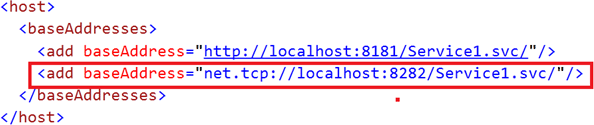
Multiple base addresses for WCF Service

3.gif

If we do not want to explicitly set address for each EndPoint in our service then we define BASE ADDRESS for the EndPoint exposed for our service
In above configuration, we added one more base address using net.tcp protocol.

Read more: C# Corner

How to Create a Software RAID Array in Windows 7

disk-mgmt-11.png

Instead of having a bunch of separate drives to deal with, why not put them together into one big drive? You can use software RAID to accomplish this, and here’s how to do it.
Windows has built in functionality to set up a software RAID (Redundant Array of Inexpensive Disks) without any additional tools. This makes it easy to turn your existing spare hard drives into massive storage or even redundant backups. In this example we are going to set up a spanned disk that takes three 2 GB disks and creates one 6 GB disk using Windows 7 Professional.

Set Up Your Disks

The first step you need to do is backup your information on the disks you want to use in the RAID. While it is not required that you format your disks for some of the RAID options, don’t take the chance and make a backup.
Once all of your information is backed up, open your start menu, right click on computer and open manage.
When computer management opens click on disk management on the left side. Any disk you want included in your RAID you need to delete them from the top area of disk management.
Once they are deleted you should only be left with disks you do not want included in the RAID. The other disks will still be there but they will show up in the lower pane and show their spaces as unallocated.

Create Your RAID

In Windows they don’t call their RAID options by the traditional 0, 1, 5, 10 etc. Instead they use spanned, striped, mirrored, and RAID-5 as the options for creating software RAIDs.
A spanned volume will create a single partition that will literally span all of the included disks whereas a striped volume will deliberately break up files across multiple disks in an attempt to improve read and write performance. In both cases there is no redundancy so you need to create your own backups.
A mirrored volume and RAID 5 both have some redundancy but you lose storage space to create the parity files needed for recovery. For this example we are going to go with the simplest volume type and create a spanned volume even though it isn’t technically RAID.
Right click on the first disk you want included in your RAID and select new spanned volume.

Read more: How-to-geek

Sunday, November 28, 2010

DansGuardian

   DansGuardian is an award winning Open Source web content filter which currently runs on Linux, FreeBSD, OpenBSD, NetBSD, Mac OS X, HP-UX, and Solaris. It filters the actual content of pages based on many methods including phrase matching, PICS filtering and URL filtering. It does not purely filter based on a banned list of sites like lesser totally commercial filters.

   DansGuardian is designed to be completely flexible and allows you to tailor the filtering to your exact needs. It can be as draconian or as unobstructive as you want. The default settings are geared towards what a primary school might want but DansGuardian puts you in control of what you want to block.
If you are running Microsoft Windows then this software is not for you; it is for running on servers. Of course you can run it on a server and filter Windows clients through it but it will not run on Windows itself.

DansGuardian is a true web content filter.

Read more:  DansGuardian

Prevent Copying files from USB Drive without Disabling USB port

Today one of my friend called me up and was asking about this issue, but he also said that he want the USB drive to read files but don’t want to write files to it or copy from it for some security purpose.
Suddenly i thought, is it possible to do it? i was little bit confused about it. Then i got some idea and was testing about it. and finally i got it. Using GP edit or Registry edit, one can easily do this task.

stop-copying-files.png

If you don’t know how to do it, follow the below steps and you could also keep some tight security for your USB Drive.
To perform this we need to edit some registry entries. To do this registry edition follow the steps below.
1. Click on start and go to Run.
2. Type “regedit”, with our quotes on run command window and click OK. Now the registry editor will be opened. Now follow the following path
HKEY_LOCAL_MACHINE\SYSTEM\CurrentControlSet\Control\StorageDevicePolicies

3. Create a DWORD value called ‘WriteProtect‘ and set it to 1.
4. To disable write protect on USB drives change the DWORD to 0.
It feels great to learn these tricks and teach someone else too.

Read more: Blig Book

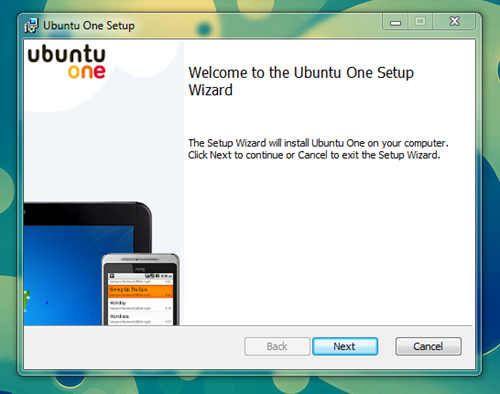
Ubuntu One for Windows – a quick run down of the first beta

image_thumb16.png

Yesterday I got my invite to join the Ubuntu One Windows Beta. I thought I’d show off some screenshots.
The installer is a small 12MB .msi installer and installation of it is straightforward.
Setting up your Ubuntu One account after installation is just as easy on Ubuntu: you open the app, enter your Ubuntu One sign in details and connect.

Read more: OMG! Ubuntu !

Company Seeks To Boost Linux Game Development With 3D Engine Giveaway

To support Linux game development, Unigine Corp. announced a competition: it will give a free license for its Unigine engine to a seasoned team willing to work on a native Linux game. The company has been Linux-friendly from the very start; it released advanced GPU benchmarks (Heaven, Tropics, Sanctuary) for Linux before and is working on the OilRush strategy game that supports Linux as well.

Read more: Slashdot
Read more: unigine

MISRA C

MISRA C is a software development standard for the C programming language developed by MISRA (Motor Industry Software Reliability Association). Its aims are to facilitate code safety, portability and reliability in the context of embedded systems, specifically those systems programmed in ISO C. There is also a set of guidelines for MISRA C++.
However, there are now more MISRA users outside of the automotive industry than in it: "MISRA has evolved as a widely accepted model for best practices by leading developers in sectors including aerospace, telecom, medical devices, defense, railway, and others."
The first edition of the MISRA C standard, "Guidelines for the use of the C language in vehicle based software", was produced in 1998, and is officially known as MISRA-C:1998.
In 2004, a second edition "Guidelines for the use of the C language in critical systems", or MISRA-C:2004 was produced, with many substantial changes to the guidelines, including a complete renumbering of the rules.
Work has just started on the next revision of the guidelines, which are intended to address use of C99.
As with many standards (eg ISO, BSI Group, RTCA, Incorporated et al) the MISRA C guideline documents are not free to users or implementors.

Read more: Wikipedia

KDE 4.6 Beta 1 – a first look

snapshot1.png
The first beta release of KDE SC 4.6 was released yesterday. OpenSUSE had packages up almost immediately, so being curious as to what’s new, I’ve downloaded and upgraded to the new release. These are my impressions thus far.
KDE’s release notes tout the following (main) features of the 4.6 release:
libplasma now does does something with QML for widgets on devices – why this is the number one feature listed on a PR release about the new release I do not know. It’s hardly sexy;
the reintroduction of activities, which now includes starting and stopping applications as part of an activity. This sounds interesting – more below;
optimization of Kwin. The release notes say that this will LEAD to smoother window management and more stunning desktop effects. So I’m guessing these aren’t in this release;
faceted browsing in dolphin. What I think this means is that you can filter particular files by various categories in a folder view;
git plugin for dolphin – yawn;
introduction of akonadi to the PIM applications.
KWIN Optimisations
This is actually really hard to show, because any screen capture program I use to show the improvements will be jerky and completely defeat the purpose. However, I can say on my desktop running an NVIDIA card, using the 256.53 version – for some reason the 260 series has a few issues on my machine – is smoooooooth. No tearing on wobbly windows. That eternal bug bear, resizing windows is smooth, even if I have the wobble on resize thing going. Basically, on an NVIDIA card, Kwin compositing performance is awesome.
On my intel 945GM desktop things are slightly different. There is definite improvement in most areas. However, wobbly windows are now unusable and even moving windows with the wobble turned off is jerky. I’m not sure if I’m alone on this or not, but hopefully this will be fixed in subsequent beta’s.
Filters in Dolphin
This is actually quite cool. I think this is what the release notes refer to as “faceted” browsing. It allows you to filter progressively on various categories, including filetypes, time periods, size as well as text in the filename, or inside the file. This can be really useful for finding files in large directories or file systems. Particularly when you’re looking for a particular file, but don’t know exactly what it is – you just know that you’ll know it when you see it. I am going to have a further play with this to see what else it can do, but finally we are seeing how nepomuk can be incorporated into KDE apps. I just hope they add this to the file open dialog.

Read more: everyday linux how2s

Pirate Bay founders lose appeal: jail time reduced, fines raised

It's been a while since the four Pirate Bay founders lost their case in a Stockholm district court -- April 2009, to be more precise. The verdict was of course appealed, but alas, it was not to be. A Swedish appeals court has upheld the original ruling but changed the sentencing. Three of the quartet have had their jail time reduced: Fredrik Neij gets ten months, Peter Sunde eight months, and Carl Lundstrom four (Gottfrid Svartholm was too ill at the time of the hearing; his "criminal liability" will be determined later, according to BBC News). The fine, however, has been upped from the original 30 million kronor to 46 million (US $6.4m). That's seriously going to cut into their Black Friday shopping plans, but hey, we know a great way to pick up the Adobe suite. Well, maybe not.

Read more: Engadget

Windows Phone 7 Sales Continue To Struggle

Even with the pre-Christmas buying rush, Microsoft is already desperately offering a new buy one get one free offer similar to the ones they gave for the KIN. According to the article, 'Windows Phone 7 devices can't even manage two per cent of the fortnight's sales.' These aren't official Microsoft figures; they come from online shopping sites. But since Microsoft official sales figures seem subject to manipulation, this is perhaps one of the better guesses we will get at the success of Windows Phone 7 until well into next year. This also strongly backs up other reports of deeply disappointing phone sales. Even Microsoft supporters have been wondering for a while whether it's time for Ballmer to go. If the sales reports are true, then he may be pushed before he jumps.

Read more: Slashdot

10 Free Server Tools Your Organization Needs

This list of 10 free, essential tools is an amalgam of tools for all sizes of companies and networks. The range of tools covered here are generally cross-platform (i.e., they run on multiple OSes) but all are extremely useful to the system administrator, network administrator and first-level support personnel. While all of these tools are free to download and use in your network without payment of any kind to their developers or maintainers, not all are open source. The 10 essential tools listed here, in no particular order, are from various sources and represent the very best in tools currently used in large and small enterprises alike.

1. PSTools
PSTools is a suite of useful command-line Windows tools that IT professionals consider essential to survival in a Windows-infested network. It provides automation tools that have no rival. There is no greater free toolset for Windows available anywhere. Microsoft provides this suite free of charge. If it's not part of your Windows diagnostic and automation arsenal, stop reading and download it now. Be sure to come back and finish the list. You can multitask, can't you?)

2. SharEnum
ShareEnum is an obscure but very useful tool. ShareEnum shows you all file shares on your network. Even better, it shows you their associated security information. This very small (94K) tool might become one of the most valuable and useful security tools that you possess. It is another free tool from Microsoft.

3. Nagios
Nagios is an enterprise infrastructure monitoring suite. It's free, mature and commercially supported. It has grown from a niche software project to a major force in contemporary network management. It's used by such high-profile companies as Citrix, ADP, Domino's Pizza, Wells Fargo, Ericsson and the U.S. Army.

4. Wireshark
If you run a network of any size or topology, Wireshark is a must-have application. It is a network packet capture and analysis program that assists you with your ongoing quest for a trouble-free network. Wireshark won't prevent network problems, but it does allow you to analyze those problems in real time and possibly avoid failure.

Read more: ServerWatch

C++0x Dynamic Message Passing

Introduction

Sometimes it is useful to have dynamic message passing as in Objective-C. The small header presented below allows any class to contain a dynamic message map that can be used to add methods dynamically to an object.

Background
Objective-C is deemed more flexible than C++ because it allows a form of dynamic dispatch known as message passing.
Message passing is a form of dynamic dispatch that does not require implementation of a specific interface type. When sending a message to a target object, it is unknown to the compiler if the message can be handled by the object or not. It is only during the execution of the program that conformance to an interface is discovered.
Message passing is quite flexible because it does not require a lot of planning. Objective-C has been praised for this feature as more flexible than C++. This article demonstrates how easy it is to do the same in standard C++ (c++0x).

Using the code
Using the code is very easy. The following steps have to be followed:

  • include the header "mp_object.hpp" in your project.
  • inherit from class mp_object.
  • add dynamic methods to your object by using the method 'add_method'.
In order to add methods to an object, you need a prototype function. A prototype function can be any free-standing function. The following code is an example of how to declare prototypes and add dynamic methods to your code:

#include <iostream>
#include "mp_object.hpp"
using namespace std;
//prototype method
void draw() {}
//prototype method
void setColor(int color) {}
//rectangle
class rect : public mp_object {
public:
   //constructor
   rect() {
       add_method(::draw, &rect::draw);
       add_method(::setColor, &rect::setColor);
   }
   //draw
   void draw() {
       cout << "rect\n";
   }
   //set color
   void setColor(int color) {
       cout << "rect color = " << color << "\n";
   }
};
//circle
class circle : public mp_object {

Read more: Codeproject

Asymmetric Encryption and Signing with RSA in Silverlight

While Silverlight is a powerful tool for rich client applications, it lacks the ability to perform asymmetric encryption out of the box.  In this article, I'm going to share a cryptography class library I've been working on and show you how to use it to perform standards compliant RSA Encryption in Silverlight that is cross compatible with .NET's built in RSACryptoServiceProvider, allowing you to encrypt from Silverlight using my library and decrypt on your website using the RSACryptoServiceProvider.  For brevity, only examples using my class library will be shown except for a few examples that show equivelant functionality from the RSACryptoServiceProvider (RSACSP).
Update 11/24/2010: The Scrypt library has been updated.  Key generation is now performed Asynchronously to avoid blocking the UI thread and freezing the browser.  I've updated the applicable source samples in this article to reflect the changes.
Edit*:  I've decided to open up the source for this project. You can download this library and/or source and view the current applicable license on its new home at CodePlex: http://scrypt.codeplex.com/
Background
Before I get into the sample code, I'm going to give you a little bit of background.
What does it all mean?
RSA is an encryption scheme that uses a public and private key.  There are a variety of uses for RSA.  The two most common are encryption to protect data, and signing to verify the authenticity of data.  Encryption is performed with the public key, with the premise that data encrypted with the public key can only be decrypted using the private key.  The private key should be kept safe and secure and the public key can be shared with everyone.  Signing works the opposite direction and is used to verify the source of data.

Read more: Dustin Horne

Online Tools That Make My Life Easier

Imagine a situation where you’re sitting in front of a colleague’s computer or one that is publicly used. By definition you’re missing all your favorite tools that you’re used to and you can’t install them even if you wanted to. Here’s a short list of online tools that help me a lot when I’m using a computer other than my own. These do not fully replace the desktop equivalents, but they’re good enough. Though it’s not a list of tools that replace desktop applications, but rather a list of online tools that complement them and some provide functionality that does not exist in desktop based applications.

HTML / Javascript
http://jsbin.com – this one allows you to write HTML and Javascript code directly in the browser and preview it instantly. Features a nice syntax highlighting.
http://zen-coding.ru/demo/ – this one is really nice. If you don’t have VIM handy or other editor that supports zen-coding, you can simply open up this page and start zen coding right inside the browser. And if you need some help with your zen here’s a cheat-sheet PDF and a nice post explaining what it is and how to take advantage of it.

Beautifiers
http://jsbeautifier.org – Javascript unpacker & beautifier. Does exactly what it says.
http://xmlbeautifier.com/default.aspx – simple XML beautifier, nothing fancy.

Regural Expressions
http://gskinner.com/RegExr/ – regular expression test page with possibility to save your expressions and a hint column if you forget something.

Data Processing

Read more: Andrius Miasnikovas's Blog

ModSecurity Advanced Topic of the Week: Mitigating Slow HTTP DoS Attacks

With the recent OWASP AppSec DC presentation on Slow HTTP POST DoS attacks, the issue of web server platform DoS concerns have reached a new high.  Notice that I said, web server platform and not web application code.  The attack scenario raised by slow HTTP POST attack is related to web server software (Apache, IIS, SunONE, etc...) and can not be directly mitigated by the application code.  In the blog post, we will highlight the two main varieties of slow HTTP attacks - slow request headers and slow request bodies.  We will then provide some new mitigation options for the Apache web server platform with ModSecurity.

Network DoS vs. Layer-7 DoS
Whereas network level DoS attacks aim to flood your pipe with lower-level OSI traffic (SYN packets, etc...), web application layer DoS attacks can often be achieved with much less traffic.  The point here is that the amount of traffic which can often cause an HTTP DoS condition is often much less than what a network level device would identify as anomalous and therefore would not report on it as they would with traditional network level botnet DDoS attacks.
Layer-7 Connection Consumption Attacks
Ivan Ristic brought up the concept of connection consumption attacks in his 2005 book "Apache Security":

5.4.3. Programming Model Attacks
The brute-force attacks we have discussed are easy to perform but may require a lot of bandwidth, and they are easy to spot. With some programming skills, the attack can be improved to leave no trace in the logs and to require little bandwidth.
The trick is to open a connection to the server but not send a single byte. Opening the connection and waiting requires almost no resources by the attacker, but it permanently ties up one Apache process to wait patiently for a request. Apache will wait until the timeout expires, and then close the connection. As of Apache 1.3.31, request-line timeouts are logged to the access log (with status code 408). Request line timeout messages appear in the error log with the level info. Apache 2 does not log such messages to the error log, but efforts are underway to add the same functionality as is present in the 1.x branch.

Read more: SpiderLabs

Binding TextBlock, ListBox, RadioButtons to Enums

Introduction
This post demonstrates different ways to bind WPF controls to an enum property so that changing the selected item on the control automatically updates the value of the property. Examples for a ListBox, ComboBox, a group of RadioButtons and a ListBox of RadioButtons is shown. A way to convert the enum value to a user-friendly string is also shown.

Using the Code
You have an enum property such as the following:

private enum State
{
   Virginia,
   WestVirginia,
   NorthCarolina,
   SouthCarolina
};

and a UserControl with the property such as the following:

private States _state;
public  States State
{
   get { return _state; }
   set { _state = value; }
}

and you want to hook up a combo box, a list box or a panel of radio buttons to the property to allow the user to select a specific value.

1 - Create the User Control
We want to bind to the property in our UserControl, so we will have to change it fire the PropertyChanged event.
So we do the following:
Add the System.ComponentModel namespace:

using System.ComponentModel;

Add the INotifyPropertyChanged interface to our UserControl and implement the interface by adding a PropertyChanged event:

public partial class UserControl1 : UserControl, INotifyPropertyChanged
{
   public event PropertyChangedEventHandler PropertyChanged;

Change the property that raises the PropertyChanged event when the value changes:

private States _state;
public States State
{
   get { return _state; }
   set
   {
       if ( _state != value )
       {
           _state = value;
           if ( PropertyChanged != null )
           {
                PropertyChanged( this,
new PropertyChangedEventArgs( "State" ));
           }
       }
   }
}

Make it pretty.

If you have multiple properties, this snippet of code takes a lot of coding. We can separate this out by creating a convenience function to check and call the PropertyChanged event.

Read more: Codeproject

Get Property using Reflection C# +Java

התבקשתי לכתוב ב java class מאוד גדול (שלא ניתן לחלק אותו)ולהפוך אותו ל xml, סיקרן אותי מאוד כיצד כותבים את אותו class גם ב c#:
יש לציין שניתן להפוך Class ל XML גם בצורה אחרת דרך XmlSerializer.
להלן הקוד ב C#:
//Class into XML
//Get the Properties of the Class and
//Create xml element
XElement xml_line = new XElement("je");
Type type = MyClass.GetType(); //Get the Type of your Class
PropertyInfo[] properties = type.GetProperties(); //Get the PropertyOnly
foreach (PropertyInfo property in properties)
{
//Add the property value and the name to the xml
xml_line.Add(new XAttribute(property.Name, property.GetValue(MyClass, null).ToString()));
}
להלן הקוד ב java:

try 
{
//Class c = Class.forName("Person");
Field heightField;
Class c = p.getClass();
Field m[] = c.getDeclaredFields();
for (int i = 0; i < m.length; i++)
{
System.out.println(m[i].get(p));
}
}
catch (Throwable e) 
{
System.err.println(e);
}

Read more: Uzi Drori's Blog

כיווץ מחיצות

שלום לכולם ,
כאן ליעד מצוות התמיכה של Microsoft.
היום נלמד כיצד להקטין את גודלן של המחיצות בדיסק הקשיח במערכת ההפעלה Windows 7  .
ממשק ניהול המחיצות (מנהל הדיסקים) של Windows 7  מספק ממשק נוח וקל לשימוש דרכו ניתן להקליד , להקטין , לערוך ולמחוק מחיצות בדיסק הקשיח שלנו .
כיום , ניתן להקטין מחיצה עד לחצי מגודלה המקורי – כלומר במידה וכונן C קיים במערכת ההפעלה ככונן יחיד וגודלו הוא 300GB נוכל להקטינו על למחצית מגודלו – 150GB .
את החלק ה"עודף" שנוצר נוכל להגדיר ככונן נוסף ולמעשה ליצור 2 כוננים שונים בגודל כולל של 300GB
חשוב לזכור כי על מנת להקטין את הכונן עלינו למחוק מידע בנפח אותו אנחנו מעוניינים להקטין מהכונן – כמות המידע הפנוי יוצג לפנינו באשף עצמו אך עדיף להכין את הכונן לפני תחילת התהליך 
מתחילים!
1. לחצו על התחל > מקש ימין על המילה מחשב > בחרו בניהול

3.1_thumb_31259172.png


Read more: MS Support Blog