Tuesday, August 31, 2010

Burning Man Goes Open Source For Cell Phones

Today I bring you a story that has it all: a solar-powered, low-cost, open source cellular network that's revolutionizing coverage in underprivileged and off-grid spots. It uses VoIP yet works with existing cell phones. It has pedigreed founders. Best of all, it is part of the sex, drugs and art collectively known as Burning Man. ... The technology starts with the 'they-said-it-couldn't-be-done' open source software, OpenBTS. OpenBTS is built on Linux and distributed via the AGPLv3 license. When used with a software-defined radio such as the Universal Software Radio Peripheral (USRP), it presents a GSM air interface ("Um") to any standard GSM cell phone, with no modification whatsoever required of the phone. It uses open source Asterisk VoIP software as the PBX to connect calls, though it can be used with other soft switches, too. ... This is the third year its founders have decided to trial-by-fire the system by offering free cell phone service to the 50,000-ish attendees at Burning Man, which begins today in Black Rock City, Nevada
Read more: Slashdot

VLC 1.1.4 is released! PPA Ubuntu

VLC 1.1.4 is released, this is the fourth bugfix release of the VLC 1.1.x branch. This release comes especially to fix important security issue  that was discovered in most windows application, Linux in general is not affected by this security bug. So this new release is targeted for the windows platform.
What`s new in VLC 1.1.4?

Avformat fps displaying fix-TS,
Fix an issue where some programs would get dropped (fixes DVB issues too)
-Audio filters: · fix timestamps handling on some filters that provoked issues when playback of mono streams, especially on Windows
-Interface and extensions: · Youtube and other scripts updates

Read more:  Unixmen

Apertus, the Open Source HD Movie Camera

This article takes a tour of the hardware and software behind the innovative Apertus, a real world open source project. Led by Oscar Spierenburg and a team of international developers, the project aims to produce 'an affordable community driven free software and open hardware cinematic HD camera for a professional production environment'
Read more: Slashdot

Silverlight Media Framework 2.1

Release Notes
This is the official Release To Web (RTW) of the Microsoft Silverlight Media Framework 2.1.
Notes:
To use SMF with IIS Smooth Streaming you must download the IIS Smooth Streaming Client here: http://www.iis.net/download/SmoothClient
The .CHM file in the API DOCUMENTATION download may need to be unblocked. Just right click on the file, select "Properties", and choose "Unblock".
Fixes/Updates:

Fix JavaScript error message (missing Silverlight.js) in SmoothStreamingPlayer.html & ProgressiveDownloadPlayer.html
http://smf.codeplex.com/Thread/View.aspx?ThreadId=218806
SMF Bitrate graph does not reload:
http://smf.codeplex.com/Thread/View.aspx?ThreadId=217902
Added support for PlaylistItem.StreamSource
http://smf.codeplex.com/workitem/17760
PlaySpeedState.Normal renamed to PlaySpeedState.NormalPlayback
http://smf.codeplex.com/workitem/18384
SlowMotionElement wrong behavior
http://smf.codeplex.com/workitem/18245
Added PlaylistItem.StreamSource
http://smf.codeplex.com/workitem/17760
Calling Play() before OnApplyTemplate() causes Player to stop working
http://smf.codeplex.com/workitem/18194
(more..)

Read more: Codeplex

Analyzing Silverlight Memory Usage: Part 1 – Obtaining Measurements

A View from the Top
So you’ve decided that it’s time to optimize the memory footprint of your Silverlight application.  Before you’ll be able to do this analysis and optimization, you’ll need to understand a little bit about the way that Silverlight is structured.

Though the Silverlight programming model that you’ve come to know and love is accessed via managed code, much of Silverlight’s internals are written in native code (C++).  The actions that you take in managed code can cause Silverlight to allocate large amounts of native memory on your behalf, be it for layout, rendering, image allocations, you name it.

Especially important to remember is that your managed Silverlight elements will have a native memory counterpart.  Reducing the element count in your visual tree will have a direct and favorable impact in native working set.  Because of these native allocations, this article will go over analyzing native memory in addition to managed memory.

Where to start?
One of the most intimidating parts of performing memory analysis can be deciding where to start.  Often developers don’t focus on memory usage until it becomes a problem, at which point the project has already grown to a rather complex scale.  The good news is that there is already a great free tool that can help you divide the problem into more manageable pieces, this tool is VMMap.
Read more: Silverlight Performance Blog

Gmail Priority Inbox Sorts Your Email For You. And It’s Fantastic.

priority1.png

Email overload has finally met its match. Tomorrow, Gmail is rolling out a new feature called Priority Inbox that is going to be a Godsend for those of you who dread opening your email. In short, Google has built a system that figures out which of your messages are important, and presents them at the top of the screen so you don’t miss them. The rest of your messages are still there, but you don’t have to dig through dozens of newsletters and confirmations to find the diamonds in rough.
The beauty of the system lies in its simplicity — it’s nearly as easy as Gmail’s one click spam filter. There’s almost no setup: once it’s activated on your account, you’ll see a prompt asking you if you want to enable Priority Inbox. You can choose from a few options (the order of your various inboxes and if there are any contacts you’d like to always mark ‘Important’) but don’t have to setup any rules or ‘teach’ Gmail what you want it to mark important. It just works, at least most of the time.
Read more: Techcrunch

Send and Read SMS through a GSM Modem using AT Commands

Introduction
There are many different kinds of applications SMS applications in the market today, and many others are being developed. Applications in which SMS messaging can be utilized are virtually unlimited. Some common examples of these are given below:
Person-to-person text messaging is the most commonly used SMS application, and it is what the SMS technology was originally designed for.
Many content providers make use of SMS text messages to send information such as news, weather report, and financial data to their subscribers.
SMS messages can carry binary data, and so SMS can be used as the transport medium of wireless downloads. Objects such as ringtones, wallpapers, pictures, and operator logos can be encoded in SMS messages.
SMS is a very suitable technology for delivering alerts and notifications of important events.
SMS messaging can be used as a marketing tool.
In general, there are two ways to send SMS messages from a computer / PC to a mobile phone:
Connect a mobile phone or GSM/GPRS modem to a computer / PC. Then use the computer / PC and AT commands to instruct the mobile phone or GSM/GPRS modem to send SMS messages.
Connect the computer / PC to the SMS center (SMSC) or SMS gateway of a wireless carrier or SMS service provider. Then send SMS messages using a protocol / interface supported by the SMSC or SMS gateway.
In this article, I will explain the first way to send, read, and delete SMS using AT commands. But before starting, I would like to explain a little bit about AT commands.
Read more: Codeproject

BITS Logging

The attached ZIP file contains scripts to both enable and disable logging for the Background Intelligent Transfer Service, or BITS. Both scripts must be run elevated so on Windows Vista or newer open an elevated command prompt and run these scripts. You may also right-click on the scripts and choose to Run as administrator.
Read more: Heath Stewart's Blog

Monday, August 30, 2010

Silverlight CRUD Operations Using WCF Service

Image3.jpg
This articles will demonstrates how to use Silverlight CRUD operations using WCF service. We are going to use Data Grid data control.
Create a new Silverlight project using .NET framework 4.
You will see project layout like this. Web project works like server project all database related classes and services, .aspx test pages, configuration file and other project has all .xaml pages controls.
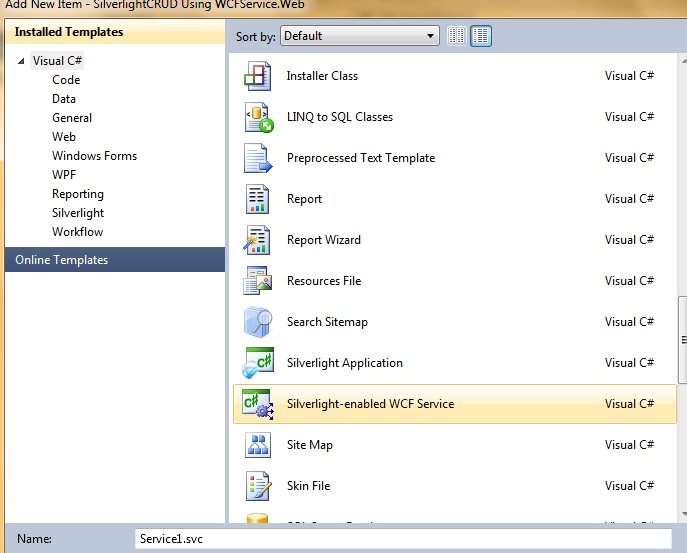
Now add a new Silverlight enabled wcf service.
In this sample I am using NORTHWND database which is available in App_Data folder. First add a new class in web project.
Customers.cs
using System;
usingSystem.Collections.Generic;
usingSystem.Linq;
usingSystem.Web;
namespace SilverlightCRUD_Using_WCFService.Web
{

public class Customers
{
public string CustomerID { get; set; }
public string CompanyName { get; set; }
public string ContactName { get; set; }
public string ContactTitle { get; set; }        
}
}

Now add functions in service class. This is connection string.
string conn = "Data Source=.\\SQLEXPRESS;AttachDbFilename=|DataDirectory|\\NORTHWND.MDF;Integrated Security=True;User Instance=True";
Read more: C# Corner

New SIlverilght Video Tutorial: How to Create a ListBox with a Static Background

Someone from my Silverlight Email List emailed me and told me that he had been struggling trying to create a ListBox with a static background image. So, I made this short, 3 mintue tutorial I show you how to do it all in Blend. So, if you need a ListBox with a background image then watch the video located here:
http://tinyurl.com/2g84vd8\
Download the Source Here
Enjoy! Victor
Read more: Victor Gaudioso's Silverlight Blog

Google Realtime Search Gets New Name, Its Own URL, And Kick In The Pants

screen-shot-2010-08-26-at-11-47-32-am.png

  In a move that emphasizes the increasing importance of realtime search, Google has just given their realtime search function a kick in the pants, moving it from the lowly “Updates” sidebar on regular Google search to it’s own URL http://google.com/realtime, which was broken this morning but now seems to be redirecting to http://www.google.com/realtime?esrch=RealtimeLaunch::Experiment.
In addition, Google has added some supplementary tools to help you sift through news stories, blog posts, Twitter, Facebook, and Buzz updates including …
Read more: Techcrunch

Making Ubuntu look like Windows 7

winbuntu-desktop-12.jpg
   Although it won’t help Linux run Windows-specific software applications, this easy hack produces an Ubuntu desktop that looks and feels a lot like Windows 7. It’s particularly suitable for reviving older PCs or laptops on which the main activities will be web-browsing, email, document writing, and streaming music and videos from Pandora, YouTube, and elsewhere on the web.
The process described below installs a Windows 7-like GNOME theme on an otherwise standard Ubuntu 10.04 installation. But before going through the installation procedure, let’s have a look at the system’s desktop before and after the modification.
Read more: LinuxTrends

WPF DataGrid Control - Performing Update and Delete Operations

  I was recently working on a requirement to perform Update and Delete operations on a WPF DataGrid control (similar to what developers do in a ASP.NET Grid control). The WPF DataGrid is an excellent control to bind with collections and provides various events to work with.
  In this article, I have developed a small application using ADO.NET EF (Entity Framework) and WPF DataGrid. The script for creating the Database table is in the db.sql file in the source code of this article.
  Note: If you are new to creating applications using WPF and ADO.NET EF then read my previous article Creating Applications using Windows Presentation Foundation (WPF) Commanding and ADO.NET Entity Framework
Creating ADO.NET EF and WPF Project
Step 1: Open VS2010 and create a WPF project and name it as ‘WPF_DataGridEvents’.
Step 2: To this project, add a new ADO.NET Entity Model. Name it as ‘CompanyEDMX’. From the wizard for ADO.NET EF, select ‘Employee’ table created in SQL Server using the db.sql script. After the completion of the wizard, the following model will be generated:
Read more: dot net curry.com

LG putting 9.7-inch color, 19-inch flexible e-paper displays into production

lg-display-19-inch-e-ink.jpg
   LG's shown off plenty of display prototypes that may or may not ever wind up in actual products, but it looks like two of them are about to get real -- a recent SEC filing has revealed that LG is expecting to put both a 9.7-inch color e-paper display and a 19-inch flexible e-paper display into mass production by the end of the year. Details beyond that are expectedly light -- including any word on what type of products they'll be used in -- but the 19-inch display is apparently the same one we first saw back in January (pictured above).
Read more: Engadget

Создание изображений из элементов управления WPF

Существует достаточно распространенная задача, когда окно приложения или его часть необходимо сохранить как изображение. В WPF есть класс, который очень упрощает ее решение – RenderTargetBitmap. Он позволяет получить изображение любого элемента управления WPF (включая его дочерние элементы) в растровом формате. Рассмотрим пример использования данного класса и некоторые особенности.
Сразу перейдем к коду примера. После я дам краткое его описание и расскажу про пару особенностей.
/// <summary>Renders the Visual object and store it to file.</summary>
/// <param name="baseElement">The Visual object to be used as a bitmap. </param>
/// <param name="imageWidth">The height of the bitmap.</param>
/// <param name="imageHeight">The width of the bitmap.</param>
/// <param name="pathToOutputFile">Full path to the output file.</param>
private void SaveControlImage(Visual baseElement,
       int imageWidth, int imageHeight, string pathToOutputFile)
{
   // 1) get current dpi
   PresentationSource pSource = PresentationSource.FromVisual(Application.Current.MainWindow);
   Matrix m = pSource.CompositionTarget.TransformToDevice;
   double dpiX = m.M11 * 96;
   double dpiY = m.M22 * 96;
   // 2) create RenderTargetBitmap
   RenderTargetBitmap elementBitmap =
               new RenderTargetBitmap(imageWidth, imageHeight, dpiX, dpiY, PixelFormats.Default);
   // 3) undo element transformation
   DrawingVisual drawingVisual = new DrawingVisual();
   using (DrawingContext drawingContext = drawingVisual.RenderOpen()) {
       VisualBrush visualBrush = new VisualBrush(baseElement);
       drawingContext.DrawRectangle(visualBrush, null,
           new Rect(new Point(0, 0), new Size(imageWidth, imageHeight)));
   }
   // 4) draw element
   elementBitmap.Render(drawingVisual);
   // 5) create PNG image
   BitmapEncoder encoder = new PngBitmapEncoder();
   encoder.Frames.Add(BitmapFrame.Create(elementBitmap));
   // 6) save image to file
   using (FileStream imageFile =
               new FileStream(pathToOutputFile, FileMode.Create, FileAccess.Write)) {
       encoder.Save(imageFile);
       imageFile.Flush();
       imageFile.Close();
   }
}
Read more: devblog.NET

Tips & Tricks: How to get the Screen Resolution in Silverlight ?

In this Tips & Tricks, I will show you the steps by which you can get the Screen Resolution of Client’s PC in Silverlight Application. It is quite simple. You have to just call the HTML DOM object to receive the handle of the screen and from that you can easily get the Screen Resolution.
To get the Screen Resolution, you need to get the handle of the Window and you can get it from:
System.Windows.Browser.HtmlPage.Window;
Read more: Kunal's Blog

6 new Windows 7 Themes for you to enjoy

831f184f-7bb2-4dd0-b71e-4ba06ae45262.jpg
6 great new Windows 7 Themes available from the Personalization Gallery
Girls Rock
Gears of War 3
26Creative
An Hsin Pu Tzu
(more..)
Read more: I'm PC

Styling tips for common Silverlight controls

Microsoft Expression Blend comes with many Microsoft Silverlight controls that you can use to create a great user experience. You can also download controls from trusted sources.
For more information, see Import a custom control by adding a reference.
If you find a control that functionally fits your needs but doesn't look the way that you want it to, and if that control supports templates, you can modify the templates of the control to change its appearance.
To make things easier, you can focus on your design by drawing everything on the artboard first, by using drawing tools, and by importing art or other assets. When you are done, you can use the Make Into Control command to convert your objects into a template for any control.
Template-binding
Controls have properties to which objects in a template can be bound. This is called template-binding. By binding parts of the template to a control, you effectively create parameters for the template. For example, instead of saying, "This Rectangle is blue," you say, "This Rectangle is the same color as the Background of the control." Thus, when you apply the template to a control with different Background properties, the result is a differently colored template.
Read more: Microsoft Expression

Calling an asp.net web service from jQuery

As I have post it in earlier post that jQuery is one of most popular JavaScript library in the world amongst web developers Lets take a example calling ASP.NET web service with jQuery . You will see at the end of the example that how easy it is to call a web service from the jQuery.
Let’s create a simple Hello World web service. Go to your project right click->Add –> New Item and select web service and add a web service like following.
[WebService(Namespace = "http://tempuri.org/")]
[WebServiceBinding(ConformsTo = WsiProfiles.BasicProfile1_1)]
[System.ComponentModel.ToolboxItem(false)]
// To allow this Web Service to be called from script, using ASP.NET AJAX, uncomment the following line.
[System.Web.Script.Services.ScriptService]
public class HelloWorld : System.Web.Services.WebService
{
 [WebMethod]
 public string PrintMessage()
 {
     return "Hello World..This is from webservice";
 }
}
...
Now let’s add some JavaScript code to call web service methods like following.
<script language="javascript" type="text/javascript">
         function CallWebServiceFromJquery() {
     
         $.ajax({
             type: "POST",
             url: "HelloWorld.asmx/PrintMessage",
             data: "{}",
             contentType: "application/json; charset=utf-8",
             dataType: "json",
             success: OnSuccess,
             error: OnError
                         });
         
     }
     function OnSuccess(data, status)
     {
        alert(data.d);
     }
     function OnError(request, status, error)
     {
         alert(request.statusText);
     }
</script>
Read more: DOTNETJAPS ALL ABOUT .NET

Smooth Streaming Primer

IIS Media Services, an integrated HTTP-based media delivery platform, delivers true HD (720p+) live and on-demand streaming, DVR functionality, and real-time analytics support to computers, TVs, and mobile devices. By offering a complete multi-format media delivery platform and a proven Web server, highly immersive websites can now be managed from a single Web platform: IIS.
Smooth Streaming, an IIS Media Services extension, enables adaptive streaming of media to Silverlight and other clients over HTTP. Smooth Streaming provides a high-quality viewing experience that scales massively on content distribution networks (CDNs), making true HD 1080p media experiences a reality.
Smooth Streaming is the productized version of technology first used by Microsoft to deliver on-demand video of the 2008 Summer Olympics for NBCOlympics.com. By dynamically monitoring both local bandwidth and video-rendering performance, Smooth Streaming optimizes content playback by switching video quality in real-time.
Contents

  • About IIS Smooth Streaming
  • About the Protected Interoperable File Format (PIFF)
  • Creating PIFF Content
  • Enabling PlayReady DRM with Smooth Streaming
  • Setting Up IIS Origin Servers for Live & On-Demand Smooth Streaming
  • Enabling Server & Encoder Failover for Live Smooth Streaming
  • Building a Smooth Streaming Client with Silverlight
  • Building a Smooth Streaming Client for Embedded Platforms without Silverlight
  • Getting Started with Expression Encoder, IIS Media Services, and Smooth Streaming to Silverlight Clients
  • Setting Up Smooth Streaming to Apple Devices
  • About the End-to-End Setup for Sunday Night Football & Winter Olympics Events
  • Comparing Smooth Streaming to Other Adaptive Streaming Technologies
  • FAQs (Coming Soon!)

Read more: IIS

Создание документации в .NET

Качественная документация – неотъемлемая часть успешного программного продукта. Создание полного и понятного описания всех функций и возможностей программы и программного компонента требует немало сил и терпения. В данной статье я рассмотрю некоторые практические аспекты создания документации для .NET компонентов.
Предположим, что у нас готова или почти готова некоторая .NET библиотека для разработчиков (они же конечные пользователи). API библиотеки безупречен, количество багов впечатляюще мало, да и вообще это не библиотека, а просто кладезь совершенного кода. Дело за малым – объяснить пользователям, как работать с этим замечательным продуктом.
Есть разные подходы к написанию документации. Некоторые команды предпочитают начинать создание документации в момент начала создания продукта. Другие откладывают написание мануалов на окончание работ. В некоторых командах документацию пишут специальные люди, которые ходят от разработчика к разработчику и от менеджера к менеджеру, аккумулируя знания о продукте. Во многих небольших командах таких специальных людей нет, а потому документацию часто пишет разработчик или разработчики. Кто-то использует сторонние средства вроде Help & Manual, в которых, как в заправском текстовом редакторе, можно создавать очень сложную верстку и на выходе получать документацию в многообразии форматов. Многие используют другой подход, широко пропагандируемый в последнее время – написание документации прямо в коде программы/библиотеки.
Генерируем файл документации
После того, как xml-описание вашего компонента готово, можно сгенерировать файл документации. Я предпочитаю для этого использовать связку Sandcastle + Sandcastle Help File Builder (SHFB). Замечу, что некоторым больше по душе DocProject. Для этого требуется:
Скачать и установить Sandcastle
sandcastle.codeplex.com/
Скачать и установить Sandcastle Help File Builder
shfb.codeplex.com/
Скачать и применить патч для стилей, используемых Sandcastle
sandcastlestyles.codeplex.com/
Если у вас возникнут проблемы со сборкой документации в формате HTML Help, то нужно проверить, что itircl.dll присутствует в системе и зарегистрирована. Обычно эта dll лежит в System32, регистрировать ее нужно через regsvr32. Подробнее написано тут:
frogleg.mvps.org/helptechnologies/htmlhelp/hhtips.html#hhc6003
Read more: Habrahabr

LINQ To XML Tutorials with Examples

   A lot of developers over the past few months have requested us for tutorials focusing on LINQToXML. Although I have written a couple of them in the past, I decided to republish these tips in the form of a single post. In this article, we will explore 24 ‘How Do I’ kind of examples using LINQ to XML. I assume you are familiar with LINQ. If not, you can start off with LINQ by checking some tutorials over here and here.
   For this article, we will be using a sample file called ‘Employees.xml’ for all our samples which is available with the source code. So make sure you keep it handy with you while are practicing these examples. The mark up for Employees.xml is as follows:
<?xml version="1.0" encoding="utf-8" ?>
<Employees>
<Employee>
   <EmpId>1</EmpId>
   <Name>Sam</Name>  
   <Sex>Male</Sex>
   <Phone Type="Home">423-555-0124</Phone>
   <Phone Type="Work">424-555-0545</Phone>
  <Address>
     <Street>7A Cox Street</Street>
     <City>Acampo</City>
     <State>CA</State>
     <Zip>95220</Zip>
     <Country>USA</Country>
   </Address>
</Employee>
<Employee>
   <EmpId>2</EmpId>
   <Name>Lucy</Name>
   <Sex>Female</Sex>
   <Phone Type="Home">143-555-0763</Phone>
   <Phone Type="Work">434-555-0567</Phone>
   <Address>
Read more: dot net curry.com

Interesting T-SQL problems

With this blog post I am hoping to start a new series of blogs devoted to the interesting T-SQL problems I encounter in forums during the week.
The idea of this blog series came to me on Wednesday night when I thought I solved a complex problem...
First Problem
The first problem, I'd like to discuss, is found in this MSDN thread:
Given this table
SalesDateTime SalesAmount
2010-08-10 00:05:12 58.22
2010-08-10 00:08:22 21.10
2010-08-10 00:09:38 8.45
2010-08-10 00:18:04 9.52
2010-08-10 00:19:56 45.20
2010-08-10 11:35:15 47.12
2010-08-10 11:36:12 88.55
2010-08-10 11:40:31 45.12
find the Average Sale amount for the 15 minutes time interval.
Second Problem
The second problem is really a gem and it is presented in How can I find overlapped ranges? thread
Name Chromosome Start End
N1 chr3 17443613 17443685
N2 chr3 17443521 17443685
N3 chr2 162180459 162180499
N343 chr2 131865573 131865687
N34 chr16 34623393 34623610
N2456 chr3 17443512 17443685
N43243 chr3 17443608 17443685
The whole table is about 31,000 records (includes 22 chromosomes + X, Y chromosomes).
The problem is to find the overlapped regions (or ranges) and these overlapped records have to be on the same Chromosome of this table.
Read more: LessThanDot

HelpProvider in C#

HelpProvider
HelpProvider control provides popup or online help for a control.  In this article, we will discuss how to use a HelpProvider control to implement help for controls in a Windows Forms application.
Here are some of the useful methods of HelpProvider.
SetShowHelp method specifies whether Help is displayed for the specified control.
SetHelpString method specifies the Help string associated with the specified control.
SetHelpNavigator method specifies the Help command to use when retrieving Help from the Help file for the specified control.
SetHelpKeyword method specifies the keyword used to retrieve Help when the user invokes Help for the specified control.
HelpNamspace property gets or sets a value specifying the name of the Help file associated with this HelpProvider.
Here is an example of how to use a HelpProvider component and load a help (.chm) file and apply on the controls.
C# Code:
private HelpProvider hlpProvider;
private void CreateHelpProvider()
{
   hlpProvider = new System.Windows.Forms.HelpProvider();
   hlpProvider.SetShowHelp(textBox1, true);
   hlpProvider.SetHelpString(textBox1, "Enter a valid text here.");
   hlpProvider.SetShowHelp(button1, true);
   hlpProvider.SetHelpString(button1, "Click this button.");
   // Help file
   hlpProvider.HelpNamespace = "helpFile.chm";
   hlpProvider.SetHelpNavigator(textBox1, HelpNavigator.TableOfContents);
}
Read more: C# Corner

Debug Your .NET Web Project With IIS Express [Tips & Tricks]

For those of us too impatient to wait for a hotfix for Visual Studio to natively support IIS Express, I've done some digging and found a way to [fairly] easily setup a debugging environment for IIS Express and VS 2010 (should work for VS 2008 also, though!). This assumes you are at least an intermediate user of .NET/IIS and Visual Studio.
Prerequisites
Download and install WebMatrix beta. This download includes IIS Express (as of this posting, I did not find a standalone download of IIS Express).
Be using Visual Studio 2010 or 2008 and a web project to debug.
Steps to Setup IIS Express
It's actually quite simple to setup IIS express. Once WebMatrix is done installing, go to "My Documents\IISExpress8\config".
image_thumb.png

Read more: InterPID

Stepping into ASP.NET MVC source code with Visual Studio debugger

Using Visual Studio symbols and source files makes debugging much easier. I am specially happy about ASP.NET MVC 2 source files because I develop on ASP.NET MVC 2 almost every day. You may also find other useful symbols and source files. In this posting I will show you how to get ASP.NET MVC source to your computer and how to use it.
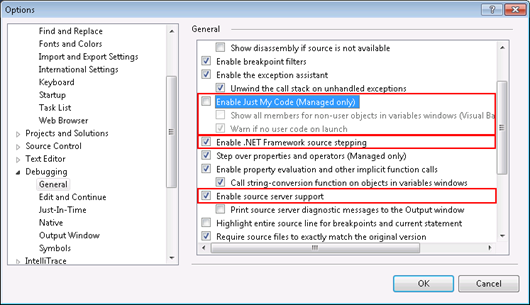
1. Debug options

Open options dialog and make sure you have check boxes set as on following image in red boxes.
debugoptions_thumb_5572C6E9.png
Read more: Gunnar Peipman's ASP.NET blog

MvcContrib Template Gallery

Project Description
This project is the MVC Template Gallery which is part of the MvcContrib project.
This gallery is filled with project styles that work with the out of the box markup from the ASP.Net MVC project template. These were origionally part of the www.asp.net website but went away after a site redesign. Since they were licensed under a Creative Commons licences, we put them up here and hope to have more submitted by great developers and designers like you!
Read more: Codeplex

Managing View State in ASP.NET 4 Using the New ViewStateMode Property

Introduction
The ASP.NET Web Forms model strives to encapsulate the lower level complexities involved in building a web application. Features like server-side event handlers, the page lifecycle, and view state effectively blur the line between the client and the server, simplify state management, and free the developer from worrying about HTTP, requests and responses, and similar matters. While these facets of the Web Forms model allow for rapid application development and make ASP.NET more accessible to developers with a web application background, their behavior can impact your website's behavior and performance.
View state is perhaps the most important - yet most misunderstood - feature of the Web Forms model. In a nutshell, view state is a technique that automatically persists programmatic changes to the Web controls on a page. By default, this state is serialized into a base-64 encoded string and included as a hidden <input> field in the Web Form. On postback, this state information is returned to the server as part of the POST request, at which point the server can deserialize it and reapply the persisted state to the controls in the control hierarchy. (If this last paragraph made crystal clear sense, great! If not, consider reading my article, Understanding ASP.NET View State, and Dave Reed's article, ViewStateMode in ASP.NET 4, before continuing.)
One potential issue with view state is that it can greatly bloat the size of your web pages. Each new version of ASP.NET seems to include new techniques for managing view state's footprint. ASP.NET 4 adds a new property to all Web controls, ViewStateMode, which allows developers to disable view state for a page by default and then selectively enable it for specific controls. This article reviews existing view state-related properties and then delves into the new ViewStateMode property. Read on to learn more!
Read more: 4 Guys From Rolla

Listening to DependencyProperty changes in Silverlight

The dependency property system is a pretty nice concept. Receiving notifications for dependency property changes on an existing object is a very common scenario in order to update my view model or the UI.
This is quite easy in WPF:
// get the property descriptor
DependencyPropertyDescriptor prop = DependencyPropertyDescriptor.FromProperty(TextBox.TextProperty, myTextBox.GetType());
// add change handler
prop.AddValueChanged(myTextBox, (sender, args) =>
{
});

Unfortunately Silverlight has a limited set of meta-data functionality around the dependency property system, because the DependencyPropertyDescriptor does exist in Silverlight.
In order to get a workaround I found a solution in which I get notified with help of the binding system. I simple use a relay object which value property is bound to the source property I want to get notified. The relay object contains a public event which raises when the value changes.
Read more: Kiener's Blog

Run Any Browser Directly from the Web

Want to quickly test your website in IE 6 or Firefox 2 or Google Chrome 5 or Safari 4 or Opera? Spoon is a cool website that lets you run specific versions of the popular web browsers directly in your web browser via a plugin. Great for geeks like me.
Read more: Spoon Browser Sandbox

Hackers accidentally give Microsoft their code

When hackers crash their systems while developing viruses, the code is often sent directly to Microsoft, according to one of its senior security architects, Rocky Heckman.
When the hacker's system crashes in Windows, as with all typical Windows crashes, Heckman said the user would be prompted to send the error details--including the malicious code--to Microsoft. The funny thing is that many say yes, according to Heckman.
"People have sent us their virus code when they're trying to develop their virus and they keep crashing their systems," Heckman said. "It's amazing how much stuff we get."
At a Microsoft Tech.Ed 2010 conference session on hacking today, Heckman detailed to the delegates the top five hacking methods and the best methods for developers to avoid falling victim to them. Heckman explained how to create malicious code that could be used in cross-site scripting or SQL injection attacks and, although he said it "wasn't anything you couldn't pick up on the Internet", he suggested delegates use the code responsibly to aid in their protection efforts.
According to Heckman, based on the number of attacks on Microsoft's website, the company was only too familiar with what types of attacks were most popular.
"The first thing [script kiddies] do is fire off all these attacks at Microsoft.com," he said. "On average we get attacked between 7000 and 9000 times per second at Microsoft.com," said the senior security architect.
"I think overall we've done pretty good, even when MafiaBoy took down half the Internet, you know, Amazon and eBay and that, we didn't go down, we were still up."
Read more: ZDnet

Sorting Algorithm Breaks Giga-Sort Barrier, With GPUs

Researchers at the University of Virginia have recently open sourced an algorithm capable of sorting at a rate of one billion (integer) keys per second using a GPU. Although GPUs are often assumed to be poorly suited for algorithms like sorting, their results are several times faster than the best known CPU-based sorting implementations.
Read more: Slashdot

Use a Dab of Vaseline to Take Vintage-Style Photos

500x_2010-08-28_094518.jpg

The low-quality lenses and loose tolerances of vintage consumer cameras often gave photos a slightly distorted and dream-like quality. Capture that vintage-feel with little more than a dab of Vaseline.
Early inexpensive consumer-grade cameras were manufactured with cheap materials and very loose tolerances which led to distortion on the edges of the photo and other effects. Photojojo, a DIY photography blog, shares a simple hack to help you easily recreate the effect:
Read more: Lifehacker

Sunday, August 29, 2010

Microsoft Co-Founder Launches Patent War

They're the everyday fixtures of the Internet experience: pop-up stock quotes on a website, suggestions for related reading near a news article, videos along the side of your screen.
Now, Microsoft Corp. co-founder Paul Allen says he owns the technology behind all these ideas, and he's demanding that some of the world's top Web companies pay up to use them.
A firm run by Microsoft co-founder Paul Allen is suing Apple, Google and 9 other companies alleging they are violating patents Mr. Allen financed more than a decade ago. Dionne Searcey and Julia Angwin look at the suit and the technology involved.
The 57-year-old software guru on Friday sued much of Silicon Valley, claiming Internet giants such as Google Inc., Facebook Inc. and eBay Inc. have built their businesses around what he says is his technology.
Mr. Allen's suit, filed in federal court in Seattle, asserts those three companies and eight others are using technology developed a decade ago at the billionaire's now-defunct Silicon Valley laboratory. Mr. Allen, a pioneer of computer software, didn't develop any of the technology himself but owns the patents.
His targets vowed to fight. "This lawsuit against some of America's most innovative companies reflects an unfortunate trend of people trying to compete in the courtroom instead of the marketplace," a Google spokesman said. Other companies named in the suit said they planned to defend themselves or weren't available to comment.

Read more: WallStreet journal

.Net On Android Is Safe, Says Microsoft

With Oracle suing Google over 'unofficial' support for Java in Android, Microsoft has come out and said it has no intention of taking action against the Mono implementation of C# on the Linux-based mobile OS. That's good news for Novell, which is in the final stages of preparing MonoDroid for release. Miguel de Icaza is not concerned about legal challenges by Microsoft over .Net implementations, and even recommends that Google switch from using Java. However, Microsoft's Community Promise has been criticized by the Free Software Foundation for not going far enough to protect open source implementations from patent litigation, which is at the heart of the Oracle-Google case.
Read more: Slashdot

Native ZFS Is Coming To Linux Next Month

Phoronix is reporting that an Indian technology company has been porting the ZFS filesystem to Linux and will be releasing it next month as a native kernel module without a dependence on FUSE. 'In terms of how native ZFS for Linux is being handled by this Indian company, they are releasing their ported ZFS code under the Common Development & Distribution License and will not be attempting to go for mainline integration. Instead, this company will just be releasing their CDDL source-code as a build-able kernel module for users and ensuring it does not use any GPL-only symbols where there would be license conflicts. KQ Infotech also seems confident that Oracle will not attempt to take any legal action against them for this work.
Read more: Slashdot

Skipping Traditional Recruitment, Going Straight To the Source

Out of necessity, reports Slate, tech startups are changing the way workers are screened and hired. Take database technology startup RethinkDB, whose old-school recruiting effort — job boards, external recruiters — yielded hundreds of resumes, dozens of phone screens, and numerous four-hour meetings with viable candidates, but no one who fit their criteria. 'They [recruiters] can't tell the difference between the competent ones and the stars,' complained Y Combinator's Paul Graham. Instead, the RethinkDB founders turned to sites like Github.com and stackoverflow.com to pick up six people (they're still looking), a mix of full-timers and interns, both senior and junior. 'You can see the code being written and how technically accurate they are,' explained RethinkDB's Michael Glukhovsky.
Read more: Slashdot

SQL Server - Understanding full power of CASE Expressions

Many programming languages like VB6 support IIF function which is used to return a value based on a particular expression/condition. In SQL Server the equivalent is to make use of CASE Expression, which is used to evaluate many conditions and return a single value. The following examples will give you some ideas on how to use CASE expression effectively
declare @t table(emp_id int, emp_name varchar(100), sex char(1))
insert into @t
select 1,'Suresh','M' union all
select 1,'John','M' union all
select 1,'Clara','F'
1 Set Male or Female based on the value of sex
select emp_id,emp_name,
case
when sex='M' then 'Male'
when sex='F' then 'Female'
end as sex
from
@t
Result:
emp_id      emp_name           sex
----------- --------------     -----
1           Suresh             Male
1           John               Male
1           Clara              Female
Read more: Beyond Relational

List of SQL Server Forums to ask your Questions

Forums is a great place to hold online discussions and look out for some amazing resources and useful tips. Here are the 8 best SQL Server forums (in no particular order) for DBA’s, BI and T-SQL Developers to ask your questions. These forums are definitely a place to hang around if you are serious in making a career in SQL Server Databases.

Read more: SQL Server curry

.NET Collection Interface Hierarchy

Nearly everybody which uses .NET knows the Collection Interfaces and what they are good for. But it's still useful to see how they are hierarchical structured.
image.axd?picture=2010%2f8%2fcollection_interface_hierarchy.png

Read more: Mattia Baldingers blog

All-In-One Windows Development Samples (Updated on 2010-8-26)

Download: http://1code.codeplex.com/releases
These are Windows Development code samples in All-In-One Code Framework.
In the list, some languages do not have a link. For example,
   Out-of-process COM Service (C++ | C++/ATL | C# | VB.NET)
It means that the C++ and VB.NET versions are still under development.

COM Samples

Diagnostics  Samples

How to recover from USB errors ?

A USB client driver sends in and out transfers to its device. At times transfers to/from the device fail and the client driver needs to recover from the error condition. Failure may be due to a legitimate error response from the USB device (e.g. transfer failed with status USBD_STATUS_STALL_PID) or it may be unexpected (e.g. transfer failed with status USBD_STATUS_XACT_ERROR).
Various articles do talk about the recovery process, however they are not comprehensive. Thus it can be confusing for a client driver writer. Some examples are:
USB Transfer May Fail Due to Transaction Error
USB Device I/O
URB_HEADER Structure
In this blog series, I will provide clear guidelines on the steps a client driver should take to recover from USB transfer errors. This blog will give you an overview of the recovery process, and the future ones will describe the recovery steps needed by a WDM client driver, a WDF client driver and a WinUSB driver.
The Recovery Process:
When a transfer to/from the device fails, the corresponding pipe transitions into halted state. No further transfers for that pipe are processed until the error condition on the pipe is cleared. A client driver can do the following types of error recovery:
(In case the error is due to device having disconnected, client driver should not invoke the following error recovery)
Reset pipe: clears the error condition on the pipe on which the error occurred
Reset port: resets the USB device thereby bringing it to a clean state
Cycle Port: resets the USB device and in addition performs PNP re-enumeration of the client driver stack
Usually it is a good idea to do a reset pipe first, and if the problem persists do the reset port or cycle port.
Note that some of the operations mentioned below can only be executed at PASSIVE LEVEL, thus your driver may need to queue a work item.
Read more: Microsoft Windows USB Core Team Blog

IIS7 File Upload Limit

I encountered this while uploading a large file to an ASP.NET handler, seems like there’s a default limit of ~30MB for a single request in IIS7 on Windows 7.
After some researching, I found that there’s a setting inside <system.webServer> other than the regular limit in <httpRuntime maxRequestLength=".."/> (god and MS know why the duplication).
To fix that do one of the following:
Option 1: Add to your Web.config the following code, under the appropriate nodes:
<system.webServer>

<security>
<requestFiltering>
<requestLimits maxAllowedContentLength="2147483648" />
</requestFiltering>
</security>
</system.webServer>

Read more: Devign

Virtual Desktop

Background
MSDN defines desktop as “A desktop has a logical display surface and contains user interface objects such as windows, menus, and hooks; it can be used to create and manage windows.”
http://msdn.microsoft.com/en-us/library/ms682573(v=VS.85).aspx
There is a Win32 functions for desktop management http://msdn.microsoft.com/en-us/library/ms687107(v=VS.85).aspx
- CreateDesktop: creates a new desktop
- SwitchDesktop: makes desktop visible and activates it
- …
Using the code
VirtualDesktop has three main classes
- Desktops: map Win32 functions and implement simple wrappers on them.
- Screenshot: capture screen shots and save them to image files.
- Form1: form events and methods.
This program creates desktops and processes on them and switch between them, creates also screenshots and saves them to image files on disk, in this way can show preview of used desktops.
How it works
It is not big project and it is well commented so let see:
- File:Desktops.cs class:Desktops map Win32 functions for desktop management and implement sample wrappers on them.
- File:Screenshot.cs class:Screenshot capture screenshots and save them to image files.
- File:Form1.cs class:Form1 contains form events and methods, use previous classes, create desktops and processes on them and switch between desktops.
Class Desktops:
- public static IntPtr DesktopCreate(string name)
- public static IntPtr DesktopOpen(string name)
- public static bool DesktopSwitch(string name)
- public static bool ProcessCreate(string name, string path, string args)
- …
Previous methods create open and switch desktops, also can create processes on desktops.
Read more: Codeproject

[Proof of Concept] Windows 7 ThemePack Builder (with three test/sample themepacks for you)

image%5B2%5D.png?imgmax=800

My name is Greg and I’m addicted to Windows 7’s wallpaper slideshows…
With Windows 7 I’ve become somewhat addicted to new Theme’s, focusing on those that provide cool wallpaper slideshows. I started with those on the Windows 7 Gallery, but have since moved on (i.e. the Gallery was a gateway drug… ;) The problem since run into is that there are tons of “wallpaper” sites, posts, etc but few seem to package them as ThemePacks (ThemePacks are new to Windows 7, as actually CAB files with all of Theme’s components included).
Manually creating new theme’s isn’t hard but it’s, well, manual.
So being the coding geek I am, I started coding… :)
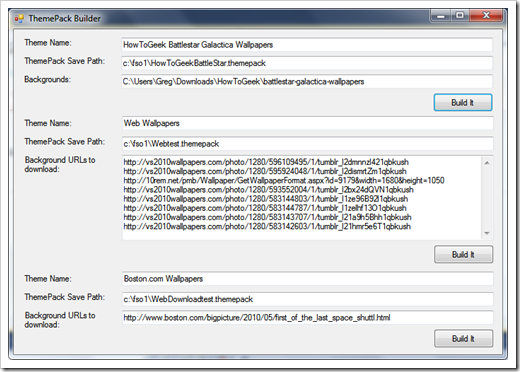
I’ve now got the ugliest in code & UI PoC now working (below) and thought it time to share a few of my ThemePacks created via my ThemePack Builder. Important Note: All original copyright holders retain their rights, etc. All I’ve done is take their images, without modification and created themepacks of them.
Read more: Greg's Cool [Insert Clever Name] of the Day

Display DDL Triggers in your SQL Server Database

To display DDL Triggers in your database (SQL Server 2005/2008), use the sys.triggers catalog view as shown below:
-- Database-scoped DDL triggers in the current database
SELECT name as TriggerName, create_date as CreationDate, type_desc as [TriggerType(SQLorCLR)], is_disabled
FROM sys.triggers
WHERE parent_class_desc = 'DATABASE'
ORDER BY name
Read more: SQL Server curry

10 things Beginning Silverlight and WPF Developers Need to Know

The 10 things are:
9. How to Hand-Code XAML
8. How to Use Expression Blend
7. How to Write Value Converters
6. Threading
5. Async Programming
4. An Architectural Pattern (like MVVM or similar)
3. The Layout System
2. Dependency Properties
1. Binding
0. Our limitations, and when to call in a designer.
Read more: 10REM.NET

Windows Forms and WPF Interop: Sharing WPF Resources

With WPF applications where the resources should not be locally with the application but shared with multiple applications, the WPF resources can be added to a library. Using the MergedDictionaries property of a ResourceDictionary the resources from another assembly can be referenced, for global resources this is usually done within the App.xaml file. Having a Windows Forms host that makes use of WPF controls it’s also possible to use shared resources for WPF styling. This blog post shows how this can be done.
Having resources in a shared library (the sample has the library named WpfStylesLib), shared resources (Dictionary1.xaml), with a WPF application the resources can be made available application-wide by adding the resource dictionary to the MergedDictionaries in the file App.xaml. To reference the shared library I’m using the relative Pack URI syntax. Following the / is the name of the assembly: WpfStylesLib. ;component following the assembly name means the assembly is referenced from the local assembly. Dictionary1.xaml is the resource name in the referenced assembly. Now all the resources defined within this dictionary can be used from the WPF application.
<Application x:Class="WPFResourceTest.App"
            xmlns="http://schemas.microsoft.com/winfx/2006/xaml/presentation"
            xmlns:x="http://schemas.microsoft.com/winfx/2006/xaml"
            StartupUri="MainWindow.xaml">
   <Application.Resources>
       <ResourceDictionary>
           <ResourceDictionary.MergedDictionaries>
               <ResourceDictionary
                   Source="/WpfStylesLib;component/Dictionary1.xaml" />
           </ResourceDictionary.MergedDictionaries>
       </ResourceDictionary>
   </Application.Resources>
</Application>
...
...
WPF.Application app = new WPF.Application();
           WPF.ResourceDictionary dict = new WPF.ResourceDictionary();
           dict.Source =
               new Uri("pack://application:,,,/StylesLib;component/Dictionary1.xaml");
           WPF.Application.Current.Resources.MergedDictionaries.Add(dict);
Read more: Christian Nagel's Blog

Get File Length over http before you download it

This is one of those forum questions that you “think” you know the answer to, and then you’re proven wrong.
User wants to download a file from a remote site but they do not want to proceed with the download if the file is larger than 10MB. Make sense, right?
I said there was no way to do this without downloading the file. I was wrong. Here’s how he solved his own problem:

static void Main(string[] args)
       {
           string completeUrl =
           "http://www.eggheadcafe.com/FileUpload/1145921998_ObjectDumper.zip";
           WebClient obj = new WebClient();
           Stream s = obj.OpenRead(completeUrl);
            Console.WriteLine( obj.ResponseHeaders["Content-Length"].ToString());
           s.Close();
           obj = null;
           Console.ReadLine();
       }
The above correctly reports the file size of 85,827 bytes without ever downloading the file!
Somebody had a problem. Instead of giving up (or worse, taking my so-called “expert advice”) he thought  “outside the box” and found a solution. I call that outstanding!
Read more: Peter Bromberg's Unblog

NHibernate - prepare_sql and some considerations on mapping very long string fields

Recently I’ve switched some of my applications from NHibernate 2.1.x to NHibernate 3, everything was working fine until I encountered a ‘strange behavior’ with the mapping of long string fields (those that should be mapped to nvarchar(max) and varchar(max)...yes I use Microsoft Sql Server as my database engine): using the standard mapping the field are correctly mapped to nvarchar(max), but during the saving operation the data gets truncated.
The trouble arise due to some small modifications to the SqlClinetDriver that were made to optimize the reuse of the query plan Sql Server will generate, you can enable the same feature in NHibernate 2.1.x setting the ‘prepare_sql’ configuration option to true.
Basically the problem is in the way the parameters of the SqlCommand are generated: without using prepare_sql=true the length of the string parameter is computed on the the data you pass in (ie: ‘aaa’ is represented by string(3)) and this is limiting the database engine capability of reusing query plans (more info in a link later on); but you can map an nvarchar(max) column like this:
<property name="StringHugeLength" column="StringHugeLength" type="string" length="10000" />
and everything works as expected.
The following commented piece of mapping sums up the behavior I’ve noticed when using prepare_sql=true:
Read more: PrimordialCode

MSBuild Extension Pack August 2010 Release

The MSBuild Extension Pack August 2010 Release is  now available to download.
The August 2010 release contains

  • version 3.5.7.0 for those using .Net 3.5
  • version 4.0.1.0 for those using .Net 4.0

This release contains the following high level changes
  • Numerous documentation improvements
  • 13 new Task Actions
  • New FTP Task
  • New DNZip Task which removes the need for the J# Redistributable
  • New SQL Logger (4.0.1.0)
  • Improved support for VS 2010 and .Net 4.0 features.
  • Various improvements to existing Tasks
  • Various bug fixes

For full details of all changes please see the Changesets listed on CodePlex. We’re fast approaching 50 000 downloads. Thanks for all the support and suggestions that have made this release possible.
Read more: FreeToDev

Demonstrating CLR Side-by-Side Execution

Starting from CLR 4.0, multiple versions of the CLR can be loaded into the same process. This doesn’t mean that you can mix the 1.1 and 2.0 runtimes, but you can have CLR 2.0 loaded in the same process with CLR 4.0. This is great news for managed shell extension developers, managed COM object developers, and other library developers whose libraries are consumed by unmanaged code.
The CLR Inside Out: In-Process Side-by-Side column contains all the nitty-gritty details. One fact you should be aware of is that if you load a managed library that targets CLR 2.0 from a managed app that targets CLR 4.0, the managed library will use the 4.0 runtime.
Anyway, the point of this post is to show you a quick demo of having two CLR versions loaded into the same process. One way to do this is using the new CLR hosting interfaces that give you the ability to load two versions of the CLR. But that’s cheating.
Instead, I wrote two managed COM libraries. One of them targets CLR 2.0 and the other targets CLR 4.0. Next, I wrote a simple C++ application that loads both COM objects. Here’s the result of the lm command in WinDbg:
0:009> lm vm clr
start    end        module name
63240000 638af000   clr        (deferred)            
   Image path: C:\Windows\Microsoft.NET\Framework\v4.0.30319\clr.dll
   Image name: clr.dll
   Timestamp:        Thu Mar 18 09:44:47 2010 (4BA1D9EF)
   CheckSum:         00671FC0
   ImageSize:        0066F000
   File version:     4.0.30319.1
   Product version:  4.0.30319.1
   File flags:       8 (Mask 3F) Private
   File OS:          4 Unknown Win32
   File type:        2.0 Dll
   File date:        00000000.00000000
   Translations:     0409.04b0
   CompanyName:      Microsoft Corporation
   ProductName:      Microsoft® .NET Framework
   InternalName:     clr.dll
   OriginalFilename: clr.dll
   ProductVersion:   4.0.30319.1
   FileVersion:      4.0.30319.1 (RTMRel.030319-0100)
   PrivateBuild:     DDBLD766
   FileDescription:  Microsoft .NET Runtime Common Language Runtime - WorkStation
   LegalCopyright:   © Microsoft Corporation.  All rights reserved.
   Comments:         Flavor=Retail

Read more: All Your Base Are Belong To Us

OpenDLP

Overview

OpenDLP is a free and open source, agent-based, centrally-managed, massively distributable data loss prevention tool released under the GPL. Given appropriate Windows domain credentials, OpenDLP can simultaneously identify sensitive data at rest on hundreds or thousands of Microsoft Windows systems from a centralized web application. OpenDLP has two components: a web application and an agent.
Web Application
  • Automatically deploy and start agents over Netbios/SMB
  • When done, automatically stop, uninstall, and delete agents over Netbios/SMB
  • Pause, resume, and forcefully uninstall agents in an entire scan or on individual systems
  • Concurrently and securely receive results from hundreds or thousands of deployed agents over two-way-trusted SSL connection
  • Create Perl-compatible regular expressions (PCREs) for finding sensitive data at rest
  • Create reusable profiles for scans that include whitelisting or blacklisting directories and file extensions
  • Review findings and identify false positives
  • Export results as XML
  • Written in Perl with MySQL backend
Agent
  • Runs on Windows 2000 and later systems
  • Written in C with no .NET Framework requirements
  • Runs as a Windows Service at low priority so users do not see or feel it
  • Resumes automatically upon system reboot with no user interaction
  • Securely transmit results to web application at user-defined intervals over two-way-trusted SSL connection
  • Uses PCREs to identify sensitive data inside files
  • Performs additional checks on potential credit card numbers to reduce false positives
  • Can read inside ZIP files, including Office 2007 and OpenOffice files
Read more: Google code

Free Rainbow Tables

The goal of FreeRainbowTables.com is to prove the insecurity of using simple hash routines to protect valuable passwords, and force developers to use more secure methods.
By distributing the generation of rainbow chains, we can generate HUGE rainbow tables that are able to crack longer passwords than ever seen before.
Furthermore, we are also improving the rainbow table technology, making them even smaller and faster than rainbow tables found elsewhere, and the best thing is, those tables are freely available to download from our site!
By installing and running the BOINC client available from our download page, you can help us to speed up the generation even more
For detailed information about how DistrRTgen (Distributed Rainbow Table Generator) works, see the download page
Read more: Free Rainbow Tables

Thursday, August 26, 2010

Prius gets optional underhood, zombie-deterring noisemaker, sounds appropriately futuristic (video)

Prius gets optional underhood, zombie-deterring noisemaker, sounds appropriately futuristic (video)
Electric vehicles and hybrids are here to save the environment (or at least kill your fuel bill), but if you listen to some people they're also here to mow down our pedestrians thanks to their ninja-like ways. Nissan's Leaf has already gone the way of sci-fi by offering a Blade Runner-inspired exterior soundtrackto make sidewalk replicants take notice, and now the Prius is joining in on the fun with its own under-hood speaker system. Curiously, this one will be optional, Toyota apparently expecting that purchasers are so philanthropically minded that they'll pay an extra 12,600 yen (about $150) to protect poor pedestrians. You can see how it's supposed to work in the image above, in which a Prius is shown emitting sound waves to deter a toupee-wearing zombie. But, if you'd rather watch a flashy presentation and hear it for yourself, check out the thrilling video after the break. It'll make you wish your auto sounded like a hovercar. 

VistaSwitcher is a beautiful Alt-Tab replacement

vistaswitcher-4705.jpg
VistaSwitcher is a beautiful Alt-Tab replacement. It's aimed mainly at Windows Vista and 7, but it also works under Windows XP.
You get a huge thumbnail of the destination window; it's far larger than the one that comes with the "stock" Alt-Tab. Another neat feature lets you Alt-Tab between the windows of just one application. It's kind of like pressing Win+[number] in Windows 7, but you don't have to look at the taskbar and count the icons in order to see what the number is for the application that you want to switch to. That's done using Alt+` (backtick) by default, but it's configurable.
Read more: DownloadSquad
Read more: VistaSwitcher

Facebook Says It Owns "Book"

The Chicago Tribune is reporting that Facebook has sued a tiny start-up called Teachbook.com over the use of 'book' in its name. The start-up, which has two employees, aims to provide tools for teachers to manage their classrooms and share lesson plans and other resources. 'Effectively they're bombing a mosquito here, and we're not sure why they want to do that,' Teachbook.com co-director Greg Shrader told the Tribune. Facebook said its use of 'book' in its name is 'highly distinctive in the context of online communities and networking websites.' Facebook apparently is alleging that no other online 'network of people' can use the word 'book' in its name without violating its trademark
Read more: Slashdot

Download 53 languages for Windows XP

Previously we have had a great page for downloading the latest language Interface packs for Windows 7 and Windows Vista, well we now have one for 53 available languages for Windows XP as well for all those users still running it.
“You can download and install additional languages to view Windows XP menus, dialog boxes, and other user interface items in your preferred language. Additional languages will work only with a genuine copy of Windows.
Language Interface Packs (LIPs), which provide a translated version of the most widely used dialog boxes, menu items, and help content, can be installed over any edition of Windows XP. You can download Language Interface Packs from the Microsoft Download Center by using the links below. To install one, you will need to have the required parent language installed on your PC. “
Read more: I'm PC
Read more: Download 53 languages for Windows XP